
Brother TD4550DNWB vs Brother TD4410D: Specification Comparison
Both the TD4550DNWB and TD4410D are Brother 4.3-inch direct thermal desktop label and receipt printers sharing the same physical footprint, memory configuration, media range, and programming language support. They target warehouse, retail, healthcare, and logistics environments where ribbonless printing of labels, tags, wristbands, and receipts is required. The comparison centers on three decision-relevant axes: print resolution and speed trade-offs, connectivity and wireless capability, and software/interface ecosystem breadth.
In This Guide
- Which printer wins on resolution versus throughput — and does that trade-off match your workload?
- Which model supports the connectivity options your deployment infrastructure requires?
- How do the on-device management interface and programming language support compare for mixed-fleet or multi-platform environments?
- Which should you choose: the TD4550DNWB or the TD4410D?
- Side-by-Side Specs
- FAQ
Which printer wins on resolution versus throughput — and does that trade-off match your workload?
The TD4550DNWB prints at 300 dpi and 6 ips, while the TD4410D prints at 203 dpi and 8 ips. The TD4550DNWB's 300 dpi output is better suited for small-font labels, dense 2D barcodes (QR, DataMatrix), and wristband applications where scan reliability at fine detail matters. The TD4410D's 203 dpi is the standard for GS1 linear barcodes, shipping labels, and asset tags where throughput volume is the priority over fine resolution.
At 8 ips versus 6 ips, the TD4410D delivers approximately 33% higher throughput at peak speed. For high-volume continuous print runs — such as warehouse pick-and-pack or point-of-sale receipts — that speed delta compounds meaningfully across a shift. Buyers who need crisp small text or print healthcare wristbands with patient ID fine print should weight resolution; buyers optimizing for batch label volume should weight speed.
Which model supports the connectivity options your deployment infrastructure requires?
Connectivity is the sharpest differentiator between these two units. The TD4550DNWB specifies USB, Serial, Bluetooth BLE, WLAN (Wi-Fi), and LAN (Ethernet) interfaces. The TD4410D specifies only USB and Serial. No wireless interfaces — Wi-Fi or Bluetooth — are listed in the TD4410D specs.
For deployments requiring wireless printing from mobile devices, tablets, or wireless host systems, the TD4550DNWB is the only option of the two. For network-shared printing in a wired LAN environment, again only the TD4550DNWB carries an Ethernet port per its spec. The TD4410D is appropriate where a direct USB or legacy 9-pin Serial connection to a fixed host (WMS terminal, POS station) is the entire integration requirement. IT infrastructure teams planning centrally managed print queues over the network should note that the TD4410D lacks both LAN and wireless interfaces per the provided specifications.
How do the on-device management interface and programming language support compare for mixed-fleet or multi-platform environments?
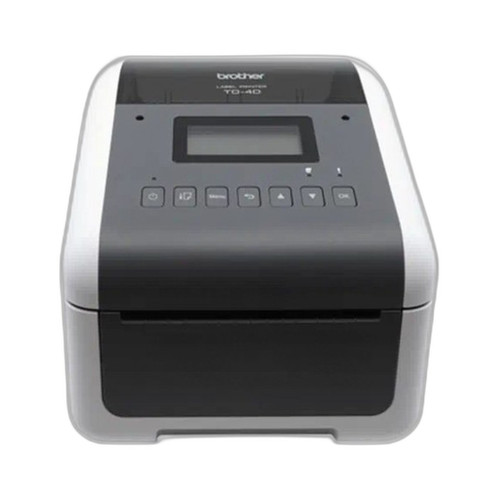
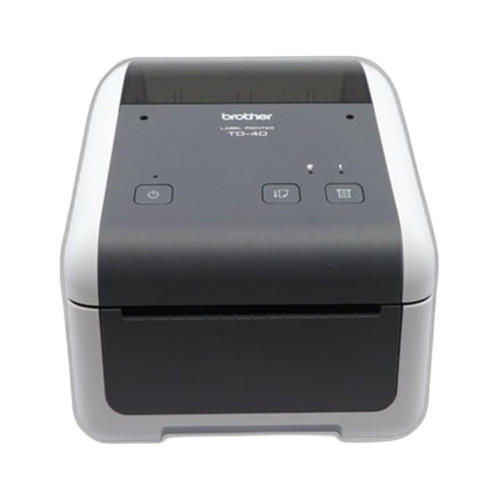
The TD4550DNWB includes a 4.3-inch LCD display, enabling on-device configuration of network settings, media calibration, and status monitoring without requiring a tethered host PC. The TD4410D specifications list no display.
On programming language support, both models share ZPL II, CPCL, Raster Graphics, and Text (Template). The TD4410D additionally lists ESC/P support, which the TD4550DNWB specifications do not mention. ESC/P is relevant for legacy POS and receipt printer ecosystems. Buyers migrating from older Epson-compatible receipt stacks, or deploying alongside ESC/P-driven software, should note that only the TD4410D lists this language in the provided specs. Both units share identical memory: 64 MB Flash (40 MB template/database) and 256 MB SDRAM.
Which should you choose: the TD4550DNWB or the TD4410D?
Our take: The TD4550DNWB is the stronger choice when wireless connectivity, higher print resolution, or on-device LCD management are deployment requirements. Versus the TD4410D, it adds Wi-Fi, Bluetooth BLE, and Ethernet interfaces — the TD4410D lists USB and Serial only — making the TD4550DNWB the only viable option for network-shared or mobile-connected print environments. Its 300 dpi resolution outperforms the TD4410D's 203 dpi for fine-detail wristbands, small-font labels, and dense 2D barcodes. Conversely, the TD4410D prints at 8 ips versus the TD4550DNWB's 6 ips, a meaningful throughput advantage for high-volume batch label runs on a fixed USB or Serial connection. The TD4410D also lists ESC/P language support absent from the TD4550DNWB specs, relevant for legacy POS stacks. Choose the TD4550DNWB for wireless, healthcare, or multi-interface deployments; choose the TD4410D for wired, high-speed, legacy-compatible label-volume environments.
Side-by-Side Comparison
Spec-for-spec, from manufacturer data.
| Specification | Brother TD4550DNWB | Brother TD4410D |
|---|---|---|
| Print Method | Direct Thermal | Direct Thermal |
| Print Width | 4.27" | 4.27" |
| Paper Width Range | 0.75" – 4.65" | 0.75" – 4.65" |
| Print Speed | 6 ips | 8 ips |
| Print Resolution | 300 dpi | 203 dpi |
| Display | 4.3" LCD | — |
| Interfaces | USB, Serial, Bluetooth BLE, WLAN, LAN | USB, Serial |
| Wi-Fi | Yes (WLAN) | — |
| Bluetooth | Yes (BLE) | — |
| Ethernet (LAN) | Yes | — |
| Media Types | Labels, tags, wristbands, receipts | Labels, tags, wristbands, receipts |
| Programming Languages | ZPL II, CPCL, Raster Graphics, Text | ZPL II, CPCL, Raster Graphics, Text, ESC/P |
| Memory | 64 MB Flash / 256 MB SDRAM | 64 MB Flash / 256 MB SDRAM |
| Form Factor | Desktop | Desktop |
| Dimensions (W × D × H) | 7.08" × 8.82" × 6.10" | 7.08" × 8.82" × 6.10" |
| Weight | 4.58 lbs | 4.58 lbs |
Frequently Asked Questions
Which should you choose: the TD4550DNWB or the TD4410D?
The TD4550DNWB is the stronger choice when wireless connectivity, higher print resolution, or on-device LCD management are deployment requirements. Versus the TD4410D, it adds Wi-Fi, Bluetooth BLE, and Ethernet interfaces — the TD4410D lists USB and Serial only — making the TD4550DNWB the only viable option for network-shared or mobile-connected print environments. Its 300 dpi resolution outperforms the TD4410D's 203 dpi for fine-detail wristbands, small-font labels, and dense 2D barcodes. Conversely, the TD4410D prints at 8 ips versus the TD4550DNWB's 6 ips, a meaningful throughput advantage for high-volume batch label runs on a fixed USB or Serial connection. The TD4410D also lists ESC/P language support absent from the TD4550DNWB specs, relevant for legacy POS stacks. Choose the TD4550DNWB for wireless, healthcare, or multi-interface deployments; choose the TD4410D for wired, high-speed, legacy-compatible label-volume environments.
Does the TD4550DNWB support Wi-Fi and Bluetooth, or do I need a wired connection like the TD4410D?
Yes — the TD4550DNWB specs list WLAN (Wi-Fi) and Bluetooth BLE interfaces in addition to USB, Serial, and LAN (Ethernet). The TD4410D specs list only USB and Serial; no wireless or Ethernet interfaces are specified for that model.
Is the TD4410D faster than the TD4550DNWB, and does print quality differ between the two?
Per the provided specifications, the TD4410D prints at 8 ips versus the TD4550DNWB's 6 ips — approximately 33% faster at peak throughput. However, the TD4550DNWB prints at 300 dpi versus the TD4410D's 203 dpi, producing finer detail for small text, 2D barcodes, and wristband applications. The right trade-off depends on whether your workload prioritizes volume speed or output resolution.
Which printer is better suited for a legacy POS or ESC/P-driven software environment?
Based on the specs provided, the TD4410D lists ESC/P as a supported programming language alongside ZPL II, CPCL, Raster Graphics, and Text (Template). The TD4550DNWB specifications do not list ESC/P support. For environments using ESC/P-compatible software — common in older POS and receipt printing stacks — the TD4410D is the specified-compatible option of the two.
More Label Printer Comparisons
- Brother TD4550DNWB vs Sato WWCT04241-WCN
- Brother TD4550DNWB vs Sato WWCT04241-NDR
- Brother TD4550DNWB vs Sato WT212-404CW-EX1-2
- Brother TD4550DNWB vs Sato WWCT04441-WDR
- Brother TD4550DNWB vs Brother TD4420DNC
- Brother TD4420DNC vs Sato WWCT04241-WCN
Label Printer Buying Guides
Get a Second Opinion on Your Camera Choice
Share your site layout, coverage goals, and budget. Our team will validate the camera selection, flag anything we would change, and recommend products that match the use case.