
Brother TD4550DNWB vs Sato WT212-404CW-EX1-2: Specification Comparison
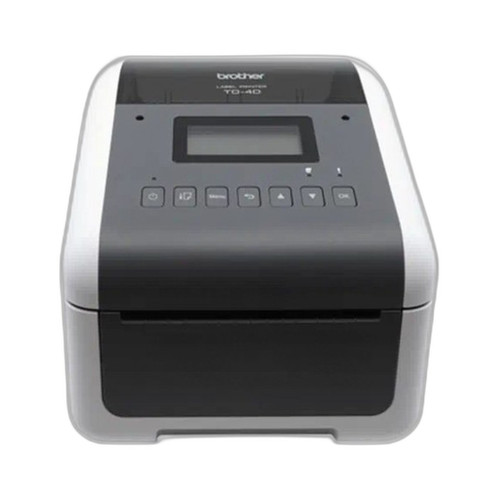
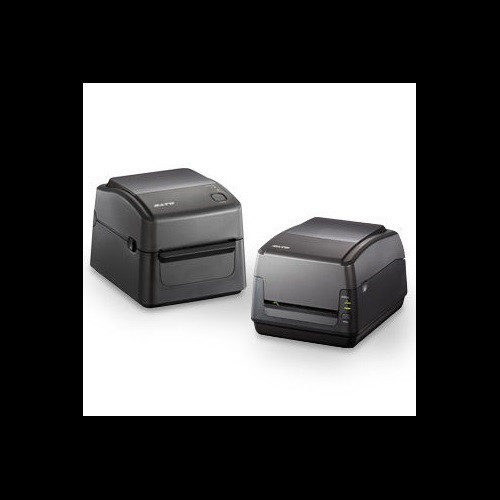
Both the Brother TD4550DNWB and the Sato WT212-404CW-EX1-2 are direct thermal desktop label and receipt printers targeting the same B2B deployment scenarios: warehousing, retail, healthcare wristbanding, and light manufacturing. They share the same form factor, media width range, and base connectivity stack. The comparison turns on print resolution, print method flexibility, memory, display capability, and ancillary hardware features such as an integrated cutter — all of which carry real operational weight for installers specifying label printing infrastructure.
In This Guide
- Which printer delivers higher output quality and broader print-method flexibility?
- How do onboard memory and interface options compare for integration and data-intensive label templates?
- What built-in hardware features and physical specifications affect deployment and maintenance decisions?
- Which should you choose: the TD4550DNWB or the WT212-404CW-EX1-2?
- Side-by-Side Specs
- FAQ
Which printer delivers higher output quality and broader print-method flexibility?
The Brother TD4550DNWB prints exclusively via direct thermal at 300 dpi, while the Sato WT212-404CW-EX1-2 supports both direct thermal and thermal transfer at 203 dpi. Resolution is a clear differentiator: 300 dpi versus 203 dpi represents a roughly 47% increase in dot density, which is meaningful for small barcodes, fine text, and high-density QR codes commonly required in healthcare and compliance labeling.
However, the Sato's dual-mode capability adds thermal transfer support, which allows ribbon-based printing on synthetic and specialty media that would not survive the heat-sensitive chemistry of direct thermal stock. Buyers who must print on polyester, polypropylene, or other durable label substrates — common in outdoor asset tagging or chemical environments — cannot accomplish that with the Brother. Both units are rated at 6 ips print speed, so throughput is equivalent.
How do onboard memory and interface options compare for integration and data-intensive label templates?
Memory is a significant delta. The Brother TD4550DNWB carries 64 MB Flash (with 40 MB available for templates and databases) and 256 MB SDRAM. The Sato WT212-404CW-EX1-2 provides 16 MB Flash, 32 MB SDRAM, and 16 MB user storage. On every memory axis the Brother holds a substantial lead — 4× the Flash and 8× the SDRAM — which directly affects the number and complexity of label formats, fonts, and graphics that can be stored and rendered onboard without host-side processing.
Connectivity is nearly symmetrical. The Brother lists USB, Serial, Bluetooth BLE, WLAN, and LAN; it also specifies programming language support for ZPL II, CPCL, Raster Graphics, and Text. The Sato lists USB 2.0, Ethernet, Wi-Fi, and Bluetooth. The Brother adds a Serial port not mentioned for the Sato, and its explicit ZPL II compatibility is a meaningful integration advantage in Zebra-centric environments. The Sato's connectivity language support is not specified in the provided data.
What built-in hardware features and physical specifications affect deployment and maintenance decisions?
The Sato WT212-404CW-EX1-2 includes an integrated automatic cutter and tool-free printhead replacement as specified features — neither is listed for the Brother TD4550DNWB. An inline cutter eliminates the need for a separate cutter accessory in receipt or tear-off label workflows, and tool-free head swaps reduce mean time to repair in high-volume environments where printheads wear and need periodic replacement.
The Brother is lighter at 4.58 lbs versus the Sato's 5.46 lbs, and smaller (7.08" W × 8.82" D × 6.10" H versus 8.69" W × 10.96" D × 7.38" H), making it more suitable for tight counter or point-of-care deployments. The Brother specifies a 4.3-inch LCD for on-device configuration; the Sato lists an LCD display without stating its size. The Sato documents an operating temperature range of 41°F–104°F (5°C–40°C); no operating temperature range is provided in the Brother specs. The Sato also supports ribbon up to 984 ft (300 m) for its thermal transfer mode; this metric is not applicable to the Brother's direct-thermal-only operation.
Which should you choose: the TD4550DNWB or the WT212-404CW-EX1-2?
Our take: The TD4550DNWB is the stronger choice when print resolution and onboard memory are the primary decision drivers — its 300 dpi output versus the WT212-404CW-EX1-2's 203 dpi, combined with 256 MB SDRAM versus 32 MB and 64 MB Flash versus 16 MB, make it substantially better suited for complex label templates, dense barcodes, and high-symbol-density printing such as GS1 DataMatrix or small QR codes. It is also smaller and lighter, and its ZPL II support eases integration into existing Zebra-based print infrastructures. The WT212-404CW-EX1-2 is the correct specification when thermal transfer printing on durable or synthetic media is required, or when an integrated automatic cutter and tool-free printhead access are operational necessities — features not listed for the Brother. Buyers running mixed media programs (paper receipts plus polyester asset tags) will need the Sato's dual print-mode capability regardless of the resolution tradeoff.
Side-by-Side Comparison
Spec-for-spec, from manufacturer data.
| Specification | Brother TD4550DNWB | Sato WT212-404CW-EX1-2 |
|---|---|---|
| Print Method | Direct Thermal only | Direct Thermal / Thermal Transfer |
| Print Resolution | 300 dpi | 203 dpi |
| Print Speed | 6 ips | 6 ips |
| Max Print Width | 4.27" | 4.09" |
| Media Width Range | 0.75" – 4.65" | 1" – 4.65" |
| Flash Memory | 64 MB (40 MB user) | 16 MB + 16 MB user storage |
| SDRAM | 256 MB | 32 MB |
| Display | 4.3" LCD | LCD (size not specified) |
| Connectivity | USB, Serial, Bluetooth BLE, WLAN, LAN | USB 2.0, Ethernet, Wi-Fi, Bluetooth |
| Programming Languages | ZPL II, CPCL, Raster Graphics, Text | Not specified |
| Integrated Cutter | — | Yes (automatic) |
| Tool-Free Printhead Swap | — | Yes |
| Max Ribbon Length | N/A (direct thermal only) | 984 ft (300 m) |
| Weight | 4.58 lbs | 5.46 lbs |
| Dimensions (W × D × H) | 7.08" × 8.82" × 6.10" | 8.69" × 10.96" × 7.38" |
| Warranty | Manufacturer Warranty (duration not specified) | 1-year Warranty |
Frequently Asked Questions
Which should you choose: the TD4550DNWB or the WT212-404CW-EX1-2?
The TD4550DNWB is the stronger choice when print resolution and onboard memory are the primary decision drivers — its 300 dpi output versus the WT212-404CW-EX1-2's 203 dpi, combined with 256 MB SDRAM versus 32 MB and 64 MB Flash versus 16 MB, make it substantially better suited for complex label templates, dense barcodes, and high-symbol-density printing such as GS1 DataMatrix or small QR codes. It is also smaller and lighter, and its ZPL II support eases integration into existing Zebra-based print infrastructures. The WT212-404CW-EX1-2 is the correct specification when thermal transfer printing on durable or synthetic media is required, or when an integrated automatic cutter and tool-free printhead access are operational necessities — features not listed for the Brother. Buyers running mixed media programs (paper receipts plus polyester asset tags) will need the Sato's dual print-mode capability regardless of the resolution tradeoff.
Is the TD4550DNWB or the WT212-404CW-EX1-2 better for healthcare wristband and compliance label printing?
The TD4550DNWB's 300 dpi resolution gives it an advantage for the small, dense barcodes and patient ID text common in healthcare wristband and compliance label applications. Both units support wristband media widths within their stated ranges. However, if the deployment requires printing on durable synthetic wristband stock that needs a thermal transfer ribbon for durability, the WT212-404CW-EX1-2's dual print-mode capability would be necessary, as the Brother is direct thermal only.
Does either printer support ZPL, and how does that affect integration with existing label software?
The Brother TD4550DNWB explicitly lists ZPL II, CPCL, Raster Graphics, and Text as supported programming languages, which means it can accept print jobs directly from Zebra-compatible label design software and middleware without a translation layer. The Sato WT212-404CW-EX1-2's supported programming languages are not specified in the provided data, so buyers integrating into a Zebra or ZPL-based ecosystem should verify Sato's language emulation support directly with the manufacturer before specifying the WT212-404CW-EX1-2.
Which printer is easier to maintain in a high-throughput environment?
The Sato WT212-404CW-EX1-2 specifies tool-free printhead replacement as a built-in feature, which reduces service time and the skill level required for routine maintenance in high-throughput environments. The Brother TD4550DNWB does not list a tool-free head-swap feature in the provided specifications. The Sato also includes a built-in automatic cutter, eliminating a separate consumable step in tear-off workflows. On the other hand, the Brother's 4.3-inch LCD provides on-device configuration capability that can reduce the need to tether a laptop for setup and diagnostics.
More Label Printer Comparisons
- Brother TD4550DNWB vs Sato WWCT04241-WCN
- Brother TD4550DNWB vs Sato WWCT04241-NDR
- Brother TD4550DNWB vs Sato WWCT04441-WDR
- Brother TD4550DNWB vs Brother TD4420DNC
- Brother TD4550DNWB vs Brother TD4410D
- Brother TD4420DNC vs Sato WWCT04241-WCN
Label Printer Buying Guides
Get a Second Opinion on Your Camera Choice
Share your site layout, coverage goals, and budget. Our team will validate the camera selection, flag anything we would change, and recommend products that match the use case.