
Brother TD4420DNC vs Sato WWCT04241-WCN: Specification Comparison
Both the Brother TD4420DNC and the Sato WWCT04241-WCN (CT4-LX) are direct thermal desktop label and receipt printers targeting retail, warehousing, and logistics environments. Both share the same 4.3-inch display, desktop form factor, and USB plus Ethernet connectivity. However, they diverge sharply in resolution, RFID capability, wireless options, memory, and print method flexibility — making this a meaningful cross-shop for buyers weighing basic networked printing against advanced RFID-encoding and higher-resolution output.

In This Guide
How do print resolution, speed, and media handling compare?
The Brother TD4420DNC prints at 203 dpi and 8 ips. It supports media widths from 0.75 inches to 4.65 inches with a maximum print width of 4.27 inches, and it includes an integrated cutter for automated batch label and receipt separation. Supported media types include receipts, labels, tags, and wristbands.
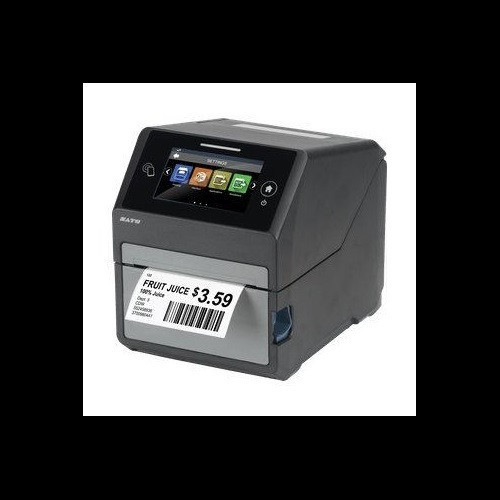
The Sato WWCT04241-WCN spec data contains a conflict: the structured product specs list 'Resolution DPI: 305' while a separate field lists '_Print Resolution: 203.' The tilde-prefixed enriched field ('~Print Resolution: 305 dpi') and the tagline both assert 305 dpi, and that figure is also consistent with the 'CT4-LX 305dpi' product name. Buyers should verify with Sato documentation, but 305 dpi is the most prominently cited value. Print speed is similarly conflicted: structured specs say 8 ips while the enriched '~Print Speed' field says 6 ips. Maximum print width is 4.09 inches and maximum media width is 4.1 inches, narrower than the Brother. The Sato supports ribbon capacities up to 984 ft and 5-inch outer-diameter media rolls. No integrated cutter is listed in the Sato specs.
Which printer offers broader connectivity and advanced encoding capabilities?
The Brother TD4420DNC provides USB, Serial, and Ethernet LAN ports, supporting ZPL II, CPCL, Raster Graphics, and ESC/P programming languages. Memory is 64 MB Flash (40 MB usable for templates and databases) plus 256 MB SDRAM. No wireless connectivity, Bluetooth, or RFID capability is listed in its specs.
The Sato WWCT04241-WCN includes USB, Ethernet, Wi-Fi, and Bluetooth interfaces, with NFC also cited in enriched fields. Its defining differentiator is built-in UHF RFID encoding at 860–960 MHz conforming to the EPC Class 1 Generation 2 standard — a capability entirely absent from the Brother. Memory is substantially larger: 4 GB Flash with 2 GB user-accessible storage plus 1 GB DDR3 RAM. The Serial port present on the Brother is not listed for the Sato.
How do physical footprint, power, environmental ratings, and warranty compare?
The Brother TD4420DNC measures 7.08 inches W × 9.50 inches D × 6.10 inches H and weighs 5.3 lbs (2.41 kg). No operating temperature range or power input specification is provided in the available specs. Warranty terms are listed only as 'Manufacturer Warranty' with no duration stated.
The Sato WWCT04241-WCN measures 7.0 inches W × 9.375 inches D × 8.4375 inches H and weighs 7.3 lbs (3.3 kg), making it taller and heavier despite similar width and depth. It is rated for operation from 32°F to 104°F (0°C to 40°C) and accepts AC 100–240V 50/60 Hz — a wide-range power supply suitable for international deployment. The display is specified as a full-color touchscreen. Warranty is stated as 1 year. The Brother's display type is not specified beyond its 4.3-inch size.
Which should you choose: the TD4420DNC or the WWCT04241-WCN?
Our take: The TD4420DNC is the stronger choice when the deployment requires Serial-port legacy POS integration, an integrated cutter for automated receipt and label separation, or a lighter-weight unit (5.3 lbs vs. 7.3 lbs) with lower procurement complexity. The WWCT04241-WCN is the stronger choice when UHF RFID label encoding (860–960 MHz EPC C1G2) is required — a capability the Brother entirely lacks — or when wireless connectivity (Wi-Fi, Bluetooth) and higher print resolution (305 dpi vs. 203 dpi, per the product name and enriched specs, though a conflicting spec field exists) are priorities. The Sato's 4 GB Flash and 1 GB DDR3 also dwarf the Brother's 64 MB Flash and 256 MB SDRAM for large label library storage. Buyers running standard retail POS or basic label printing without RFID requirements are well-served by the Brother; buyers encoding RFID inlays for asset tracking, supply-chain compliance, or smart-label workflows should select the Sato.
Side-by-Side Comparison
Spec-for-spec, from manufacturer data.
| Specification | Brother TD4420DNC | Sato WWCT04241-WCN |
|---|---|---|
| Print Method | Direct Thermal | Direct Thermal / Thermal Transfer |
| Print Resolution | 203 dpi | 305 dpi (conflict: one field lists 203 dpi — verify with Sato) |
| Print Speed | 8 ips | 8 ips (conflict: enriched field lists 6 ips — verify with Sato) |
| Max Print Width | 4.27" | 4.09" |
| Max Media Width | 0.75" – 4.65" | 1.0" – 4.1" |
| Display | 4.3" | 4.3" Full-Color Touchscreen |
| Connectivity | USB, Serial, Ethernet LAN | USB, Ethernet, Wi-Fi, Bluetooth |
| Serial Port | Yes | — |
| RFID | — | UHF 860–960 MHz, EPC C1G2 |
| Flash Memory | 64 MB (40 MB usable) | 4 GB (2 GB user storage) |
| RAM | 256 MB SDRAM | 1 GB DDR3 |
| Integrated Cutter | Yes | — |
| Ribbon Capacity | — | 984 ft |
| Weight | 5.3 lbs (2.41 kg) | 7.3 lbs (3.3 kg) |
| Dimensions (W×D×H) | 7.08" × 9.50" × 6.10" | 7.0" × 9.375" × 8.4375" |
| Warranty | Manufacturer Warranty (duration not specified) | 1 Year |
Frequently Asked Questions
Which should you choose: the TD4420DNC or the WWCT04241-WCN?
The TD4420DNC is the stronger choice when the deployment requires Serial-port legacy POS integration, an integrated cutter for automated receipt and label separation, or a lighter-weight unit (5.3 lbs vs. 7.3 lbs) with lower procurement complexity. The WWCT04241-WCN is the stronger choice when UHF RFID label encoding (860–960 MHz EPC C1G2) is required — a capability the Brother entirely lacks — or when wireless connectivity (Wi-Fi, Bluetooth) and higher print resolution (305 dpi vs. 203 dpi, per the product name and enriched specs, though a conflicting spec field exists) are priorities. The Sato's 4 GB Flash and 1 GB DDR3 also dwarf the Brother's 64 MB Flash and 256 MB SDRAM for large label library storage. Buyers running standard retail POS or basic label printing without RFID requirements are well-served by the Brother; buyers encoding RFID inlays for asset tracking, supply-chain compliance, or smart-label workflows should select the Sato.
Does either printer support RFID label encoding?
Only the Sato WWCT04241-WCN includes built-in UHF RFID encoding, operating at 860–960 MHz and conforming to the EPC Class 1 Generation 2 standard. The Brother TD4420DNC has no RFID capability listed in its specifications.
Which printer works better in a networked environment with wireless access points?
The Sato WWCT04241-WCN lists Ethernet, Wi-Fi, and Bluetooth connectivity, making it suitable for wireless networked deployments. The Brother TD4420DNC provides USB, Serial, and Ethernet LAN only — no wireless interfaces are listed in its specifications.
Is the Brother TD4420DNC or the Sato WWCT04241-WCN better for high-volume receipt printing with automatic cutting?
The Brother TD4420DNC includes an integrated cutter and explicitly lists receipts as a supported media type alongside labels, tags, and wristbands, making it directly suited to receipt-printing workflows. The Sato WWCT04241-WCN does not list a cutter in its available specifications, and while it supports thermal transfer as well as direct thermal printing, its receipt-specific suitability is not confirmed by the provided specs.
More Label Printer Comparisons
- Brother TD4550DNWB vs Sato WWCT04241-WCN
- Brother TD4550DNWB vs Sato WWCT04241-NDR
- Brother TD4550DNWB vs Sato WT212-404CW-EX1-2
- Brother TD4550DNWB vs Sato WWCT04441-WDR
- Brother TD4550DNWB vs Brother TD4420DNC
- Brother TD4550DNWB vs Brother TD4410D
Label Printer Buying Guides
Get a Second Opinion on Your Camera Choice
Share your site layout, coverage goals, and budget. Our team will validate the camera selection, flag anything we would change, and recommend products that match the use case.