
Brother TD4550DNWB vs Sato WWCT04441-WDR: Specification Comparison
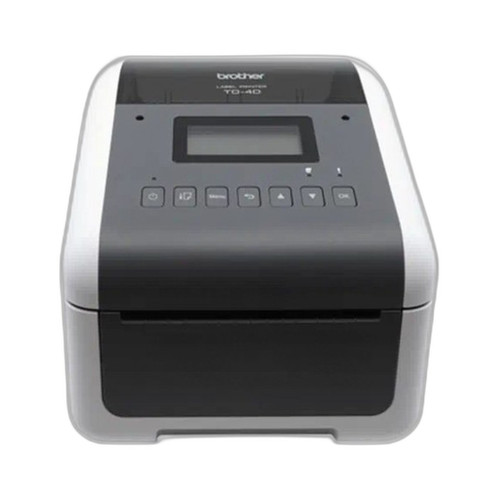
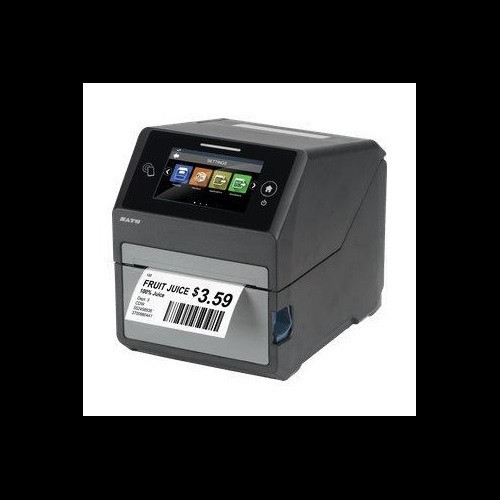
Both the Brother TD4550DNWB and the Sato CT4-LX (WWCT04441-WDR) are direct thermal desktop label and receipt printers targeting the same commercial deployment class — countertop or workstation installations requiring label, tag, wristband, or receipt output. Both offer 4.3-inch displays, multi-protocol wireless and wired connectivity, and sub-5-inch media width. The key differentiators span print engine capability, RFID encoding, memory architecture, thermal transfer support, and media handling — all of which carry real cost and workflow implications for integrators and IT buyers.
In This Guide
- Which printer delivers faster throughput and higher resolution, and does one support thermal transfer in addition to direct thermal?
- Which printer offers RFID encoding capability, and how do the memory and display architectures compare for on-device management?
- How do the two printers compare on connectivity options, media handling range, and physical footprint for deployment planning?
- Which should you choose: the TD4550DNWB or the WWCT04441-WDR?
- Side-by-Side Specs
- FAQ
Which printer delivers faster throughput and higher resolution, and does one support thermal transfer in addition to direct thermal?
The Sato CT4-LX prints at 8 ips versus the Brother TD4550DNWB's 6 ips — a 33% speed advantage that becomes meaningful in high-volume label runs or time-sensitive retail and healthcare environments. On resolution, the CT4-LX is specified at 305 dpi in its primary spec fields (with an inconsistent '203' in one raw field, but the predominant and tilde-confirmed value is 305 dpi), while the TD4550DNWB prints at 300 dpi — effectively equivalent for most label content.
The more substantive print-engine difference is thermal transfer capability. The CT4-LX supports both direct thermal and thermal transfer, accepting ribbon stock up to 984 feet in length and a maximum roll diameter of 5 inches for media. The TD4550DNWB is direct thermal only — no ribbon path, no thermal transfer output. For environments requiring durable, solvent-resistant, or outdoor-rated labels that demand transfer ribbon, the CT4-LX is the only eligible candidate between these two. The TD4550DNWB's ribbon-free design does reduce consumable management overhead in high-churn receipt or short-life label applications.
The TD4550DNWB specifies compatibility with ZPL II, CPCL, Raster Graphics, and Text programming languages. The CT4-LX does not list supported programming languages in the provided specifications — buyers integrating into existing label software environments should confirm CT4-LX language compatibility with Sato directly before deployment.
Which printer offers RFID encoding capability, and how do the memory and display architectures compare for on-device management?
The Sato CT4-LX includes integrated HF/NFC RFID encoding at 13.56 MHz, with Sato RF Analyze antenna auto-tuning for inlay-to-inlay optimization. This is a hardware capability the Brother TD4550DNWB does not have — the TD4550DNWB's specifications list no RFID frequency, RFID type, or encoding function. For any deployment requiring smart label encoding — asset tracking, patient wristbands with embedded NFC, or supply chain serialization — the CT4-LX is the only option between these two.
Memory architecture differs substantially. The CT4-LX carries 4 GB Flash, 1 GB DDR3 RAM, and 2 GB user storage — a significantly larger on-board resource pool. The TD4550DNWB specifies 64 MB Flash (40 MB usable for templates and databases) and 256 MB SDRAM. For environments storing large template libraries, font sets, or graphics databases on-device, the CT4-LX's memory footprint provides considerably more headroom.
Both units feature a 4.3-inch display. The CT4-LX provides a full-color touchscreen, while the TD4550DNWB uses an LCD (touch capability not specified in the provided specs). The Brother's LCD supports on-device network and media configuration. Buyers requiring intuitive touchscreen-driven operator interaction should confirm the CT4-LX's touch interface against their workflow; the TD4550DNWB's display capability for touch is not confirmed by spec.
How do the two printers compare on connectivity options, media handling range, and physical footprint for deployment planning?
Connectivity is broadly equivalent: both units support USB, Ethernet, Wi-Fi, and Bluetooth. The TD4550DNWB additionally specifies a Serial interface and Bluetooth BLE explicitly; the CT4-LX specs list Bluetooth without specifying BLE. The TD4550DNWB's Serial port adds legacy integration flexibility for environments running older host systems or industrial controllers.
Media width range differs. The TD4550DNWB handles media from 0.75 inches to 4.65 inches wide, with a maximum print width of 4.27 inches. The CT4-LX accepts media from 1.0 inch to 4.1 inches, with a maximum print width of 4.09 inches. The TD4550DNWB's lower minimum (0.75 inch) and slightly wider maximum print path give it a modest edge in media format flexibility — relevant for wristband, receipt, and narrow-tag applications. The CT4-LX specifies a maximum media roll outer diameter of 5 inches; the TD4550DNWB does not specify maximum roll diameter in the provided specs.
Physically, the TD4550DNWB weighs 4.58 lbs at 7.08" W × 8.82" D × 6.10" H. The CT4-LX is heavier at 7.3 lbs and measures 7.0" W × 9.375" D × 8.4375" H — taller and deeper, though marginally narrower. Both are desktop-class units, but the CT4-LX's added weight reflects its dual-mode print mechanism and RFID hardware. The TD4550DNWB specifies power requirements only implicitly; the CT4-LX is rated AC 100–240V, 50/60Hz with an operating range of 32°F–104°F (0°C–40°C). Operating temperature for the TD4550DNWB is not stated in the provided specifications.
Which should you choose: the TD4550DNWB or the WWCT04441-WDR?
Our take: The TD4550DNWB is the stronger choice when the deployment is direct thermal only, ribbon management is undesirable, media format variety (down to 0.75-inch width) matters, and legacy Serial connectivity or explicit ZPL II / CPCL language support is required. The CT4-LX (WWCT04441-WDR) is the correct selection for any workflow that requires HF/NFC RFID smart label encoding — a capability the TD4550DNWB simply does not offer. Beyond RFID, the CT4-LX adds thermal transfer output for durable labels, prints 33% faster at 8 ips versus 6 ips, and provides a substantially larger memory footprint (4 GB Flash / 1 GB DDR3 versus 64 MB Flash / 256 MB SDRAM). Buyers running pure direct thermal receipt or short-life label operations with existing ZPL II infrastructure will find the TD4550DNWB a lighter, simpler, and physically smaller fit. Buyers in healthcare, asset tracking, or retail smart-label environments should select the CT4-LX.
Side-by-Side Comparison
Spec-for-spec, from manufacturer data.
| Specification | Brother TD4550DNWB | Sato WWCT04441-WDR |
|---|---|---|
| Print Method | Direct Thermal only | Direct Thermal / Thermal Transfer |
| Print Speed | 6 ips | 8 ips |
| Print Resolution | 300 dpi | 305 dpi |
| Max Print Width | 4.27" | 4.09" |
| Media Width Range | 0.75" – 4.65" | 1.0" – 4.1" |
| Max Roll Diameter | Not specified | 5 inches |
| Max Ribbon Length | N/A (direct thermal only) | 984 feet |
| RFID Encoding | None | 13.56 MHz HF/NFC |
| Display | 4.3" LCD | 4.3" full-color touchscreen |
| Connectivity | USB, Serial, Bluetooth BLE, Wi-Fi, Ethernet | USB, Bluetooth, Wi-Fi, Ethernet |
| Flash Memory | 64 MB (40 MB usable) | 4 GB |
| RAM | 256 MB SDRAM | 1 GB DDR3 |
| User Storage | Not specified | 2 GB |
| Programming Languages | ZPL II, CPCL, Raster Graphics, Text | Not specified |
| Weight | 4.58 lbs | 7.3 lbs |
| Warranty | Manufacturer Warranty (duration not specified) | 1-year Warranty |
Frequently Asked Questions
Which should you choose: the TD4550DNWB or the WWCT04441-WDR?
The TD4550DNWB is the stronger choice when the deployment is direct thermal only, ribbon management is undesirable, media format variety (down to 0.75-inch width) matters, and legacy Serial connectivity or explicit ZPL II / CPCL language support is required. The CT4-LX (WWCT04441-WDR) is the correct selection for any workflow that requires HF/NFC RFID smart label encoding — a capability the TD4550DNWB simply does not offer. Beyond RFID, the CT4-LX adds thermal transfer output for durable labels, prints 33% faster at 8 ips versus 6 ips, and provides a substantially larger memory footprint (4 GB Flash / 1 GB DDR3 versus 64 MB Flash / 256 MB SDRAM). Buyers running pure direct thermal receipt or short-life label operations with existing ZPL II infrastructure will find the TD4550DNWB a lighter, simpler, and physically smaller fit. Buyers in healthcare, asset tracking, or retail smart-label environments should select the CT4-LX.
Can either printer encode RFID or NFC smart labels?
Only the Sato CT4-LX (WWCT04441-WDR) encodes RFID. It includes an integrated 13.56 MHz HF/NFC encoder with Sato RF Analyze antenna auto-tuning. The Brother TD4550DNWB has no RFID or NFC encoding capability listed in its specifications.
Is the Brother TD4550DNWB or the Sato CT4-LX faster for high-volume label runs?
The Sato CT4-LX prints at 8 ips; the Brother TD4550DNWB prints at 6 ips. For sustained high-volume output, the CT4-LX has a 33% throughput advantage based on the specified print speeds.
Which printer works with ZPL II label software, and does the other support thermal transfer ribbons?
The Brother TD4550DNWB explicitly supports ZPL II, CPCL, Raster Graphics, and Text programming languages. The CT4-LX's supported languages are not listed in the provided specifications — confirm with Sato before deploying against ZPL II-dependent software. Regarding ribbons: the CT4-LX supports thermal transfer (up to 984 feet of ribbon) in addition to direct thermal; the TD4550DNWB is direct thermal only with no ribbon path.
More Label Printer Comparisons
- Brother TD4550DNWB vs Sato WWCT04241-WCN
- Brother TD4550DNWB vs Sato WWCT04241-NDR
- Brother TD4550DNWB vs Sato WT212-404CW-EX1-2
- Brother TD4550DNWB vs Brother TD4420DNC
- Brother TD4550DNWB vs Brother TD4410D
- Brother TD4420DNC vs Sato WWCT04241-WCN
Label Printer Buying Guides
Get a Second Opinion on Your Camera Choice
Share your site layout, coverage goals, and budget. Our team will validate the camera selection, flag anything we would change, and recommend products that match the use case.