
Brother TD4420DNC vs Sato WT212-404CW-EX1-2: Specification Comparison
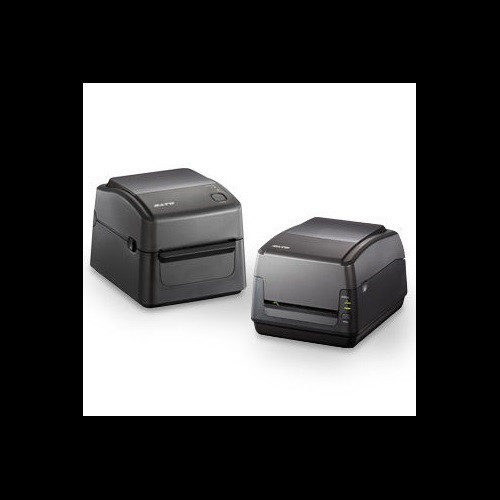
Both the Brother TD4420DNC and the Sato WT212-404CW-EX1-2 are desktop thermal printers targeting label, receipt, and tag printing environments. The Brother unit is direct thermal only, while the Sato supports both direct thermal and thermal transfer, adding ribbon-based printing capability. This comparison examines print performance and media handling, connectivity and memory resources, and physical footprint and environmental suitability — the three axes most relevant to installers and IT buyers selecting a desktop thermal printer for POS, warehouse, or clinical wristband applications.

In This Guide
- Which printer delivers faster throughput, wider media support, and greater print method flexibility?
- Which printer offers broader connectivity options and sufficient onboard memory for demanding deployments?
- How do the two printers compare on physical footprint, weight, operating environment, and warranty coverage?
- Which should you choose: the TD4420DNC or the WT212-404CW-EX1-2?
- Side-by-Side Specs
- FAQ
Which printer delivers faster throughput, wider media support, and greater print method flexibility?
The Brother TD4420DNC prints at 8 ips at 203 dpi with a maximum print width of 4.27 inches (paper width range 0.75 to 4.65 inches). It operates exclusively in direct thermal mode — no ribbon is required. Supported media types listed in the specs include receipts, labels, tags, and wristbands. An integrated cutter is included. Programming languages supported are ZPL II, CPCL, Raster Graphics, and Text (Template) ESC P.
The Sato WT212-404CW-EX1-2 prints at 6 ips at 203 dpi with a maximum print width of 4.09 inches (media width range 1.0 to 4.65 inches). It supports both direct thermal and thermal transfer modes; maximum ribbon length is listed at 984 ft (300 m). An integrated cutter and LCD display are included, and the specs note tool-free printhead replacement. Programming language support is not specified in the provided specs.
On raw throughput, the TD4420DNC holds a 2 ips advantage (8 vs 6 ips). Maximum print width also favors the Brother at 4.27 inches versus the Sato's 4.09 inches. The Sato's thermal transfer capability is a functional differentiator: direct thermal output fades under heat and UV exposure, while thermal transfer ribbons produce durable, long-life labels — relevant for outdoor asset tags, chemical drums, or any media requiring archival permanence. The TD4420DNC cannot produce thermal transfer output.
Which printer offers broader connectivity options and sufficient onboard memory for demanding deployments?
The Brother TD4420DNC provides USB, Serial, and Ethernet LAN ports. No wireless interface is listed in the specs. Onboard memory is specified at 64 MB Flash (40 MB usable for templates and databases) and 256 MB SDRAM — the largest memory figures of the two units.
The Sato WT212-404CW-EX1-2 provides USB 2.0, Ethernet, Wi-Fi, and Bluetooth. This is the only unit in this comparison with wireless connectivity. Onboard memory is listed as 16 MB Flash, 32 MB SDRAM, and 16 MB user storage — substantially lower than the Brother across all memory dimensions.
The Sato's wireless interfaces (Wi-Fi and Bluetooth) make it compatible with mobile POS systems, cart-based clinical workflows, and untethered kiosk installations where running a cable is impractical. The TD4420DNC's Serial port adds compatibility with legacy POS terminals and older WMS hosts that lack USB or Ethernet drivers. The Brother's 256 MB SDRAM versus the Sato's 32 MB is an 8× advantage — relevant when storing large template libraries, Asian character sets, or high-resolution graphic assets locally on the device.
How do the two printers compare on physical footprint, weight, operating environment, and warranty coverage?
The Brother TD4420DNC measures 7.08 inches W × 9.50 inches D × 6.10 inches H and weighs 5.3 lbs (2.41 kg). Operating temperature range is not specified in the provided specs. Warranty is described as 'Manufacturer Warranty' without a stated duration in the provided specs.
The Sato WT212-404CW-EX1-2 measures 8.69 inches W × 10.96 inches D × 7.38 inches H and weighs 5.46 lbs (2.48 kg). Operating temperature is specified at 41°F to 104°F (5°C to 40°C). Power input is AC 100-240V, 50/60 Hz. Maximum media roll diameter is 5 inches. Warranty is listed as 1-year. The Sato is physically larger in all three dimensions and 0.16 lbs heavier.
For counter space-constrained environments — pharmacy windows, retail checkout lanes, small kiosk enclosures — the TD4420DNC's smaller footprint (7.08 × 9.50 × 6.10 in) is a practical advantage over the Sato's 8.69 × 10.96 × 7.38 in chassis. The Sato's 5-inch maximum media roll diameter is noted; the Brother's maximum roll diameter is not specified in the provided specs. The Sato's explicit operating temperature range (41°F to 104°F) is useful for qualifying deployments in uncontrolled environments such as receiving docks or warehouses; the Brother's operating temperature is absent from the provided specs, so that qualification cannot be made for the TD4420DNC without consulting its full datasheet.
Which should you choose: the TD4420DNC or the WT212-404CW-EX1-2?
Our take: The TD4420DNC is the stronger choice when throughput, legacy interface compatibility, and onboard memory depth are the primary criteria. It prints at 8 ips versus the Sato's 6 ips — a 33% speed advantage relevant in high-volume receipt or label batch runs. Its 256 MB SDRAM dwarfs the Sato's 32 MB, supporting larger local template libraries and complex graphics. Its Serial port adds compatibility with legacy POS hosts the Sato cannot address. The WT212-404CW-EX1-2 is the stronger choice when thermal transfer durability, wireless connectivity, or tool-free serviceability are required. Thermal transfer mode produces chemically and UV-resistant labels the TD4420DNC cannot. Wi-Fi and Bluetooth enable untethered mobile and cart-based workflows. Tool-free printhead replacement reduces service downtime in high-availability environments. Buyers on wired, high-throughput POS or WMS lines should favor the Brother; buyers needing durable outdoor labels, wireless deployment, or simplified field maintenance should favor the Sato.
Side-by-Side Comparison
Spec-for-spec, from manufacturer data.
| Specification | Brother TD4420DNC | Sato WT212-404CW-EX1-2 |
|---|---|---|
| Form Factor | Desktop | Desktop |
| Print Method | Direct Thermal only | Direct Thermal / Thermal Transfer |
| Print Speed | 8 ips | 6 ips |
| Print Resolution | 203 dpi | 203 dpi |
| Max Print Width | 4.27" | 4.09" |
| Media Width Range | 0.75" – 4.65" | 1.0" – 4.65" |
| Connectivity | USB, Serial, Ethernet LAN | USB 2.0, Ethernet, Wi-Fi, Bluetooth |
| Flash Memory | 64 MB (40 MB template/DB) | 16 MB + 16 MB user storage |
| SDRAM | 256 MB | 32 MB |
| Integrated Cutter | Yes | Yes |
| Display | 4.3" | LCD (size not specified) |
| Max Ribbon Length | — | 984 ft (300 m) |
| Operating Temperature | Not specified in provided specs | 41°F – 104°F (5°C – 40°C) |
| Dimensions (W × D × H) | 7.08" × 9.50" × 6.10" | 8.69" × 10.96" × 7.38" |
| Weight | 5.3 lbs (2.41 kg) | 5.46 lbs (2.48 kg) |
| Warranty | Manufacturer Warranty (duration not specified) | 1-year Warranty |
Frequently Asked Questions
Which should you choose: the TD4420DNC or the WT212-404CW-EX1-2?
The TD4420DNC is the stronger choice when throughput, legacy interface compatibility, and onboard memory depth are the primary criteria. It prints at 8 ips versus the Sato's 6 ips — a 33% speed advantage relevant in high-volume receipt or label batch runs. Its 256 MB SDRAM dwarfs the Sato's 32 MB, supporting larger local template libraries and complex graphics. Its Serial port adds compatibility with legacy POS hosts the Sato cannot address. The WT212-404CW-EX1-2 is the stronger choice when thermal transfer durability, wireless connectivity, or tool-free serviceability are required. Thermal transfer mode produces chemically and UV-resistant labels the TD4420DNC cannot. Wi-Fi and Bluetooth enable untethered mobile and cart-based workflows. Tool-free printhead replacement reduces service downtime in high-availability environments. Buyers on wired, high-throughput POS or WMS lines should favor the Brother; buyers needing durable outdoor labels, wireless deployment, or simplified field maintenance should favor the Sato.
Is the TD4420DNC or the WT212-404CW-EX1-2 better for printing durable outdoor asset tags?
The WT212-404CW-EX1-2 is better suited for durable outdoor asset tags. It supports thermal transfer printing mode, which uses a ribbon to produce labels that resist heat, UV exposure, and chemical contact — properties direct thermal output lacks. The TD4420DNC is direct thermal only; its output will fade under prolonged heat or sunlight. If outdoor label permanence is a requirement, the Sato's thermal transfer capability is the deciding factor.
Can either printer connect to a mobile cart or wireless POS system without a cable?
Only the Sato WT212-404CW-EX1-2 supports wireless connectivity. Its spec lists both Wi-Fi and Bluetooth interfaces, enabling integration with mobile carts, tablet-based POS terminals, and Bluetooth-paired devices. The Brother TD4420DNC's listed interfaces are USB, Serial, and Ethernet LAN only — no wireless option is specified in the provided specs, so a physical cable connection is required for all deployments.
Which printer is better for a high-volume retail or warehouse label line that needs to run large template libraries?
The Brother TD4420DNC is better positioned for high-volume lines requiring large onboard template libraries. It provides 64 MB Flash (40 MB allocated for templates and databases) and 256 MB SDRAM — versus the Sato's 16 MB Flash, 16 MB user storage, and 32 MB SDRAM. The TD4420DNC also prints at 8 ips compared to the Sato's 6 ips, reducing cycle time per label in batch runs. Its ZPL II and CPCL language support eases integration with common WMS platforms.
More Label Printer Comparisons
- Brother TD4550DNWB vs Sato WWCT04241-WCN
- Brother TD4550DNWB vs Sato WWCT04241-NDR
- Brother TD4550DNWB vs Sato WT212-404CW-EX1-2
- Brother TD4550DNWB vs Sato WWCT04441-WDR
- Brother TD4550DNWB vs Brother TD4420DNC
- Brother TD4550DNWB vs Brother TD4410D
Label Printer Buying Guides
Get a Second Opinion on Your Camera Choice
Share your site layout, coverage goals, and budget. Our team will validate the camera selection, flag anything we would change, and recommend products that match the use case.