
Altronix NETWAY5P vs TP-Link ES205GP: Specification Comparison
Both the Altronix NETWAY5P and TP-Link ES205GP are 5-port Gigabit PoE+ managed switches targeting edge deployments in physical security and networking environments. Each delivers 802.3at PoE+ across multiple ports with full 10/100/1000 Mbps per-port speeds. The comparison turns on three decisive axes: PoE power budget and port coverage, management platform and integration ecosystem, and physical form factor with environmental operating range — all of which differ meaningfully between these two units.
In This Guide
- Which switch delivers more PoE power, and across how many ports?
- How are these switches managed, and what ecosystems do they support?
- Where and how can each switch be physically installed, and what environments do they tolerate?
- Which should you choose: the NETWAY5P or the ES205GP?
- Side-by-Side Specs
- FAQ
Which switch delivers more PoE power, and across how many ports?
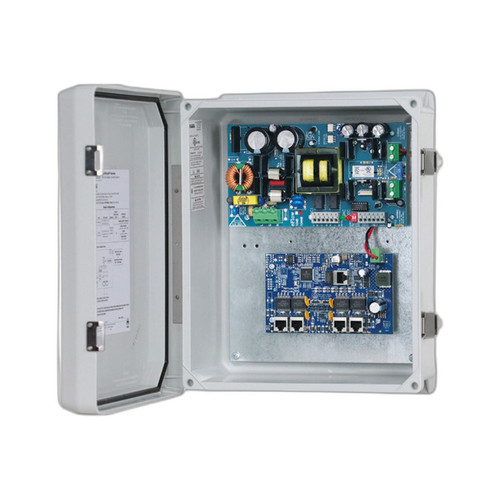
The NETWAY5P provides a 120W total PoE+ budget with all 5 ports delivering simultaneous PoE+ power. Every port is a powered port, meaning up to five 802.3at endpoints can draw power concurrently without trade-offs.
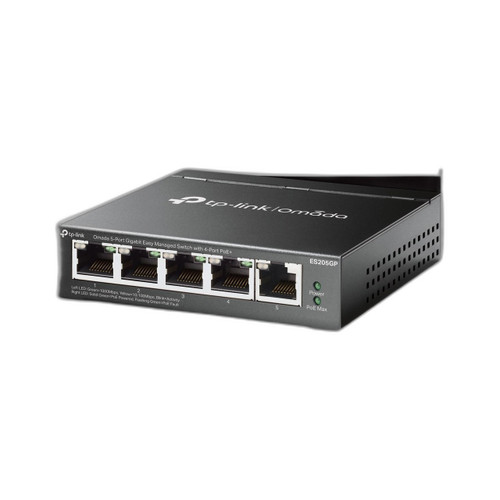
The ES205GP allocates a 65W total PoE+ budget across 4 of its 5 ports, with a maximum of 30W per port. The fifth port is an uplink-only data port with no PoE output. Maximum aggregate powered-device load is therefore capped at 65W regardless of per-port headroom.
For deployments requiring five simultaneously powered endpoints — such as five PTZ cameras, door controllers, or access points — the NETWAY5P's 120W budget and 5-port PoE coverage is a concrete advantage. The ES205GP's 65W budget can support a mix of 802.3af and 802.3at devices but will constrain high-draw endpoints if all four PoE ports are fully loaded near 30W each (120W theoretical four-port max versus 65W actual budget).
How are these switches managed, and what ecosystems do they support?
The NETWAY5P is documented as a Managed Layer 2 switch with full-duplex Gigabit switching fabric. The provided specifications do not detail the management interface protocol, cloud controller support, VLAN configuration depth, or CLI/GUI access method beyond the Layer 2 managed designation.
The ES205GP is managed via TP-Link's Omada SDN platform, offering centralized management compatible with the Omada controller ecosystem (hardware, software, or cloud controller). Specified management features include DHCP Client. Additional Omada SDN capabilities such as VLAN, QoS, port mirroring, and traffic monitoring are associated with the Omada platform but are not enumerated in the provided spec data for this model.
Installers already operating within the TP-Link Omada ecosystem gain unified visibility of the ES205GP alongside Omada APs, routers, and other switches. The NETWAY5P's Layer 2 management is noted without a named controller platform in the provided specs, which is a relevant gap for IT buyers evaluating centralized network management.
Where and how can each switch be physically installed, and what environments do they tolerate?
The NETWAY5P supports DIN-rail and panel mount installation, making it purpose-built for security enclosures, electrical panels, and rack-less edge deployments common in access control and surveillance head-end cabinets. No operating temperature range is specified in the provided data.
The ES205GP is rated for wall and rack mounting and measures 99.8 × 98 × 25 mm (3.9 × 3.9 × 1.0 in). Operating temperature is specified at 0°C to 40°C (32°F to 104°F). The unit is powered by an external supply at 53.5 VDC / 1.31A. A bracket form factor is noted, suited to small wall-mount or rack-shelf installations.
The NETWAY5P's DIN-rail compatibility is a decisive differentiator for enclosure-based security system integrators who route cabling through structured panels. The ES205GP's defined temperature rating and compact footprint suit office, IDF closet, or wall-mount deployments. No temperature specification is available for the NETWAY5P in the provided data, which limits direct environmental comparison.
Which should you choose: the NETWAY5P or the ES205GP?
Our take: The NETWAY5P is the stronger choice when all five switch ports must deliver PoE+ power simultaneously and the installation is enclosure-based. Its 120W PoE budget is 84% higher than the ES205GP's 65W, it covers all 5 ports with PoE+ versus 4 on the ES205GP, and its DIN-rail/panel mount design integrates directly into security head-end enclosures without adapters. The ES205GP is the stronger choice when Omada SDN centralized management is a platform requirement, when a defined operating temperature ceiling of 40°C matters for compliance documentation, or when compact wall/rack form factor is needed. Neither unit should be selected solely on management depth without confirming the NETWAY5P's specific management interface capabilities, as those details are absent from the provided specifications.
Side-by-Side Comparison
Spec-for-spec, from manufacturer data.
| Specification | Altronix NETWAY5P | TP-Link ES205GP |
|---|---|---|
| Product Type | PoE+ Gigabit Switch | Managed PoE+ Gigabit Switch |
| Total Ports | 5 | 5 |
| PoE+ Powered Ports | 5 (all ports) | 4 of 5 |
| PoE Standard | 802.3at (PoE+) | 802.3af / 802.3at (PoE+) |
| Total PoE Budget | 120W | 65W |
| Max PoE per Port | Not specified | 30W |
| Port Speed | 10/100/1000 Mbps (Gigabit) | 10/100/1000 Mbps (Gigabit) |
| Switching Capacity | Not specified | 10 Gbps |
| Packet Forwarding Rate | Not specified | 7.4 Mpps |
| Management | Managed Layer 2 | Omada SDN (Easy Managed) |
| Mount Type | DIN-rail, Panel mount | Wall, Rack |
| Dimensions | Not specified | 99.8 × 98 × 25 mm (3.9 × 3.9 × 1.0 in) |
| Operating Temperature | Not specified | 0°C to 40°C (32°F to 104°F) |
| Power Input | Single centralized PoE source | 53.5 VDC / 1.31A external supply |
| Memory / MAC Table | Not specified | 64 Mbit Flash; 8K MAC addresses; 4 Mbit buffer |
| Warranty | Lifetime | Not specified |
Frequently Asked Questions
Which should you choose: the NETWAY5P or the ES205GP?
The NETWAY5P is the stronger choice when all five switch ports must deliver PoE+ power simultaneously and the installation is enclosure-based. Its 120W PoE budget is 84% higher than the ES205GP's 65W, it covers all 5 ports with PoE+ versus 4 on the ES205GP, and its DIN-rail/panel mount design integrates directly into security head-end enclosures without adapters. The ES205GP is the stronger choice when Omada SDN centralized management is a platform requirement, when a defined operating temperature ceiling of 40°C matters for compliance documentation, or when compact wall/rack form factor is needed. Neither unit should be selected solely on management depth without confirming the NETWAY5P's specific management interface capabilities, as those details are absent from the provided specifications.
Can the NETWAY5P or ES205GP power five cameras at once?
The NETWAY5P can power all five connected endpoints simultaneously via PoE+ across all 5 ports with a 120W budget. The ES205GP provides PoE+ on 4 of its 5 ports with a 65W total budget and a 30W per-port maximum — five simultaneously powered endpoints is not supported since port 5 carries no PoE output.
Is the ES205GP or NETWAY5P better suited for a security enclosure installation?
The NETWAY5P is specifically designed for DIN-rail and panel mount deployment, which is the standard mounting method inside security and access control enclosures. The ES205GP is rated for wall and rack mount only; DIN-rail compatibility is not stated in its specifications.
Which switch works with a centralized network management platform?
The ES205GP integrates with TP-Link's Omada SDN controller for centralized management of switches, APs, and routers in a unified dashboard. The NETWAY5P is documented as a Managed Layer 2 switch, but no named controller platform or management software ecosystem is identified in the provided specifications.
More Network Switch Comparisons
- TP-Link ES205GP vs Ubiquiti USW-FLEX
- TP-Link ES205GP vs Ubiquiti USW-FLEX-MINI
- TP-Link ES205GP vs Ubiquiti USW-FLEX-3
- TP-Link ES205GP vs Ubiquiti USW-FLEX-MINI-3
- TP-Link ES205GP vs TP-Link SG105PP-M2
- TP-Link SG105PP-M2 vs Ubiquiti USW-FLEX
Network Switch Buying Guides
Get a Second Opinion on Your Camera Choice
Share your site layout, coverage goals, and budget. Our team will validate the camera selection, flag anything we would change, and recommend products that match the use case.