
Zebra ZD22042-D01G00EZ vs Zebra ZT42162-T01000GA: Specification Comparison
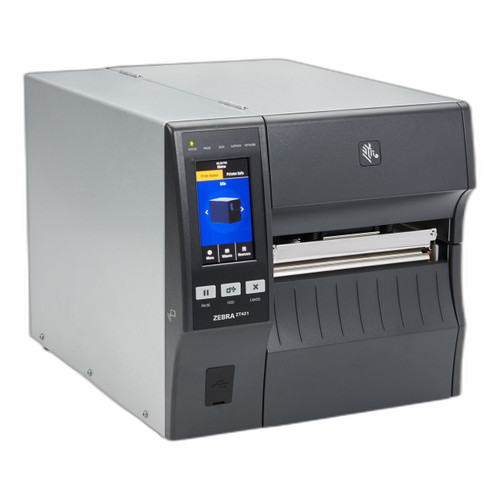
Both the Zebra ZD22042-D01G00EZ and the Zebra ZT42162-T01000GA are desktop direct/thermal label printers sharing the same barcode symbology support and a 1-year warranty. The ZD220 is a compact, entry-level unit aimed at light-duty label printing up to 4.4 inches wide at 203 DPI, while the ZT421 is a heavier industrial-grade desktop printer supporting 6-inch media, speeds up to 14 ips, and multi-resolution output up to 600 DPI with Ethernet and Bluetooth connectivity. Buyers cross-shopping these two are typically weighing deployment scale, media width, and connectivity requirements.

In This Guide
- How do print width, resolution, and speed compare between the ZD22042-D01G00EZ and ZT42162-T01000GA?
- What connectivity and interface options does each printer offer for integration into existing infrastructure?
- How do the physical size, weight, and onboard memory of the two printers compare for deployment planning?
- Which should you choose: the ZD22042-D01G00EZ or the ZT42162-T01000GA?
- Side-by-Side Specs
- FAQ
How do print width, resolution, and speed compare between the ZD22042-D01G00EZ and ZT42162-T01000GA?
The ZD22042-D01G00EZ supports media widths from 1.00 in. to 4.4 in. (25.4–112 mm) and operates at a single native resolution of 203 DPI. Print speed is not stated in the provided specifications.
The ZT42162-T01000GA prints across a 6-inch media width and offers multi-resolution capability: 203 DPI native with 300 and 600 DPI also specified. Print speed is listed at 14 ips at 203 DPI. The wider print path and higher resolution options give the ZT421 a clear advantage for applications requiring fine detail or oversized labels.
Label length for the ZD220 is specified at up to 39.0 in. (991 mm). The ZT421 specification does not state a maximum label length in the provided data.
What connectivity and interface options does each printer offer for integration into existing infrastructure?
The ZD22042-D01G00EZ lists USB as its wired interface. No Ethernet, Bluetooth, or serial interfaces are cited in the provided specifications.
The ZT42162-T01000GA includes standard USB, Serial, Ethernet, and Bluetooth 2.1/MFi per its package contents and connectivity specifications. This breadth of interfaces makes it deployable over wired networks, legacy serial hosts, and mobile Bluetooth-paired devices without additional hardware.
For environments requiring network-attached printing or mobile device pairing, the ZT421's connectivity profile is substantially broader. The ZD220's USB-only interface, per available specs, limits it to direct host connections.
How do the physical size, weight, and onboard memory of the two printers compare for deployment planning?
The ZD22042-D01G00EZ weighs 2.5 lbs. (1.1 kg) and is described as a compact desktop unit. It provides 256 MB Flash and 128 MB SDRAM, with 50 MB user-available non-volatile memory and 8 MB user-available SDRAM called out in package contents.
The ZT42162-T01000GA weighs 36 lbs. (16.33 kg) unboxed and 40 lbs. (18.14 kg) boxed, a substantial difference reflecting its industrial-grade chassis. Its memory spec lists 256 MB SDRAM; Flash storage capacity is not separately specified in the provided data.
The ZD220's roughly 14× lighter weight makes it practical for counter or bench deployment where footprint matters. The ZT421's mass is consistent with a fixed workstation or dock installation, where mobility is not a factor but sustained throughput and wider media handling justify the size.
Which should you choose: the ZD22042-D01G00EZ or the ZT42162-T01000GA?
Our take: The ZD22042-D01G00EZ is the stronger choice when the deployment demands a lightweight, low-cost, USB-connected label printer for standard shipping or inventory labels up to 4.4 inches wide. The ZT42162-T01000GA is the stronger choice for high-throughput or network-integrated environments requiring 6-inch media, multi-resolution output (203/300/600 DPI), and 14 ips print speed. Key spec deltas: the ZT421 prints across a 6 in. path versus the ZD220's 4.4 in. maximum; the ZT421 offers Ethernet and Bluetooth 2.1/MFi versus the ZD220's USB-only interface per available specs; and the ZT421 delivers up to 600 DPI resolution versus the ZD220's fixed 203 DPI. Buyers running warehouse dock stations or retail print servers with mixed wired/wireless clients should specify the ZT421. Buyers needing a simple, light bench printer for standard 4 in. labels on a single workstation connection will find the ZD220 appropriate and notably easier to move and redeploy.
Side-by-Side Comparison
Spec-for-spec, from manufacturer data.
| Specification | Zebra ZD22042-D01G00EZ | Zebra ZT42162-T01000GA |
|---|---|---|
| Product Class | Desktop Direct Thermal Printer | Desktop Thermal Printer |
| Print Width (Max) | 4.4 in. / 112 mm | 6 in. |
| Print Width (Min) | 1.00 in. / 25.4 mm | 4 in. (also listed) |
| Print Resolution | 203 DPI | 203 / 300 / 600 DPI |
| Print Speed | — | 14 ips at 203 DPI |
| Max Label Length | 39.0 in. / 991 mm | — |
| Connectivity | USB | USB, Serial, Ethernet, Bluetooth 2.1/MFi |
| Bluetooth | — | Bluetooth 2.1/MFi |
| Ethernet | — | Yes |
| 1D Symbologies | Code 128, Code 39, UPC, EAN | Code 128, Code 39, UPC, EAN |
| 2D Symbologies | QR Code, Data Matrix, PDF417 | QR Code, Data Matrix, PDF417 |
| Memory (Flash) | 256 MB | — |
| Memory (SDRAM) | 128 MB | 256 MB |
| User Non-Volatile Memory | 50 MB | — |
| Weight | 2.5 lbs. / 1.1 kg | 36 lbs. / 16.33 kg |
| Warranty | 1-year | 1-year |
Frequently Asked Questions
Which should you choose: the ZD22042-D01G00EZ or the ZT42162-T01000GA?
The ZD22042-D01G00EZ is the stronger choice when the deployment demands a lightweight, low-cost, USB-connected label printer for standard shipping or inventory labels up to 4.4 inches wide. The ZT42162-T01000GA is the stronger choice for high-throughput or network-integrated environments requiring 6-inch media, multi-resolution output (203/300/600 DPI), and 14 ips print speed. Key spec deltas: the ZT421 prints across a 6 in. path versus the ZD220's 4.4 in. maximum; the ZT421 offers Ethernet and Bluetooth 2.1/MFi versus the ZD220's USB-only interface per available specs; and the ZT421 delivers up to 600 DPI resolution versus the ZD220's fixed 203 DPI. Buyers running warehouse dock stations or retail print servers with mixed wired/wireless clients should specify the ZT421. Buyers needing a simple, light bench printer for standard 4 in. labels on a single workstation connection will find the ZD220 appropriate and notably easier to move and redeploy.
Is the ZD22042-D01G00EZ or ZT42162-T01000GA better for larger deployments?
The ZT42162-T01000GA is better suited for larger deployments. It supports Ethernet and Bluetooth 2.1/MFi connectivity, enabling integration into network print queues and mobile workflows. The ZD22042-D01G00EZ lists only USB connectivity in the provided specifications, which limits it to single-host, direct-connected use.
Can both printers handle the same barcode types?
Yes. Both printers share identical listed symbology support: 2D codes including QR Code, Data Matrix, and PDF417, and 1D codes including Code 128, Code 39, UPC, and EAN. Neither model is differentiated on barcode symbology in the provided specifications.
Which printer is better for printing fine-detail labels or small barcodes?
The ZT42162-T01000GA has an advantage here. It supports 203, 300, and 600 DPI resolution per the provided specifications, allowing finer barcode and text output when higher DPI modes are used. The ZD22042-D01G00EZ is specified at 203 DPI only, which is standard for general-purpose shipping and inventory labels but does not offer the finer resolution options of the ZT421.
More Label Printer Comparisons
- Brother TD4550DNWB vs Sato WWCT04241-WCN
- Brother TD4550DNWB vs Sato WWCT04241-NDR
- Brother TD4550DNWB vs Sato WT212-404CW-EX1-2
- Brother TD4550DNWB vs Sato WWCT04441-WDR
- Brother TD4550DNWB vs Brother TD4420DNC
- Brother TD4550DNWB vs Brother TD4410D
Label Printer Buying Guides
Get a Second Opinion on Your Camera Choice
Share your site layout, coverage goals, and budget. Our team will validate the camera selection, flag anything we would change, and recommend products that match the use case.