
TP-Link SG6428X vs Ubiquiti USW-24: Specification Comparison
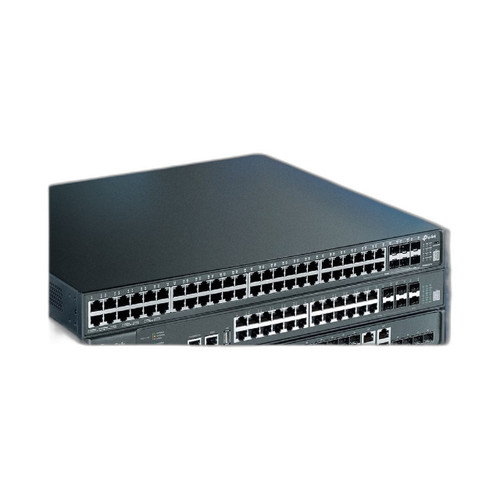
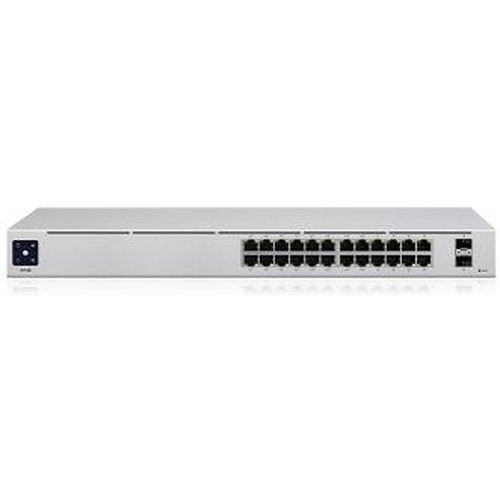
Both the TP-Link SG6428X and Ubiquiti USW-24 are 1U rack-mount, 24-port Gigabit managed switches aimed at enterprise-class LAN deployments. The SG6428X positions itself as a Layer 3 stackable core/distribution switch with 10GE uplinks and advanced routing, while the USW-24 is a Layer 2 managed access switch designed for UniFi-ecosystem environments. Buyers comparing these are typically evaluating fabric capacity, routing depth, uplink speed, and ecosystem integration for mid-scale wired network builds in commercial, education, or multi-site physical-security installations.
In This Guide
- Which switch offers more switching capacity and higher-speed uplinks for demanding deployments?
- How deep is the management and routing capability of each switch?
- How do these switches compare on power draw, physical build, and operating environment?
- Which should you choose: the SG6428X or the USW-24?
- Side-by-Side Specs
- FAQ
Which switch offers more switching capacity and higher-speed uplinks for demanding deployments?
The SG6428X delivers 128 Gbps of switching capacity across its 24 Gigabit RJ45 ports plus four 10GE SFP+ uplink slots. Those 10GE SFP+ ports provide a direct high-bandwidth path to a distribution or core layer, making the switch well-suited to environments where uplink saturation is a concern—such as dense IP camera aggregation feeding an NVR server.
The USW-24 specifies 52 Gbps switching capacity and 26 Gbps non-blocking throughput with a forwarding rate of 39 Mpps. Its port count is identical (24× Gigabit Ethernet), but no 10GE or SFP+ uplink slots are listed in the provided specifications. The fabric headroom gap between the two units is substantial: 128 Gbps vs. 52 Gbps—a 2.46× difference—which is meaningful at high concurrency.
How deep is the management and routing capability of each switch?
The SG6428X is a Layer 3 managed switch supporting dynamic routing protocols: RIP, OSPF, VRRP, ECMP, PIM-SM/DM, Static Routing, and PBR (policy-based routing). It is manageable via CLI, SNMP v1/v2c/v3, and RMON, and integrates into TP-Link's Omada SDN controller ecosystem. Its processor is a dual-core ARM at 1.5 GHz with 8 GB eMMC storage, which underpins the routing table and control-plane workloads. It also supports stacking, allowing multiple units to be managed as a single logical switch.
The USW-24 provides Layer 2 management with VLAN support for up to 1,000 VLANs and integrates into the Ubiquiti UniFi controller ecosystem. No dynamic routing protocols (OSPF, RIP, VRRP, PBR) are listed in the provided specifications. Management is via Ethernet (UniFi controller). For sites that require inter-VLAN routing or dynamic routing at the switch level, the USW-24 would require a separate router or gateway appliance; the SG6428X can handle that function natively.
How do these switches compare on power draw, physical build, and operating environment?
The USW-24 specifies a typical power consumption of 25W with a 36W internal AC/DC power supply, making it notably efficient for a 24-port managed switch. Its enclosure is listed as SGCC steel and it weighs 2.7 kg without mounting brackets. Operating temperature is -5 to 45°C, and it carries CE, FCC, IC, and Anatel certifications. NDAA compliance is explicitly stated as Yes.
The SG6428X specifies a power supply input of 100–240V 50/60 Hz; however, no typical power consumption figure (in watts) is provided in the supplied specifications. Its dimensions are 440 × 420 × 44 mm (17.3 × 16.5 × 1.7 in) versus the USW-24's 442 × 200 × 44 mm—the SG6428X chassis is notably deeper (420 mm vs. 200 mm). Operating temperature for both units is -5°C to 45°C. No NDAA compliance status is listed for the SG6428X in the provided specifications.
Which should you choose: the SG6428X or the USW-24?
Our take: The SG6428X is the stronger choice when the deployment demands Layer 3 routing, high switching fabric headroom, or 10GE uplinks to a core layer. Its 128 Gbps fabric is 2.46× the USW-24's 52 Gbps, its four 10GE SFP+ ports enable low-latency uplinks that the USW-24 lacks entirely per available specs, and native support for OSPF, VRRP, PBR, and ECMP eliminates the need for a separate routing appliance. The USW-24, by contrast, is better suited to pure Layer 2 access deployments inside a Ubiquiti UniFi environment where ecosystem cohesion, a compact 200 mm chassis depth, explicit NDAA compliance, and a confirmed 25W power draw matter more than routing depth or uplink speed. Choose the SG6428X for distribution-layer or multi-VLAN-routed builds; choose the USW-24 for UniFi-native, space- or power-constrained access closets.
Side-by-Side Comparison
Spec-for-spec, from manufacturer data.
| Specification | TP-Link SG6428X | Ubiquiti USW-24 |
|---|---|---|
| Product Type | L3 Stackable Managed Switch | L2 Managed Switch |
| Access Ports | 24× Gigabit RJ45 | 24× Gigabit Ethernet |
| Uplink Ports | 4× 10GE SFP+ | — (not specified) |
| Switching Capacity | 128 Gbps | 52 Gbps |
| Non-Blocking Throughput | — (not specified) | 26 Gbps |
| Forwarding Rate | — (not specified) | 39 Mpps |
| Layer | Layer 3 (OSPF, RIP, VRRP, ECMP, PBR) | Layer 2 |
| VLAN Support | — (not specified) | Up to 1,000 VLANs |
| Stacking | Yes (stackable) | — (not specified) |
| Management Protocol | CLI, SNMP v1/v2c/v3, RMON | Ethernet (UniFi controller) |
| Ecosystem | TP-Link Omada SDN | Ubiquiti UniFi |
| Power Consumption | — (not specified) | 25W typical |
| Power Supply | 100–240V AC, 50/60 Hz (internal) | 36W internal AC/DC, 100–240V |
| Chassis Depth | 420 mm | 200 mm |
| Operating Temperature | -5°C to 45°C | -5°C to 45°C |
| NDAA Compliant | — (not specified) | Yes |
Frequently Asked Questions
Which should you choose: the SG6428X or the USW-24?
The SG6428X is the stronger choice when the deployment demands Layer 3 routing, high switching fabric headroom, or 10GE uplinks to a core layer. Its 128 Gbps fabric is 2.46× the USW-24's 52 Gbps, its four 10GE SFP+ ports enable low-latency uplinks that the USW-24 lacks entirely per available specs, and native support for OSPF, VRRP, PBR, and ECMP eliminates the need for a separate routing appliance. The USW-24, by contrast, is better suited to pure Layer 2 access deployments inside a Ubiquiti UniFi environment where ecosystem cohesion, a compact 200 mm chassis depth, explicit NDAA compliance, and a confirmed 25W power draw matter more than routing depth or uplink speed. Choose the SG6428X for distribution-layer or multi-VLAN-routed builds; choose the USW-24 for UniFi-native, space- or power-constrained access closets.
Is the SG6428X or USW-24 better for larger deployments with multiple VLANs that need inter-VLAN routing?
The SG6428X is the clearer fit. It is a Layer 3 switch with native support for OSPF, RIP, VRRP, ECMP, and PBR, meaning it can route between VLANs on-box without an upstream router. The USW-24 is a Layer 2 switch; no dynamic routing protocols are listed in its specifications, so inter-VLAN routing would require a separate gateway or UniFi router in the path.
Does either switch support 10-Gigabit uplinks to a core switch or NVR server?
Yes, but only the SG6428X. Its specifications include four 10GE SFP+ uplink ports in addition to the 24 Gigabit RJ45 access ports. The USW-24 specifications do not list any SFP+ or 10GE uplink ports—all ports are listed as 24× Gigabit Ethernet.
Which switch is confirmed NDAA-compliant for government or regulated-site installations?
The USW-24 explicitly lists NDAA Compliant: Yes in its specifications. The SG6428X specifications provided do not include an NDAA compliance statement, so compliance cannot be confirmed from the available data. Buyers with NDAA requirements should verify directly with TP-Link or request documentation before specifying the SG6428X.
More Network Switch Comparisons
- TP-Link S5500-24GP4XF vs NETGEAR GS728TP-300NAS
- TP-Link S5500-24GP4XF vs Comnet CNGE24FX12TX12MSPOE
- TP-Link S5500-24GP4XF vs Ubiquiti USW-24
- TP-Link S5500-24GP4XF vs Ubiquiti USW-ENTERPRISEXG-24
- TP-Link S5500-24GP4XF vs TP-Link SL2428P
- TP-Link S5500-24GP4XF vs TP-Link SG3428XPP-M2
Network Switch Buying Guides
Get a Second Opinion on Your Camera Choice
Share your site layout, coverage goals, and budget. Our team will validate the camera selection, flag anything we would change, and recommend products that match the use case.