
Sato WWCT04241-WDN vs Brother TD4550DNWB: Specification Comparison
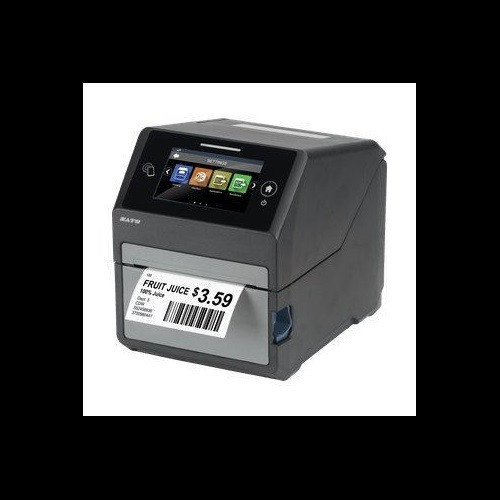
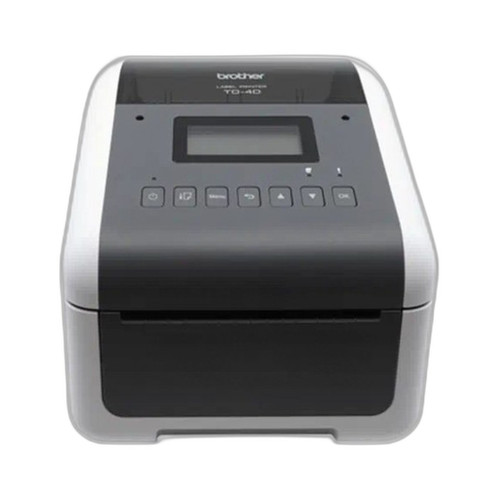
Both the Sato WWCT04241-WDN (CT4-LX) and Brother TD4550DNWB are desktop thermal label printers targeting commercial and light-industrial labeling workloads. Each offers a 4.3-inch display, multi-interface wireless connectivity, and a compact desktop footprint suitable for shipping, healthcare, retail, or asset-tracking environments. The key differentiators span print technology breadth, RFID capability, resolution, speed, and onboard memory — all of which directly affect which workflows each unit can serve and how deeply it can integrate into a larger labeling or inventory infrastructure.
In This Guide
- Which printer delivers higher throughput, resolution, and media flexibility for demanding label runs?
- Which unit supports smarter label encoding and has the onboard resources to handle complex templates or databases?
- How do connectivity options, operating environment, and physical footprint compare for real-world deployment?
- Which should you choose: the WWCT04241-WDN or the TD4550DNWB?
- Side-by-Side Specs
- FAQ
Which printer delivers higher throughput, resolution, and media flexibility for demanding label runs?
The Sato WWCT04241-WDN prints at 8 ips at 305 dpi, while the Brother TD4550DNWB prints at 6 ips at 300 dpi. The Sato's 2 ips speed advantage is meaningful in continuous or high-volume batch runs. Resolution is close — 305 dpi vs. 300 dpi — but Sato's spec is marginally higher for fine text and barcodes.
Print method is a significant dividing line: the Sato supports both direct thermal and thermal transfer (ribbon-based), giving it the ability to produce durable, heat- and chemical-resistant labels when paired with a ribbon. The Brother is direct thermal only, limiting it to environments where label longevity under heat, UV, or moisture is not a concern.
On media width, the Sato's max print width is 4.09 inches with a max media width of 4.1 inches and a max media roll diameter of 5 inches. The Brother supports a print width of 4.27 inches (per structured spec) and paper width up to 4.65 inches, making it slightly more accommodating of wider stock. The Brother also explicitly lists wristbands and receipts as supported media types. The Sato's ribbon capacity is specified at 984 feet.
Which unit supports smarter label encoding and has the onboard resources to handle complex templates or databases?
The Sato WWCT04241-WDN includes integrated UHF RFID encoding at 860–960 MHz, conforming to EPC Class 1 Gen 2 — a standard used in pharmaceutical serialization, asset tracking, and supply-chain compliance. The Brother TD4550DNWB has no RFID capability specified in its provided specifications.
Memory is decisively in the Sato's favor: 4 GB Flash, 2 GB user storage, and 1 GB DDR3 RAM versus the Brother's 64 MB Flash (40 MB usable for templates/databases) and 256 MB SDRAM. The Sato's memory headroom allows for far larger template libraries, graphic assets, and on-device databases without host-PC dependency.
The Brother specifies programming language support — ZPL II, CPCL, Raster Graphics, and Text — which is relevant for IT buyers integrating into existing label management ecosystems (particularly Zebra-based infrastructure). The Sato's supported programming languages are not listed in the provided specifications.
How do connectivity options, operating environment, and physical footprint compare for real-world deployment?
Both units offer Ethernet, Wi-Fi, and Bluetooth. The Sato adds USB and specifies USB 2.0 explicitly. The Brother adds Serial as a listed interface, which matters for legacy POS or industrial system integration. The Brother's structured spec lists USB, Serial, Bluetooth BLE, WLAN, and LAN — a more explicit interface breakdown than the Sato's provided data.
The Sato specifies an operating temperature range of 32°F to 104°F (0°C to 40°C). No operating temperature range is provided in the Brother's specifications. Buyers deploying in warehouse or outdoor-adjacent environments should verify Brother's thermal tolerance independently.
Physical footprint: the Sato measures 7.0" W × 9.375" D × 8.4375" H and weighs 7.3 lbs. The Brother is slightly narrower and shorter at 7.08" W × 8.82" D × 6.10" H and weighs 4.58 lbs — meaningfully lighter, which may matter for counter-space-constrained or portable desktop deployments. Both carry a display described as 4.3 inches; the Sato specifies a full-color touchscreen while the Brother specifies an LCD without touch or color detail in the provided specs. Warranty terms differ: Sato provides an explicit 1-year warranty; Brother lists 'Manufacturer Warranty' without duration.
Which should you choose: the WWCT04241-WDN or the TD4550DNWB?
Our take: The WWCT04241-WDN is the stronger choice when RFID encoding, thermal transfer durability, or high-volume throughput are requirements. It prints at 8 ips versus the TD4550DNWB's 6 ips, supports both direct thermal and thermal transfer (vs. direct thermal only on the Brother), and integrates UHF EPC C1G2 RFID encoding — a capability the Brother does not offer at all per available specifications. Its onboard memory (4 GB Flash, 1 GB DDR3) dwarfs the Brother's 64 MB Flash / 256 MB SDRAM, enabling complex on-device template and database workloads. The TD4550DNWB is better suited for lighter-duty, cost-sensitive receipt, wristband, or label applications where ZPL II / CPCL language compatibility with existing Zebra-based infrastructure matters, wider media stock (up to 4.65") is needed, or a lighter 4.58 lb unit is preferred. Buyers should note that the Brother's operating temperature and warranty duration are unspecified in the provided data.
Side-by-Side Comparison
Spec-for-spec, from manufacturer data.
| Specification | Sato WWCT04241-WDN | Brother TD4550DNWB |
|---|---|---|
| Print Method | Direct Thermal / Thermal Transfer | Direct Thermal only |
| Print Speed | 8 ips | 6 ips |
| Print Resolution | 305 dpi | 300 dpi |
| Max Print Width | 4.09" | 4.27" |
| Max Media Width | 4.1" | 4.65" |
| RFID | UHF 860–960 MHz, EPC C1G2 | — |
| Flash Memory | 4 GB | 64 MB (40 MB usable) |
| RAM | 1 GB DDR3 | 256 MB SDRAM |
| User Storage | 2 GB | — |
| Display | 4.3" full-color touchscreen | 4.3" LCD |
| Connectivity | Ethernet, Wi-Fi, Bluetooth, USB 2.0 | USB, Serial, Bluetooth BLE, WLAN, LAN |
| Programming Languages | — | ZPL II, CPCL, Raster Graphics, Text |
| Operating Temperature | 32°F – 104°F | — |
| Weight | 7.3 lbs | 4.58 lbs |
| Dimensions (W×D×H) | 7.0" × 9.375" × 8.4375" | 7.08" × 8.82" × 6.10" |
| Warranty | 1 year | Manufacturer Warranty (duration not specified) |
Frequently Asked Questions
Which should you choose: the WWCT04241-WDN or the TD4550DNWB?
The WWCT04241-WDN is the stronger choice when RFID encoding, thermal transfer durability, or high-volume throughput are requirements. It prints at 8 ips versus the TD4550DNWB's 6 ips, supports both direct thermal and thermal transfer (vs. direct thermal only on the Brother), and integrates UHF EPC C1G2 RFID encoding — a capability the Brother does not offer at all per available specifications. Its onboard memory (4 GB Flash, 1 GB DDR3) dwarfs the Brother's 64 MB Flash / 256 MB SDRAM, enabling complex on-device template and database workloads. The TD4550DNWB is better suited for lighter-duty, cost-sensitive receipt, wristband, or label applications where ZPL II / CPCL language compatibility with existing Zebra-based infrastructure matters, wider media stock (up to 4.65") is needed, or a lighter 4.58 lb unit is preferred. Buyers should note that the Brother's operating temperature and warranty duration are unspecified in the provided data.
Can the Sato WWCT04241-WDN or Brother TD4550DNWB print RFID-encoded labels?
Only the Sato WWCT04241-WDN supports RFID encoding. It includes an integrated UHF reader/writer operating at 860–960 MHz conforming to EPC Class 1 Gen 2, suitable for pharmaceutical, asset-tracking, and supply-chain label applications. No RFID capability is listed in the Brother TD4550DNWB's provided specifications.
Which printer is faster and produces sharper output — the WWCT04241-WDN or the TD4550DNWB?
The Sato WWCT04241-WDN prints at 8 ips at 305 dpi. The Brother TD4550DNWB prints at 6 ips at 300 dpi. The Sato is 33% faster and has a marginally higher resolution. For high-volume batch runs or fine-detail barcodes and text, the Sato holds the advantage on both metrics per the provided specifications.
Is the WWCT04241-WDN or TD4550DNWB the better fit for integration into an existing Zebra-based label management system?
The Brother TD4550DNWB explicitly supports ZPL II and CPCL programming languages per its provided specifications, making it directly compatible with Zebra-based label management software and workflows without translation middleware. The Sato WWCT04241-WDN's supported programming languages are not listed in the provided specifications, so compatibility with ZPL II or CPCL environments should be verified directly with Sato before deployment.
More Label Printer Comparisons
- Brother TD4550DNWB vs Sato WWCT04241-WCN
- Brother TD4550DNWB vs Sato WWCT04241-NDR
- Brother TD4550DNWB vs Sato WT212-404CW-EX1-2
- Brother TD4550DNWB vs Sato WWCT04441-WDR
- Brother TD4550DNWB vs Brother TD4420DNC
- Brother TD4550DNWB vs Brother TD4410D
Label Printer Buying Guides
Get a Second Opinion on Your Camera Choice
Share your site layout, coverage goals, and budget. Our team will validate the camera selection, flag anything we would change, and recommend products that match the use case.