
Sato WWCT04241-NDN vs Brother TD4210D: Specification Comparison
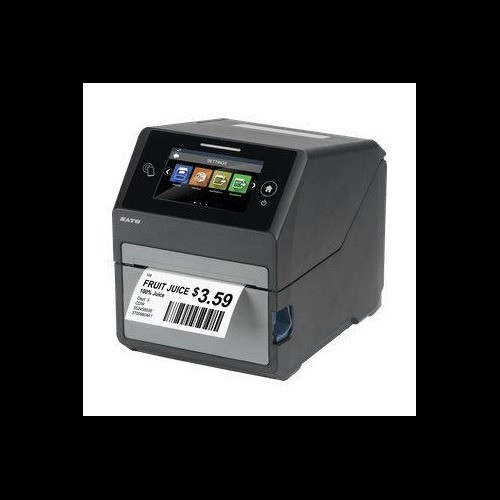
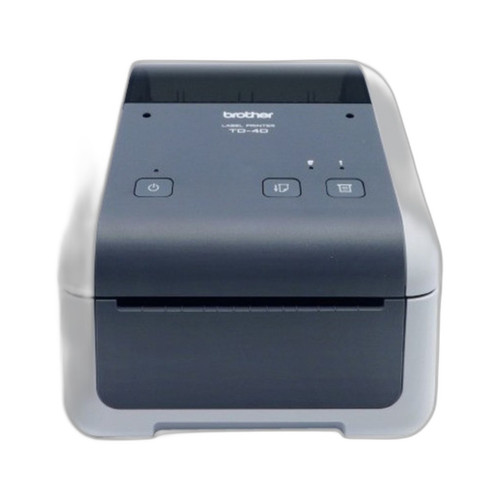
Both the Sato CT4-LX (WWCT04241-NDN) and the Brother TD4210D are desktop direct thermal label and receipt printers aimed at warehouse, logistics, and light industrial environments. Each outputs to media up to roughly 4.1–4.3 inches wide and sits on a desktop footprint. A buyer evaluating either unit is looking at a 4-inch class desktop thermal printer for barcode labels, tags, or receipts—making direct cross-shopping reasonable, with the understanding that the Sato adds thermal transfer capability and integrated UHF RFID encoding that the Brother does not.
In This Guide
- Which printer delivers faster throughput and sharper output for label and barcode work?
- What media types and print technologies does each printer support?
- How do the two printers differ in connectivity and smart-label (RFID) capability?
- Which should you choose: the WWCT04241-NDN or the TD4210D?
- Side-by-Side Specs
- FAQ
Which printer delivers faster throughput and sharper output for label and barcode work?
The Sato CT4-LX prints at 8 ips at 305 dpi, producing sharp barcodes and QR codes on media up to 4.09 inches wide. The Brother TD4210D prints at 5 ips at 203 dpi on media up to 4.3 inches wide.
The Sato's 305 dpi resolution is 50 percent higher than the Brother's 203 dpi, which is consequential for small-font compliance labels, dense 2D DataMatrix codes, or GS1-128 barcodes that must scan reliably at reduced sizes. The 8 ips vs 5 ips speed difference (60 percent faster) matters in high-volume pick-and-pack or end-of-line labeling where throughput directly affects line rate.
The Brother TD4210D's 203 dpi at 5 ips is adequate for standard 1D/2D barcodes on receipts, shelf labels, and shipping tags, but it cannot match the Sato's output quality or speed for applications where label density or volume is a primary driver.
What media types and print technologies does each printer support?
The Sato CT4-LX supports both Direct Thermal and Thermal Transfer print methods, uses media up to 4.1 inches wide and 5 inches outer diameter, and accepts ribbon up to 984 feet long. It also carries 4 GB flash, 1 GB DDR3 RAM, and 2 GB user storage.
The Brother TD4210D is Direct Thermal only—no ribbon is required or supported. It accepts media up to 4.3 inches wide. No ribbon length, flash, or RAM figures are provided in the available specifications for the Brother.
Thermal Transfer capability on the Sato means it can print on synthetic polyester, polypropylene, and other non-paper substrates that require a resin or wax-resin ribbon for durability—necessary for outdoor asset tags, chemical-resistant labels, or long-life compliance marking. The Brother is limited to direct thermal media (heat-sensitive paper or approved DT synthetics), which fade under prolonged UV or heat exposure. Buyers needing durable substrate support must consider this distinction carefully.
How do the two printers differ in connectivity and smart-label (RFID) capability?
The Sato CT4-LX provides USB, Ethernet, Wi-Fi, and Bluetooth connectivity, a 4.3-inch full-color touchscreen, and integrated UHF RFID encoding at 860–960 MHz conforming to EPC Class 1 Gen 2. Operating temperature is specified as 32°F to 104°F (0–40°C).
The Brother TD4210D provides USB and Serial (RS-232) connectivity only. No Wi-Fi, Bluetooth, Ethernet, RFID, or touchscreen is listed in the available specifications. No operating temperature range is provided in the Brother's specification data.
The connectivity gap is significant for networked production environments: the Sato can be placed anywhere on a wired or wireless LAN and managed remotely or via its onscreen interface, while the Brother requires a direct cable connection to a host PC. For RFID-enabled workflows—asset tracking, retail inventory, pharmaceutical serialization—the Sato is the only option between the two; the Brother has no RFID capability specified.
Which should you choose: the WWCT04241-NDN or the TD4210D?
Our take: The WWCT04241-NDN is the stronger choice when the application demands higher print resolution, faster throughput, thermal transfer media support, network connectivity, or UHF RFID encoding. Concretely: the Sato prints at 305 dpi versus the Brother's 203 dpi (50% sharper), runs at 8 ips versus 5 ips (60% faster), and adds Ethernet, Wi-Fi, and Bluetooth where the Brother offers only USB and RS-232. The Sato also supports thermal transfer ribbons for durable synthetic labels, carries 4 GB flash and 1 GB RAM with no comparable figures disclosed for the Brother, and includes integrated UHF RFID (860–960 MHz, EPC C1G2) that the TD4210D entirely lacks. The Brother TD4210D is a viable lower-complexity option for point-of-sale receipt printing or simple direct thermal label jobs where a wired single-host connection is acceptable and RFID, Wi-Fi, and durable media are not requirements.
Side-by-Side Comparison
Spec-for-spec, from manufacturer data.
| Specification | Sato WWCT04241-NDN | Brother TD4210D |
|---|---|---|
| Print Method | Direct Thermal / Thermal Transfer | Direct Thermal only |
| Print Resolution | 305 dpi | 203 dpi |
| Print Speed | 8 ips | 5 ips |
| Max Print Width | 4.09 in | 4.3 in |
| Max Media Width | 4.1 in | 4.3 in |
| Connectivity | USB, Ethernet, Wi-Fi, Bluetooth | USB, Serial (RS-232) |
| RFID | UHF 860–960 MHz (EPC C1G2) | — |
| Display | 4.3" full-color touchscreen | — |
| Flash Memory | 4 GB | — |
| RAM | 1 GB DDR3 | — |
| User Storage | 2 GB | — |
| Max Ribbon Length | 984 ft | N/A (no ribbon) |
| Max Media OD | 5 in | — |
| Operating Temperature | 32°F – 104°F (0–40°C) | — |
| Weight | 7.3 lb (3.3 kg) | — |
| Warranty | 1-year | Manufacturer Warranty (duration not specified) |
Frequently Asked Questions
Which should you choose: the WWCT04241-NDN or the TD4210D?
The WWCT04241-NDN is the stronger choice when the application demands higher print resolution, faster throughput, thermal transfer media support, network connectivity, or UHF RFID encoding. Concretely: the Sato prints at 305 dpi versus the Brother's 203 dpi (50% sharper), runs at 8 ips versus 5 ips (60% faster), and adds Ethernet, Wi-Fi, and Bluetooth where the Brother offers only USB and RS-232. The Sato also supports thermal transfer ribbons for durable synthetic labels, carries 4 GB flash and 1 GB RAM with no comparable figures disclosed for the Brother, and includes integrated UHF RFID (860–960 MHz, EPC C1G2) that the TD4210D entirely lacks. The Brother TD4210D is a viable lower-complexity option for point-of-sale receipt printing or simple direct thermal label jobs where a wired single-host connection is acceptable and RFID, Wi-Fi, and durable media are not requirements.
Do I need the Sato CT4-LX if I'm only printing basic shipping labels from one PC?
If your workflow is a single PC connected by USB or serial, standard direct thermal media, 203 dpi is sufficient for your barcode sizes, and you print fewer labels per shift than the speed difference would matter, the Brother TD4210D covers that use case. The Sato's additional capabilities—Wi-Fi, Ethernet, Bluetooth, 305 dpi, thermal transfer, RFID—are not required in that scenario and carry a corresponding cost premium.
Can either printer encode RFID smart labels?
Only the Sato CT4-LX (WWCT04241-NDN) encodes RFID smart labels. It supports UHF 860–960 MHz at the EPC Class 1 Gen 2 standard. No RFID capability of any kind is listed in the Brother TD4210D's specifications.
Which printer is better for durable outdoor or chemical-resistant labels?
The Sato CT4-LX supports Thermal Transfer printing, which uses wax, wax-resin, or resin ribbons to print on synthetic polyester and polypropylene substrates that resist UV, moisture, and chemicals. The Brother TD4210D is Direct Thermal only; direct thermal images on paper stock are not rated for outdoor or chemical-exposure environments. For durable label applications, the Sato is the appropriate choice based on the available specifications.
More Label Printer Comparisons
- Brother TD4550DNWB vs Sato WWCT04241-WCN
- Brother TD4550DNWB vs Sato WWCT04241-NDR
- Brother TD4550DNWB vs Sato WT212-404CW-EX1-2
- Brother TD4550DNWB vs Sato WWCT04441-WDR
- Brother TD4550DNWB vs Brother TD4420DNC
- Brother TD4550DNWB vs Brother TD4410D
Label Printer Buying Guides
Get a Second Opinion on Your Camera Choice
Share your site layout, coverage goals, and budget. Our team will validate the camera selection, flag anything we would change, and recommend products that match the use case.