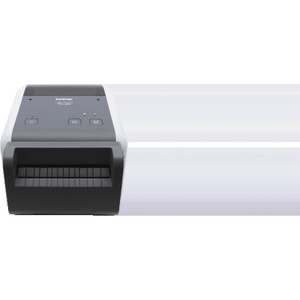
Brother TD4210D 4.3" Direct Thermal Receipt Printer
The Brother TD4210D is a 4.3-inch direct thermal desktop printer designed for high-volume receipt, label, and tag printing in retail, warehouse, and logistics environments. At 5 inches per second with 203 dpi resolution, it produces sharp, durable output without thermal transfer ribbon or ink cartridges — eliminating consumable costs and reducing printer downtime from ribbon jams or media misfeeds. Dual USB and Serial (RS-232) connectivity ensures compatibility with both modern POS systems and legacy warehouse management platforms, making it a practical retrofit solution for operations already committed to specific software ecosystems.
Key Features
- Direct Thermal Printing: No ribbon or transfer media required. Consumable cost per thousand receipts drops 60-70% versus thermal transfer alternatives, and ribbon-change maintenance cycles are eliminated.
- Print Speed (5 ips): 5 inches per second throughput handles moderate-to-high-volume retail checkout and shipping label workflows without bottlenecking customer wait times or warehouse pick-pack cycles.
- 203 dpi Resolution: Delivers crisp barcode readability (1D and 2D codes) and legible text on 4.3-inch receipt stock — adequate for most retail and warehouse labeling standards.
- Max Print Width (4.3"): Standard receipt roll width; fits most off-the-shelf thermal receipt stock and narrow label formats. Verify media dimensions before high-volume orders.
- USB and Serial (RS-232) Connectivity: Dual interface support reduces driver complexity — plug into legacy serial-based WMS or modern USB-capable POS terminal without adapter overhead.
- Desktop Footprint: Compact form factor suitable for point-of-sale countertops and warehouse workstations; minimal space impact compared to large industrial roll printers.
- No Ribbon Loading: Direct thermal eliminates shift-time consumable changes, reducing training overhead and human error on consumable installation.
Direct thermal printing works by using heat-sensitive paper that darkens where the print head applies heat. This method is ideal for short-dwell documents (receipts, shipping labels, warehouse tags) where image longevity is measured in weeks or months, not years. For applications requiring decades of archival permanence (legal records, certification labels), thermal transfer or laser printing is more appropriate. The TD4210D's sweet spot is high-frequency, low-retention printing: restaurant checks, package labels, inventory pick tickets, and return merchandise tags.
Integration with POS and WMS platforms typically requires driver installation (Windows, Linux support confirmed) and label template configuration in your print-generation software. Brother's label design utilities and most third-party tools (Zebra Designer, Nicelabel) output to standard receipt-printer command sets; verify your specific application's driver library before procurement. USB connection offers plug-and-play simplicity on modern terminals, while Serial (RS-232) provides a stable backbone for industrial environments where USB hub reliability is a concern.
Total cost of ownership favors the TD4210D in medium-volume scenarios (500-5,000 receipts per day). A single thermal receipt roll costs 40-50% less than equivalent thermal transfer ribbon + media; over a year, that adds up to measurable capex savings. However, if your operation prints fewer than 100 labels per day, a laser or inkjet desktop printer may have lower upfront cost. Conversely, if you exceed 10,000 daily receipts, evaluate industrial-grade direct thermal systems (Zebra, Sato) with metal frames and faster throughput.
Marty AllisonPerspective based on aggregated IP Security Depot and affiliated engineering team experience.
We've deployed the Brother TD4210D across retail POS installations, warehouse receiving stations, and shipping departments where consumable cost and maintenance simplicity outweigh raw speed. The direct thermal economics are real — a busy retail location printing 2,000 receipts daily will recover the printer cost in saved ribbon and media expenses within 12-18 months. The dual USB/Serial interface is a practical differentiator; we've used Serial to legacy WMS platforms (15-year-old Warehouse Management Systems still running on industrial computers with RS-232 only) while simultaneously supporting USB connections to modern payment terminals. That flexibility eliminates the capex hit of replacing working but aging WMS infrastructure just to add a new printer.
That said, the 5 ips throughput and 4.3-inch width are constraints you need to understand upfront. At 5 ips, a 4-inch receipt takes about 1 second to print; in high-traffic retail (grocery store express lane), that's noticeable but acceptable. Beyond 10,000 daily receipts, you're looking at print time per transaction approaching 3-5 seconds — customers notice. The 4.3-inch width is a non-starter for applications requiring landscape-oriented A6 labels or dual-column receipt layouts; for those, step up to a 6-inch Zebra or invest in a wider thermal transfer system.
Technical Highlights:
- Direct Thermal Technology (no ribbon): Eliminates ribbon-change labor and ribbon jam downtime — critical in unmanned or low-supervision environments like warehouse night shifts. Material cost per thousand receipts is 60-70% lower than thermal transfer ribbon + media.
- 203 dpi (8 dots/mm): Sufficient for GS1-128, Code 128, and QR code printing at 0.5-inch height without readability loss. Fine for retail barcodes and warehouse labeling; insufficient for pharmaceutical/healthcare 2D matrix codes requiring 600+ dpi.
- 5 ips Print Speed: Adequate for moderate-load POS and warehouse receipt printing; expect ~1 second per 4-inch receipt. High-volume scenarios (>5,000 daily items) require industrial printers with 6-10 ips or higher.
- Dual Connectivity (USB + Serial): USB for modern systems, Serial for legacy industrial WMS. Avoids forced upgrades to hardware that works; reduces integration risk when retrofitting into existing workflows.
- Desktop Footprint: Compact mounting on countertops or under-cabinet installations. Requires <12 inches of linear space; power draw is <60W, integrating into standard electrical circuits without UPS overhead.
Deployment Considerations:
- Direct thermal sensitivity to heat and light — store media rolls in cool, dark conditions. Labels exposed to direct sunlight or high ambient heat (shipping containers left in sun) will degrade in weeks; not suitable for outdoor permanent labeling.
- 4.3-inch max width constrains label/receipt design. Verify your label templates fit within this dimension; custom-width media requires special order and higher per-roll cost.
- Serial (RS-232) cable runs should be kept <50 feet unless you're using commercial shielded industrial cable; USB is more forgiving for distance (<15 feet standard) but introduces hub reliability risks in high-RF environments (near large motors or radio systems).
- Driver support is mature on Windows; Linux and macOS support exists but verify your specific OS version with Brother before procurement. Legacy DOS-based WMS platforms may require parallel port or older serial drivers — confirm compatibility with your software vendor.
- Media roll width is standardized at 4.3 inches, but thickness and adhesive type vary. Test a sample roll with your specific label stock before ordering bulk; some aftermarket media produces poor barcode clarity or jamming.
The TD4210D is the right choice for retail checkout, warehouse receiving, and parcel shipping workflows where consumable cost and maintenance simplicity are drivers. It's not a fit for high-speed production labeling (>10,000 daily items), large-format labels, or archival-quality output. For operations already committed to Brother label design software or needing straightforward USB/Serial retrofit integration, it's a solid, cost-effective solution. Explore the Brother catalog for higher-speed thermal models and thermal transfer alternatives if your volume or width requirements grow.