
Sato W2312-400DB-EX1 vs Zebra ZT11143-D01000FZ: Specification Comparison
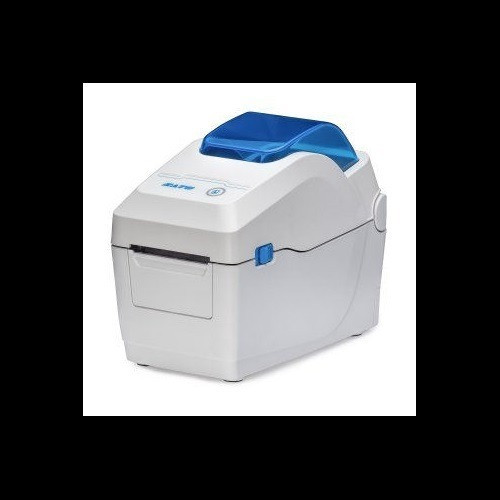
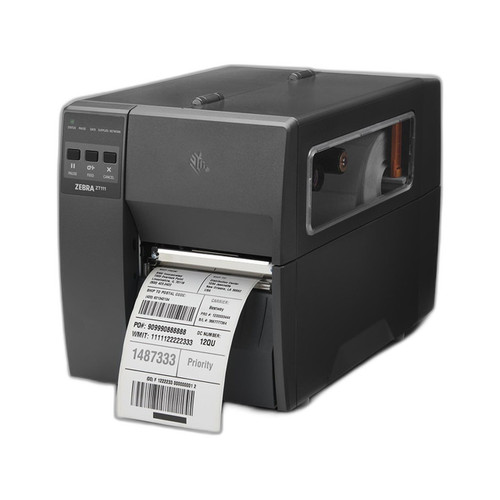
Both the Sato WS2 W2312-400DB-EX1 and the Zebra ZT11143-D01000FZ are 300 DPI direct thermal desktop label printers aimed at shipping, warehouse, and fulfillment environments. Neither uses a ribbon, both sit on a fixed workstation, and both target scan-reliable barcode output. This comparison examines print performance and media handling, connectivity and integration breadth, and operator interface and configuration — the three axes that most directly influence purchasing decisions at the station level.
In This Guide
- How do print speed, resolution, and media width compare between the two printers?
- Which printer offers broader connectivity and system integration options?
- What operator interface and onboard memory does each printer provide?
- Which should you choose: the W2312-400DB-EX1 or the ZT11143-D01000FZ?
- Side-by-Side Specs
- FAQ
How do print speed, resolution, and media width compare between the two printers?
Both printers share a 300 DPI direct thermal print engine, so resolution is identical. Print speed is specified only for the Sato W2312-400DB-EX1 at 7 inches per second; no print speed figure is provided in the available specifications for the Zebra ZT11143-D01000FZ, so a direct numeric comparison cannot be made.
Maximum print width is specified at 2.2 inches for the Sato W2312-400DB-EX1. No maximum print width figure is provided in the Zebra ZT11143-D01000FZ specifications. The Zebra spec sheet identifies its media type as roll label stock, while the Sato spec sheet does not explicitly state media type. The Zebra unit includes an integrated tear-off feature as part of its desktop form factor; no equivalent finishing feature is listed for the Sato.
Which printer offers broader connectivity and system integration options?
The Sato W2312-400DB-EX1 lists four interfaces: USB 2.0, Ethernet, Wi-Fi, and Bluetooth. The Zebra ZT11143-D01000FZ lists Ethernet, Bluetooth (specified as BTLE), and USB; its Card Bullet 2 additionally references RS-232 serial, though this does not appear in the structured spec fields. Wi-Fi is not listed for the Zebra ZT11143-D01000FZ in any specification field.
The Sato W2312-400DB-EX1 therefore provides Wi-Fi as a documented interface that is absent from the Zebra's specifications. The Zebra's BTLE (Bluetooth Low Energy) designation is more specific than the Sato's generic 'Bluetooth' listing. RS-232 legacy serial support is referenced in Zebra marketing copy but not confirmed in structured specs; buyers requiring RS-232 should verify directly with Zebra. Operating system compatibility is listed as Windows for the Sato; no OS compatibility data is provided for the Zebra.
What operator interface and onboard memory does each printer provide?
The Sato W2312-400DB-EX1 is specified with a 2.4-inch color LCD display, described as providing guided media and configuration changes. Onboard memory is listed as 256 MB Flash plus 128 MB SDRAM. Neither display type nor memory specifications are provided for the Zebra ZT11143-D01000FZ.
The Zebra ZT11143-D01000FZ is noted as factory-configured for North America with AC power input of 110–240V (US configuration). No power specification is provided for the Sato W2312-400DB-EX1. Both units carry a 1-year warranty. The absence of display and memory data for the Zebra means a full operator-interface comparison cannot be completed from available specifications.
Which should you choose: the W2312-400DB-EX1 or the ZT11143-D01000FZ?
Our take: The W2312-400DB-EX1 is the stronger documented choice when wireless mobility, operator guidance, and onboard memory are priorities. The Sato specifies Wi-Fi connectivity — absent from the Zebra's listed interfaces — making it suitable for untethered or roaming station deployments. It also documents 7 ips print speed, a 2.4-inch color LCD, and 256 MB Flash / 128 MB SDRAM, none of which have counterpart figures in the Zebra's available specs. The Zebra ZT11143-D01000FZ holds an advantage in legacy integration contexts where RS-232 serial is required and in media finishing via its integrated tear-off bar, neither of which are listed for the Sato. Buyers in fixed, wired LAN environments who need RS-232 WMS compatibility should evaluate the Zebra further using its full datasheet. Buyers prioritizing wireless flexibility, a guided color UI, and confirmed memory headroom will find the Sato's published specifications more complete.
Side-by-Side Comparison
Spec-for-spec, from manufacturer data.
| Specification | Sato W2312-400DB-EX1 | Zebra ZT11143-D01000FZ |
|---|---|---|
| Print Method | Direct Thermal | Direct Thermal |
| Resolution | 300 DPI | 300 DPI |
| Print Speed | 7 ips | — |
| Max Print Width | 2.2 inches | — |
| Form Factor | Desktop | Desktop |
| Media Finishing | — | Integrated Tear-Off |
| Media Type | — | Roll Label Stock |
| USB | USB 2.0 | USB |
| Ethernet | Yes | Yes |
| Wi-Fi | Yes | — |
| Bluetooth | Yes (Bluetooth) | Yes (BTLE) |
| RS-232 | — | Referenced in copy; not in spec fields |
| Operator Display | 2.4-inch Color LCD | — |
| Flash Memory | 256 MB | — |
| RAM | 128 MB SDRAM | — |
| Power Input | — | AC 110–240V (US) |
| OS Compatibility | Windows | — |
| Warranty | 1 Year | 1 Year |
Frequently Asked Questions
Which should you choose: the W2312-400DB-EX1 or the ZT11143-D01000FZ?
The W2312-400DB-EX1 is the stronger documented choice when wireless mobility, operator guidance, and onboard memory are priorities. The Sato specifies Wi-Fi connectivity — absent from the Zebra's listed interfaces — making it suitable for untethered or roaming station deployments. It also documents 7 ips print speed, a 2.4-inch color LCD, and 256 MB Flash / 128 MB SDRAM, none of which have counterpart figures in the Zebra's available specs. The Zebra ZT11143-D01000FZ holds an advantage in legacy integration contexts where RS-232 serial is required and in media finishing via its integrated tear-off bar, neither of which are listed for the Sato. Buyers in fixed, wired LAN environments who need RS-232 WMS compatibility should evaluate the Zebra further using its full datasheet. Buyers prioritizing wireless flexibility, a guided color UI, and confirmed memory headroom will find the Sato's published specifications more complete.
Does either printer support Wi-Fi for wireless label printing?
Yes — Wi-Fi is a documented interface on the Sato W2312-400DB-EX1 (listed alongside USB 2.0, Ethernet, and Bluetooth). Wi-Fi does not appear in any specification field for the Zebra ZT11143-D01000FZ. Buyers requiring wireless connectivity should confirm Zebra's Wi-Fi support independently before purchase.
Is the Sato W2312-400DB-EX1 or ZT11143-D01000FZ better for legacy WMS systems using RS-232 serial?
The Zebra ZT11143-D01000FZ references RS-232 in its marketing copy, suggesting legacy serial support, though RS-232 does not appear in its structured specification fields. The Sato W2312-400DB-EX1 does not list RS-232 in any specification. Buyers with RS-232 WMS requirements should verify directly with Zebra using its full datasheet before specifying either unit.
Which printer has a faster print speed?
Print speed is specified only for the Sato W2312-400DB-EX1 at 7 inches per second. No print speed figure is provided in the available specifications for the Zebra ZT11143-D01000FZ. A direct speed comparison cannot be made from the data provided; consult the Zebra datasheet at the listed path for a confirmed figure.
More Label Printer Comparisons
- Sato WT302-403NN-EX1-2 vs Zebra ZT11143-D01000FZ
- Sato WT302-403NN-EX1-2 vs Sato W2312-400CN-EX1
- Sato WT302-403NN-EX1-2 vs Sato W2302-400DN-EX1
- Sato W2312-400CN-EX1 vs Zebra ZT11143-D01000FZ
- Sato W2312-400CN-EX1 vs Sato W2302-400DN-EX1
- Sato W2302-400DN-EX1 vs Zebra ZT11143-D01000FZ
Label Printer Buying Guides
Get a Second Opinion on Your Camera Choice
Share your site layout, coverage goals, and budget. Our team will validate the camera selection, flag anything we would change, and recommend products that match the use case.