
Brother TD4420DNC vs Sato WWCT04441-WDR: Specification Comparison
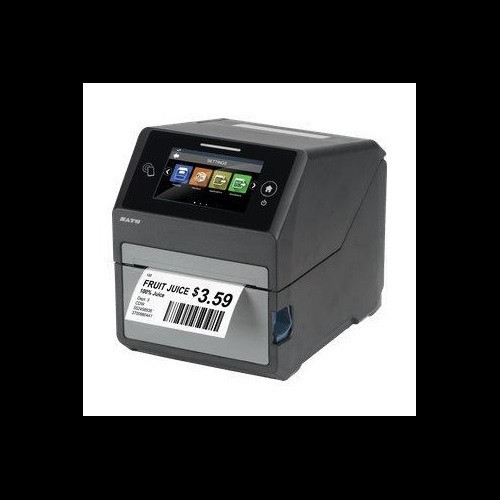
Both the Brother TD4420DNC and the Sato WWCT04441-WDR (CT4-LX) are direct thermal desktop label and receipt printers targeting commercial deployments where batch printing, connectivity flexibility, and media versatility matter. The Brother unit is a pure direct-thermal platform aimed at retail POS and light industrial labeling, while the Sato CT4-LX adds thermal transfer capability and integrated HF/NFC RFID encoding, positioning it for smart-label and asset-tracking workflows. This comparison evaluates print performance and resolution, connectivity and memory architecture, and RFID plus media handling to help buyers match the right unit to their use case.

In This Guide
- How do print speed, resolution, and print width compare between the TD4420DNC and the CT4-LX?
- Which printer offers stronger connectivity and onboard memory for networked or high-volume deployments?
- Does RFID capability, media handling, and physical footprint affect the buying decision for this printer class?
- Which should you choose: the TD4420DNC or the WWCT04441-WDR?
- Side-by-Side Specs
- FAQ
How do print speed, resolution, and print width compare between the TD4420DNC and the CT4-LX?
Both printers share an 8 ips rated print speed, so throughput is equivalent on paper. Resolution diverges meaningfully: the Brother TD4420DNC prints at 203 dpi, while the Sato CT4-LX is rated at 305 dpi in its primary marketing spec (a second field in the Sato spec sheet lists 203 dpi as well — buyers should confirm the active print head with the manufacturer). At 305 dpi, the CT4-LX can render finer barcodes, small fonts, and detailed graphics more crisply, which matters for 2D codes like QR and Data Matrix at small print sizes.
Print width also differs: the Brother TD4420DNC supports a maximum print width of 4.27–4.3 inches, while the Sato CT4-LX caps at 4.09 inches. For operations printing 4-inch-wide labels close to the media edge, the Brother's slightly wider print field is a practical advantage. The Brother accepts media from 0.75 to 4.65 inches wide; the Sato handles 1.0 to 4.1 inches, giving the Brother a broader media width range on both ends.
The Sato CT4-LX also supports thermal transfer in addition to direct thermal, meaning it can accept ribbon-based printing for longer-duration labels that resist heat, UV, and chemicals. The Brother TD4420DNC is direct thermal only — no ribbon. If label durability beyond direct-thermal limits is required, only the Sato qualifies.
Which printer offers stronger connectivity and onboard memory for networked or high-volume deployments?
The Brother TD4420DNC provides USB, Serial, and Ethernet LAN ports. This covers wired POS and WMS integrations, legacy RS-232 serial device connections, and networked printing. However, it does not list Wi-Fi or Bluetooth in its specifications.
The Sato CT4-LX offers USB, Ethernet, Wi-Fi, and Bluetooth. The addition of wireless connectivity makes it suitable for warehouse floor deployments where running Ethernet drops is impractical, and Bluetooth enables mobile device pairing without infrastructure. For environments already standardized on wired networks, both printers serve equally well, but the CT4-LX's wireless options provide more deployment flexibility.
Memory architecture differs substantially. The Brother TD4420DNC ships with 64 MB Flash (40 MB available for templates and databases) and 256 MB SDRAM. The Sato CT4-LX provides 4 GB Flash, 1 GB DDR3 RAM, and 2 GB user storage. The Sato's memory is dramatically larger, supporting bigger label template libraries, firmware headroom, and RFID database storage. For high-SKU or RFID-intensive environments, the CT4-LX's memory architecture is a clear differentiator. The Brother's 64 MB Flash is adequate for standard retail label and receipt workflows but will constrain large template libraries.
Does RFID capability, media handling, and physical footprint affect the buying decision for this printer class?
The Sato CT4-LX integrates HF/NFC RFID encoding at 13.56 MHz with what Sato describes as RF Analyze for antenna auto-tuning. This is a built-in capability for encoding ISO 15693, ISO 14443, and NFC-compatible smart labels in a single print-and-encode pass. The Brother TD4420DNC has no RFID capability specified. If the deployment involves smart labels, NFC asset tags, access cards printed on label stock, or pharmaceutical track-and-trace on HF inlays, the Brother cannot fulfill that requirement.
Both printers include an integrated cutter. The Brother specifies this explicitly; the Sato CT4-LX lists a cutter as part of its configuration (WWCT04441-WDR SKU). Max roll diameter is 5 inches on the Sato; the Brother does not specify a max roll diameter in the provided specs. The Sato also accommodates ribbon up to 984 feet for thermal transfer runs.
Physically, the Brother TD4420DNC weighs 5.3 lbs (2.41 kg) and measures 7.08 W × 9.50 D × 6.10 H inches. The Sato CT4-LX weighs 7.3 lbs (3.3 kg) at 7.0 W × 9.375 D × 8.4375 H inches — notably taller due to the larger media compartment and RFID module. Both have a 4.3-inch display. The Sato specifies a full-color touchscreen; the Brother's display type is not detailed in the provided specs. The Sato specifies an operating range of 32°F to 104°F (0°C to 40°C); the Brother's operating temperature is not listed in the provided specs. The Sato carries a stated 1-year warranty; the Brother lists 'Manufacturer Warranty' without a defined term.
Which should you choose: the TD4420DNC or the WWCT04441-WDR?
Our take: The TD4420DNC is the stronger choice when the deployment is a wired retail POS or light WMS environment printing standard labels and receipts on a budget, with no need for wireless connectivity, RFID encoding, or thermal transfer durability. The CT4-LX leads on three concrete spec axes: it adds Wi-Fi and Bluetooth where the Brother is wired-only, it delivers 305 dpi versus 203 dpi for finer barcode and graphic output, and it integrates 13.56 MHz HF/NFC RFID encoding that the Brother entirely lacks. The CT4-LX also carries 4 GB Flash and 1 GB DDR3 RAM versus the Brother's 64 MB Flash and 256 MB SDRAM — a significant advantage for large template libraries and RFID databases. Buyers running smart-label, NFC asset-tracking, pharmaceutical, or wireless warehouse workflows should specify the CT4-LX. Buyers operating conventional wired retail or desktop label printing with no RFID requirement will find the TD4420DNC a lighter, narrower-footprint option, provided the 203 dpi resolution meets their barcode density needs.
Side-by-Side Comparison
Spec-for-spec, from manufacturer data.
| Specification | Brother TD4420DNC | Sato WWCT04441-WDR |
|---|---|---|
| Print Method | Direct Thermal only | Direct Thermal / Thermal Transfer |
| Print Speed | 8 ips | 8 ips |
| Print Resolution | 203 dpi | 305 dpi (second field lists 203 dpi — verify with manufacturer) |
| Max Print Width | 4.27–4.3 inches | 4.09 inches |
| Media Width Range | 0.75" – 4.65" | 1.0" – 4.1" |
| Max Roll Diameter | — | 5 inches |
| Max Ribbon Length | — (no ribbon; direct thermal only) | 984 feet |
| RFID | — | 13.56 MHz HF/NFC with RF Analyze |
| Connectivity | USB, Serial, Ethernet LAN | USB, Ethernet, Wi-Fi, Bluetooth |
| Display | 4.3" | 4.3" full-color touchscreen |
| Flash Memory | 64 MB (40 MB template/DB) | 4 GB |
| RAM | 256 MB SDRAM | 1 GB DDR3 |
| User Storage | — | 2 GB |
| Weight | 5.3 lbs (2.41 kg) | 7.3 lbs (3.3 kg) |
| Dimensions (W × D × H) | 7.08" × 9.50" × 6.10" | 7.0" × 9.375" × 8.4375" |
| Warranty | Manufacturer Warranty (term not specified) | 1-year Warranty |
Frequently Asked Questions
Which should you choose: the TD4420DNC or the WWCT04441-WDR?
The TD4420DNC is the stronger choice when the deployment is a wired retail POS or light WMS environment printing standard labels and receipts on a budget, with no need for wireless connectivity, RFID encoding, or thermal transfer durability. The CT4-LX leads on three concrete spec axes: it adds Wi-Fi and Bluetooth where the Brother is wired-only, it delivers 305 dpi versus 203 dpi for finer barcode and graphic output, and it integrates 13.56 MHz HF/NFC RFID encoding that the Brother entirely lacks. The CT4-LX also carries 4 GB Flash and 1 GB DDR3 RAM versus the Brother's 64 MB Flash and 256 MB SDRAM — a significant advantage for large template libraries and RFID databases. Buyers running smart-label, NFC asset-tracking, pharmaceutical, or wireless warehouse workflows should specify the CT4-LX. Buyers operating conventional wired retail or desktop label printing with no RFID requirement will find the TD4420DNC a lighter, narrower-footprint option, provided the 203 dpi resolution meets their barcode density needs.
Can either the TD4420DNC or the CT4-LX print RFID smart labels?
Only the Sato CT4-LX (WWCT04441-WDR) supports RFID encoding. It integrates a 13.56 MHz HF/NFC encoder with RF Analyze antenna auto-tuning for print-and-encode in a single pass. The Brother TD4420DNC has no RFID capability listed in its specifications and cannot encode smart labels.
Which printer is better suited for a wireless warehouse or factory-floor deployment?
The Sato CT4-LX includes Wi-Fi and Bluetooth in addition to USB and Ethernet, making it deployable without a wired network drop. The Brother TD4420DNC lists USB, Serial, and Ethernet only — no wireless interfaces are specified — so it requires a physical network connection or USB tether to a host.
Is the print resolution difference between 203 dpi and 305 dpi meaningful for barcode scanning?
For standard 1D barcodes (Code 128, UPC) at typical label sizes, 203 dpi is generally sufficient for scanner read rates. At smaller label sizes, higher symbol densities, or when printing 2D codes (QR, Data Matrix) at reduced footprints, 305 dpi — as specified for the Sato CT4-LX — produces finer dot structure and improves decode reliability. The Brother TD4420DNC's 203 dpi is standard for retail POS workflows; the CT4-LX's 305 dpi provides headroom for demanding barcode specifications.
More Label Printer Comparisons
- Brother TD4550DNWB vs Sato WWCT04241-WCN
- Brother TD4550DNWB vs Sato WWCT04241-NDR
- Brother TD4550DNWB vs Sato WT212-404CW-EX1-2
- Brother TD4550DNWB vs Sato WWCT04441-WDR
- Brother TD4550DNWB vs Brother TD4420DNC
- Brother TD4550DNWB vs Brother TD4410D
Label Printer Buying Guides
Get a Second Opinion on Your Camera Choice
Share your site layout, coverage goals, and budget. Our team will validate the camera selection, flag anything we would change, and recommend products that match the use case.