
Office Surveillance Buying Checklist
Most office camera proposals get reviewed on price and camera count alone. The proposals that land well after install are the ones where the facilities manager or property manager ran through a proper pre-purchase checklist — catching the remote-access gap, the privacy-law issue, the landlord-tenant allocation question, and the missing mobile-app capability before ink hit paper. This checklist captures the 28 questions we work through on every office proposal.
Bottom Line
An office surveillance proposal is ready to approve when you can answer yes to every question below. Gaps on more than two or three items mean the proposal is a starting point, not a finished plan. The cost of walking through this list is a couple of hours; the cost of skipping it is typically a retrofit, a tenant dispute, or a privacy complaint that lands 6 to 12 months later.
Our commercial team runs this checklist on every office proposal before sign-off. The 28 questions reflect real-world gaps that show up repeatedly in first-draft proposals.
Best For
- Facilities managers reviewing office surveillance proposals
- Property managers standardizing across multi-tenant buildings
- Corporate security leads evaluating integrator quotes
- IT directors checking integration and remote-access terms
- Building owners or operations leads doing a second-opinion read on a quote
Not For
- Warehouse or distribution proposals (use the warehouse checklist)
- Residential multifamily
- Retail storefronts
In This Guide
Office-Specific Priorities to Check
Office surveillance has a different priority ordering than warehouse or industrial surveillance. The top priorities, in order:
Remote access for facilities and property teams. The system is useful only to the extent the people who need footage can get to it. A camera with excellent specs on an NVR with poor mobile-app support is less useful than an adequate camera on a great app.
Lobby and entry coverage that actually captures identification. Two cameras at the main entry — one wide-view for situational awareness, one focused for identification. First-draft proposals often include only one.
Elevator and stairwell landings at every floor. Highest-value investigation positions in any multi-floor building. Consistently undercovered.
Privacy and employee-law compliance. Bathrooms, locker rooms, medical areas — excluded. Break rooms — disclosed. Audio recording — disabled in two-party-consent states.
Tenant-landlord camera allocation (multi-tenant). Landlord covers common areas; tenants cover inside their suites. Document in the lease.
Integration with access control. Camera-on-badge-event workflows are standard; missing integration is a retrofit cost.
Red Flags Specific to Office Proposals
All cameras the same model. Office buildings need a mix: lobby-discreet domes, conference-room fisheyes, executive-floor AI cameras, vandal-rated at shared positions, outdoor for main entry. A single-model proposal is generic, not tailored to the building.
No privacy statement. Employee-notification plan, bathroom and locker-room exclusions, audio-recording policy — these should be explicit in the proposal. A proposal that does not address privacy will create privacy issues.
No VMS mobile-app specification. The app quality matters. A proposal that lists the NVR model but not the mobile-app capability is incomplete.
No tenant-landlord allocation (multi-tenant). Who installs what, who owns the cameras, who pays for maintenance, how tenant footage requests are handled — all should be spelled out.
Cameras in executive offices without explicit corporate approval. Executive-area surveillance is a policy decision requiring corporate counsel or HR sign-off, not an integrator design choice.
No access-control integration plan. Badge-forced-open and tailgating events should trigger camera retrieval. A proposal without the integration plan leaves the workflow manual.
Missing cable-plant and install labor. Hardware-only quotes understate true cost by 30 to 40 percent. Ask for the full-install number.
No commissioning time. Each camera needs positioning, exposure tuning, VMS registration, mobile-app configuration. Missing commissioning produces "system is broken" tickets for months.
Recommended Starting Products for an Office System
Four proven picks to anchor a typical office deployment. Mix with perimeter bullets and vandal domes as needed.
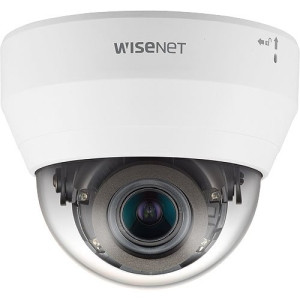
Hanwha
Hanwha QND-7082R 4MP Indoor IR Dome Camera
QND-7082R
4MP indoor IR dome, discreet housing, strong VMS mobile-app integration. Default lobby and corridor camera.
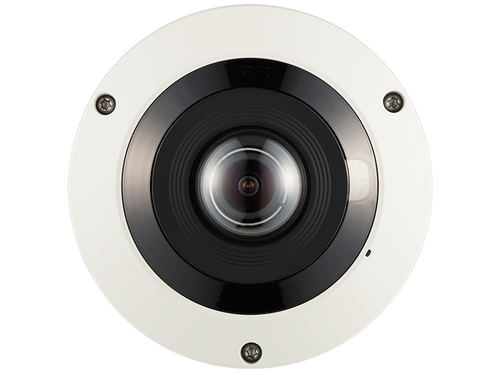
Hanwha
Hanwha PNF-9010RV 12MP 360˚ Fisheye Camera
PNF-9010RV
12MP 360-degree fisheye for full-room conference and break-room coverage. One clearly-posed camera.
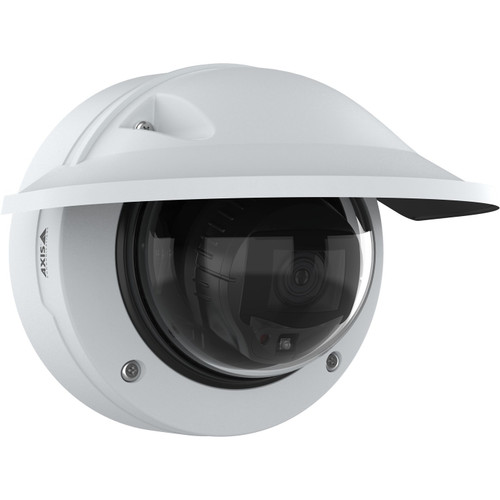
Axis
Axis P3277-LVE 5MP Outdoor AI IR Dome Camera - 03153-001
03153-001
Axis P3277-LVE 5MP AI outdoor dome. Handles glass-front mixed lighting; integrates with Axis and third-party VMS.
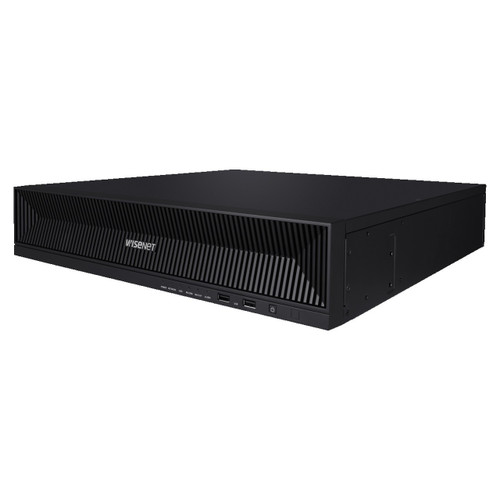
Hanwha
Hanwha XRN-1620B2 16-Channel 4K NVR
XRN-1620B2
16-channel 4K NVR for 12 to 16 camera office systems. Hanwha Wisenet WAVE remote access.
The 28-Question Office Surveillance Checklist
Walk through this list before approving any office proposal. A complete proposal answers every item; gaps become privacy complaints, tenant disputes, and costly retrofits later.
Is there a wide-view and a focused camera at the main lobby entry?
Two cameras at the main entry — situational and identification.
Is every elevator landing covered on every floor?
Highest-value investigation positions in multi-floor buildings.
Are stairwell top and bottom landings covered at minimum?
Stairwells are the escape route around elevator cameras.
Are back-of-house corridors covered, not just front-of-house?
After-hours incidents happen in back-of-house.
Is there a plan for conference and boardroom coverage?
Fisheye for large rooms with assets; entry-only for most meeting rooms.
Are executive-area cameras approved by corporate counsel or HR?
Executive-area surveillance is a policy decision.
Is there a written employee-notification plan?
Most jurisdictions require disclosure; post signage, include in handbook.
Are bathrooms, locker rooms, and medical rooms explicitly excluded?
Near-universal legal requirement.
Is audio recording disabled in two-party-consent states?
CA, FL, IL, MD, MA, MT, NH, PA, WA require all-party consent.
In multi-tenant: is there a landlord vs tenant camera allocation?
Landlord covers common areas; tenants cover inside leased suites.
Is the CAM recovery plan for landlord cameras in the lease?
Surveillance cost allocation should be explicit.
Is the camera mix varied (lobby dome, corridor, fisheye, vandal, outdoor)?
All-same-model proposals are generic, not tailored.
Does the VMS have a strong mobile app (iOS and Android)?
Most common feature used by property and facilities teams.
Is role-based access configured?
Different users see different subsets of cameras.
Is the VMS integrated with access control?
Camera-on-badge-event workflows are standard.
Is the retention period explicitly specified (30, 60, or 90 days)?
30 days default; 60-90 for compliance tenants.
Is storage sized for retention plus RAID overhead?
RAID 5/6 adds 25-33% overhead beyond raw calc.
Is PoE switch budget calculated with 25 percent headroom?
Cameras, APs, intercoms all draw PoE.
Are all cable runs under 100 meters or fiber-extended?
PoE standard max is 100m.
Is UPS coverage specified for NVR and core switch?
Power loss creates documentation gaps insurance may flag.
Is cable-plant and install labor in the proposal?
Labor is 30-40% of total system cost.
Is commissioning and tuning labor included?
Per-camera positioning, exposure, VMS registration.
Is camera warranty explicit (1, 3, or 5 year)?
Commercial warranties vary by brand.
Is cybersecurity baseline specified?
Factory-default passwords fail security audits.
Is firmware-update cadence defined?
Monthly patch cadence standard.
Is there a spare-camera plan for failures?
Keep 5-10% spares on site for fast swap.
Is employee training included (2-3 hours on-site)?
Prevents most support tickets in the first 6 months.
Is there a clear point of contact for post-install support?
Install teams and support teams are often different.
Frequently Asked Questions
How long should I spend reviewing an office surveillance proposal?
Plan 2 to 4 hours for a mid-size office (12-24 cameras). Block a half-day for buildings above 40 cameras. The time pays back in catching missed privacy items, undersized retention, or missing labor line items — all of which become costly retrofits later.
What's the most common mistake in office camera proposals?
Missing the mobile-app specification. The VMS mobile app is the single most-used feature for property and facilities teams; great cameras with a poor app are less useful than adequate cameras with a great app.
What if a proposal includes executive-floor cameras?
Pause and get corporate counsel or HR sign-off before approving. Executive-area surveillance is a corporate policy decision, not an integrator design choice.
What do I do if a proposal does not address privacy?
Send it back. Privacy language should be explicit: employee notification plan, bathroom and locker-room exclusions, audio-recording policy. A proposal that skips privacy creates privacy issues.
Is it OK to approve a phased rollout?
Yes. Phases: Phase 1 = main entries, lobbies, elevator/stair landings; Phase 2 = corridors, common areas, conference rooms; Phase 3 = perimeter, parking, specialty. Validate Phase 1 before committing to Phase 2.
How do I verify an integrator has done office deployments?
Ask for 3 references at similar building sizes; call at least 2. Ask about mobile-app usage, remote-access reliability, commissioning quality, and post-install support. Warehouse-experienced integrators may not be the right fit for office aesthetics and privacy.
What retention should I specify?
30 days continuous is the default. 60 to 90 days for SOC 2, HIPAA, or financial-services tenants. Some insurance policies require specific retention; check with your carrier.
No Bots, Just Experts
No bots, just experts. Free pre-sales support for every customer — product questions, BOM quotes, compatibility checks, price confirmation — typically answered within one business day. Paid services available like full system design, remote installation, and more. Got a list of products? Free BOM quote. Need help figuring out what to buy? Buy engineering time by the hour — $175/hour, qty 1 = 1 hour. Tell us about your project, we scope how many hours it needs, you purchase that quantity. Hardware buyers get up to one hour ($175) credited back against their order as a thank-you.