
The Typical Number of Cameras for a Commercial Office Building
A facilities manager asking this question is almost always one or two specific events into the project — an after-hours incident that was caught on camera badly, a corporate-tenant audit that flagged the surveillance program, a new lease with compliance language, or a quote that arrived with a camera count that felt too low or too high without explanation. This guide walks through the counts we actually specify for commercial office buildings, why each number is what it is, and the blind spots that get missed when coverage is planned on square footage alone.
Bottom Line
A typical 50,000 sq ft single-tenant office runs 14 to 22 cameras; multi-tenant runs 20 to 32 at the same footprint because the landlord covers more shared ground. The real drivers are lobby-and-entry count, elevator and stairwell landings, visible tenant-suite entries, and parking exposure — not the floor area. Decide what you need to see, then count the cameras it takes to see it.
Our commercial team specifies office camera systems for landlords, corporate tenants, and property managers across multiple metros. The ranges below come from real sign-offs, not theoretical guidelines.
Best For
- Facilities managers scoping a new system or tenant-improvement build
- Property managers standardizing surveillance across a multi-tenant portfolio
- Corporate security leads evaluating integrator quotes with a sanity check
- Office owners reviewing a quote that feels too low or too high and want to understand why
- IT or operations leaders who inherited the project and need to answer a board-level question
Not For
- Residential multifamily — see the multifamily sizing guide
- Warehouse and distribution — see the warehouse sizing guide
- Retail storefronts and ground-floor retail — different zone mix
- Small one-office professional practices under 1,500 sq ft — typically a 4-6 camera kit, not a building project
In This Guide
- Bottom Line
- Decide What You Need to See First
- Assumptions Behind These Numbers
- Camera Counts by Square Footage
- Counts by Office Type
- Cameras We Actually Recommend
- The Blind Spots Most Proposals Miss
- When You Should Add More Cameras
- Remote Access for Managers and Facilities
- Frequently Asked Questions
- Related Resources
Decide What You Need to See Before Counting Cameras
Most office camera-count conversations start backwards. An integrator walks a floor, sketches out 18 cameras, and emails a quote. The facilities manager has no framework to evaluate whether 18 is the right number, so the approval comes down to whether the number seems reasonable or the dollar figure seems reasonable — neither of which is the actual question.
The actual question is: what events do you need the surveillance to answer? A facilities team that wants to review lobby tailgating incidents every Tuesday morning has different camera needs than a property manager who gets two footage requests a year from local police. A corporate HQ that wants employee-injury incident documentation has different needs than a multi-tenant building that just needs to show tenants the system exists.
The most useful framing is the incident list: what are the last five incidents you would have wanted footage for, and what cameras would have given you usable images of each? Work backwards from that list and the camera count takes a recognizable shape. A building that has caught a tailgating incident at the main entry, a stolen laptop at reception, a car break-in at the north lot, a dumpster-diving incident at the service yard, and an after-hours badge-anomaly at the back stair needs at least five cameras positioned and configured specifically for those angles. Other cameras support general monitoring; these five do the real documentation work.
Assumptions Behind These Numbers
The ranges below assume a mid-risk single-tenant or multi-tenant commercial office with standard business-hours operation, 4MP baseline resolution, 30-day continuous recording retention, and a mixed camera lineup (domes, bullets, one or two fisheye cameras for common areas, no PTZ unless called out). If your building is higher-risk — financial services, healthcare with pharmacy, legal firm with records room, tech company with server room — add 20 to 30 percent to the baseline count.
Assumed: NDAA-compliant brand lineup (Axis, Hanwha Vision, i-PRO, Bosch, Pelco). Required if the building has any federal-contractor or GSA-tenant exposure; often still specified for purely commercial buildings because of corporate-tenant due diligence and insurance underwriting.
Assumed: VMS is integrated with access control, so camera footage tags to door-forced-open, badge-mismatch, and tailgating events. If systems are not integrated, camera count does not change but investigation workflow is slower.
Assumed: 8 to 12 foot ceilings in interior spaces. Taller lobbies or atrium-style spaces with 18+ foot ceilings need longer focal lengths or higher-resolution cameras to maintain usable identification distance.
Assumed: retention is 30 days continuous plus an incident archive for events flagged by security or tenants. For SOC 2 tenants or insurance policies that require longer retention, budget NVR storage for 60 to 90 days and plan for 2 to 3x the 30-day storage cost.
Camera Counts by Square Footage
These ranges are what we actually sign off on, not a marketing round number. Single-tenant is the baseline; multi-tenant runs higher because the landlord covers more shared common areas across more suite entries.
| Building Footprint | Lobby/Entry | Corridors/Elevator/Stair | Exterior/Parking | Single-Tenant Total | Multi-Tenant Total |
|---|---|---|---|---|---|
| 10,000 sq ft (small) | 2-3 | 2-4 | 2-4 | 6-11 | 8-15 |
| 25,000 sq ft | 2-4 | 4-6 | 3-5 | 9-15 | 13-22 |
| 50,000 sq ft (typical) | 3-5 | 6-10 | 4-8 | 14-22 | 20-32 |
| 100,000 sq ft (multi-floor) | 4-6 | 12-18 | 6-12 | 22-36 | 32-52 |
| 200,000 sq ft (campus-scale) | 6-10 | 24-36 | 12-20 | 42-66 | 60-95 |
For buildings under 10,000 square feet, the sizing is not worth dividing by zone — plan 4 to 10 cameras total covering main entry, primary open workspace or reception, any conference room with company assets, and a single exterior camera. For buildings over 200,000 sq ft, handle the count at the floor or wing level rather than building-wide.
Not Sure How Many Cameras Your Building Needs?
No bots, just experts. Free pre-sales support for every customer — product questions, BOM quotes, compatibility checks. Paid services available like full system design, remote installation, and more. Need camera count and placement designed from a floor plan? Engineering time is $175/hour, qty 1 = 1 hour. A typical single-site office placement runs 3 to 4 hours. We scope the hours with you before you purchase. Hardware buyers get up to one hour ($175) credited back on their order.
Counts by Office Type
Square footage is one signal; tenant type is another. Below are the adjustments we apply to the baseline count based on who occupies the building.
Professional services (law, accounting, consulting): Baseline count. Low after-hours traffic, standard tenant mix, no unusual risk profile. 50,000 sq ft → 14 to 22 cameras.
Corporate HQ (Fortune 1000 single-tenant): Baseline plus 20 to 30 percent. Executive floor coverage with privacy exceptions, conference-center coverage, server-room entry, loading dock, and often reception-level guest tracking. 50,000 sq ft → 18 to 28 cameras.
Technology or creative agency: Baseline or slightly below. Open-plan layouts need fewer corridor cameras and a privacy-aware culture often excludes break rooms and collaboration zones. 50,000 sq ft → 12 to 20 cameras.
Financial services (advisory, wealth management, banking): Baseline plus 30 to 40 percent. Transaction-room or wire-room coverage, vault or safe room, client-meeting rooms, regulatory retention. 50,000 sq ft → 20 to 30 cameras.
Healthcare (medical office, outpatient, dental): Baseline plus 25 to 35 percent. Pharmacy or medication cabinet, exam-room entry hallways (never inside exam rooms), records room, HIPAA-aware placement. 50,000 sq ft → 18 to 30 cameras.
Multi-tenant mixed (10 to 30 tenants): Baseline plus 30 to 50 percent for landlord-managed cameras. Each suite entry gets a corridor-side camera; shared amenities need dedicated coverage. 50,000 sq ft → 20 to 32 landlord cameras (tenants add their own).
Co-working / flex workspace: Highest count per square foot. Member-access tracking, conference-room bookings, common-area accountability, higher user churn. 50,000 sq ft → 24 to 38 cameras.
Government or quasi-government lessee: Baseline plus 40 to 50 percent, all NDAA-compliant, with specific retention requirements. 50,000 sq ft → 20 to 32 minimum.
The Blind Spots Most Office Proposals Miss
Most office proposals get the lobby and parking lot right. The following are the positions we consistently add on review because they are consistently undercovered in first-draft proposals:
Elevator landings at each floor. Not inside the elevator — at the landing, facing the elevator doors. This is the position that captures everyone moving between floors, including the delivery, maintenance, and after-hours visitor traffic that a lobby camera misses. A multi-floor building without landing cameras is blind to most inter-floor movement.
Stairwell landings. Same reason as elevator landings, with the addition that stairwells are the escape route for anyone trying to avoid the elevator camera. Cover the top and bottom landing of every stairwell at minimum; for mid-rise buildings with four or more floors, cover every second landing.
Back-of-house corridors. The corridor behind the front-of-house lobby, the service-entry hallway, and the route from the dock to the freight elevator are higher-risk than public corridors. First-draft proposals cover front-of-house and miss the back, which is exactly where after-hours incidents occur.
Conference room entries (not interiors). A camera inside a conference room is rarely useful and often excluded for privacy; a camera covering the entry captures the who-and-when without the in-meeting privacy issues. For conference centers or boardrooms with company assets inside, a 360-degree fisheye camera provides full-room coverage with less privacy friction.
Reception waiting areas. A camera at the reception desk covers the front-line greeting; the waiting area — where visitors queue, where deliveries stage, where documents may be left — is a separate coverage zone. One extra camera here resolves most visitor-interaction disputes.
Loading dock interior. The dock exterior gets covered; the dock interior (where packages transition into the building) often does not. This is the single position most likely to resolve a missing-package dispute.
Mailroom and package-delivery areas. Particularly in multi-tenant buildings with a shared mailroom, coverage here resolves most tenant complaints about missing mail or packages.
Trash and dumpster staging. After-hours loitering, dumpster diving, and illegal dumping are disproportionately common at trash-staging areas. One camera here often pays for itself the first quarter.
When You Should Add More Cameras
Camera counts are not set-once-and-forget. The events that typically drive a count increase:
An incident you could not fully document. If a specific event — a theft, a tailgating incident, a disputed injury claim — would have been clearer with a camera at one specific position, that camera is now a requirement. A single under-documented incident is usually enough to justify the incremental camera cost.
A new tenant with a higher risk profile or compliance requirement. A new financial services or healthcare tenant typically triggers 4 to 8 new cameras covering the suite entry, the corridor leading to it, and any shared amenities used by that tenant. SOC 2 or HIPAA requirements add the required positions (server room, records room, pharmacy).
A renovation or buildout. Any tenant-improvement project is the best time to add cameras. Cable plant work, ceiling access, and wall access are already happening; the marginal cost of adding cameras is a fraction of a one-off retrofit.
An insurance-policy change. Cyber-liability renewals now include surveillance-coverage questions. If the carrier asks about specific positions (server room, data-storage area, wire room) and the answer is no, the cameras pay back through premium changes.
A corporate-tenant audit that fails. Add the positions the audit identified; tenant-retention benefit usually exceeds the camera cost.
A change in building access pattern. Opening a new entry, adding a second shift, starting 24/7 operations, or accommodating after-hours delivery or maintenance all change which cameras matter. Rebalance coverage around the new access pattern.
Remote Access for Managers and Facilities
Office surveillance without solid remote access is worth significantly less than a system with it. The managers, property managers, corporate security leads, and facilities teams who actually use the system are rarely sitting at the on-premise NVR — they are on mobile devices, at other buildings, or on a corporate VPN. The cameras matter; the ability to get to the footage matters just as much.
Key features to specify: mobile apps for iOS and Android with camera grid view, single-camera live view, and timeline playback; browser access without a client install; role-based permissions so a property manager sees common-area cameras but not tenant-specific cameras, facilities sees mechanical-room cameras, and corporate security sees the full set. Hanwha Wisenet WAVE, Milestone XProtect, Genetec Security Center, and Axis Camera Station all support this natively.
Bandwidth: a single mobile client pulling 720p live from one camera uses 2 to 5 Mbps; multiple camera pulls scale linearly. For a property manager who may pull 4 cameras at once on a morning review, plan 10 to 20 Mbps of sustained upload bandwidth. Small offices with basic cable or DSL may need an upload upgrade to make remote access practical.
Notification workflows: VMS platforms can push mobile notifications for specific events (door-forced, motion in a critical area, analytics events). For facilities teams who want to know about after-hours activity without staring at a grid, this is the highest-leverage feature. Spend 30 minutes during commissioning tuning notifications so they generate signal, not noise.
Cameras We Actually Recommend for Commercial Offices
These are the cameras that show up repeatedly in our office deployments. NDAA-compliant, discreet enough for lobby mounting, and supported by mainstream VMS platforms with solid mobile apps.
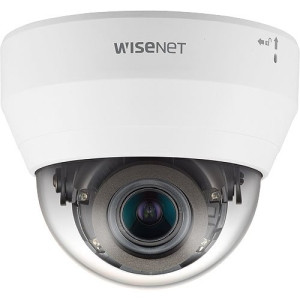
Hanwha
Hanwha QND-7082R 4MP Indoor IR Dome Camera
QND-7082R
4MP indoor IR dome with a discreet housing that disappears into a drop ceiling. The default lobby and corridor camera; clean facial-detail capture without drawing attention to itself.
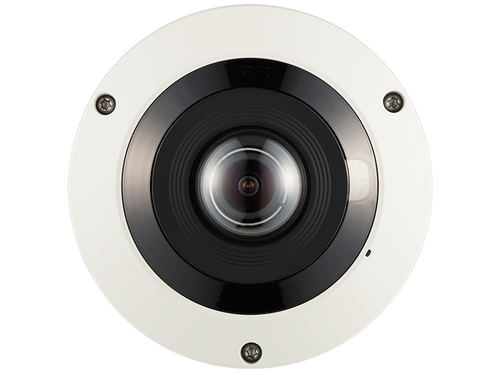
Hanwha
Hanwha PNF-9010RV 12MP 360˚ Fisheye Camera
PNF-9010RV
12MP fisheye for full-room coverage from a single ceiling mount. Replaces three or four fixed cameras in a conference center or large break room; privacy-friendly because it is one clearly-posed camera, not a cluster.
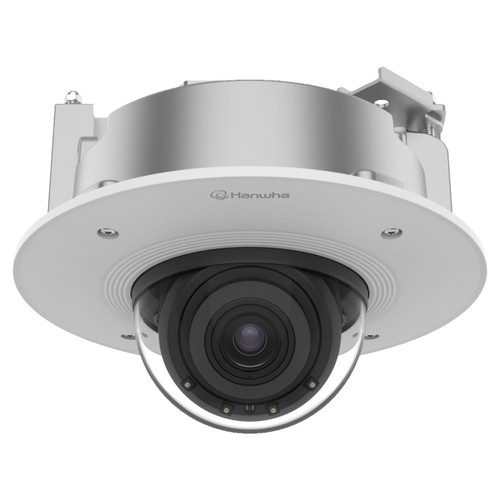
Hanwha
Hanwha PND-A9081RF 4K Indoor AI IR Dome IP Camera
PND-A9081RF
4K AI indoor dome for executive suites, boardroom entries, and high-compliance tenant floors. Edge AI runs people counting and object analytics on-device without cloud dependencies.
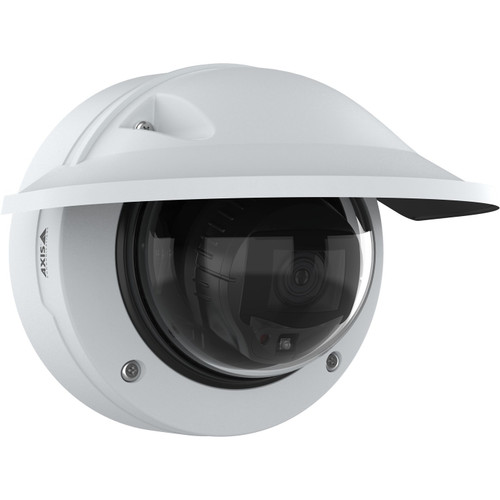
Axis
Axis P3277-LVE 5MP Outdoor AI IR Dome Camera - 03153-001
03153-001
Axis P3277-LVE 5MP AI outdoor dome for main building entries and parking coverage. Lightfinder 2.0 handles the glass-front lobby sunrise/sunset mixed lighting better than most competitors.
Hanwha
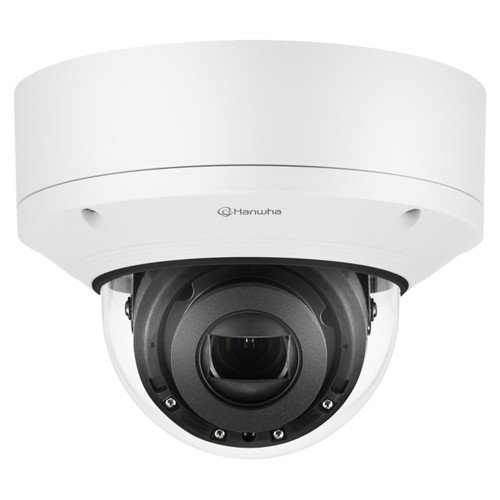
Hanwha XND-6081RV 2MP Vandal-Resistant Dome Camera
XND-6081RV
Vandal-rated indoor dome for high-traffic lobbies, shared elevator landings, or any position where occasional housing contact is possible. IK10 impact rating with a discreet low-profile design.
Hanwha
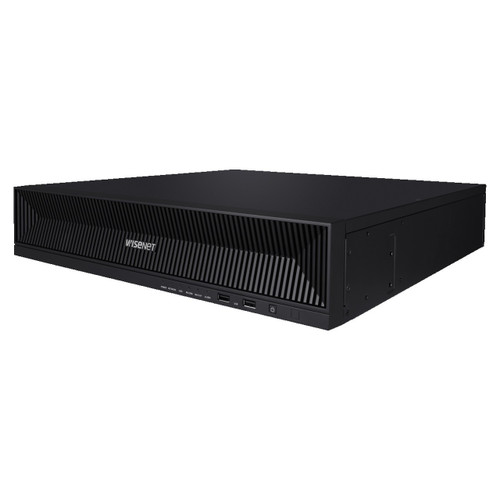
Hanwha XRN-1620B2 16-Channel 4K NVR
XRN-1620B2
16-channel 4K NVR sized for typical office deployments of 12 to 16 cameras. Hanwha Wisenet WAVE integration gives facilities and property teams solid mobile and browser remote access.
Frequently Asked Questions
How many cameras does a 50,000 sq ft office building typically have?
Single-tenant: 14 to 22 cameras. Multi-tenant: 20 to 32 cameras (landlord-provided common-area coverage only; tenants install in-suite cameras separately). Financial services and healthcare tenants push the count higher; technology and creative agencies tend to run lower.
What's the biggest mistake offices make with camera counts?
Undercovering elevator and stairwell landings. These are the highest-value investigation positions in any multi-floor building because they capture everyone moving between floors. Most first-draft proposals count two lobby cameras and no landing cameras; the revised proposal adds 4 to 10 landing cameras and the investigation-quality of the system improves more than anything else you could add.
Is 4MP enough resolution for an office?
Yes for most positions. 4MP gives usable facial identification at 15 to 25 feet — covers lobby, corridor, and break room scenarios. Step up to 4K or 8MP for main entries (glass-front lobbies with mixed lighting), executive floors, and conference centers where detail matters. Higher resolution means higher storage cost; 4MP is sufficient for 80 percent of office positions.
Should cameras be hidden or visible?
Visible, in most cases. Office employees and tenants have a legal right to know surveillance is in place; hidden cameras expose you to privacy-law, employment-law, and in many jurisdictions criminal liability. Visible-and-discreet is the right posture — clearly present but aesthetically non-disruptive.
Do I need cameras in the conference room?
Usually not inside the room. Cover the conference-room entry from a corridor camera. For conference centers or boardrooms with company assets inside, a 360-degree fisheye is preferred — one clearly-posed camera rather than a cluster.
Can property managers access camera footage from their phone?
Yes, with most mainstream VMS platforms. Hanwha WAVE, Milestone XProtect Mobile, Genetec Mobile, and Axis Camera Station Mobile all support role-based access with grid views, single-camera live, and timeline playback. Specify the mobile-app capability during VMS selection; it is the single most-used feature for property and facilities teams.
How often are office cameras replaced?
Commercial-grade office cameras typically run 7 to 10 years. Replacement drivers are resolution upgrades (4MP to 4K), AI analytics adoption, or NDAA compliance replacement. Plan as a capital-expense line item every 7 to 10 years; a phased rollout over 2 to 3 years is common for larger buildings.
What retention period should I use?
30 days continuous is the default. 60 to 90 days for SOC 2, HIPAA, or financial-services tenants. Some insurance policies require specific retention; check with your carrier before locking in NVR storage. Undersized retention drives expensive retrofits later.
Do I need NDAA-compliant cameras for an office?
Required if the building has federal-contractor tenants, GSA leases, or federal-facility adjacency. Increasingly specified even without federal exposure because of corporate-tenant due diligence, insurance underwriting, and portfolio standardization. The premium is roughly 15 to 25 percent on matched specs.
No Bots, Just Experts
No bots, just experts. Free pre-sales support for every customer — product questions, BOM quotes, compatibility checks, price confirmation — typically answered within one business day. Paid services available like full system design, remote installation, and more. Know what you need? Send us your BOM, free quote. Need camera placement designed from a floor plan? That is engineering work — $175 per hour, qty 1 = 1 hour. Typical single-site placement runs 3 to 4 hours. We scope the hours with you before you purchase. Hardware buyers get up to one hour ($175) credited back against their order as a thank-you.