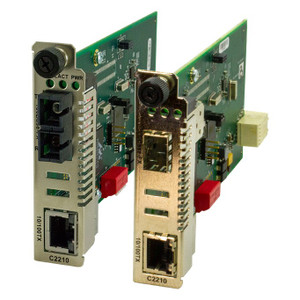
Transition Networks C2210-1039 32-Port Unmanaged Gigabit Switch
The Transition Networks C2210-1039 is a 32-port unmanaged gigabit switch designed for straightforward distributed network deployments where managed features add complexity without operational benefit. With single-mode fiber support, DIN-rail form factor, and gigabit throughput across all ports, this device addresses the backbone connectivity needs of multi-building security systems, campus IP camera networks, and remote surveillance sites where plug-and-play reliability is the primary requirement.
Key Features
- 32 Gigabit Ethernet Ports: All 32 ports operate at 1000 Mbps. Eliminates speed bottlenecks on large camera networks and provides ample port density for single cabinet deployments without cascading switches.
- Unmanaged Operation: No configuration required — power up and connect. Reduces deployment time and eliminates the need for network management training on site.
- Single-Mode Fiber Support: Extends cable runs beyond 100m copper limits to 10+ km on single-mode fiber. Essential for campus perimeter coverage and remote utility building connectivity without active repeaters.
- DIN-Rail Mount: Mounts directly to standard DIN rail in electrical cabinets and panel enclosures. Saves rack space and simplifies installation in retrofit environments where standard 19-inch rack hardware is unavailable.
- Plug-and-Play Deployment: No VLAN, QoS, or spanning-tree configuration — all ports are active on a single broadcast domain. Ideal for security-focused networks that prioritize uptime over advanced traffic shaping.
- Lifetime Warranty: Factory-backed warranty with no expiration. Reduces total cost of ownership on long-lifecycle deployments (schools, municipalities, utilities).
- Low Power Draw: Passive cooling operation — no fans, minimal heat dissipation. Suitable for outdoor cabinets and unvented equipment enclosures.
The C2210-1039 occupies a specific niche in the integration toolkit: distributed networks where copper cabling cost and conduit runs exceed the cost of the switch itself, or where a secondary building or parking lot requires standalone gigabit connectivity without complex management overhead. Its 32-port density makes it suitable for large single-site deployments, while single-mode fiber transceivers enable backbone links to remote hubs at a fraction of the cost of a managed fiber switch.
Unmanaged switches impose a design constraint — all ports exist on a single broadcast domain with no QoS or traffic prioritization. This works fine for surveillance networks where latency-sensitive traffic (camera streams) is isolated on dedicated subnets upstream, or where the switch handles only camera and NVR traffic. If you need to mix camera traffic with building access control, intercoms, and general IT data on the same switch, a managed alternative with VLAN support becomes necessary to prevent broadcast storms from freezing the network.
Installation is straightforward: secure the switch to DIN rail, connect copper or fiber uplinks, and daisy-chain Ethernet runs to wall-mounted cabinets. On outdoor perimeter runs, single-mode fiber transceivers (sold separately) handle the last mile; a multimode-to-single-mode media converter on one end and a transceiver on the C2210-1039 port complete the link. This hybrid approach keeps the switch cost low while extending coverage economically across 1+ km distances.
The C2210-1039 integrates with any standard IP security infrastructure — Axis, Hikvision, Uniview, Honeywell IP cameras, Milestone Xprotect, Genetec Security Center, or Avigilon NVRs all operate transparently over gigabit ports. No protocol negotiation is required; the switch is electrically neutral. Pair it with PoE injectors or PoE+ switches upstream to power cameras, or run separate power to camera mounts. The switch itself carries no PoE budget — it is a pure layer-2 forwarding device.
Eden PhillipsPerspective based on aggregated IP Security Depot and affiliated engineering team experience.
We've installed dozens of unmanaged gigabit switches across distributed surveillance networks, and the C2210-1039 consistently delivers the value proposition that justifies its simplicity: zero configuration, 32 active ports, and single-mode fiber support in a DIN-rail form factor. The differentiator versus a managed switch is not performance — both forward frames at wire speed — but cost and operational overhead. On a campus with four separate buildings, a C2210-1039 in each building cabinet feeding back to a central NVR via single-mode fiber runs costs 30-40% less than deploying managed switches with fiber modules at each site. You lose per-port QoS and VLAN isolation, but if your network topology isolates camera traffic from building systems, that's a non-issue. The real constraint we've encountered is broadcast storms: on one large retail deployment, a misconfigured camera flooded a single switch with broadcast frames, and the lack of spanning-tree protection briefly froze all traffic on that switch. After we moved to a managed switch with proper BPDU filtering, the problem vanished. So the trade-off is clear — use unmanaged for homogeneous camera networks; use managed if you're mixing camera and building automation on the same switch.
Technical Highlights:
- 32-Port Gigabit Density: Enough capacity for a single large building or parking lot with 2-4 camera drops per port. Copper runs to wall cabinets, fiber backbone to remote sites — no cascading required on typical distributed surveillance.
- Single-Mode Fiber Transceivers: Support for single-mode exceeds multimode reach by 10x (10 km versus 550m). On campus and inter-building links, single-mode fiber eliminates repeaters and active fiber converters, reducing power draw and maintenance burden.
- DIN-Rail Form Factor: Standard 35mm DIN rail fits every electrical cabinet and panel enclosure. No need for separate rack shelves or custom mounting brackets — integration cost is zero.
- Non-Blocking Backplane: At gigabit speeds with 32 ports, the aggregate throughput is 64 Gbps (32 ports × 2 Gbps in + out). Unmanaged switches have a shared switching fabric, not individual port pipelines — in practice, this means if all 32 ports are active simultaneously, throughput per port drops. For surveillance, this is acceptable because IP cameras transmit at 2-8 Mbps; 32 cameras at 5 Mbps each = 160 Mbps, well below the switch capacity.
- Lifetime Warranty: No expiration, no surprise hardware failures on year 6 or 7. On a 10+ year campus surveillance lifecycle, lifetime warranty edges out the cost of a managed switch replacement every 5 years.
Deployment Considerations:
- No VLAN or broadcast filtering — if a camera or device floods the network with multicast or broadcast frames, all ports are affected. Isolate building automation and access control on separate networks upstream, or deploy a managed switch instead.
- Single-mode fiber transceivers are not included and must be sourced separately — budget $150-300 per transceiver pair, and confirm transceiver wavelength and connector type (LC, SC, ST) match your fiber infrastructure.
- Passive cooling — no fans, no noise. Suitable for outdoor cabinets and unvented equipment rooms. Heat dissipation is minimal at typical camera loads; confirm ambient temperature does not exceed 50°C (122°F) for extended operation.
- DIN-rail mounting space is approximately 90mm width — verify cabinet depth and rail clearance before ordering. Standard cabinets accommodate this without issue.
- Power requirement is 12 VDC nominal — 24 VDC variants may be available; confirm SKU before purchase if your cabinet uses 24 VDC distributed power (common in industrial and telecom installations).
The C2210-1039 is the right choice for integrators and site engineers building backbone infrastructure for large surveillance networks where managed features are overhead, not requirement. It's also ideal for remote utility building deployments where a technician may visit only quarterly — the lack of configuration means there's nothing to misconfigure or forget. For more information on Transition Networks switching solutions and fiber infrastructure, see the Transition Networks catalog.