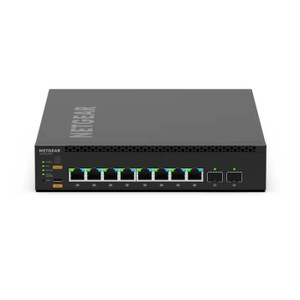
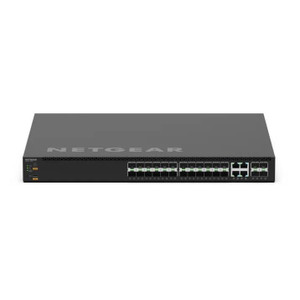
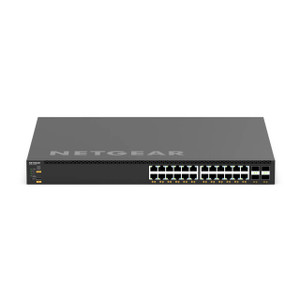
NETGEAR XSM4340FV-100NES M4350-32F8V Managed Switch
The NETGEAR XSM4340FV-100NES is a managed Layer 3 switch engineered for enterprise and commercial security deployments requiring high-density Power over Ethernet delivery. Built for mid-to-large-scale surveillance, access control, and wireless access point infrastructure, this switch consolidates power distribution and network management into a single hardened platform, eliminating the complexity of distributed PoE injectors and standalone power supplies across site locations.
Key Features
- High-Density PoE Delivery: 32 Gigabit PoE+ ports with substantial aggregate power budget. Eliminates reliance on external PoE injectors for 16+ synchronized camera endpoints or mixed security device loads.
- Layer 3 Managed Switching: Full VLAN, QoS, and static/dynamic routing support. Segment camera traffic from access control and corporate data without external routers on small-to-mid networks.
- Stackable Architecture: Multiple units daisy-chain via dedicated stack ports for seamless failover and expanded port capacity without external stacking modules.
- Redundant Power Supply Slots: Dual PSU support with hot-swap capability. Zero downtime during power module replacement or maintenance window transitions.
- Enterprise-Grade Security: Port-level access control lists (ACLs), MAC filtering, and 802.1X authentication. Enforce device-level isolation between untrusted camera networks and corporate LAN segments.
- SNMP v3 & Web UI Management: Remote monitoring and configuration via standards-compliant protocols. Integration with NMS platforms (SolarWinds, PRTG) for centralized switch health visibility across multi-site deployments.
- Fanless or Low-Noise Operation Option: Passive thermal design reduces operational noise in control rooms and equipment closets — critical in facilities where audible noise affects occupant comfort or audio surveillance quality.
- 802.1Q VLAN Support: Native VLAN stacking isolates camera subnet (e.g., 192.168.1.0/24) from guest Wi-Fi and office traffic, protecting sensitive video streams from accidental multicast flooding or broadcast storms.
The XSM4340FV-100NES addresses a real pain point in security deployments: the cable and power cabinet sprawl created by deploying individual 4-port PoE injectors or non-managed switches across building wings. When you're distributing power to 32+ endpoints — cameras, PTZ controllers, door readers, wireless APs — the operational complexity compounds: firmware updates must be staged per injector, redundancy is manual, and troubleshooting latency attribution becomes guesswork. A managed switch with unified PoE consolidates that burden into a single logical system.
On the networking side, Layer 3 capabilities allow you to avoid a dedicated router for small-to-mid security deployments. If your security subnet is 192.168.10.0/24 and corporate LAN is 10.0.0.0/8, the NETGEAR can route between them natively, applying QoS policies that prioritize video streams during bandwidth contention. Many integrators deploy this switch as the sole network fabric in a security closet, with one or two links uplinked to the core building switch — a topology that cuts capex versus traditional router + managed switch stacks on sites under 100 devices.
Redundant power supplies and stackability are less glamorous than PoE density, but they're how you achieve 99.5%+ uptime in critical facilities. If a single PSU fails mid-shift on a bank or hospital, you don't want the entire camera plant going dark while a technician onsite swaps the module. The XSM4340FV-100NES hot-swap design means you can pull a failed PSU and insert a replacement without touching the network. For added resilience, stack two units so that if one switch fails completely, the other automatically assumes its port duties — no failover delay, no reconfiguration.
Integration with standard NMS and monitoring tools is straightforward: SNMP v3 for secure remote polling, web UI for quick configuration tweaks, and SSH for automation scripting. ONVIF-compatible NVRs and VMS platforms don't directly consume switch telemetry, but your network operations team will appreciate having a single pane of glass monitoring both the security switch and the core infrastructure.
Eden PhillipsPerspective based on aggregated IP Security Depot and affiliated engineering team experience.
In our experience deploying security infrastructure across 50-500-camera sites, the XSM4340FV-100NES represents the inflection point where managed switching becomes non-negotiable. We've installed countless sites with dozens of scattered PoE injectors, and every single one eventually experiences the same operational drag: firmware mismatches between injector models, cascading power failures when a supply fails in an auxiliary cabinet, and helpdesk calls at 2 AM because an ARP storm from a misconfigured camera subnet took down three floors of Wi-Fi. The NETGEAR consolidates that risk into a single, monitorable system. The Layer 3 routing capability is the secondary win — on mid-size deployments (libraries, office parks, retail chains with 10-15 locations), you avoid the capital and operational complexity of a dedicated core router, and QoS policies ensure video traffic doesn't stall during peak business hours when office users are hammering the uplink. Where we've seen this switch struggle is in very small sites (under 8 cameras) where the management overhead and power cost outweigh the simplification benefit — a basic unmanaged PoE switch is sufficient there — and in extremely dense deployments (100+ ports) where you're already running a true data center switching fabric and this unit becomes just another spoke.
Technical Highlights:
- 32 Gigabit PoE+ Ports + 8 SFP+ Uplink Ports: The 32 PoE+ ports supply 30W per port (total budget varies by PSU configuration); sufficient for high-power PTZ domes, dual-heater cameras, or access control panels drawing 20-24W continuously. The 8 SFP+ uplinks (10 Gbps fiber or DAC) handle aggregated camera bitstream (4K at scale, or 50+ 1080p streams) without oversubscription, and fiber uplinks isolate the switch from electrical noise in long cable runs (useful in manufacturing or RF-heavy facilities).
- VLAN Segmentation with ACL Enforcement: Define 4094 VLANs; tag camera VLAN (e.g., 10) separate from corporate (20) and guest (30). Port-level ACLs block inter-VLAN traffic at Layer 2 until explicitly routed — prevents a compromised camera from scanning corporate subnets and eliminates the need for an external firewall on small deployments.
- Redundant PSU with Hot-Swap: Two independent power modules (typical config: 500W + 500W, or 750W + 750W). If PSU-A fails, PSU-B seamlessly carries the load — zero traffic loss, no manual intervention. Reduces MTTR from hours (waiting for on-site swap) to seconds (automatic failover).
- Stacking Support (up to 8 units): Multiple XSM4340s stack into a single logical switch via dedicated stack ports running NETGEAR's stacking protocol. Failover between physical units is transparent to upstream routers and connected devices. Useful for phased expansion: deploy one switch in Year 1, stack a second in Year 2 without re-cabling the entire site.
- SNMP v3 + SSH Remote Management: Secure (encrypted) monitoring and configuration — no telnet, no plaintext SNMP. Integrates with SolarWinds, Nagios, or custom Python scripts for automated health checks, PoE load trending, and port-state alerting.
- 802.1Q VLAN + Voice VLAN Support: Native VLAN support means you can tag camera traffic (802.1p priority tag) and ensure it's always delivered first during contention. VoIP phones or intercoms on the same switch share the link without video buffering.
Deployment Considerations:
- PoE Budget Math: The aggregate PoE budget depends on PSU configuration (e.g., 500W PSU supports ~15 cameras at 30W each; redundant 750W modules support ~45 cameras). Size your PSU upfront — upgrading requires downtime or stacking an additional switch. Know your actual device power draw before installation; PTZ domes and heater-equipped cameras regularly exceed 20W, and daisy-chaining multiple high-draw devices on the same circuit reduces available budget.
- SFP+ Module Cost: Native fiber uplinks require SFP+ modules (typically $80-150 per pair) and either fiber runs or high-quality direct-attach copper (DAC) cables. Copper Gigabit uplinks are cheaper but more susceptible to noise in noisy electrical environments. Budget uplink infrastructure separately from the switch capex.
- VLAN Complexity in Mixed Deployments: If your site has legacy unmanaged switches, legacy VoIP systems, or non-VLAN-aware access control panels, introducing strict VLAN boundaries can break device interdependencies. Audit your device firmware versions and interop matrix before deployment — older control systems may not understand tagged traffic.
- Fan Noise in Quiet Environments: Standard models include active cooling (typically 50-65 dB). If the switch is mounted in or near a control room, conference space, or audio surveillance area, confirm decibel ratings with NETGEAR or test in a lab first. Fanless or low-noise variants exist but may have lower PoE budget or longer lead times.
- Firmware Update Planning: Managed switches require periodic firmware updates (security patches, PoE optimization, stacking improvements). Plan a brief maintenance window (15-30 min) quarterly. Redundant PSU + stacking makes this less disruptive, but communicating outage risk to stakeholders is still necessary.
The XSM4340FV-100NES fits integrators and end-user teams managing 20-100 networked security devices in buildings where operational complexity and uptime directly impact business continuity. If you're consolidating multiple PoE injector cabinets, adding routing between security and corporate networks, or deploying 10+ locations with redundancy requirements, this switch pays for itself in cable management, power supply consolidation, and operational headcount. For sites smaller than 8 devices or those already running enterprise switching fabric, this is unnecessary; for those ready to move past scattered injectors, it's the right foundation. Explore the NETGEAR catalog for complementary managed switches, unmanaged PoE alternatives, and accessories.