
Unitech SL220-YMU0G0-SG-AZ3 vs Unitech MS838-2UCB0S-5G: Specification Comparison
Both the Unitech SL220-YMU0G0-SG-AZ3 and the Unitech MS838-2UCB0S-5G are wired, corded 2D barcode scanners from the same manufacturer, targeting warehouse, logistics, and retail environments. Each decodes a broad range of 1D and 2D symbologies including QR Code, Data Matrix, PDF417, Code 128, UPC, and EAN. The comparison covers imaging resolution and scan performance, physical durability and form factor, and interface compatibility — the three axes most relevant to buyers choosing between corded handheld 2D scanners for fixed or mobile deployment.
In This Guide
- Which scanner delivers superior imaging resolution and scan capability?
- How do the two scanners compare on durability, weight, and physical form factor?
- Which scanner offers broader interface and platform compatibility for system integration?
- Which should you choose: the SL220-YMU0G0-SG-AZ3 or the MS838-2UCB0S-5G?
- Side-by-Side Specs
- FAQ
Which scanner delivers superior imaging resolution and scan capability?
The SL220-YMU0G0-SG-AZ3 uses a 2D Imager with a 1280×800 global shutter sensor, providing significantly higher pixel density than the MS838-2UCB0S-5G, which uses a 2D CMOS Imager at 640×480 resolution. The global shutter design on the SL220 eliminates motion blur on fast-moving or hand-held targets, which matters in high-throughput pick-and-pack environments.
The MS838-2UCB0S-5G specifies a scan rate of 60 scans/sec; no equivalent scan rate is stated in the SL220 specs. The SL220 supports an extended postal symbology set (Australian Post, British Post, Canadian Post, China Post, Japanese Post, Korea Post, Netherlands Post) plus Chinese Sensible (Han Xin), Grid Matrix, Dot Code, and Plane — symbologies not listed for the MS838. The MS838 lists Micro QR and Industrial 2 of 5, which are not listed for the SL220.
Both scanners share omnidirectional scan patterns with ±60° skew and pitch tolerance and 0–360° roll, making either suitable for casual presentation scanning without precise aiming. The SL220 adds a red laser aimer per its card bullets; no aiming specification is stated for the MS838.
How do the two scanners compare on durability, weight, and physical form factor?
The SL220-YMU0G0-SG-AZ3 carries an IP65 rating, meaning it is fully dust-tight and protected against low-pressure water jets from any direction. The MS838-2UCB0S-5G is rated IP52, which provides protection against dust ingress sufficient to prevent harmful deposits and against vertically dripping water with the unit tilted up to 15°. For environments with wash-down procedures, liquid splashing, or heavy particulate exposure, IP65 offers meaningfully stronger protection.
The MS838-2UCB0S-5G specifies a 1.5 m drop rating onto concrete, a concrete durability benchmark not stated in the SL220 specs. Buyers in environments with frequent accidental drops should note this gap in SL220 documentation.
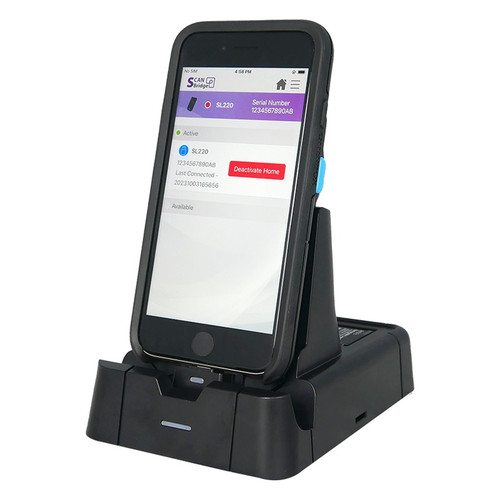
The SL220 weighs 102 g with dimensions of 125 × 64 × 27 mm (scanner body), making it substantially lighter and more compact than the MS838, which weighs 245 g and measures 174 × 72 × 96 mm. The SL220 also includes a cradle (142 × 96 × 95 mm) in its form factor description; the MS838 lists an optional hands-free stand. The SL220 includes a 1150 mAh battery pack; the MS838 lists no battery, consistent with a pure wired-power design.
Which scanner offers broader interface and platform compatibility for system integration?
The SL220-YMU0G0-SG-AZ3 supports USB, Apple Lightning MFi, and USB-C interfaces and explicitly requires iOS 15 or later, indicating it is designed as a companion scanner for Apple mobile devices as well as standard USB hosts. The inclusion of MFi Lightning certification distinguishes it from a generic USB scanner and makes it suitable for iOS-based WMS or POS deployments.
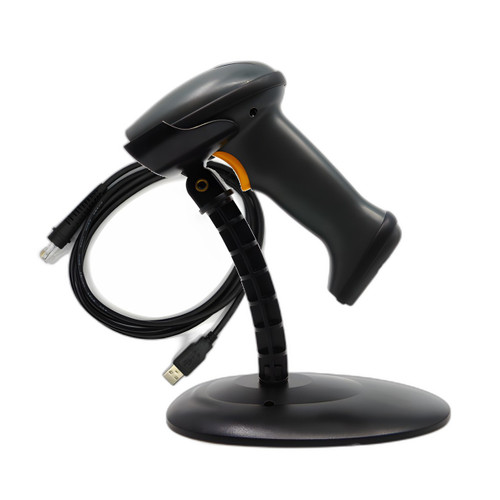
The MS838-2UCB0S-5G supports USB and RS-232 interfaces. RS-232 serial connectivity is significant for integration with legacy POS terminals, industrial controllers, or older warehouse management systems that lack USB host ports — a capability the SL220 does not list.
Neither product lists Windows, Android, or other OS compatibility beyond the SL220's iOS 15 requirement. The MS838 package includes an interface cable; the SL220 package includes a USB-C adaptor (without power cord) and battery pack. Buyers must confirm host-side cable type for the MS838 against their RS-232 or USB infrastructure before ordering.
Which should you choose: the SL220-YMU0G0-SG-AZ3 or the MS838-2UCB0S-5G?
Our take: The SL220-YMU0G0-SG-AZ3 is the stronger choice when high imaging resolution, iOS MFi integration, and superior ingress protection are the primary requirements. Its 1280×800 global-shutter imager delivers more than four times the pixel count of the MS838's 640×480 CMOS sensor, supporting reliable decodes of damaged, dense, or small-pitch codes. Its IP65 rating outclasses the MS838's IP52 in wet or dusty environments. At 102 g versus 245 g, it is significantly lighter for sustained handheld use. The MS838-2UCB0S-5G is the better fit when RS-232 legacy interface compatibility is required, when a verified 1.5 m concrete drop spec is a procurement requirement, or when iOS dependency is undesirable. No scan rate is published for the SL220, so throughput-sensitive buyers should request that specification from Unitech before finalizing. Platform dependency — iOS 15+ for the SL220 versus interface-agnostic USB/RS-232 for the MS838 — is the decisive integration qualifier.
Side-by-Side Comparison
Spec-for-spec, from manufacturer data.
| Specification | Unitech SL220-YMU0G0-SG-AZ3 | Unitech MS838-2UCB0S-5G |
|---|---|---|
| Scan Engine | 2D Imager — 1280×800 global shutter | 2D CMOS Imager — 640×480 |
| IP Rating | IP65 | IP52 |
| Weight | 102 g | 245 g |
| Dimensions | 125 × 64 × 27 mm (scanner); 142 × 96 × 95 mm (cradle) | 174 × 72 × 96 mm (L × W × H) |
| Interface | USB / Apple Lightning MFi / USB-C | USB / RS-232 |
| OS Compatibility | iOS 15 or later | Not specified |
| Scan Rate | Not specified | 60 scans/sec |
| Drop Specification | Not specified | 1.5 m onto concrete |
| Scan Pattern | Omnidirectional ±60° skew & pitch, 0–360° roll | Omnidirectional ±60° skew & pitch, 0–360° roll |
| Battery | 1150 mAh (included) | — |
| Aiming | Red laser aimer | Not specified |
| Form Factor | Handheld + Cradle | Handheld / Presentation |
| 1D Symbologies | Codabar, Code 11, Code 128, Code 2 of 5, Code 39, Code 93/93i, EAN/JAN-13, EAN/JAN-8, IATA 2 of 5, Interleaved 2 of 5, Matrix 2 of 5, MSI, GS1 Databar, UPC-A, UPC-E, GS1 Code 32, TLC39 | Code 128, EAN-13, EAN-8, Code 39, Code 32, UPC-A, UPC-E, Codabar, Interleaved 2 of 5, Code 93, GS1-128, GS1 Databar, GS1 Databar Limited, GS1 Databar Expanded, Matrix 2 of 5, Code 11, Industrial 2 of 5 |
| 2D Symbologies | PDF417, MicroPDF417, Codablock A/F, Aztec Code, Data Matrix, MaxiCode, QR Code, Han Xin, Grid Matrix, Dot Code, postal codes (AU/UK/CA/CN/JP/KR/NL) | PDF417, Micro PDF417, QR Code, Micro QR, Data Matrix, Aztec Code |
| Package Contents | SL220 scanner, battery pack, USB-C adaptor (no power cord) | MS838 scanner, interface cable, optional hands-free stand |
| Color | White | Not specified |
Frequently Asked Questions
Which should you choose: the SL220-YMU0G0-SG-AZ3 or the MS838-2UCB0S-5G?
The SL220-YMU0G0-SG-AZ3 is the stronger choice when high imaging resolution, iOS MFi integration, and superior ingress protection are the primary requirements. Its 1280×800 global-shutter imager delivers more than four times the pixel count of the MS838's 640×480 CMOS sensor, supporting reliable decodes of damaged, dense, or small-pitch codes. Its IP65 rating outclasses the MS838's IP52 in wet or dusty environments. At 102 g versus 245 g, it is significantly lighter for sustained handheld use. The MS838-2UCB0S-5G is the better fit when RS-232 legacy interface compatibility is required, when a verified 1.5 m concrete drop spec is a procurement requirement, or when iOS dependency is undesirable. No scan rate is published for the SL220, so throughput-sensitive buyers should request that specification from Unitech before finalizing. Platform dependency — iOS 15+ for the SL220 versus interface-agnostic USB/RS-232 for the MS838 — is the decisive integration qualifier.
Is the SL220-YMU0G0-SG-AZ3 or the MS838-2UCB0S-5G better suited for wet or dusty warehouse environments?
The SL220-YMU0G0-SG-AZ3 is rated IP65 (fully dust-tight, protected against water jets), while the MS838-2UCB0S-5G is rated IP52 (limited dust and drip protection only). For wash-down areas or heavy particulate environments, the SL220's IP65 rating provides meaningfully stronger protection.
Can either scanner connect to a legacy RS-232 serial POS terminal or industrial controller?
Only the MS838-2UCB0S-5G lists RS-232 as a supported interface in addition to USB. The SL220-YMU0G0-SG-AZ3 specifies USB, Apple Lightning MFi, and USB-C only; RS-232 is not listed for that model.
Which scanner is the right choice for an iOS-based mobile warehouse management system?
The SL220-YMU0G0-SG-AZ3 is specifically designed for iOS deployments: it lists Apple Lightning MFi as a supported interface and requires iOS 15 or later. The MS838-2UCB0S-5G lists no iOS or MFi compatibility in its published specifications.
More Barcode Scanner Comparisons
- Zebra DS8108 vs Datalogic GBT4600-HC-BTK1-HP
- Zebra DS8108 vs Datalogic GD4590-HCK10-HDR-B
- Zebra DS8108 vs Honeywell 1202G-2USB-5BF-N
- Zebra DS8108 vs Datalogic GBT4500-BK-BTK1DRA
- Zebra DS8108 vs Zebra DS3608
- Zebra DS8108 vs Zebra LI3608
Barcode Scanner Buying Guides
Get a Second Opinion on Your Camera Choice
Share your site layout, coverage goals, and budget. Our team will validate the camera selection, flag anything we would change, and recommend products that match the use case.