
Transition Networks SM24TAT4XB-NA vs Transition Networks SMATBT2SA-NA: Specification Comparison
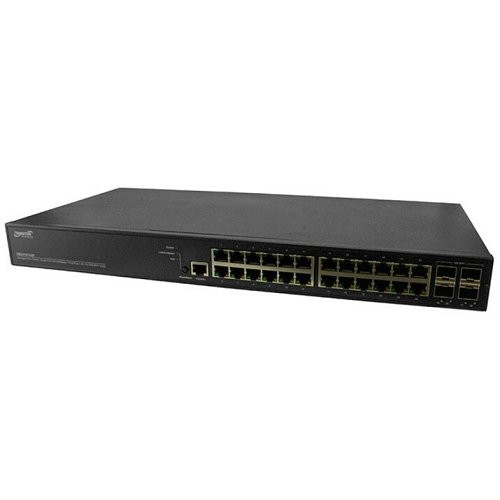
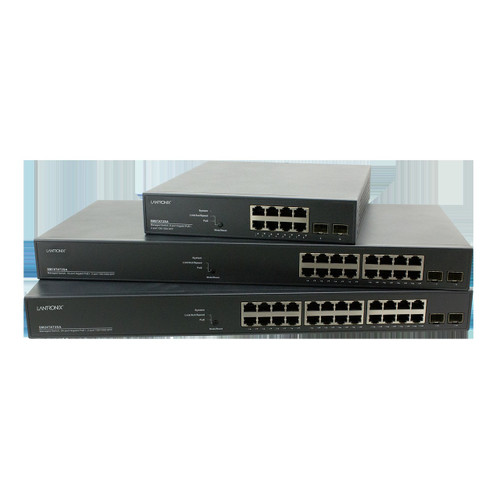
Both the SM24TAT4XB-NA and the SMATBT2SA-NA are Transition Networks 24-port Gigabit PoE switches intended for physical-security and enterprise edge deployments. The comparison centers on management capability, per-port power delivery, PoE budget, and uplink flexibility. Buyers choosing between these two are weighing plug-and-play simplicity against Layer 2 management features, and evaluating whether the power architecture matches the draw profiles of their installed endpoints such as PTZ cameras, access-control readers, and wireless access points.
In This Guide
- Which switch delivers the right PoE power for your endpoint mix?
- Does the deployment require VLAN segmentation, QoS, or remote monitoring?
- How do uplink options and physical form factor affect backbone and rack integration?
- Which should you choose: the SM24TAT4XB-NA or the SMATBT2SA-NA?
- Side-by-Side Specs
- FAQ
Which switch delivers the right PoE power for your endpoint mix?
The SM24TAT4XB-NA provides PoE+ on all 24 ports at up to 30W per port, with the specification listing a per-port ceiling of 95W in one place and 30W in another — buyers should verify the authoritative figure against the datasheet (SM24TAT4XB-NA.pdf) before sizing high-draw endpoints. The SMATBT2SA-NA specifies PoE++ across all 24 ports with a total budget of 370W. At 370W shared across 24 ports, the average available per port is approximately 15.4W — sufficient for standard IP cameras and access readers but a meaningful constraint for simultaneously powering multiple high-draw PTZ cameras or dual-radio APs at full IEEE 802.3bt Class 6 draw. No total PoE budget figure is provided for the SM24TAT4XB-NA, making direct budget-to-budget comparison impossible from the available specifications.
Does the deployment require VLAN segmentation, QoS, or remote monitoring?
The SM24TAT4XB-NA is explicitly unmanaged. It operates as a plug-and-play device with no configuration interface, no VLAN support, no QoS, and no remote monitoring capability. All 24 ports share a flat Layer 2 domain. This is appropriate for small, isolated camera networks where simplicity and zero-touch deployment are priorities.
The SMATBT2SA-NA is a managed switch supporting VLAN, QoS, remote monitoring, store-and-forward switching, and LACP (Link Aggregation Control Protocol). VLAN capability allows camera traffic to be isolated from corporate or guest networks — a common requirement in enterprise and government physical-security installations. QoS prioritizes video streams during congestion events. LACP enables link aggregation for uplink redundancy or increased throughput. No specific management interface type (web GUI, CLI, SNMP version) is documented in the provided specifications.
How do uplink options and physical form factor affect backbone and rack integration?
The SM24TAT4XB-NA includes four hot-swappable SFP uplink slots supporting fiber or copper modules, enabling long-distance runs to aggregation switches or across multi-building campuses. Its form factor is listed as 1U rack mount or desktop, and cooling is passive (fanless), making it suitable for noise-sensitive or ventilation-limited environments such as utility closets or retail backrooms.
The SMATBT2SA-NA specifies zero SFP slots. Uplink options beyond its 24 GbE ports are not documented in the provided specifications, which is a critical gap for integrators planning fiber backbone connections or multi-switch stacking. Its form factor is rack/cabinet mount. Weight is listed at 6.6 (units not specified in the provided data). No cooling method is documented for the SMATBT2SA-NA. Both switches carry a lifetime warranty.
Which should you choose: the SM24TAT4XB-NA or the SMATBT2SA-NA?
Our take: The SM24TAT4XB-NA is the stronger choice when the deployment requires fiber or long-copper uplinks, a fanless installation environment, and a simple flat camera network with no VLAN or QoS requirements. It provides four hot-swappable SFP uplinks absent entirely from the SMATBT2SA-NA, passive fanless cooling not documented on the SMATBT2SA-NA, and a per-port PoE+ ceiling the SMATBT2SA-NA's 370W shared budget may not match under simultaneous full-load conditions across all 24 ports. Conversely, the SMATBT2SA-NA is the appropriate selection for enterprise or multi-tenant installations requiring Layer 2 VLAN segmentation, QoS video prioritization, LACP uplink aggregation, and remote monitoring — none of which the unmanaged SM24TAT4XB-NA can provide. Note that the SM24TAT4XB-NA carries a conflicting per-port PoE spec (30W vs. 95W) that must be resolved against the manufacturer datasheet before finalizing designs involving high-draw endpoints.
Side-by-Side Comparison
Spec-for-spec, from manufacturer data.
| Specification | Transition Networks SM24TAT4XB-NA | Transition Networks SMATBT2SA-NA |
|---|---|---|
| Product Type | Switch | Switch |
| Management | Unmanaged | Managed |
| Total Ports | 24 GbE + 4 SFP | 24 GbE |
| SFP Uplink Slots | 4 (hot-swappable) | 0 (not specified) |
| PoE Standard | PoE+ | PoE++ |
| Per-Port PoE Power | 30W (spec conflict: also listed as 95W — verify datasheet) | Not specified per port |
| Total PoE Budget | Not specified | 370W |
| VLAN Support | No | Yes |
| QoS | No | Yes |
| LACP / Link Aggregation | No | Yes |
| Remote Monitoring | No | Yes |
| Switching Architecture | Plug-and-play, flat L2 | Store-and-Forward, L2 |
| Form Factor | 1U rack mount or desktop | Rack/cabinet mount |
| Cooling | Passive (fanless) | Not specified |
| Warranty | Lifetime | Lifetime |
| Weight | Not specified | 6.6 (units not specified) |
Frequently Asked Questions
Which should you choose: the SM24TAT4XB-NA or the SMATBT2SA-NA?
The SM24TAT4XB-NA is the stronger choice when the deployment requires fiber or long-copper uplinks, a fanless installation environment, and a simple flat camera network with no VLAN or QoS requirements. It provides four hot-swappable SFP uplinks absent entirely from the SMATBT2SA-NA, passive fanless cooling not documented on the SMATBT2SA-NA, and a per-port PoE+ ceiling the SMATBT2SA-NA's 370W shared budget may not match under simultaneous full-load conditions across all 24 ports. Conversely, the SMATBT2SA-NA is the appropriate selection for enterprise or multi-tenant installations requiring Layer 2 VLAN segmentation, QoS video prioritization, LACP uplink aggregation, and remote monitoring — none of which the unmanaged SM24TAT4XB-NA can provide. Note that the SM24TAT4XB-NA carries a conflicting per-port PoE spec (30W vs. 95W) that must be resolved against the manufacturer datasheet before finalizing designs involving high-draw endpoints.
Is the SM24TAT4XB-NA or SMATBT2SA-NA better for a multi-VLAN camera and access-control network?
The SMATBT2SA-NA is the only option here. It supports VLAN, QoS, and remote monitoring. The SM24TAT4XB-NA is unmanaged and cannot segment traffic or enforce prioritization policies.
Which switch supports fiber uplinks to a core aggregation switch?
Only the SM24TAT4XB-NA includes SFP uplink slots — four of them, hot-swappable, supporting fiber or copper modules. The SMATBT2SA-NA specifies zero SFP slots; no fiber uplink capability is documented for it.
Can the SMATBT2SA-NA simultaneously power 24 PTZ cameras at full PoE++ draw?
The SMATBT2SA-NA has a total PoE budget of 370W across 24 ports, averaging approximately 15.4W per port simultaneously. IEEE 802.3bt high-draw PTZ cameras can require 45W–60W each. Full simultaneous PoE++ load across all 24 ports would exceed the 370W budget; load calculations against actual endpoint draw profiles are required before deployment.
More Network Switch Comparisons
- Vivotek GEV-288A-370 vs Axis T8524
- Vivotek GEV-288A-370 vs Cradlepoint SW2400P-GN
- Vivotek GEV-288A-370 vs Allied Telesis AT-x530L-28GPX-901
- Vivotek GEV-288A-370 vs Ubiquiti USW-ENTERPRISE-24-POE
- Axis T8524 vs Cradlepoint SW2400P-GN
- Axis T8524 vs Allied Telesis AT-x530L-28GPX-901
Network Switch Buying Guides
Get a Second Opinion on Your Camera Choice
Share your site layout, coverage goals, and budget. Our team will validate the camera selection, flag anything we would change, and recommend products that match the use case.