
Comelit 1440 vs Comelit 1440A: Specification Comparison
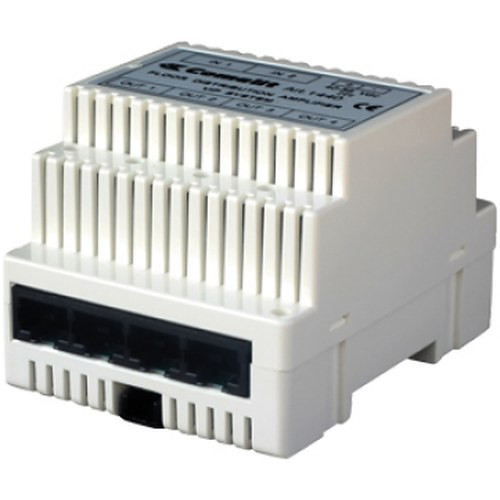
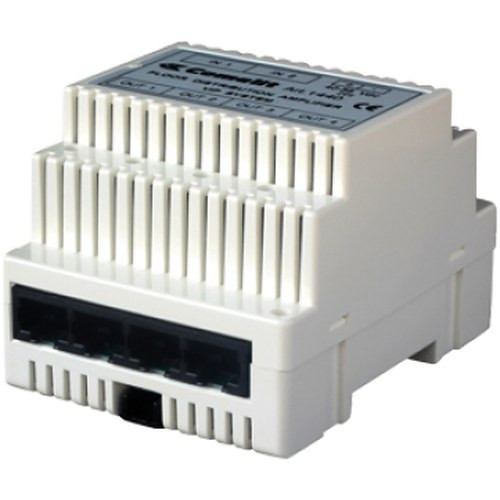
The Comelit 1440 and 1440A are both 6-port Gigabit 802.3af PoE switches aimed at compact IP camera deployments within the Comelit VIP ecosystem. Both share identical rated dimensions, white housing, and a 2-year warranty, but differ in mount options, per-port PoE budget, total power delivery, and physical depth. Installers choosing between them are weighing deployment environment—wall/rack versus desktop/DIN-rail—and PoE headroom per port, which directly affects camera compatibility and future-proofing in small-to-mid surveillance runs.
In This Guide
- Which switch delivers more PoE power per port, and does the total budget matter for your camera count?
- Which switch offers higher throughput and more network management capability?
- Which mounting options and physical dimensions fit your installation environment?
- Which should you choose: the 1440 or the 1440A?
- Side-by-Side Specs
- FAQ
Which switch delivers more PoE power per port, and does the total budget matter for your camera count?
The 1440 provides 13 W per port under 802.3af with a stated total PoE budget of 78 W across all 6 ports. The 1440A lists 15.4 W per port—the full 802.3af ceiling—but no aggregate PoE budget figure is specified in its provided data. For installers, the per-port difference (13 W vs. 15.4 W) is meaningful: most fixed IP cameras draw 6–12 W, so both switches cover standard cameras, but PTZ cameras or multi-sensor units that push toward the 802.3af maximum of 15.4 W will only be reliably powered by the 1440A. The 1440's explicit 78 W total budget lets installers calculate worst-case draw precisely; the 1440A's total budget is not stated, which adds a verification step before deployment.
Which switch offers higher throughput and more network management capability?
The 1440 is specified with a Gigabit switching fabric and is explicitly classified as a managed switch supporting VLAN, QoS, and port mirroring—features that matter for video segmentation, traffic prioritization, and network troubleshooting in multi-camera installations. The 1440A specifies 1 Gbps per port throughput but carries no management tier designation in its provided specs; VLAN, QoS, and port mirroring support are not stated. For IT buyers or integrators building segmented networks or managing bandwidth across mixed 4MP–8MP camera streams, the 1440's confirmed managed feature set is a concrete differentiator. The 1440A's per-port Gbps figure is consistent with Gigabit operation but does not confirm a managed capability.
Which mounting options and physical dimensions fit your installation environment?
Both switches share identical rated external dimensions (66" × 85" × 35" as listed), but their physical depth readings differ: the 1440 measures 1.38" deep versus the 1440A at 2.44" deep—a 77% deeper footprint that is relevant inside shallow wall enclosures or DIN-rail panels. The 1440 supports wall mount and rack mount; the 1440A supports desktop and DIN-rail mounting. Neither mount type is superior in all cases: rack and wall mount suits traditional IDF closets and surface-mounted enclosures, while DIN-rail suits industrial enclosures, control panels, and sites without rack infrastructure. Mount type is therefore an installation-site constraint, not a quality differentiator. The 1440A's greater depth (2.44" vs. 1.38") should be verified against enclosure clearance before ordering.
Which should you choose: the 1440 or the 1440A?
Our take: The 1440 is the stronger choice when network management and confirmed total PoE budget are required, while the 1440A is preferable when DIN-rail mounting or maximum per-port PoE headroom is the priority. Three concrete spec deltas drive the decision: (1) per-port PoE power is 13 W on the 1440 versus 15.4 W on the 1440A—the 1440A supports power-hungry cameras that approach the 802.3af ceiling; (2) the 1440 carries a confirmed managed feature set (VLAN, QoS, port mirroring) that the 1440A's specs do not state; (3) the 1440A is 2.44" deep versus 1.38" for the 1440, limiting the 1440A in shallow enclosures. Installers building segmented surveillance VLANs in rack or wall environments should specify the 1440. Those deploying into DIN-rail enclosures or powering PTZ/multi-sensor cameras near the 802.3af maximum should evaluate the 1440A, pending confirmation of its total PoE budget from Comelit.
Side-by-Side Comparison
Spec-for-spec, from manufacturer data.
| Specification | Comelit 1440 | Comelit 1440A |
|---|---|---|
| SKU | 1440 | 1440A |
| Total Ports | 6x Gigabit Ethernet (PoE) | 6x Gigabit RJ-45 (PoE) |
| PoE Standard | 802.3af | 802.3af |
| PoE Power Per Port | 13 W | 15.4 W max |
| Total PoE Budget | 78 W | — |
| Switching / Throughput | Gigabit backbone | 1 Gbps per port |
| Management | Managed (VLAN, QoS, port mirroring) | — |
| Mount Type | Wall; Rack | Desktop; DIN-rail |
| Housing Color | White | White |
| Width | 2.6" | 2.8" |
| Height | 3.35" | 3.5" |
| Depth | 1.38" | 2.44" |
| Power Type | PoE / AC option | PoE |
| Warranty | 2-Year | 2-Year |
| Compatibility Statement | — | Comelit IP cameras, standard PoE endpoints |
| Datasheet | /content/product-datasheets/1440.pdf | /content/product-datasheets/1440A.pdf |
Frequently Asked Questions
Which should you choose: the 1440 or the 1440A?
The 1440 is the stronger choice when network management and confirmed total PoE budget are required, while the 1440A is preferable when DIN-rail mounting or maximum per-port PoE headroom is the priority. Three concrete spec deltas drive the decision: (1) per-port PoE power is 13 W on the 1440 versus 15.4 W on the 1440A—the 1440A supports power-hungry cameras that approach the 802.3af ceiling; (2) the 1440 carries a confirmed managed feature set (VLAN, QoS, port mirroring) that the 1440A's specs do not state; (3) the 1440A is 2.44" deep versus 1.38" for the 1440, limiting the 1440A in shallow enclosures. Installers building segmented surveillance VLANs in rack or wall environments should specify the 1440. Those deploying into DIN-rail enclosures or powering PTZ/multi-sensor cameras near the 802.3af maximum should evaluate the 1440A, pending confirmation of its total PoE budget from Comelit.
Can either switch power a PTZ camera that draws close to 15 W?
Only the 1440A is specified at the full 802.3af maximum of 15.4 W per port. The 1440 is rated at 13 W per port, which is below the 802.3af ceiling. High-draw PTZ cameras or multi-sensor units requiring more than 13 W should be matched to the 1440A. Verify the specific camera's PoE class draw against whichever switch is selected before installation.
Which switch is better for a rack in a telecom closet?
The 1440 explicitly lists rack mount as a supported form factor and is confirmed as a managed switch with VLAN and QoS—features standard in IT-managed telecom environments. The 1440A specifies desktop and DIN-rail mounting; rack compatibility is not stated in its provided specifications. For a traditional rack deployment, the 1440 is the documented choice.
Does the 1440A work with non-Comelit cameras?
The 1440A's specs list compatibility with 'Comelit IP cameras, standard PoE endpoints,' indicating it is not locked to Comelit devices. The 1440's specs do not include an explicit compatibility statement. Both switches use standard 802.3af PoE on RJ-45 Gigabit ports, which is broadly compatible with third-party IEEE 802.3af-compliant cameras. Confirm specific camera PoE class requirements against each switch's per-port wattage before mixing brands.
More Network Switch Comparisons
- Vivotek GEL-065A-060 vs Comelit 10081
- Vivotek GEL-065A-060 vs Comelit 1440
- Vivotek GEL-065A-060 vs Comelit 1440A
- Comelit 10081 vs Code Blue SLNP0018
- Comelit 10081 vs Comelit 1440
- Comelit 10081 vs Comelit 1440A
Network Switch Buying Guides
Get a Second Opinion on Your Camera Choice
Share your site layout, coverage goals, and budget. Our team will validate the camera selection, flag anything we would change, and recommend products that match the use case.