
Brother RJ2050 vs Brother RJ4230BL: Specification Comparison
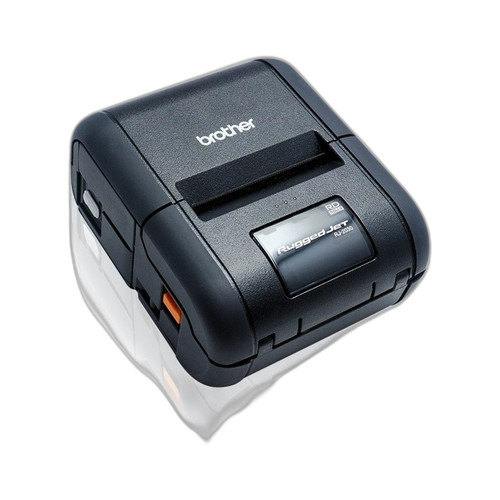
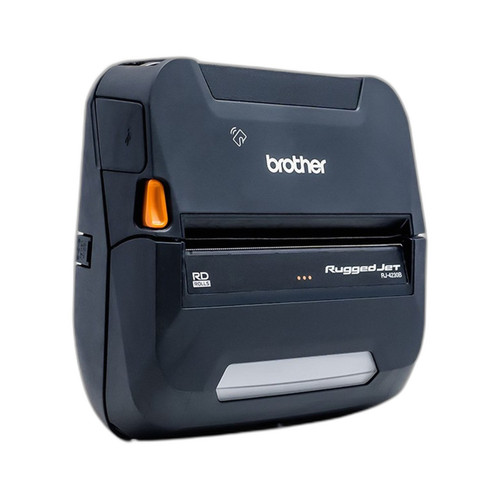
Both the Brother RJ2050 and RJ4230BL are direct thermal mobile printers designed for field use, sharing ribbon-free print technology, LCD displays, Bluetooth connectivity, and portable form factors. The key divergence is print width — 2 inches versus 4 inches — along with differences in wireless interface stack and print speed. Buyers cross-shopping these units are typically evaluating whether their label or receipt format requirements fit a compact 2-inch footprint or demand the wider 4-inch media width standard for shipping labels and larger field documents.
In This Guide
Which printer handles your media width and throughput requirements?
The RJ2050 prints at 2-inch width and 6 ips, making it suited for narrow receipt stock, small shipping tags, and compact field labels where speed per narrow strip matters. The RJ4230BL prints at 4-inch width and 5 ips, covering standard 4×6 shipping labels, wider tags, and multi-column receipts. The RJ2050's 1 ips speed advantage is meaningful only on narrow stock; the RJ4230BL's wider platen is non-negotiable if the application requires 4-inch media. Print resolution is specified at 203 dpi for the RJ4230BL; resolution is not stated in the provided specs for the RJ2050.
Which wireless and interface stack fits your deployment infrastructure?
The RJ2050 offers Wi-Fi 802.11b/g/n plus Bluetooth dual connectivity, enabling both networked (enterprise WLAN) and direct peer-to-peer wireless use. The RJ4230BL provides Bluetooth 4.2LE and NFC for wireless pairing, plus a USB interface, but does not include Wi-Fi per the provided specifications. For environments with existing 802.11 wireless infrastructure — warehouses, hospitals, retail floors — the RJ2050's Wi-Fi support allows integration into networked print queues without relying on a paired mobile device as an intermediary. The RJ4230BL's NFC adds fast tap-to-pair convenience for Bluetooth-only deployments where Wi-Fi is unavailable or unnecessary.
What do the hardware specifications and package contents reveal about field readiness?
The RJ4230BL specifies 256MB RAM and ships with a lithium-ion battery, charger, belt clip, and USB cable as confirmed package contents, indicating it is field-ready out of box. The RJ2050's specs do not list a RAM figure or enumerate package contents, so comparable readiness cannot be confirmed from the provided data. Both units carry a manufacturer warranty; the RJ4230BL explicitly states a 2-Year Limited Warranty. The RJ2050's warranty term is listed only as 'Manufacturer Warranty' without a duration in the provided specifications.
Which should you choose: the RJ2050 or the RJ4230BL?
Our take: The RJ2050 is the stronger choice when Wi-Fi network integration and narrower 2-inch media are the deployment requirements, while the RJ4230BL is the necessary choice whenever 4-inch media width is required. Three concrete spec deltas: print width is 2 inches (RJ2050) versus 4 inches (RJ4230BL) — a hard format constraint, not a preference; print speed is 6 ips (RJ2050) versus 5 ips (RJ4230BL); and wireless stack is Wi-Fi + Bluetooth (RJ2050) versus Bluetooth 4.2LE + NFC + USB, no Wi-Fi (RJ4230BL). For route accounting, parking enforcement, or narrow-label field workflows on a 802.11 network, the RJ2050 fits. For logistics, last-mile delivery, or any application printing 4×6 shipping labels, the RJ4230BL is the required platform regardless of speed or Wi-Fi considerations.
Side-by-Side Comparison
Spec-for-spec, from manufacturer data.
| Specification | Brother RJ2050 | Brother RJ4230BL |
|---|---|---|
| Print Width | 2 inches | 4 inches |
| Print Method | Direct Thermal | Direct Thermal |
| Print Speed | 6 ips | 5 ips |
| Print Resolution | — | 203 dpi |
| Wi-Fi | 802.11b/g/n | — |
| Bluetooth | Yes | 4.2LE |
| NFC | — | Yes |
| USB Interface | — | Yes |
| Display | LCD | LCD |
| RAM | — | 256MB |
| Media Types | Receipt stock, shipping labels, tags | Labels, tags, receipts |
| Battery Included | — | Lithium-ion with charger |
| Belt Clip Included | — | Yes |
| Warranty Term | Manufacturer Warranty (duration not specified) | 2-Year Limited Warranty |
| Form Factor | Portable/Mobile | Mobile Handheld |
Frequently Asked Questions
Which should you choose: the RJ2050 or the RJ4230BL?
The RJ2050 is the stronger choice when Wi-Fi network integration and narrower 2-inch media are the deployment requirements, while the RJ4230BL is the necessary choice whenever 4-inch media width is required. Three concrete spec deltas: print width is 2 inches (RJ2050) versus 4 inches (RJ4230BL) — a hard format constraint, not a preference; print speed is 6 ips (RJ2050) versus 5 ips (RJ4230BL); and wireless stack is Wi-Fi + Bluetooth (RJ2050) versus Bluetooth 4.2LE + NFC + USB, no Wi-Fi (RJ4230BL). For route accounting, parking enforcement, or narrow-label field workflows on a 802.11 network, the RJ2050 fits. For logistics, last-mile delivery, or any application printing 4×6 shipping labels, the RJ4230BL is the required platform regardless of speed or Wi-Fi considerations.
Can either printer handle standard 4×6 shipping labels?
Only the RJ4230BL supports 4-inch media width, which is required for standard 4×6 shipping labels. The RJ2050 is limited to 2-inch print width and cannot produce a full 4×6 label regardless of software configuration.
Does the RJ4230BL work on a corporate Wi-Fi network without a paired phone?
Based on the provided specifications, the RJ4230BL does not include Wi-Fi; its wireless interfaces are Bluetooth 4.2LE and NFC only. Direct integration into a corporate 802.11 WLAN requires the RJ2050, which lists Wi-Fi 802.11b/g/n. Verify with Brother documentation if Wi-Fi is a hard requirement before selecting the RJ4230BL.
Which unit is better for a field technician printing small receipts or service tags all day?
For narrow receipt stock and small service tags, the RJ2050 offers a faster 6 ips print speed and Wi-Fi plus Bluetooth connectivity in a 2-inch format. However, if the technician's workflow ever requires tags or receipts wider than 2 inches, the RJ4230BL's 4-inch platen is required. Choose based on media width first; speed and connectivity are secondary differentiators.
More Label Printer Comparisons
- TSC 99-082A101-1001 vs Zebra ZD4A042-301X01EZ
- TSC 99-082A101-1001 vs Zebra ZD4A042-D01X01EZ
- TSC 99-082A101-1001 vs Zebra ZD4AH42-D01X01EZ
- TSC 99-082A101-1001 vs Zebra ZD4A022-D01X01EZ
- TSC 99-082A101-1001 vs TSC 99-083A501-0011
- TSC 99-082A101-1001 vs TSC 99-052A003-0411
Label Printer Buying Guides
Get a Second Opinion on Your Camera Choice
Share your site layout, coverage goals, and budget. Our team will validate the camera selection, flag anything we would change, and recommend products that match the use case.