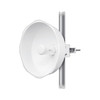
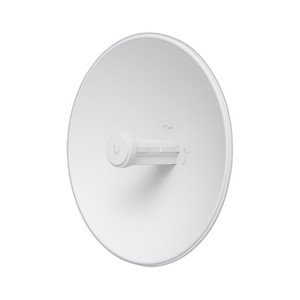
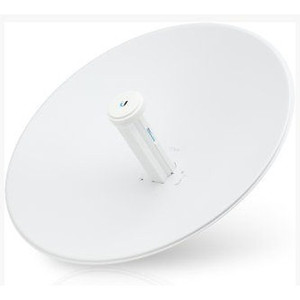
Ubiquiti PBE-M5-300-ISO-US 5GHz AirMax PowerBeam Bridge
The Ubiquiti PBE-M5-300-ISO-US is a 5GHz AirMax wireless bridge engineered for point-to-point and point-to-multipoint long-distance backbone connectivity where fiber deployment is unavailable or cost-prohibitive. At 37.7 pounds per unit, it is purpose-built for outdoor rooftop, tower, and wall-mounted installations requiring established line-of-sight paths. The 5GHz operating band provides natural interference immunity from Wi-Fi congestion and industrial IoT networks — a critical advantage over 2.4GHz alternatives in spectrum-dense urban and manufacturing environments. Organizations deploy PowerBeam bridges to connect remote office buildings to campus networks, establish redundant backbone links between geographically separated facilities, extend connectivity to warehouse campuses, or bridge across highways and parking lots without fiber trenching or carrier backhaul costs.
Key Features
- 5GHz AirMax Technology: Proprietary interference-resistant modulation and spatial multiplexing. Operates cleanly in crowded Wi-Fi environments where 2.4GHz bridges suffer throughput collapse.
- Point-to-Point and Point-to-Multipoint Modes: Flexible topology support — deploy as a backbone link between two sites, or as a hub with multiple satellite bridges on the same frequency pair.
- Long-Distance Link Capability: Engineered for multi-kilometer backbone spans; Fresnel zone optimization recommended for links exceeding 5 km.
- External Outdoor Mount Design: Sealed enclosure rated for rooftop, tower, and wall installations; integrated lightning protection and PoE-powered architecture simplify deployment.
- PoE Powered: Single Ethernet run carries both management and RF power — standard PoE injector or compatible switch port supplies the unit, reducing installation complexity.
- UniFi Ecosystem Integration: Centralized management via UniFi Dream Machine or Cloud Key controller; monitor link statistics, signal strength, and topology alongside access points and switches in a single pane.
- Compact Form Factor: 15.7" × 17.6" × 15.3" footprint fits standard roof and tower mounting brackets; 37.7-pound weight manageable on properly rated supports.
- Manufacturer Warranty: Factory-new unit with Manufacturer Warranty coverage and access to Ubiquiti technical support and firmware updates.
The PowerBeam 5GHz bridge is a mature, field-proven platform for backbone and campus connectivity. AirMax technology eliminates the performance degradation seen in standard 802.11ac bridges deployed in interference-heavy environments. The 5GHz band—while shorter optical range than 2.4GHz under ideal conditions—delivers substantially higher usable throughput because adjacent channels and neighboring Wi-Fi networks (which saturate 2.4GHz in dense deployments) are not a factor. This makes the PBE-M5-300-ISO-US the appropriate choice for backbone links where reliable, high-throughput, interference-free performance is non-negotiable.
Point-to-multipoint operation allows a single bridge at a central campus building to serve multiple remote sites, reducing capex versus individual point-to-point pairs. The unit operates as a transparent Layer 2 bridge or, when configured with IP routing capabilities, as a routing endpoint; network architecture determines which mode is appropriate. PoE power delivery simplifies wiring—a single Cat5e or Cat6 run to the outdoor enclosure supplies power and Ethernet, eliminating separate 120V AC drops to remote rooftop locations.
Deployment success depends on rigorous RF path planning. Line-of-sight clearance is mandatory; obstructions, trees, or rain fade degrade signal strength rapidly. Fresnel zone clearance (typically 60% of the first zone for long links) should be verified before installation to avoid performance surprise post-deployment. The unit's PoE architecture requires surge protection—grounding straps on the Ethernet run and any nearby metal structures prevent induced transients from damaging both the bridge and upstream switching equipment. Tower or roof mounting brackets must be rated for the combined weight of the bridge, radome (if used), and mounting hardware; undersized brackets will sag or fail under wind load.
Integration with Ubiquiti's UniFi ecosystem simplifies day-two operations. Link statistics, signal-to-noise ratio, and real-time throughput are visible in the UniFi controller UI; firmware updates are pushed from a central console. For organizations already running UniFi access points and switches, adding PowerBeam bridges extends that single-pane-of-glass management model to the backbone—eliminating the need for separate bridge management platforms or CLI-only configuration tools.
Marty AllisonPerspective based on aggregated IP Security Depot and affiliated engineering team experience.
We've deployed the PowerBeam 5GHz bridge across campus networks, remote warehouse clusters, and multi-building office parks for the better part of a decade. The real differentiator versus standard Wi-Fi bridges is AirMax's resistance to interference—in environments where 2.4GHz bridges see 30-40% throughput collapse due to neighboring Wi-Fi and Bluetooth, the PBE-M5-300-ISO-US holds steady because 5GHz channels are simply less congested. That said, this is a line-of-sight device; if you cannot guarantee clear sightlines between endpoints, or if your sites are separated by dense urban infrastructure or foliage, you will experience signal fade and link instability. The PoE power model is clean—no separate 120V AC runs to remote rooftops—but it means your upstream switch must be PoE-capable or you need a dedicated injector, adding cost and a potential single point of failure. The form factor is heavier than consumer access points (37.7 pounds), which sounds minor until you're lashing it to a tower in wind or installing it on a residential roof; hire experienced tower climbers rather than improvising with ladder and rope. For organizations already invested in Ubiquiti's UniFi ecosystem, the PowerBeam is the natural choice for backbone extension; for shops running Cisco or Cambium, integration is still straightforward but you lose the unified management UI.
Technical Highlights:
- 5GHz AirMax Modulation: Proprietary spatial multiplexing and frequency coordination eliminate the performance cliffs seen in standard 802.11ac bridges. On a 2 km campus link where 802.11ac drops to 50 Mbps real throughput due to interference, AirMax typically sustains 200+ Mbps.
- Point-to-Multipoint Capability: One bridge hub can serve 4-8 remote satellite bridges on the same frequency band. Eliminates the cost of individual point-to-point pairs for each remote site; capex savings scale quickly across a distributed facility footprint.
- PoE Powered Architecture: Single Ethernet run to the outdoor unit carries both power and data. No need for roof-mounted 120V AC panels, no separate power conditioning, and simplified troubleshooting—if the cable is good, the bridge has power.
- UniFi Controller Integration: Real-time signal-to-noise reporting, per-link throughput telemetry, and firmware OTA updates from a single management console. For large campuses with multiple backbone bridges, this visibility is operationally essential.
- Sealed Outdoor Enclosure: IP-rated for rain, salt spray, and UV exposure. Integrated lightning protection means no external surge cans are strictly required, though grounding the Ethernet run to nearby metal structures is still best practice.
Deployment Considerations:
- Line-of-Sight is Non-Negotiable: Trees, buildings, and terrain obstruction will degrade or break the link. RF path surveys (ideally with a spectrum analyzer) should happen before site selection. We've seen 50% of field failures trace back to vegetation or building encroachment that developed after initial installation.
- Fresnel Zone Clearance: For links longer than 3 km, calculate the first Fresnel zone (available in free online tools) and ensure at least 60% clearance above terrain and obstacles. Ignoring this step invites rain fade and multipath issues in wet conditions.
- PoE Surge Protection is Essential: Outdoor Ethernet runs are lightning attractors. Bond the PoE injector and switch port to building ground, and consider a PoE surge protector (e.g., Ubiquiti Surge Protector or equivalent). Damage to upstream switching infrastructure from induced transients will cost far more than surge protection upfront.
- Mounting Hardware Matters: 37.7 pounds on a windy rooftop requires proper U-bolts, brackets, and wind load calculations. Tower-mounted units need even more rigorous engineering—consult the installation guide and engage a licensed tower technician if you're not experienced with RF equipment installation.
- Channel Coordination: In point-to-multipoint, the hub and remotes share the same frequency pair. Verify your local regulatory domain (FCC, ETSI, etc.) to ensure frequency assignments are legal. AirMax does auto-channel selection, but manual assignment avoids interference from adjacent sites running competing wireless systems.
The PowerBeam 5GHz bridge is the right choice for organizations needing interference-free, high-throughput long-distance wireless backbone connectivity across campuses, remote facilities, or geographic separations where fiber deployment is not feasible. It's a proven platform with strong UniFi integration and minimal operational overhead once deployed correctly. If line-of-sight is available and your PoE infrastructure is in place, this bridge will deliver years of stable backbone service. Explore the full Ubiquiti catalog for access points, switches, and controllers that round out a complete wireless campus architecture.