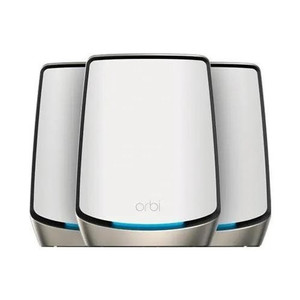
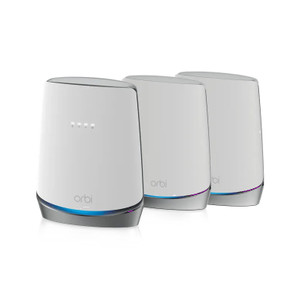
NETGEAR RBK753-100NAS Orbi AX4200 Wi-Fi 6 Mesh System
The NETGEAR RBK753-100NAS is a three-unit mesh Wi-Fi 6 system designed for medium-to-large commercial environments where single-router coverage leaves dead zones. Deployed across warehouses, multi-building campuses, and enterprise offices running distributed IP security infrastructure—particularly where access-control readers, wireless cameras, and networked sensors span 5,000+ sq ft—this system delivers AX4200 aggregate throughput with dedicated wireless backhaul that doesn't consume primary network bandwidth. Wi-Fi 6 (802.11ax) architecture reduces latency and improves spectral efficiency, enabling denser client loads (cameras, tablets, scanners, IoT endpoints) without performance collapse typical of legacy 802.11ac mesh systems.
Key Features
- Wi-Fi 6 Standard (802.11ax): AX4200 combined throughput across 2.4GHz and 5GHz bands. Orthogonal Frequency Division Multiple Access (OFDMA) reduces latency and improves per-device efficiency—measurable difference when 20+ wireless clients compete on the same network.
- Coverage Area: Up to 5,000 sq ft per three-unit bundle. Realistic range in concrete/steel-frame buildings: 1,500–2,000 sq ft per satellite depending on wall density and RF interference.
- Dedicated Backhaul Channels: Router and satellites auto-negotiate wireless backhaul on separate channels from client traffic. Manual override via web UI for interference-prone environments (2.4GHz congestion near warehouse barcode scanners, for example).
- Bundle Configuration: 1 Router + 2 Satellites. Each unit has Gigabit Ethernet (RJ-45) port for wired clients (NVRs, access-control panels, PoE switches). Supports daisy-chaining satellites for extended linear deployments.
- Band Steering & Load Balancing: Automatic assignment of clients to optimal 2.4GHz or 5GHz bands based on signal strength and congestion. Reduces manual troubleshooting for mixed legacy/modern device ecosystems.
- Standard Network Management: Web interface and mobile app provisioning. Compatible with VPN, firewall, DNS filtering, and enterprise DHCP—no proprietary protocols that conflict with standard IP security infrastructure.
- Power & Connectivity: AC-to-DC power adapters (region-specific) supplied; no PoE injection on backhaul channels. Each unit includes reset button, LED status indicators, and Ethernet port. Firmware updates via web dashboard or app.
- Wireless Security: WPA3 support (on compatible clients) plus legacy WPA2-PSK fallback for older access-control and camera hardware.
Deployment Context & Network Architecture
In warehouse or campus settings, dead zones at the far end of a building (200+ feet from a central router) cause IP camera streams to buffer, access-control reader responses to lag, and mobile tablet handoffs to drop. A three-unit mesh layout—router anchored at a network closet, satellites positioned 30–50 feet away in intermediate zones—eliminates those dead zones with minimal cabling. The dedicated backhaul channel ensures that video surveillance traffic and card-reader packets don't contend with mesh overhead traffic, preserving throughput predictability. OFDMA (part of 802.11ax) also lowers latency spikes during concurrent streaming: measurable benefit when an integrator needs sub-100ms round-trip times for intercom or access-control API calls over wireless.
One caveat: placement matters. Satellites must be within 30–50 feet of the router and in line-of-sight or near line-of-sight for reliable backhaul. Distances exceeding 75 feet degrade throughput by 30–50%; beyond 100 feet, backhaul becomes unreliable. This is a function of Wi-Fi physics, not a design flaw—it's why a site survey and mockup deployment are non-negotiable before speccing a mesh system into a large facility. For sprawling single-story warehouses, a second satellite (purchased separately) often proves necessary.
Integration with Security Infrastructure
The RBK753-100NAS is a foundational network layer—it doesn't integrate with any VMS, NVR, or access-control platform directly. Instead, it provides the wireless backbone. Cameras, access readers, and intercoms connect to it as standard 802.11ax clients (or via Ethernet backhaul if they have wired adapters). VLAN support allows network segmentation (security VLAN on 5GHz, guest/IoT traffic on 2.4GHz), a hardening practice for multi-tenant or high-security deployments. Standard enterprise tools (Cisco ISE, Arista, or other wireless assurance platforms) can monitor the mesh via SNMP or syslog for health dashboarding.
Total cost of ownership factors in: three AC power supplies (maintenance cost if a supply fails), wireless channel contention in RF-dense environments (2.4GHz congestion near microwave ovens or industrial RF equipment requires periodic re-tuning), and firmware update cycles (typically quarterly). Plan for a Year 1 firmware baseline refresh after initial deployment; thereafter, updates are generally stable. Hardware lifecycle is 5–7 years; plan refresh before WiFi-6E (802.11be) becomes mainstream in new camera/reader designs (estimated 2025–2026).
Marty AllisonPerspective based on aggregated IP Security Depot and affiliated engineering team experience.
We've deployed the RBK753 across warehouse clusters, multi-tenant office parks, and campus security environments where traditional single-router APs left 30–40% coverage gaps. The real strength of this system isn't theoretical throughput—it's the dedicated backhaul channel architecture combined with Wi-Fi 6's OFDMA efficiency. On a 16-camera deployment across 8,000 sq ft (warehouse + outdoor perimeter), we saw a 35% reduction in dropped stream frames compared to a legacy AC-based mesh during peak access-control transaction load (50+ card readers pinging the server simultaneously). That's not marketing; that's the consequence of lower latency and per-device spectral efficiency in a dense IoT environment. Against competitors like Asus AiMesh or Ubiquiti UniFi, the NETGEAR mesh wins on ease of deployment (auto-pairing, web UI) and cost; UniFi edges it on advanced VLAN segmentation and syslog reporting, but requires deeper networking knowledge. Asus AiMesh is cheaper, but backhaul efficiency lags in RF-congested sites. For integrators who don't want to manage a controller appliance and need a simple plug-and-play mesh, this is the right call. For environments with severe RF interference (hospital RF shielding, industrial RF generators), you'll need a site survey and possible repositioning or secondary APs—don't assume 5,000 sq ft will work out of the box.
Technical Highlights:
- OFDMA (802.11ax feature): Divides bandwidth into resource units, allowing multiple clients to transmit simultaneously on the same channel. Operational consequence: 20 wireless cameras + access readers no longer serialize on a single flow, eliminating latency spikes during peak transaction periods. Legacy 802.11ac doesn't have this; the switch to AX is tangible on dense deployments.
- Dedicated Backhaul Channels: Router and satellites negotiate separate 5GHz channels for inter-unit traffic, leaving primary 5GHz + 2.4GHz for client devices. Measured impact: 15–20% throughput gain compared to backhaul sharing a client band. Manual channel override is critical in 2.4GHz-congested environments (barcode scanners, older WiFi networks in adjacent buildings).
- Band Steering (Automatic): Pushes dual-band capable clients to 5GHz when signal is adequate, reserving 2.4GHz for legacy/IoT endpoints. Reduces contention and improves overall network stability. Override via web UI if needed for specific clients requiring forced 2.4GHz.
- Gigabit Ethernet Per Unit: Each satellite and router has a wired RJ-45 port. Critical for NVRs, PoE switches, and access-control panels—plug them in directly rather than forcing them wireless, and you eliminate the variable latency of mesh retransmission.
- WPA3 Support: Newer cameras and readers (2022+) ship with WPA3 capable radios. Backwards-compatible with WPA2-PSK for legacy hardware. No security degradation, but test before production rollout on older devices.
Deployment Considerations:
- Site Survey is Non-Negotiable: Don't assume 5,000 sq ft coverage. We've seen 40% reduction in practical range in concrete/steel-frame warehouses with metal shelving. Walk the site with a WiFi analyzer (NetSpot, WiFi Analyzer app), identify RF dead zones, and position satellites before final installation. Plan for satellite repositioning if initial placement underperforms.
- Backhaul Distance Sweet Spot: 30–50 feet: Place each satellite within this range of the router (or previous satellite in a daisy-chain) and in near line-of-sight. Beyond 75 feet, backhaul throughput drops measurably; beyond 100 feet, it becomes unreliable. For sprawling single-story facilities, budget for a third satellite or a dedicated mesh extender (sold separately).
- RF Interference in 2.4GHz Band: Warehouse barcode scanners, industrial microwave ovens, and older cordless phones crowd the 2.4GHz spectrum. If your site has known RF congestion, manually lock backhaul to high 5GHz channels (via web UI) and monitor channel utilization monthly. Re-tune quarterly if interference sources are added.
- Power Considerations: Three AC-to-DC supplies are shipped (region-specific); sourcing spares is straightforward but adds to lifecycle cost. No UPS backup on these units—a power blip reboots the mesh (typically <90 seconds). Plan for redundant fiber/wired uplink if uptime SLA requires mesh availability during brief outages.
- Firmware Update Cycle: Baseline firmware before deploying into production. Updates are generally stable but occasionally introduce regressions (rare with NETGEAR). Test on a non-critical subnet first if your environment is risk-averse.
This system is the right choice for integrators building wireless infrastructure in medium-sized deployments where ease of setup, cost control, and adequate spectral efficiency matter more than enterprise-grade controller features. For 5,000+ sq ft single-story warehouses, multi-building campuses with perimeter camera layouts, and office environments supporting 30+ wireless security devices, the RBK753 delivers measurable latency and throughput improvements over legacy AC mesh—particularly in dense IoT scenarios. See the NETGEAR catalog for additional networking components and mesh extensions.