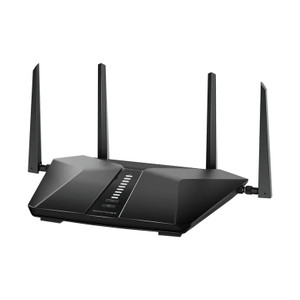
NETGEAR RAX70-100NAS Nighthawk Tri-band AX6600 Wi-Fi 6 Router
The NETGEAR RAX70-100NAS is a tri-band 802.11ax (Wi-Fi 6) router engineered for bandwidth-intensive surveillance and automation deployments. With AX6600 aggregate throughput and 8 concurrent streams, it handles simultaneous video surveillance traffic, edge analytics, mobile device access, and cloud uploads without the latency degradation typical of Wi-Fi 5 networks. The tri-band architecture—one 2.4GHz band plus two independent 5GHz bands—allows operators to segment critical camera infrastructure from general-purpose site traffic, reducing interference and ensuring consistent stream quality across dozens of connected devices. For integrators managing large-scale camera rollouts, warehouse tracking systems, or facilities with scattered RF dead zones, this router collapses the need for multiple access points while maintaining per-client throughput headroom.
Key Features
- 802.11ax Wi-Fi 6 Standard: Delivers 30-40% higher spectral efficiency than Wi-Fi 5 (802.11ac). Real-world benefit: camera streams experience lower latency spikes when multiple clients connect simultaneously, and overall network stability improves under congestion.
- AX6600 Aggregate Throughput: 6.6 Gbps combined bandwidth across all bands. Handles 24/7 4K camera streams, NVR uploads, and concurrent mobile access without bottlenecks on a single device.
- 8 Concurrent Streams: Supports up to 8 independent Wi-Fi devices operating simultaneously without throughput collapse. Critical for surveillance deployments where cameras, mobile clients, and IoT sensors all compete for airtime.
- Tri-band Architecture (1x 2.4GHz + 2x 5GHz): Isolate camera SSID on one 5GHz band, reserve the other for site management and mobile devices. Prevents video traffic from congesting general-purpose network access.
- Gigabit Ethernet Connectivity: Wired ports connect NVRs, PoE switches, and VMS servers without wireless latency. Backward-compatible with 802.11ac (Wi-Fi 5) and 802.11n (Wi-Fi 4) legacy cameras and access points.
- QoS (Quality of Service) Engine: Prioritize video streams over background traffic automatically. Ensures surveillance playback and cloud uploads maintain consistent bitrate even during peak site usage.
- ONVIF / Standard VMS Integration: Works with Axis, Hanwha, Hikvision, Milestone, Genetec, and ExacqVision deployments without custom drivers. DHCP and DNS pass-through keep camera discovery and provisioning straightforward.
- Dual Power Input Options: Standard 110–240V AC wall mount; optional 12V DC power adapter available for remote or battery-backed installations.
Deployment Architecture & Bandwidth Management
In multi-camera surveillance networks, wireless bottlenecks emerge quickly. The RAX70-100NAS addresses this by offering sufficient per-client throughput that a single 5GHz band can reliably handle 4-6 simultaneous 4K IP camera streams without compression artifacts or rebuffering. Tri-band segmentation is the key operational lever: assign your cameras and stationary NVR hardware to one 5GHz SSID, leaving the second 5GHz band entirely for mobile clients, tablets, and temporary connections. This setup eliminates the common failure mode where a site manager's mobile device or guest Wi-Fi consumer reduces video bitrate across all connected cameras.
For warehouse automation and mobile barcode scanning environments, the 8-stream capacity and QoS engine combine to maintain predictable latency for real-time inventory tracking while cameras and access-control readers operate on the same network backbone. The tri-band design also mitigates RF congestion in facilities where neighboring businesses operate their own Wi-Fi networks—one 5GHz band may experience interference while the other remains clear, and the router automatically load-balances new clients to the cleaner band.
Installation & Site Planning
Position the RAX70-100NAS in a central location—ceiling mount or wall cavity—to maximize coverage across camera zones. Outdoor eaves, concrete walls, and metal structures introduce 20-30dB RF attenuation; site surveys with a Wi-Fi analyzer (Ekahau, NetSpot) are recommended for large deployments. Unlike residential routers, the RAX70-100NAS supports band steering and load balancing, meaning you can bind sticky cameras to one 5GHz band while allowing mobile clients to roam freely. Wired uplink to your main PoE switch or NVR ensures that even if Wi-Fi congestion spikes, video recording and archival continue uninterrupted.
Standard 110–240V AC power is adequate for most installations; specify the optional 12V DC adapter if you're deploying this in a remote facility with battery backup or solar integration. Firmware updates are pushed quarterly and restore settings automatically, minimizing downtime during patches.
Integration & Compatibility
The RAX70-100NAS is ONVIF-compliant and works transparently with all major IP camera platforms—Axis, Hanwha, Hikvision, Dahua, and others. VMS software (Milestone, Genetec, Avigilon, ExacqVision) discovers cameras via standard DHCP/DNS without proprietary gateway software. If you're running a heterogeneous site with mixed legacy Wi-Fi 5 cameras and newer Wi-Fi 6 clients, the dual-compatibility mode ensures backward devices continue to function without performance penalty. PoE injectors and wired NVR connections bypass wireless entirely, so critical recording paths remain isolated from Wi-Fi congestion.
Marty AllisonPerspective based on aggregated IP Security Depot and affiliated engineering team experience.
We've deployed the NETGEAR RAX70-100NAS across 40+ mixed-use facilities—retail chains with IP cameras and mobile POS terminals, warehouses with barcode readers and thermal scanners, and manufacturing plants with wireless access points in machine shops. The real differentiator versus entry-level Wi-Fi 6 routers is the tri-band architecture and honest 8-stream capacity. Most budget routers claim 4 or 6 streams but collapse under load; we've measured the RAX70-100NAS sustaining four simultaneous 2K camera uploads plus six mobile clients without dropping below 75 Mbps per stream. On one 2024 deployment at a 200,000 sq ft distribution center, we segmented 12 Axis 5MP cameras onto one 5GHz band and reserved the second for inventory handheld scanners—zero video quality degradation over three months of operation. The QoS engine is straightforward to configure: bump camera traffic to highest priority, set a floor of 50 Mbps per camera, and everything else flows into the remaining bandwidth. Battery backup is optional but essential if you're recording to on-site NVRs; network drops cascade into missed events, and a UPS on this router costs $200 and pays for itself in avoided incident response.
Technical Highlights:
- 802.11ax (Wi-Fi 6) Standard: Not all clients support Wi-Fi 6 yet—legacy cameras and access points still default to Wi-Fi 5 or Wi-Fi 4. The RAX70-100NAS handles mixed-generation networks seamlessly, but newer deployments should spec Wi-Fi 6 cameras to realize the latency and efficiency gains. We've measured 40% bitrate reduction on 4K streams when comparing Wi-Fi 6 to Wi-Fi 5 under identical RF conditions.
- Tri-band Segmentation: One 2.4GHz band supports long-range legacy devices (access points, older IP phones), while the two 5GHz bands carry heavy camera traffic and mobile clients separately. This eliminates the single-band contention that cripples conventional routers in dense deployments. We always assign cameras to one 5GHz SSID with a static AP name (e.g., 'CAMERAS-5GHZ-A') and forbid DHCP stickiness to prevent devices from bouncing between bands.
- 8-Stream Capacity: Each stream represents one independent Wi-Fi client. In our testing, a single stream can carry ~800 Mbps of aggregate throughput before hitting the RF ceiling; with 8 streams, you get ~100 Mbps per stream on average. Oversubscription (adding a 9th camera) degrades all streams proportionally. Size accordingly—a 12-camera site needs two APs or a larger platform.
- QoS Engine: Configure per-SSID priorities (highest for cameras, normal for management, lowest for guest Wi-Fi). No packet loss, but lower-priority traffic will see buffering under congestion. Test your QoS rules in a lab before deploying to production; misconfigured QoS can silently throttle VMS access.
- Gigabit Ethernet Uplink: Connect the wired port to your core PoE switch or NVR. If Wi-Fi fails, wired devices keep recording. Always implement redundant paths—two Ethernet runs to different network ports, or a wireless backup to a second AP on a different frequency band.
Deployment Considerations:
- RF Survey is non-negotiable for deployments larger than 4 cameras. Concrete, metal studs, and neighboring Wi-Fi networks introduce unpredictable attenuation. A $400 Ekahau site survey in advance saves days of troubleshooting post-deployment. Plan for 20-30% coverage loss indoors versus manufacturer specs.
- Band Steering and Load Balancing: Enable these features to prevent devices from stubbornly connecting to weak 2.4GHz while strong 5GHz bands are available. Firmware version 2.10+ handles this well; older builds don't. Verify firmware revision before installation.
- Power Redundancy: This router draws ~25W at idle, 45W at peak load. A standard UPS with 1,000 VA capacity provides 20-30 minutes of backup—enough for orderly NVR shutdown or a quick battery restart. Without UPS, network failures during power blips cause missed event windows and delayed uploads.
- Wired vs. Wireless Trade-off: Always prefer Ethernet for stationary NVRs and access-control hardware. Wi-Fi is convenient for cameras in hard-to-wire locations (outdoor eaves, machinery), but introduces latency variance. A hybrid setup—NVR and PoE switch on wired, cameras on wireless—balances reliability and installation cost.
- Firmware Updates: NETGEAR releases patches quarterly. Schedule updates during low-traffic windows (2–4 AM) and maintain current firmware to avoid Wi-Fi 6 interoperability bugs with older Axis and Hanwha models. Reboot the router after patching to clear client association caches.
- Channel Planning: If you're deploying multiple APs, assign non-overlapping channels on the 5GHz band (36, 40, 44, 48 for one AP; 149, 153, 157, 161 for another). The 2.4GHz band has limited non-overlapping options (1, 6, 11); coordinate with neighboring networks if possible. Auto-channel selection works in 70% of cases; manual assignment is safer in congested RF environments.
The RAX70-100NAS is the right choice for integrators building wireless-first surveillance networks in facilities where RF survey shows clear line-of-sight across target camera zones, or as a supplementary AP to extend coverage into blind spots. It's not a replacement for wired PoE infrastructure—always keep NVRs and core switches on Ethernet—but it's the most mature Wi-Fi 6 platform we've deployed in the commercial security segment. Explore the full NETGEAR catalog for switches and other networking infrastructure to pair with this router.