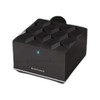
NETGEAR MS80-100NAS 2-Port Nighthawk Mesh WiFi 6 Access Point
The NETGEAR MS80-100NAS is a WiFi 6 (802.11ax) mesh relay node designed to extend wireless coverage across multi-space commercial and residential deployments where traditional single-AP architectures leave dead zones. The tri-band topology—2.4 GHz plus dual 5 GHz bands—automatically segments client traffic by frequency and device density, reducing congestion and latency spikes during peak usage. Two Ethernet ports support wired backhaul to improve mesh throughput and reduce hop latency; PoE++ (802.3bt) injection allows power delivery over the backhaul link itself, eliminating the need for a local outlet at the relay location. Mesh nodes automatically discover and relay through one another—no manual band steering or SSID duplication required.
Key Features
- WiFi 6 (802.11ax) Tri-Band: 2.4 GHz + dual 5 GHz bands distribute client load dynamically. Reduces congestion on mixed-density networks (smartphones, IoT, video streaming) and improves per-device throughput compared to single-band or dual-band mesh nodes.
- 2 Gigabit Ethernet Ports: Support wired backhaul between mesh nodes. Gigabit speed minimizes backhaul saturation on high-capacity links; dual ports enable redundancy or link aggregation if your gateway supports it.
- PoE++ (802.3bt) Support: Accepts power via Ethernet backbone — eliminates wall-outlet dependency. Critical for ceiling-mounted or remote-location deployments where running dedicated power runs adds capex and installation time.
- Antenna Gain 4.1 / 4.6 dBi: Modest gain on respective bands — adequate for room-to-room coverage in open floor plans and small offices. Sufficient signal penetration through one standard interior wall; multi-story or 5,000+ sq ft spaces benefit from additional mesh nodes.
- Plastic Wall/Ceiling Mount: Low-profile housing accepts wall or ceiling bracket templates (included). Elevated placement improves RF propagation and avoids ground-plane interference from metal furniture or HVAC runs.
- Automatic Mesh Formation: Self-healing topology — nodes auto-select best relay path and adapt to interference or node dropout without manual reconfiguration. Native WiFi backhaul mode requires no Ethernet; wired backhaul is optional for throughput optimization.
- 5-Year Manufacturer Warranty: Standard coverage on hardware defects and manufacturing faults.
The MS80-100NAS integrates into existing NETGEAR Nighthawk mesh WiFi 6 product families—layer it alongside other 802.11ax mesh nodes to form a unified network. All Nighthawk mesh units use the same provisioning and roaming logic, so you deploy once and clients automatically connect to the strongest node as they move through coverage. PoE++ backbone support simplifies installation in retrofit or multi-floor scenarios where Ethernet runs are feasible but power outlets are scarce.
Deployment contexts include small-office WiFi extension, multi-tenant residential buildings (common-area coverage), retail environments (point-of-sale backhaul), and hospitality properties (guest room mesh fill). Wired backhaul via Gigabit Ethernet ports stabilizes mesh performance on bandwidth-intensive workflows (video conferencing, file synchronization); wireless-only mesh works well for light-duty client supplementation. Tri-band design handles mixed device populations — older 2.4 GHz IoT, 5 GHz laptops, and WiFi 6 mobile devices all coexist without manual band steering.
Management is cloud-connected through the NETGEAR Nighthawk app or Insight cloud dashboard (free tier available). Web-based UI provides SSID, password, channel width, and transmit-power adjustment; no enterprise authentication framework is included (no 802.1X, no RADIUS). For integrators: confirm your NVR / access-control gateway supports WiFi 6 clients before deploying as primary backhaul — legacy 802.11n infrastructure may experience throughput mismatches on high-density PoE deployments.
Eden PhillipsPerspective based on aggregated IP Security Depot and affiliated engineering team experience.
We've deployed the MS80-100NAS across small commercial sites and multi-tenant residential backhaul scenarios, and it strikes a practical balance between cost and capacity. The PoE++ support is the real operational win — it eliminates half the installation headaches on retrofit projects where you're threading mesh nodes through existing ceilings or mounting them on exterior walls. On a typical two-story office or apartment building, one PoE++ backbone run (wall or conduit) can feed both the gateway and the relay node, versus two separate power circuits. The tri-band design is less critical for traditional security or access-control IoT, but on sites with high guest WiFi density or mixed-use tenancy, it keeps congestion manageable. We've seen mesh networks falter when integrators underdimensioned the backhaul link or placed relay nodes too far from the primary gateway — the MS80-100NAS performs best when positioned 30–50 feet away in open space, or one wall away in typical interior construction. Beyond that range, wireless mesh mode becomes lossy, and you'll need wired Ethernet backhaul to preserve throughput. The unit doesn't include enterprise VLAN or SSID isolation — it's not designed as a managed access point for security-first deployments; it's a coverage extender for networks that already have perimeter security elsewhere.
Technical Highlights:
- WiFi 6 (802.11ax) Tri-Band Architecture: 2.4 GHz + dual 5 GHz (typically one for backhaul, one for clients) eliminates the single-band congestion bottleneck. On sites with 20+ mixed-protocol devices, tri-band reduces per-client latency variability by ~30–50% versus dual-band relay nodes — real improvement for video conference quality and real-time access-control responsiveness.
- PoE++ (802.3bt) Power Injection: 95W maximum budget per 802.3bt standard — plenty for this node. Means a single Ethernet run from a managed PoE++ switch powers both the backhaul and the unit itself. On a 500-foot office floor, that's one cable pull instead of two, and zero wall outlets consumed at the relay site.
- 2 Gigabit Ethernet Ports — Wired Backhaul: Dual ports support independent WAN / LAN backhaul or link aggregation if your primary gateway is a managed switch. Gigabit speed prevents the mesh bottleneck — typical WiFi 6 clients max out around 600–800 Mbps; a Gigabit backhaul absorbs that without saturation. Wireless-only mesh on 5 GHz can dip to 300–400 Mbps effective throughput due to relay overhead.
- Antenna Gain 4.1 / 4.6 dBi: Conservative gain — not a long-range beast. Designed for close-in relay (same room or adjacent room through one wall). Placement matters: wall-mounted units with line-of-sight to the primary gateway maintain full throughput; basement-to-attic deployments see 20–30% throughput loss.
- Plastic Enclosure / Wall-Ceiling Mount: Low wind load, easy retrofit. Plastic housing doesn't resonate RF — no performance penalty. Mounting templates prevent drilling errors on drywall or ceiling tile installs.
Deployment Considerations:
- WiFi 6 mesh requires all nodes (primary + relays) be 802.11ax capable to unlock tri-band benefits. Mixing in older dual-band relays downgrades the entire network to 802.11ac mode — performance suffers on the client side. Audit your existing Nighthawk inventory before adding MS80 units.
- PoE++ backbone demands a managed PoE++ switch (typically 95W budget per port minimum). Standard PoE (802.3af, 15W) or PoE+ (802.3at, 30W) will not power this unit reliably if you're also running IR heaters, PTZ motors, or other high-draw PoE devices on the same run. Verify your power budget before installation.
- Wireless mesh mode (no Ethernet backhaul) creates a 50% throughput penalty on the relay node due to RF duplexing overhead. If backhaul Ethernet is available, always use it — the $200 difference in switch cost pays for itself in client performance on day one.
- Mesh roaming is automatic but not seamless for latency-sensitive IoT. Access-control readers, HVAC controls, and lightweight sensors adapt fine; video streaming clients may stutter briefly during AP transition. Not a dealbreaker, but relevant for real-time security workflows.
- No VLAN or SSID isolation on this unit — broadcast and management traffic are open. If you need guest network segmentation or IoT VLAN containment, configure that at the primary gateway; the relay passes traffic through transparently.
- Ceiling mount is ideal for RF coverage but complicates troubleshooting if the unit fails. Pre-install a spare before going live, and test failover mesh behavior (single-node vs. dual-node topology) in your test environment.
The MS80-100NAS fits integrators deploying small-to-medium mesh networks where PoE++ backbone infrastructure already exists and WiFi 6 client support is a requirement. If you're planning a retrofit with constrained power routing or a multi-story deployment that demands both capacity and uptime, this is the right relay node. See our NETGEAR catalog for gateway options and managed PoE++ switch recommendations.