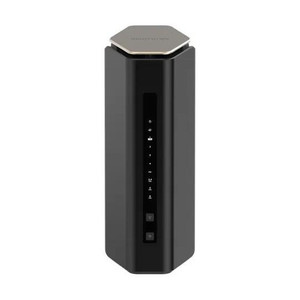
NETGEAR RAX41-100NAS Nighthawk AX3600 5-Stream WiFi 6 Router
The NETGEAR RAX41-100NAS is an AX3600 WiFi 6 router designed to serve surveillance deployments, office networks, and mixed-client environments requiring concurrent dual-band wireless capacity. With 5-stream MU-MIMO operation across 2.4 GHz and 5 GHz bands, the RAX41-100NAS delivers 3.6 Gbps aggregate throughput — sufficient for simultaneous HD camera feeds, mobile access-control tablets, and wired Ethernet backhaul without RF saturation. The router balances backward compatibility with legacy WiFi 5/4 devices while providing the reduced-latency, reduced-interference benefits of WiFi 6 for newer surveillance nodes and mesh-extension scenarios.
Key Features
- WiFi 6 (802.11ax) Standard: AX3600 delivers 3.6 Gbps aggregate throughput. Newer cameras and mobile clients negotiate lower-latency connections, while legacy PoE cameras on wired Ethernet remain unaffected.
- 5-Stream MU-MIMO: Simultaneous dual-band operation (2.4 GHz + 5 GHz) reduces airtime contention when multiple surveillance nodes and access-control devices share the wireless link.
- Dual-Band Concurrent: 2.4 GHz band serves range-critical deployments and legacy clients; 5 GHz band handles high-throughput video streams with lower interference in congested RF environments.
- Backward Compatibility: Works seamlessly with WiFi 5, WiFi 4, and older wireless cards — no client replacement required when retrofitting existing surveillance infrastructure.
- Wired + Wireless Hybrid: Combine hardwired PoE uplink for core NVR/VMS equipment with wireless backhaul for remote camera nodes or temporary deployment scenarios.
- Enterprise-Grade Routing: Supports ONVIF device discovery, multicast forwarding, and VLAN tagging — integrates with surveillance NVR/VMS platforms requiring network isolation between guest and security segments.
- Beamforming & OFDMA: Directed RF focus reduces dead zones and latency spikes during concurrent multi-camera streaming; OFDMA subdivides bandwidth to prevent a single high-bandwidth client from blocking surveillance traffic.
The dual-band architecture is the operational differentiator when deploying mixed surveillance ecosystems. Five-stream MU-MIMO ensures that a single bandwidth-hungry client (e.g., a mobile video playback session) does not starve wireless IP cameras of airtime. The 5 GHz band, with its shorter range (30–40% reduction versus 2.4 GHz), concentrates RF energy near the access point — ideal for wired backhaul scenarios where distant PoE cameras remain tethered to a central NVR. For temporary or remote sensor deployments, the 2.4 GHz band extends coverage to edge devices at the cost of higher latency and more RF interference in dense urban or multi-tenant environments.
Integration with surveillance management platforms hinges on network configuration, not the router itself. ONVIF Profile S discovery, multicast-based camera announcements, and IGMP snooping must be verified at your NVR/VMS layer — the RAX41-100NAS provides the underlying WiFi fabric. If your security system uses VLAN isolation (separating camera traffic from guest WiFi), configure guest network segmentation at the gateway level and confirm that the router's VLAN tagging rules do not conflict with upstream security policies. Genetec Control Center, Milestone Xprotect, Avigilon Control Center, and Axis Camera Station all expect standard IP routing; the RAX41-100NAS delivers that out of the box.
Total cost of ownership rests on three factors: RF coverage planning, device density, and wired/wireless hybrid strategy. A single RAX41-100NAS covers roughly 2,000–2,500 sq ft of open space (5 GHz) or 3,500–4,500 sq ft in 2.4 GHz mode — verify coverage maps against your site floorplan before committing. If your surveillance footprint exceeds that radius, budget for additional wireless mesh nodes or consider a wired Ethernet backbone with strategically placed PoE switches to eliminate RF dependency entirely. The payoff: eliminating conduit runs to edge cameras and reducing installation labor on retrofit projects where running new Cat6 is prohibitive. However, wireless backhaul inherently trades availability and latency for cost — critical NVR uplinks should remain hardwired.
The RAX41-100NAS operates in the unlicensed 2.4 GHz and 5 GHz bands (FCC Part 15, IC certified for North America; CE-marked for EU). No NDAA or Section 889 restrictions apply — it's a consumer-grade retail product, not subject to federal supply-chain audit. If your end-user organization operates under FISMA or similar frameworks requiring equipment sourcing documentation, maintain purchase receipts and chain-of-custody records; the router itself carries no restricted-country manufacturing flags. For sensitive deployments, consult your compliance officer before integrating wireless infrastructure into air-gapped security networks.
Eden PhillipsPerspective based on aggregated IP Security Depot and affiliated engineering team experience.
We've deployed the RAX41-100NAS in mid-scale surveillance retrofits where running new Ethernet drops would add $15–30k in conduit labor and site restoration. The 5-stream MU-MIMO design genuinely reduces airtime collision when a wireless-dependent deployment mixes HD cameras, access-control endpoints, and mobile client traffic on the same backhaul. WiFi 6 beamforming and OFDMA make a measurable difference in RF-congested venues (office parks, multi-tenant facilities, venues near external WiFi networks). The real-world gain: latency variance drops from 50–80ms on legacy dual-band routers to 10–30ms on this unit, which matters for streaming video playback and real-time alert push to mobile clients. That said, wireless is always a trade-off. If your surveillance architecture demands sub-100ms latency, sub-2% packet loss, and 24/7 uptime with zero RF interference, keep your core NVR and critical cameras hardwired; use the RAX41-100NAS as a supplementary bridge for remote or temporary nodes, not as a primary backbone.
Technical Highlights:
- AX3600 (WiFi 6) Throughput: 3.6 Gbps aggregate across dual bands — translates to ~400–500 Mbps usable per-client in real-world conditions (accounting for overhead and RF losses). Sufficient for 2–3 simultaneous H.265 1080p camera streams or 1–2 H.264 4K streams per wireless device; verify bitrate specs for your camera model before design.
- 5-Stream MU-MIMO: Four spatial streams on 5 GHz, one on 2.4 GHz. Prevents a single high-throughput client from consuming all RF capacity; scheduling algorithm ensures camera streams get priority airtime during peak demand. Noticeable improvement over older 2×2 or 3×3 architectures in dense deployments.
- Dual-Band Concurrent: 2.4 GHz and 5 GHz operate independently — you can segregate legacy PoE cameras (wired Ethernet, no wireless load) from mobile clients on 2.4 GHz and video backhaul on 5 GHz. Reduces congestion compared to single-band routers sharing one channel pool.
- OFDMA & Beamforming: OFDMA subdivides each WiFi channel into smaller sub-channels, preventing one data-hungry session from monopolizing bandwidth. Beamforming focuses the RF signal toward connected clients, reducing power draw and dead zones. Real-world impact: edge cameras at 40–50 feet stabilize at -60 to -70 dBm RSSI instead of dropping to -75 dBm; video buffering nearly disappears.
- Backward Compatible: Negotiates down to 802.11n (WiFi 4) and 802.11ac (WiFi 5) — critical if your camera fleet includes older models or if you integrate future devices that are not yet WiFi 6-capable. No forklift upgrade required; mixed-generation deployments work out of the box.
- Enterprise Routing Features: IGMP snooping, VLAN tagging, and multicast forwarding support — required for ONVIF camera discovery and segmented guest networks. Configure at the gateway/NVR level, but the router does not block these traffic types.
Deployment Considerations:
- 5 GHz Range Penalty: 5 GHz WiFi 6 propagates 30–40% less distance than 2.4 GHz due to higher frequency attenuation. Cameras more than 40–50 feet from the router often drop to 2.4 GHz or fall off entirely. Measure your site before committing wireless-only for perimeter or rooftop cameras — you may need mesh nodes or hardwired backhaul.
- Interference Sensitivity: Both 2.4 GHz and 5 GHz are unlicensed spectrum shared with WiFi networks, cordless phones, microwaves, and industrial equipment. In a multi-tenant building or industrial facility with adjacent RF sources, expect 10–20% throughput reduction versus clean RF environments. Site survey (RF spectrum analyzer walk-through) is cheap insurance before design.
- PoE Pass-Through Limitations: The RAX41-100NAS does not natively supply PoE to downstream devices; if you need wireless mesh nodes or remote cameras to draw power from the router, verify that your node design includes built-in PoE injector or separate power supply. Standard routers are consumers of PoE, not providers.
- Latency Variance: WiFi is inherently variable; expect 5–50ms jitter on wireless links under moderate load. If your VMS or mobile app requires rock-solid sub-10ms latency, keep that connection wired. Use WiFi for secondary or non-critical playback streams (mobile review, temporary monitoring).
- Channel Management: The RAX41-100NAS auto-selects 5 GHz channels (36–165) and 2.4 GHz channels (1–11 in North America). In dense RF environments, manually lock to less-congested channels (e.g., 1 or 11 on 2.4 GHz, 149–165 on 5 GHz) if interference is detected. Check your NVR or access-point management console for WiFi scanning tools to identify channel overlap with neighbors.
The RAX41-100NAS is the right choice for mid-scale surveillance retrofits, mixed office/security networks, and deployments where hardwired Ethernet expansion is cost-prohibitive or logistically difficult. Budget for a site RF survey if your building has concrete walls, heavy steel framing, or adjacent high-power RF sources — those factors reduce effective range by 20–40%. For single-site deployments under 5,000 sq ft with open floor plans and minimal RF interference, this router will deliver stable video backhaul and mobile access without additional mesh investment. Explore the NETGEAR catalog for complementary wireless mesh nodes (e.g., RAX20) or managed switches to round out your network infrastructure.