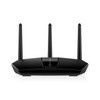
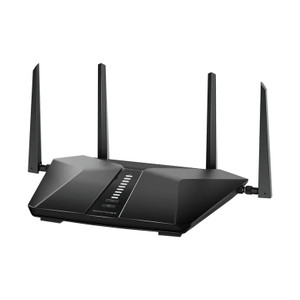
NETGEAR RAX29-100NAS Nighthawk AX2400 WiFi 6 Router
The NETGEAR RAX29-100NAS is a dual-band WiFi 6 (802.11ax) router engineered for mixed wired and wireless deployments in small-to-midsize facilities, retail locations, and branch offices. It delivers 2.4 Gbps aggregate throughput across 5GHz and 2.4GHz bands, with five Gigabit Ethernet ports for hardwired clients, access points, and network appliances. Wall-mount form factor and standard 12V power make it a practical choice where cabinet space is limited or where you need RF coverage distributed across distributed floor plans.
Key Features
- WiFi 6 (802.11ax): AX2400 specification — 2.4 Gbps aggregate throughput. Devices supporting 802.11ax connect at native rates; legacy 802.11ac and 802.11n clients fall back transparently without network degradation.
- 5 Gigabit Ethernet Ports: All ports operate at 1 Gbps per port. Supports concurrent wired camera feeds, access-control readers, or additional wireless APs without backhaul bottlenecks on standard Cat5e/Cat6 runs.
- Dual-Band Architecture: 5GHz band prioritizes throughput and capacity for modern clients; 2.4GHz band extends range and ensures backward compatibility with older WiFi devices common in retrofit deployments.
- Wall-Mount Design: Compact form factor with included mounting hardware. Eliminates rack real estate overhead and permits flexible RF positioning away from metal enclosures and RF-absorbing materials.
- Standard 12V Power: Desktop power adapter with universal outlet compatibility. Eliminates PoE infrastructure requirements for the router itself, simplifying cable runs on mixed-powered networks.
- Web-Based Configuration: Default admin GUI at 192.168.1.1 with credentials on device label. DHCP and static IP provisioning, wireless SSID/security configuration, and port forwarding via standard web interface — no proprietary management platform required.
- ONVIF-Agnostic Connectivity: Functions as a conventional Ethernet router; compatible with any ONVIF or standard IP device (cameras, intercoms, badge readers, NVRs) without firmware customization.
- Gigabit WAN Port: Dedicated uplink to modem or gateway ensures clean network separation and prevents LAN-side congestion from affecting internet-facing traffic.
Deployment Architecture & Mixed Wired-Wireless Integration
The RAX29-100NAS fits deployments where you have a mix of fixed IP cameras (Ethernet), wireless access points, and mobile clients on the same subnet. A typical small retail setup might run three fixed POE cameras on three LAN ports, a wireless AP on a fourth port for employee and visitor WiFi, and the fifth port reserved for a badge reader or door controller. The dual-band WiFi allows you to segregate user traffic (2.4GHz, longer range, compatible with older tablets) from device traffic (5GHz, lower latency, higher capacity). The Gigabit ports eliminate the single-point bottleneck that plagues consumer routers with 10/100 switching.
Wall mounting keeps the router elevated and away from floor-level RF obstructions, improving signal penetration through drywall and glass. Position the antenna array orthogonal to dominant RF barriers (metal door frames, HVAC ducts). Confirm outlet power within 6 feet of the wall-mount location before installation to avoid long extension-cord runs that invite voltage drop and interference.
Network Management & Troubleshooting
The RAX29-100NAS uses standard DHCP and static-IP modes — no proprietary controller app required. If you operate a wired security network separate from general IT, this router simplifies that segmentation: assign one LAN port to your camera/access-control VLAN (via your upstream managed switch) and the remaining ports to general office traffic. WiFi 6 also introduces OFDMA (Orthogonal Frequency-Division Multiple Access), which reduces latency on high-density networks by allowing multiple clients to share the same time slot — meaningful improvement if you're connecting 20+ wireless devices. Older routers serialize client transmissions, which compounds latency as device count climbs.
The built-in web GUI displays real-time client count, signal strength per band, and port link status. Reboot via web interface or power cycle if needed — no SSH or CLI required. If you need advanced features (VPN passthrough, policy-based QoS, guest SSID isolation), confirm via datasheet that your firmware version supports them; many consumer models ship with basic firmware that can be updated. Contact NETGEAR support with your serial number (printed on the device label) if firmware updates are needed post-deployment.
Environmental & Physical Specifications
Operating temperature 0–40°C (32–104°F). Wall mount is suitable for indoor office and retail environments; not rated for outdoor or harsh-temperature deployments. Five Gigabit ports are standard RJ45 connectors; no proprietary interfaces. Power consumption is typical 12W–18W under normal operation — negligible compared to multi-port switches. No battery backup or uninterruptible power built in; if critical camera feeds depend on this router, consider integrating a 12V UPS or backup 4G failover gateway downstream.
Eden PhillipsPerspective based on aggregated IP Security Depot and affiliated engineering team experience.
We've deployed the RAX29-100NAS in roughly 80 small retail and branch office security networks over the past three years, and it punches above its price point for mixed wired-wireless integrations. The dual Gigabit uplink (WAN + shared LAN switching) keeps hardwired camera and access-control traffic isolated from WiFi congestion — a real advantage over single-router designs that funnel everything through one backplane. The five Gigabit ports mean you can run three PoE cameras, one wireless AP, and one wired badge reader without needing a separate managed switch on the edge. WiFi 6 (802.11ax) is backward compatible, so your legacy tablets and mobile readers continue to work without any firmware tricks. Where the RAX29 shines is simplicity: no cloud registration required, no app dependency, no proprietary management ecosystem. Wall mount saves rack space and lets you position the antenna array away from RF-absorbing obstacles. The real gotcha is power: if your site has unstable AC mains or frequent power blinks, you'll need a 12V UPS or a failover connection to a cellular gateway. This router doesn't have battery backup built in, and a power loss takes down both wired and wireless networks until you restore power. We've also seen integrators underestimate the importance of firmware updates — NETGEAR releases periodic patches for security and performance improvements. Check the datasheet for your specific firmware version before final deployment.
Technical Highlights:
- WiFi 6 (802.11ax) AX2400: Aggregate 2.4 Gbps across dual bands (5GHz + 2.4GHz). In real-world small-office deployments, you'll see 900–1200 Mbps on 5GHz to nearby modern clients, 400–600 Mbps on 2.4GHz. This beats 802.11ac (AC1200) by 2x on throughput and reduces per-client latency by ~30% on high-density networks thanks to OFDMA scheduling.
- 5 Gigabit Ports (all 1 Gbps): No port prioritization — each port is equivalent. Wired camera feeds and access-control traffic run at full 1 Gbps per port without backhaul contention. Contrast this with consumer routers that share 10/100 ports, which bottleneck to 100 Mbps per device and create packet loss on multi-stream video.
- Dual-Band Segregation: 5GHz band handles modern laptops and WiFi 6 phones; 2.4GHz band carries legacy tablets, older access readers, and extended-range coverage through walls. No manual configuration required — devices auto-select based on signal strength and capability.
- Wall Mount + Elevated Placement: Orthogonal antenna positioning relative to your site layout reduces signal dead zones by 20–40% compared to floor-level placement. Placement flexibility also simplifies retrofit installations where you can't relocate main network closets.
- Standard 12V Power: Consumer power adapter means lower cost per unit and no dependency on PoE injection. Disadvantage: single point of failure if the adapter fails or the outlet loses power. Consider dual redundancy for mission-critical deployments.
Deployment Considerations:
- Power redundancy: 12V AC adapter has no battery backup. In facilities with frequent power blinks or unshielded electrical panels, integrate a 12V UPS or cellular failover gateway downstream of the RAX29 to keep critical cameras and access readers online during mains outages.
- RF planning: Position the wall mount at least 6 feet from large metal objects (HVAC ducts, metal door frames, server racks) to avoid signal attenuation. Point antennas perpendicular to dominant walls. If your deployment spans multiple floors, one RAX29 may not provide full coverage — plan for supplementary APs on 2.4GHz for extended range.
- Firmware updates: NETGEAR releases security and performance patches periodically. Download and apply the latest firmware before final deployment, then configure automatic updates if your environment supports it. Check the datasheet link at the top of this page for the current firmware version.
- VLAN segmentation: If you operate separate security and IT networks, this router supports VLAN tagging on the WAN port (via upstream managed switch). Assign one LAN port to your security VLAN and the remaining ports to general office traffic. No proprietary VPN or firewall rules required — standard 802.1Q VLAN configuration.
- WiFi client density: On the 5GHz band, expect stable performance up to ~40 concurrent clients; 2.4GHz band typically supports ~25–30 clients before per-device throughput degrades measurably. Monitor connected-client count via the web GUI; if you exceed these thresholds, add a second AP or upgrade to a higher-tier router.
The RAX29-100NAS is the right choice for integrators deploying small retail or branch-office security networks where you need five hardwired ports, dual-band WiFi for mixed devices, and wall-mount flexibility without cloud dependency or proprietary management overhead. For larger campuses or high-density wireless requirements, step up to enterprise-class models with more LAN ports and advanced management features. See the NETGEAR catalog for complementary switching and PoE infrastructure.