
Zebra ZT51042-T210000Z vs Sato WWPV41280: Specification Comparison
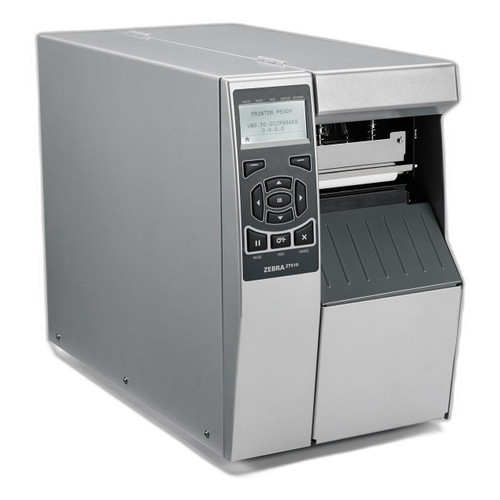
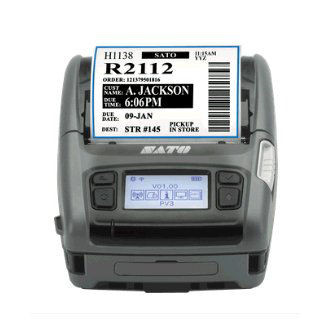
Both the Zebra ZT51042-T210000Z and the Sato WWPV41280 are 203 DPI thermal label printers with Bluetooth and Wi-Fi connectivity, placing them in the same general product class. However, they occupy meaningfully different deployment niches: the Zebra is a stationary 4-inch industrial desktop/workstation printer, while the Sato is a compact mobile unit weighing 1.53 lbs and powered by a rechargeable Li-ion battery. Buyers cross-shopping these should weigh fixed-station throughput and print width against portability, ruggedization, and on-the-move label printing for route delivery or field applications.
In This Guide
- Which printer handles wider media and what label formats does each support?
- How do the two printers differ in portability, ruggedness, and power source?
- What connectivity options and onboard resources does each printer provide for system integration?
- Which should you choose: the ZT51042-T210000Z or the WWPV41280?
- Side-by-Side Specs
- FAQ
Which printer handles wider media and what label formats does each support?
The Zebra ZT51042-T210000Z offers a 4-inch maximum print width, directly accommodating standard 4×6-inch shipping labels and wide warehouse tags without reformatting. The Sato WWPV41280 is limited to a 2.83-inch maximum print width, supporting media from 1 inch to 3.15 inches wide — adequate for route labels, receipts, and compliance tags but unable to produce a full 4×6 shipping label in a single pass.
Both units print at 203 DPI, delivering equivalent barcode resolution. The Zebra spec lists supported symbologies explicitly: QR Code, Code 128, Code 39, UPC, and EAN. Sato's provided specs do not enumerate supported symbologies. Buyers requiring confirmed 2D symbology support should verify the WWPV41280's symbology list with Sato documentation before deployment.
How do the two printers differ in portability, ruggedness, and power source?
The Sato WWPV41280 is explicitly engineered for mobile use: it weighs 1.53 lbs, runs on a rechargeable Li-ion battery, carries an IP54 ingress protection rating (dust-protected and splash-resistant), and is rated for 7-foot drop resistance. Its polycarbonate clamshell form factor and operating temperature range of -4°F to 122°F further support outdoor and harsh-environment route delivery scenarios.
The Zebra ZT51042-T210000Z's provided specifications do not include a weight, IP rating, drop rating, battery option, or operating temperature range. Its form factor is described as a stationary 4-inch thermal printer — consistent with warehouse workstation or dock-door fixed installations. Buyers needing a printer that travels with a worker or withstands moisture, drops, or temperature extremes should note these specs are confirmed only for the Sato unit.
What connectivity options and onboard resources does each printer provide for system integration?
Both printers support Bluetooth and Wi-Fi. The Sato WWPV41280 adds USB as a third wired connectivity option, which the Zebra's provided specs do not list. The Zebra specifies Bluetooth Classic, while the Sato spec does not detail the Bluetooth version.
The Sato WWPV41280 provides detailed onboard resource specs: 256 MB Flash, 128 MB SDRAM, and 128 MB user storage, with an Android operating system noted. The Zebra ZT51042-T210000Z's provided specifications do not include memory capacity, storage, or an embedded OS reference. The Sato's print speed is specified at 5 inches per second; no print speed is provided for the Zebra ZT51042-T210000Z in the supplied specifications.
Which should you choose: the ZT51042-T210000Z or the WWPV41280?
Our take: The ZT51042-T210000Z is the stronger choice when the deployment is a fixed workstation or dock-door station requiring full 4-inch-wide label output — its 4-inch print width directly handles standard 4×6 shipping labels that the Sato's 2.83-inch-maximum media path cannot accommodate. Conversely, the WWPV41280 is the clear choice for any mobile or field scenario: it is rated IP54 for splash resistance, survives 7-foot drops, weighs only 1.53 lbs, and operates on a rechargeable Li-ion battery across -4°F to 122°F — none of which are confirmed in the Zebra's supplied specs. The Sato also adds USB connectivity and specifies 256 MB Flash / 128 MB SDRAM, details absent from the Zebra listing. At identical 203 DPI resolution and matching 1-year warranties, the decision is essentially deployment topology: fixed high-volume station with wide media favors the Zebra; mobile route delivery or field use favors the Sato.
Side-by-Side Comparison
Spec-for-spec, from manufacturer data.
| Specification | Zebra ZT51042-T210000Z | Sato WWPV41280 |
|---|---|---|
| Print Resolution | 203 DPI | 203 DPI |
| Max Print Width | 4 inches | 2.83 inches |
| Print Method | Thermal | Direct Thermal |
| Print Speed | — | 5 ips |
| Form Factor | Stationary 4" printer | Mobile polycarbonate clamshell |
| Power Source | — | Rechargeable Li-ion battery |
| Weight | — | 1.53 lbs |
| IP Rating | — | IP54 |
| Drop Rating | — | 7 ft |
| Operating Temperature | — | -4°F to 122°F |
| Connectivity | Bluetooth Classic, Wi-Fi | Wi-Fi, Bluetooth, USB |
| Bluetooth Type | Classic | — |
| Operating System | — | Android |
| Flash Memory | — | 256 MB |
| SDRAM | — | 128 MB |
| Supported Symbologies | QR Code, Code 128, Code 39, UPC, EAN | — |
| Media Width Range | — | 1" to 3.15" |
| Warranty | 1 year | 1 year |
Frequently Asked Questions
Which should you choose: the ZT51042-T210000Z or the WWPV41280?
The ZT51042-T210000Z is the stronger choice when the deployment is a fixed workstation or dock-door station requiring full 4-inch-wide label output — its 4-inch print width directly handles standard 4×6 shipping labels that the Sato's 2.83-inch-maximum media path cannot accommodate. Conversely, the WWPV41280 is the clear choice for any mobile or field scenario: it is rated IP54 for splash resistance, survives 7-foot drops, weighs only 1.53 lbs, and operates on a rechargeable Li-ion battery across -4°F to 122°F — none of which are confirmed in the Zebra's supplied specs. The Sato also adds USB connectivity and specifies 256 MB Flash / 128 MB SDRAM, details absent from the Zebra listing. At identical 203 DPI resolution and matching 1-year warranties, the decision is essentially deployment topology: fixed high-volume station with wide media favors the Zebra; mobile route delivery or field use favors the Sato.
Can either printer produce a standard 4×6 shipping label?
Only the Zebra ZT51042-T210000Z, with its 4-inch print width, can produce a full 4×6 shipping label in one pass. The Sato WWPV41280 has a maximum print width of 2.83 inches, which is insufficient for a standard 4-inch-wide shipping label.
Is the Sato WWPV41280 or the Zebra ZT51042-T210000Z better suited for outdoor or warehouse floor use?
The Sato WWPV41280 is the only unit with confirmed ruggedization specs: IP54 rating, 7-foot drop resistance, and an operating range of -4°F to 122°F. The Zebra ZT51042-T210000Z's provided specifications include no IP rating, drop rating, or operating temperature range, so its suitability for harsh environments cannot be confirmed from the supplied data.
Which printer offers more connectivity options for integration with tablets or handheld devices?
The Sato WWPV41280 provides three confirmed interfaces — Wi-Fi, Bluetooth, and USB — and runs Android, which facilitates direct integration with Android handhelds and tablets. The Zebra ZT51042-T210000Z confirms Bluetooth Classic and Wi-Fi but does not list USB in the provided specifications. Buyers requiring USB connectivity should verify the Zebra's interface options against its full datasheet.
More Label Printer Comparisons
- Sato WWCLP1701-WAR vs Zebra ZD421
- Sato WWCLP1701-WAR vs Sato WWCLP1C01-WAR
- Sato WWCLP1701-WAR vs Sato WWFX31241-WDB
- Sato WWCLP1C01-WAR vs Zebra ZD421
- Sato WWCLP1C01-WAR vs Sato WWFX31241-WDB
- Zebra ZD421 vs Sato WWFX31241-WDB
Label Printer Buying Guides
Get a Second Opinion on Your Camera Choice
Share your site layout, coverage goals, and budget. Our team will validate the camera selection, flag anything we would change, and recommend products that match the use case.