
Unitech SL220-YMU0G0-SG-AZ3 vs Unitech SL220-VMU0G0-SG-Z3: Specification Comparison
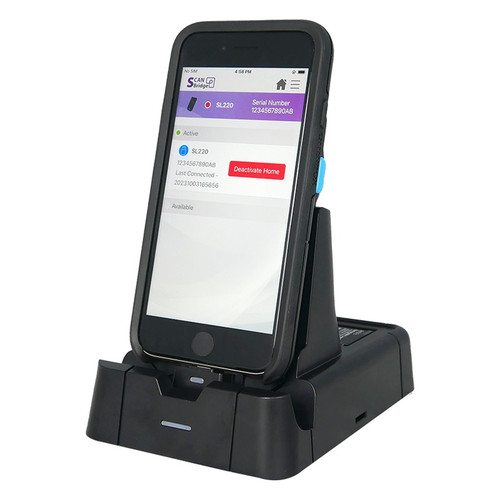
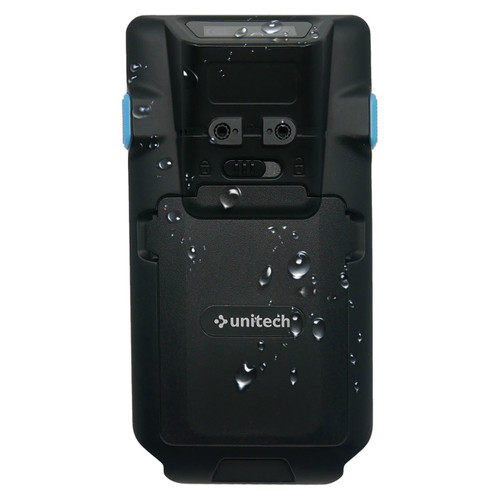
Both the Unitech SL220-YMU0G0-SG-AZ3 and SL220-VMU0G0-SG-Z3 are wired, handheld 2D barcode scanners in the same SL220 platform family, sharing identical form factors, IP65 ratings, and 1150 mAh batteries. They target the same warehouse and retail deployment scenarios. The meaningful differences lie in scan engine specification detail, interface breadth, symbology coverage, form-factor flexibility, and repair-service terms—dimensions that matter to IT buyers standardizing across a mixed iOS fleet or evaluating depot-repair SLAs.
In This Guide
- Which scanner covers more barcode symbologies and delivers a more precisely specified imaging engine?
- How do the two scanners differ in interface options and host-device compatibility?
- Do the two scanners differ in deployment flexibility or warranty repair terms?
- Which should you choose: the SL220-YMU0G0-SG-AZ3 or the SL220-VMU0G0-SG-Z3?
- Side-by-Side Specs
- FAQ
Which scanner covers more barcode symbologies and delivers a more precisely specified imaging engine?
The SL220-YMU0G0-SG-AZ3 spec identifies its engine explicitly as a 1280×800 global-shutter 2D imager with an omnidirectional scan pattern of ±60° skew and pitch across a full 0–360° roll range. Its 1D symbology list adds GS1 Code 32 (PARAF) and TLC39 beyond what the SL220-VMU0G0-SG-Z3 lists, and its 2D list includes Australian Post, British Post, Canadian Post, China Post, Japanese Post, Korea Post, Netherlands Post, and Plane postal codes—none of which appear in the -VMU0G0 spec. Both units share Codablock A/F, Grid Matrix, Dot Code, Aztec, Data Matrix, MaxiCode, QR Code, MicroPDF417, PDF417, and Chinese Sensible (Han Xin).
The SL220-VMU0G0-SG-Z3 describes its engine as a '2D Area Imager' without publishing sensor resolution or shutter type. Its omnidirectional pattern is stated without the angular tolerance figures present in the -YMU0G0 model. Its 1D list omits GS1 Code 32 (PARAF) and TLC39, and its 2D list omits all postal symbologies. For deployments scanning postal or logistics barcodes, the -YMU0G0 carries a documented symbology advantage.
How do the two scanners differ in interface options and host-device compatibility?
The SL220-YMU0G0-SG-AZ3 spec lists three interfaces: USB, Apple Lightning MFi, and USB-C. The presence of an Apple Lightning MFi connector is a critical differentiator for iOS fleets still running Lightning-port iPads or iPhones, as MFi-certified accessories are required for reliable iOS connectivity. Both models specify iOS 15 or later as the supported operating system, and both include a USB-C adaptor (without power cord) in the box.
The SL220-VMU0G0-SG-Z3 spec lists USB-C as its interface. USB and USB-C appear in both models' internal spec fields, but the -VMU0G0 does not list Apple Lightning MFi in any spec field. Buyers standardizing on USB-C-only iOS devices (iPhone 15 and later, iPad Pro/Air with USB-C) will find both units equally capable; those with Lightning-port devices should note the MFi option is only documented for the -YMU0G0.
Do the two scanners differ in deployment flexibility or warranty repair terms?
Both scanners share the same physical scanner dimensions (125 × 64 × 27 mm), cradle dimensions (142 × 96 × 95 mm), weight (102 g), handheld form factor, two-scan-key keypad, and identical package contents. The -YMU0G0 spec additionally notes 'Handheld + Cradle' as scanner type and 'Handheld' as form factor; the -VMU0G0 spec lists 'Handheld / Fixed-Mount' as scanner type, indicating it is also rated for fixed-mount deployment—a distinction absent from the -YMU0G0 spec.
Warranty repair SLA is the starkest operational difference. The SL220-YMU0G0-SG-AZ3 spec states a 3-year warranty with 48-hour repair service. The SL220-VMU0G0-SG-Z3 spec states a 3-year warranty with 5-day ground repair. Both durations are three years, but the -YMU0G0's 48-hour depot turnaround is significantly faster than the -VMU0G0's 5-day ground service—a meaningful SLA gap for high-utilization environments where scanner downtime directly affects throughput.
Which should you choose: the SL220-YMU0G0-SG-AZ3 or the SL220-VMU0G0-SG-Z3?
Our take: The SL220-YMU0G0-SG-AZ3 is the stronger choice when interface breadth, symbology depth, and repair turnaround speed are priorities. Three concrete spec deltas support this: (1) the -YMU0G0 documents a 1280×800 global-shutter imager with ±60° skew/pitch and 0–360° roll tolerance, while the -VMU0G0 lists only '2D Area Imager' without resolution or angular specs; (2) the -YMU0G0 adds Apple Lightning MFi to its interface list alongside USB and USB-C, covering mixed Lightning/USB-C iOS fleets the -VMU0G0 does not document support for; (3) the -YMU0G0 carries a 48-hour depot repair SLA versus the -VMU0G0's 5-day ground repair under the same 3-year warranty. Conversely, the -VMU0G0 spec notes 'Fixed-Mount' capability absent from the -YMU0G0 spec, making it the documented option for fixed-mount kiosk or conveyor deployments. Both units are rated IP65 and carry identical batteries, weights, and dimensions.
Side-by-Side Comparison
Spec-for-spec, from manufacturer data.
| Specification | Unitech SL220-YMU0G0-SG-AZ3 | Unitech SL220-VMU0G0-SG-Z3 |
|---|---|---|
| MPN | SL220-YMU0G0-SG-AZ3 | SL220-VMU0G0-SG-Z3 |
| Product Type | 2D Barcode Scanner (Wired) | 2D Barcode Scanner (Wired) |
| Scan Engine | 2D Imager, 1280×800 global shutter | 2D Area Imager (resolution not specified) |
| Scan Pattern | Omnidirectional ±60° skew/pitch, 0–360° roll | Omnidirectional (angular tolerances not specified) |
| Interface | USB / Apple Lightning MFi / USB-C | USB-C |
| IP Rating | IP65 | IP65 |
| Battery Capacity | 1150 mAh | 1150 mAh |
| Weight | 102 g | 102 g |
| Dimensions (Scanner) | 125 × 64 × 27 mm | 125 × 64 × 27 mm |
| Dimensions (Cradle) | 142 × 96 × 95 mm | 142 × 96 × 95 mm |
| Form Factor / Mounting | Handheld + Cradle | Handheld / Fixed-Mount |
| Keypad | 2 scan keys | 2 scan keys |
| Operating System | iOS 15 or later | iOS 15 or later |
| Postal Symbologies | Australian, British, Canadian, China, Japanese, Korea, Netherlands, Plane Post | — |
| Additional 1D Symbologies | GS1 Code 32 (PARAF), TLC39 | — |
| Warranty | 3-year, 48-hour repair service | 3-year, 5-day ground repair |
| Package Contents | SL220 + Battery pack + USB-C Adaptor (no power cord) | SL220 + Battery pack + USB-C Adaptor (no power cord) |
| Color | White | — |
Frequently Asked Questions
Which should you choose: the SL220-YMU0G0-SG-AZ3 or the SL220-VMU0G0-SG-Z3?
The SL220-YMU0G0-SG-AZ3 is the stronger choice when interface breadth, symbology depth, and repair turnaround speed are priorities. Three concrete spec deltas support this: (1) the -YMU0G0 documents a 1280×800 global-shutter imager with ±60° skew/pitch and 0–360° roll tolerance, while the -VMU0G0 lists only '2D Area Imager' without resolution or angular specs; (2) the -YMU0G0 adds Apple Lightning MFi to its interface list alongside USB and USB-C, covering mixed Lightning/USB-C iOS fleets the -VMU0G0 does not document support for; (3) the -YMU0G0 carries a 48-hour depot repair SLA versus the -VMU0G0's 5-day ground repair under the same 3-year warranty. Conversely, the -VMU0G0 spec notes 'Fixed-Mount' capability absent from the -YMU0G0 spec, making it the documented option for fixed-mount kiosk or conveyor deployments. Both units are rated IP65 and carry identical batteries, weights, and dimensions.
Is the SL220-YMU0G0-SG-AZ3 or SL220-VMU0G0-SG-Z3 better for a warehouse using older Lightning-port iPads?
Based on the published specs, only the SL220-YMU0G0-SG-AZ3 lists Apple Lightning MFi as a supported interface. The SL220-VMU0G0-SG-Z3 spec documents USB-C connectivity only. If your fleet includes Lightning-port iOS devices, the -YMU0G0 is the documented choice; the -VMU0G0 spec does not confirm Lightning compatibility.
Which model has the faster warranty repair turnaround, and does it matter for high-volume operations?
The SL220-YMU0G0-SG-AZ3 spec states 48-hour repair service under its 3-year warranty. The SL220-VMU0G0-SG-Z3 spec states 5-day ground repair under the same 3-year term. For high-utilization environments where a down scanner directly reduces throughput, the -YMU0G0's 48-hour SLA represents a significantly shorter out-of-service window compared to the -VMU0G0's 5-day ground return.
Can either scanner be used in a fixed-mount conveyor or kiosk application?
The SL220-VMU0G0-SG-Z3 spec explicitly lists 'Handheld / Fixed-Mount' as its scanner type, indicating documented support for fixed-mount deployment. The SL220-YMU0G0-SG-AZ3 spec lists 'Handheld + Cradle' only; fixed-mount use is not stated in its published specs. Buyers planning fixed-mount installations should note this distinction and verify with Unitech if fixed-mount use is required for the -YMU0G0.
More Barcode Scanner Comparisons
- Zebra DS8108 vs Datalogic GBT4600-HC-BTK1-HP
- Zebra DS8108 vs Datalogic GD4590-HCK10-HDR-B
- Zebra DS8108 vs Honeywell 1202G-2USB-5BF-N
- Zebra DS8108 vs Datalogic GBT4500-BK-BTK1DRA
- Zebra DS8108 vs Zebra DS3608
- Zebra DS8108 vs Zebra LI3608
Barcode Scanner Buying Guides
Get a Second Opinion on Your Camera Choice
Share your site layout, coverage goals, and budget. Our team will validate the camera selection, flag anything we would change, and recommend products that match the use case.