
Sato WWHC04041-NHN vs Zebra ZT41142-T31A000Z: Specification Comparison
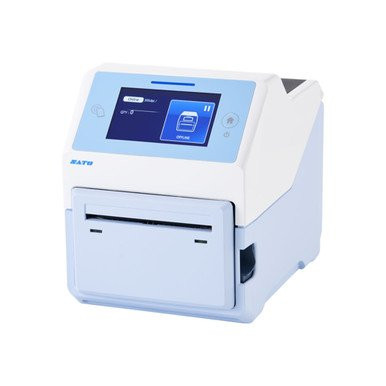
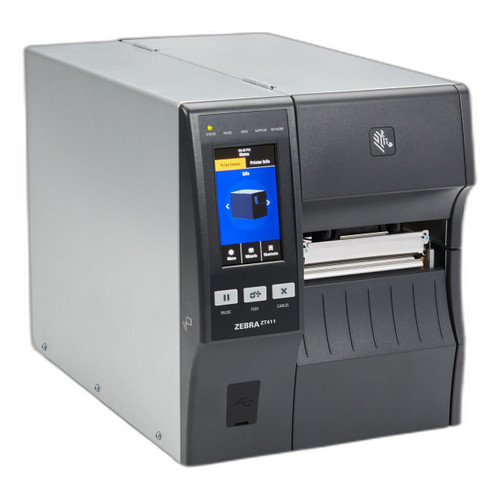
Both the Sato CT4-LX-HC (WWHC04041-NHN) and the Zebra ZT411 (ZT41142-T31A000Z) are 4-inch-class direct thermal and thermal transfer label printers targeting professional label-production environments. However, the Sato is a desktop healthcare unit with an antimicrobial housing designed for clinical settings, while the Zebra ZT411 is a mid-range industrial printer with an integrated 2D scan engine intended for warehouse, logistics, and field service. Buyers evaluating these two will be weighing healthcare-specific design features against higher throughput and integrated scanning capability.
In This Guide
- Which printer delivers faster throughput and higher resolution output?
- How do connectivity options and scanning capability compare between these two printers?
- Which unit is better suited to its intended operating environment and media handling requirements?
- Which should you choose: the WWHC04041-NHN or the ZT41142-T31A000Z?
- Side-by-Side Specs
- FAQ
Which printer delivers faster throughput and higher resolution output?
Print speed is the most immediate throughput differentiator. The Zebra ZT41142-T31A000Z is rated at 14 ips, compared to 8 ips for the Sato WWHC04041-NHN — a 75% speed advantage for the Zebra in peak throughput terms.
On resolution, the Sato specifies 305 dpi as its operating resolution (with a secondary listing of 203 dpi also present in the spec data — buyers should confirm the active print head resolution with the datasheet). The Zebra ZT411 offers selectable resolution of 203, 300, or 600 dpi, giving operators flexibility to trade speed for quality depending on label content complexity.
Maximum print width is nearly identical: 4.09 inches on the Sato versus 4 inches on the Zebra, so neither unit has a meaningful advantage in media width coverage for standard 4-inch label stock.
How do connectivity options and scanning capability compare between these two printers?
Both units share a common connectivity baseline: Ethernet, Wi-Fi, and Bluetooth. The Sato WWHC04041-NHN adds USB as a fourth interface. The Zebra ZT41142-T31A000Z specifies Bluetooth 4.1 with MFi certification — a meaningful detail for iOS-heavy mobile deployments — while the Sato spec does not identify a specific Bluetooth version.
The most significant functional differentiator in this dimension is the Zebra's integrated 2D barcode scan engine supporting QR Code, Data Matrix, PDF417, Code 128, Code 39, UPC, and EAN symbologies. The Sato WWHC04041-NHN carries no scan engine specification, meaning it is a print-only device. For workflows requiring print-and-verify or scan-to-print operation at the point of care or warehouse pick station, the Zebra's onboard scanner is a capability the Sato cannot match.
The Sato includes a 4.3-inch full-color touchscreen display, which is not specified for the Zebra ZT411 in the provided data. A color touchscreen simplifies on-device menu navigation, label format selection, and status feedback — particularly relevant for clinical staff who are not dedicated print operators.
Which unit is better suited to its intended operating environment and media handling requirements?
The Sato WWHC04041-NHN is explicitly engineered for healthcare settings. Its housing is constructed from antimicrobial, disinfectant-resistant plastic — a specification directly relevant to clinical environments where surfaces must withstand repeated chemical wipe-downs with hospital-grade disinfectants. No equivalent housing material specification is provided for the Zebra ZT41142-T31A000Z.
Operating temperature for the Sato is specified as 32°F to 104°F (0°C to 40°C). The Zebra ZT411 operating temperature range is not provided in the supplied specifications.
On media handling, the Sato documents a media width range of 1 inch to 4.1 inches, a 1.5-inch core size, a maximum roll diameter of 5 inches, and a maximum ribbon length of 984 feet. The Zebra ZT411 spec does not include comparable media geometry data in the provided specifications.
Memory and storage favor the Sato: 1 GB DDR3 RAM, 4 GB flash, and 2 GB user storage are specified. The Zebra lists 256 MB SDRAM. Note that the Zebra's memory figure may reflect a base configuration; buyers should verify against the full Zebra datasheet. The Sato is a desktop unit (7.0" × 9.375" × 8.4375", 8.0 lbs); the Zebra's stated weight of 36–40 lbs and rack mount type suggest the spec data for the Zebra ZT411 may include figures from a related industrial model — buyers should validate physical dimensions directly from the ZT411 datasheet before finalizing site planning.
Which should you choose: the WWHC04041-NHN or the ZT41142-T31A000Z?
Our take: The WWHC04041-NHN is the stronger choice when the deployment is healthcare-specific and chemical disinfection of equipment surfaces is a routine requirement. Its antimicrobial, disinfectant-resistant housing is a distinct clinical-grade specification the Zebra ZT41142-T31A000Z does not carry in the provided data, and its 4.3-inch color touchscreen simplifies operation for non-dedicated print users. Conversely, the ZT41142-T31A000Z holds a clear advantage in throughput (14 ips vs. 8 ips), resolution flexibility (up to 600 dpi vs. 305 dpi), and integrated 2D scanning across seven symbologies — capabilities that directly serve warehouse, logistics, and field-service label workflows. Memory specifications also diverge sharply: the Sato provides 1 GB DDR3 RAM versus the Zebra's specified 256 MB SDRAM. Buyers running clinical label printing at the point of care should favor the Sato; buyers requiring high-speed industrial output with onboard barcode verification should evaluate the Zebra ZT411.
Side-by-Side Comparison
Spec-for-spec, from manufacturer data.
| Specification | Sato WWHC04041-NHN | Zebra ZT41142-T31A000Z |
|---|---|---|
| Print Method | Direct Thermal / Thermal Transfer | Thermal (DT/TT not confirmed in specs) |
| Print Speed | 8 ips | 14 ips |
| Print Resolution | 305 dpi | 203 / 300 / 600 dpi (selectable) |
| Max Print Width | 4.09" | 4" |
| Display | 4.3" Full-Color Touchscreen | — |
| Connectivity | USB, Ethernet, Wi-Fi, Bluetooth | Ethernet, Wi-Fi, Bluetooth 4.1 MFi |
| Integrated Scanner | — | 2D (QR, Data Matrix, PDF417, Code 128, Code 39, UPC, EAN) |
| Housing Material | Antimicrobial, disinfectant-resistant plastic | — |
| Operating Temperature | 32°F to 104°F | — |
| RAM | 1 GB DDR3 | 256 MB SDRAM |
| Flash / Storage | 4 GB flash / 2 GB user storage | — |
| Media Width Range | 1" to 4.1" | — |
| Max Roll Diameter | 5" | — |
| Max Ribbon Length | 984 ft | — |
| Mount / Form Factor | Desktop | Rack (per spec — verify against datasheet) |
| Warranty | 1-year | 1-year |
Frequently Asked Questions
Which should you choose: the WWHC04041-NHN or the ZT41142-T31A000Z?
The WWHC04041-NHN is the stronger choice when the deployment is healthcare-specific and chemical disinfection of equipment surfaces is a routine requirement. Its antimicrobial, disinfectant-resistant housing is a distinct clinical-grade specification the Zebra ZT41142-T31A000Z does not carry in the provided data, and its 4.3-inch color touchscreen simplifies operation for non-dedicated print users. Conversely, the ZT41142-T31A000Z holds a clear advantage in throughput (14 ips vs. 8 ips), resolution flexibility (up to 600 dpi vs. 305 dpi), and integrated 2D scanning across seven symbologies — capabilities that directly serve warehouse, logistics, and field-service label workflows. Memory specifications also diverge sharply: the Sato provides 1 GB DDR3 RAM versus the Zebra's specified 256 MB SDRAM. Buyers running clinical label printing at the point of care should favor the Sato; buyers requiring high-speed industrial output with onboard barcode verification should evaluate the Zebra ZT411.
Can the Sato WWHC04041-NHN or the Zebra ZT41142-T31A000Z handle both direct thermal and thermal transfer media?
The Sato WWHC04041-NHN explicitly supports both Direct Thermal and Thermal Transfer print methods. The Zebra ZT41142-T31A000Z is listed as 'Thermal' in the provided specifications without further breakdown between direct thermal and thermal transfer; buyers should confirm supported print methods with the full Zebra ZT411 datasheet before committing to a ribbon-based media strategy.
Is the Sato WWHC04041-NHN or the Zebra ZT41142-T31A000Z the better fit for a hospital or clinic environment?
Based on the provided specifications, the Sato WWHC04041-NHN is purpose-built for healthcare: its antimicrobial, disinfectant-resistant plastic housing is designed to survive routine clinical wipe-downs, and its operating temperature range of 32°F to 104°F covers standard indoor clinical environments. The Zebra ZT41142-T31A000Z carries no equivalent housing material or healthcare-specific rating in the supplied data, and its intended use is documented as warehouse, logistics, and field service.
Which printer is faster, and does that matter for my use case?
The Zebra ZT41142-T31A000Z prints at up to 14 ips versus the Sato WWHC04041-NHN's 8 ips — a 75% speed advantage. For high-volume warehouse or logistics label runs where throughput is the primary constraint, the Zebra's speed advantage is meaningful. For lower-volume clinical labeling at the point of care — patient wristbands, specimen labels, pharmacy bags — the Sato's 8 ips is typically sufficient, and the speed delta is less operationally relevant than the healthcare housing and display interface.
More Label Printer Comparisons
- Sato WWCT04241-NAR vs Zebra ZD4A043-D01X01EZ
- Sato WWCT04241-NAR vs Zebra ZT41142-T010000Z
- Sato WWCT04241-NAR vs Zebra ZT41142-T31A000Z
- Sato WWCT04241-NAR vs Sato WWCT04441-WCN
- Sato WWCT04241-NAR vs Sato WWHC03041-WAN
- Sato WWCT04441-WCN vs Zebra ZD4A043-D01X01EZ
Label Printer Buying Guides
Get a Second Opinion on Your Camera Choice
Share your site layout, coverage goals, and budget. Our team will validate the camera selection, flag anything we would change, and recommend products that match the use case.