
Sato WWCT04441-WCN vs Zebra ZT41142-T31A000Z: Specification Comparison
Both the Sato CT4-LX WWCT04441-WCN and the Zebra ZT41142-T31A000Z are 4-inch-class thermal label printers supporting direct thermal and/or thermal transfer output, placing them in the same general industrial/commercial label-printing category. This comparison evaluates the two across RFID and scanning capability, print performance and resolution, and connectivity and physical deployment profile—the three axes most relevant to buyers choosing between these units for warehouse, retail, or field-service labeling workflows.
In This Guide
- Which printer offers the right RFID or barcode-scanning capability for your workflow?
- How do print speed, resolution, and media handling compare between the two printers?
- Which printer fits better into your network environment and physical deployment setup?
- Which should you choose: the WWCT04441-WCN or the ZT41142-T31A000Z?
- Side-by-Side Specs
- FAQ
Which printer offers the right RFID or barcode-scanning capability for your workflow?
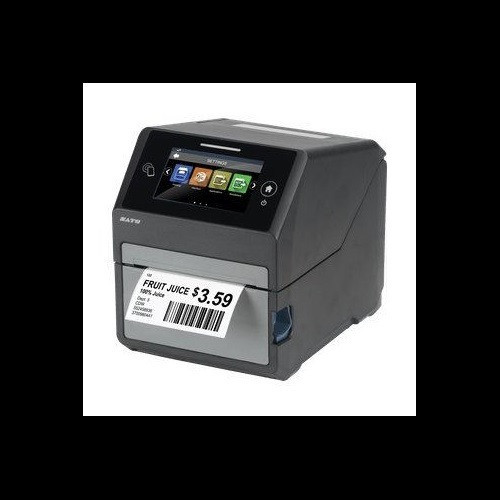
The Sato WWCT04441-WCN includes an integrated HF RFID encoder operating at 13.56 MHz with NFC support. This makes it the clear choice for item-level RFID tagging applications—smart labels, NFC-enabled retail tags, or asset tracking programs that require HF/NFC compliance. No UHF (860–960 MHz) RFID capability is listed in the provided specs for either unit.
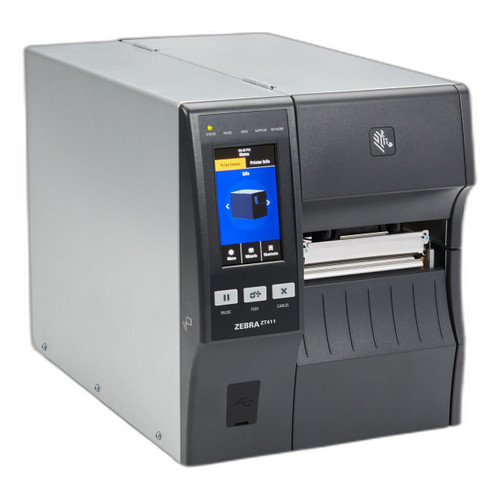
The Zebra ZT41142-T31A000Z carries no RFID encoding capability per its provided specifications. Instead, it integrates a 2D barcode scan engine supporting QR Code, Data Matrix, PDF417, Code 128, Code 39, UPC, and EAN symbologies. This built-in scanner is absent from the Sato's listed specs. For workflows requiring inline barcode verification or scan-to-print without a separate handheld, the Zebra's integrated 2D engine is a meaningful operational differentiator.
How do print speed, resolution, and media handling compare between the two printers?
Print speed differs substantially. The Zebra ZT41142-T31A000Z is rated at 14 ips, while the Sato WWCT04441-WCN is rated at 8 ips. For high-volume label runs where throughput directly affects line speed or fulfillment rates, the Zebra's 75% speed advantage is operationally significant.
On resolution, the Sato WWCT04441-WCN is specified at 305 dpi (with a secondary '_Print Resolution: 203' field also present in the raw data—the marketing copy and model-number suffix consistently indicate 305 dpi as the primary spec). The Zebra ZT41142-T31A000Z lists multiple resolution options: 203, 300, and 600 dpi, depending on printhead configuration. The 600 dpi option exceeds the Sato's 305 dpi ceiling for applications requiring fine-detail printing such as small-font compliance labels or dense 2D codes.
Max print width is nearly equivalent: 4.09 inches for the Sato versus 4 inches for the Zebra (a 6-inch width is also listed in the Zebra specs but may reflect a different model variant—buyers should verify). The Sato supports media widths from 1 to 4.1 inches and specifies a 5-inch max media roll diameter, 1.5-inch core, and up to 984 ft ribbon length. The Zebra's provided specs do not list media roll diameter, core size, or ribbon length, so direct comparison on those points is not possible.
Which printer fits better into your network environment and physical deployment setup?
Both printers share a core connectivity set: Ethernet, Wi-Fi, and Bluetooth. The Sato WWCT04441-WCN adds USB 2.0 to this list; the Zebra ZT41142-T31A000Z specifies Bluetooth 4.1 with MFi certification and 802.11ac Wi-Fi, while the Sato's Wi-Fi standard is not specified in the provided data. MFi certification on the Zebra is relevant for iOS-device-driven workflows.
The Sato WWCT04441-WCN is designated a desktop unit with a 4.3-inch full-color touchscreen, 4 GB flash, 1 GB DDR3 RAM, and 2 GB user storage—a notably richer onboard compute platform than the Zebra, whose provided specs list only 256 MB SDRAM and do not specify flash or user storage. The Sato's touchscreen supports guided operator workflows without a host PC.
Physical footprint and weight diverge sharply. The Sato is listed at 7.3 lbs / 3.3 kg. The Zebra is listed at 36 lbs / 16.33 kg (with a second figure of 40 lbs / 18.14 kg also appearing in the specs). The Zebra is mount-typed as 'Rack' in its specs while the Sato is 'Desktop.' The Zebra's weight and rack designation suggest an industrial or fixed-station installation rather than a benchtop or mobile role, despite the 'Mobile Thermal Printer' product-type label also present in its specs—buyers should confirm the intended form factor with the Zebra datasheet. Both carry a 1-year warranty.
Which should you choose: the WWCT04441-WCN or the ZT41142-T31A000Z?
Our take: The WWCT04441-WCN is the stronger choice when HF/NFC RFID encoding, a touchscreen-guided operator interface, and a compact desktop footprint are required. Its 13.56 MHz RFID encoder and 4.3-inch full-color display are absent from the ZT41142-T31A000Z's spec sheet, and its 7.3 lb weight versus the Zebra's listed 36 lbs makes it far more deployable on a bench or workstation. The ZT41142-T31A000Z, however, holds concrete advantages in three areas: print speed (14 ips versus 8 ips), maximum resolution (600 dpi available versus 305 dpi), and integrated 2D barcode scanning (QR, Data Matrix, PDF417), which the Sato does not list. Buyers running high-volume label operations without RFID requirements—warehouse pick-and-pack, logistics, or field service with iOS devices—will favor the Zebra. RFID-tagging programs, retail item-level NFC applications, or installations needing a self-contained touchscreen interface should evaluate the Sato.
Side-by-Side Comparison
Spec-for-spec, from manufacturer data.
| Specification | Sato WWCT04441-WCN | Zebra ZT41142-T31A000Z |
|---|---|---|
| Print Method | Direct Thermal / Thermal Transfer | Thermal (type not further specified in provided specs) |
| Print Speed | 8 ips | 14 ips |
| Primary Print Resolution | 305 dpi | 203 / 300 / 600 dpi (configuration-dependent) |
| Max Print Width | 4.09 inches | 4 inches |
| RFID Encoding | HF 13.56 MHz / NFC | — |
| Integrated Barcode Scanner | — | 2D (QR, Data Matrix, PDF417, Code 128, Code 39, UPC, EAN) |
| Display | 4.3-inch full-color touchscreen | — |
| Connectivity | Ethernet, Wi-Fi, Bluetooth, USB 2.0 | Ethernet, Wi-Fi 802.11ac, Bluetooth 4.1 MFi |
| Memory (RAM) | 1 GB DDR3 | 256 MB SDRAM |
| Flash / Storage | 4 GB flash / 2 GB user storage | — |
| Media Width Range | 1 inch to 4.1 inches | — |
| Max Media Roll Diameter | 5 inches | — |
| Max Ribbon Length | 984 ft | — |
| Weight | 7.3 lbs / 3.3 kg | 36 lbs / 16.33 kg |
| Mount / Form Factor | Desktop | Rack (also labeled Mobile in product type field—verify with datasheet) |
| Warranty | 1-year | 1-year |
Frequently Asked Questions
Which should you choose: the WWCT04441-WCN or the ZT41142-T31A000Z?
The WWCT04441-WCN is the stronger choice when HF/NFC RFID encoding, a touchscreen-guided operator interface, and a compact desktop footprint are required. Its 13.56 MHz RFID encoder and 4.3-inch full-color display are absent from the ZT41142-T31A000Z's spec sheet, and its 7.3 lb weight versus the Zebra's listed 36 lbs makes it far more deployable on a bench or workstation. The ZT41142-T31A000Z, however, holds concrete advantages in three areas: print speed (14 ips versus 8 ips), maximum resolution (600 dpi available versus 305 dpi), and integrated 2D barcode scanning (QR, Data Matrix, PDF417), which the Sato does not list. Buyers running high-volume label operations without RFID requirements—warehouse pick-and-pack, logistics, or field service with iOS devices—will favor the Zebra. RFID-tagging programs, retail item-level NFC applications, or installations needing a self-contained touchscreen interface should evaluate the Sato.
Does the Sato WWCT04441-WCN or the Zebra ZT41142-T31A000Z print faster?
The Zebra ZT41142-T31A000Z is rated at 14 ips versus 8 ips for the Sato WWCT04441-WCN—a 75% speed advantage. If label throughput is a primary constraint, the Zebra has a clear edge based on the provided specifications.
Which unit supports RFID label encoding?
Only the Sato WWCT04441-WCN includes an RFID encoder, operating at HF 13.56 MHz with NFC support per its specifications. The Zebra ZT41142-T31A000Z does not list any RFID encoding capability in the provided spec data.
Can either printer verify barcodes inline without a separate scanner?
The Zebra ZT41142-T31A000Z includes an integrated 2D scan engine supporting QR Code, Data Matrix, PDF417, Code 128, Code 39, UPC, and EAN—enabling inline read-after-print or scan-to-print workflows. The Sato WWCT04441-WCN does not list an integrated scan engine in its provided specifications.
More Label Printer Comparisons
- Sato WWCT04241-NAR vs Zebra ZD4A043-D01X01EZ
- Sato WWCT04241-NAR vs Zebra ZT41142-T010000Z
- Sato WWCT04241-NAR vs Zebra ZT41142-T31A000Z
- Sato WWCT04241-NAR vs Sato WWCT04441-WCN
- Sato WWCT04241-NAR vs Sato WWHC03041-WAN
- Sato WWCT04441-WCN vs Zebra ZD4A043-D01X01EZ
Label Printer Buying Guides
Get a Second Opinion on Your Camera Choice
Share your site layout, coverage goals, and budget. Our team will validate the camera selection, flag anything we would change, and recommend products that match the use case.