
Sato WT312-403CW-EX1-2 vs Sato WD212-409DW-EX1-2: Specification Comparison
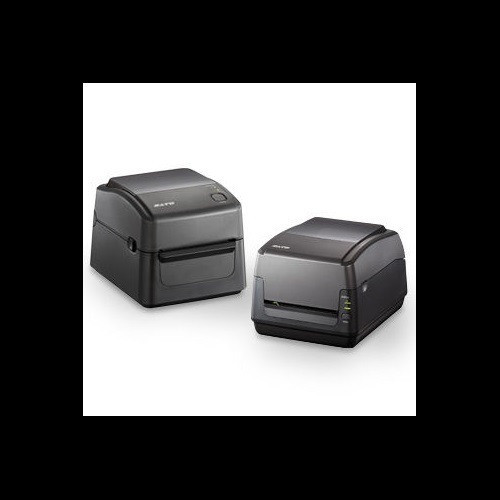
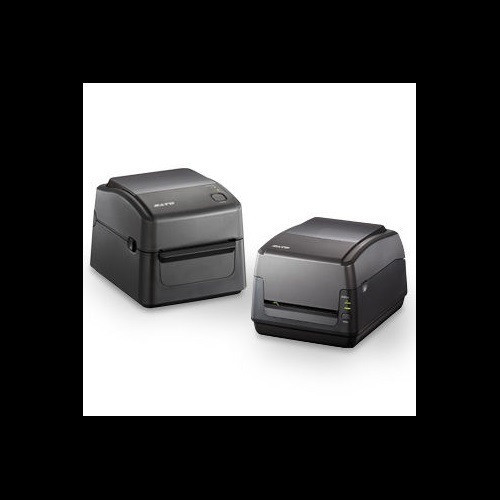
Both the Sato WS4 WT312-403CW-EX1-2 and WD212-409DW-EX1-2 are 203 dpi desktop thermal printers in the same WS4 family, sharing an identical physical footprint, print engine, connectivity suite, and media handling profile. A buyer evaluating either unit is choosing between two sibling desktop label printers targeted at shipping, warehousing, and light industrial labeling. The comparison focuses on the specification-documented differences—primarily feature set (tool-free maintenance, cutter) and USB interface generation—that distinguish one SKU from the other within this otherwise closely matched pair.
In This Guide
- How do print performance and output capabilities compare between the WT312-403CW-EX1-2 and WD212-409DW-EX1-2?
- Which model offers more installer- and operator-friendly features for day-to-day use and servicing?
- Are there any differences in connectivity or on-board memory that affect host integration or label storage?
- Which should you choose: the WT312-403CW-EX1-2 or the WD212-409DW-EX1-2?
- Side-by-Side Specs
- FAQ
How do print performance and output capabilities compare between the WT312-403CW-EX1-2 and WD212-409DW-EX1-2?
Both printers deliver identical core print performance: 203 dpi resolution, 6 ips print speed, and a maximum print width of 4.09 inches. Both support direct thermal and thermal transfer print methods, making them compatible with the same range of label stocks and ribbon types.
Media handling specifications are also shared: a 1" to 4.65" media width range, 1" media core, 5" maximum roll diameter, and a maximum ribbon length of 984 ft. Neither printer holds a measurable edge in output throughput or media flexibility based on the provided specifications.
Which model offers more installer- and operator-friendly features for day-to-day use and servicing?
The WT312-403CW-EX1-2 specification explicitly lists tool-free printhead replacement and an integrated cutter as documented features. These are meaningful operational differentiators: tool-free printhead swap reduces service downtime without requiring a technician, and the built-in cutter enables automatic label separation, which is critical in high-throughput or unattended labeling environments.
The WD212-409DW-EX1-2 specifications do not document tool-free printhead replacement or a cutter. Both units include an LCD display. Buyers who require automated label cutting or minimal-tool maintenance should note that only the WT312-403CW-EX1-2 carries these features in its published spec sheet.
Are there any differences in connectivity or on-board memory that affect host integration or label storage?
Both printers share the same connectivity options—Ethernet, Wi-Fi, Bluetooth, and USB—and identical memory specifications: 16 MB Flash, 32 MB SDRAM, and 16 MB user storage. The WD212-409DW-EX1-2 spec sheet specifies USB 2.0 explicitly; the WT312-403CW-EX1-2 spec lists USB without a version qualifier.
Both units operate on AC 100–240V, 50/60Hz universal power and share the same operating temperature range of 41°F to 104°F (5°C to 40°C). Physical dimensions (8.69" x 10.96" x 7.38") and weight (5.46 lbs / 2.48 kg) are identical. Both carry a 1-year warranty and support LPR analytics.
Which should you choose: the WT312-403CW-EX1-2 or the WD212-409DW-EX1-2?
Our take: The WT312-403CW-EX1-2 is the stronger choice when automated label cutting and tool-free printhead serviceability are operational requirements. Its spec sheet documents an integrated cutter—absent from the WD212-409DW-EX1-2 specification—enabling automatic label separation without operator intervention, a meaningful advantage in higher-volume or unattended workflows. It also lists tool-free printhead and platen replacement, reducing service time and technician dependency; this feature is not documented for the WD212-409DW-EX1-2. All other measured parameters—203 dpi resolution, 6 ips speed, 4.09" max print width, media range, memory, connectivity, weight, power, operating temperature, and warranty—are identical between the two models. The WD212-409DW-EX1-2 explicitly calls out USB 2.0; the WT312-403CW-EX1-2 does not specify USB version. Buyers whose environment requires only basic label printing without a cutter and for whom USB version clarity matters may find the WD212-409DW-EX1-2 adequate, but the WT312-403CW-EX1-2 offers documented feature advantages at the same form factor.
Side-by-Side Comparison
Spec-for-spec, from manufacturer data.
| Specification | Sato WT312-403CW-EX1-2 | Sato WD212-409DW-EX1-2 |
|---|---|---|
| MPN | WT312-403CW-EX1-2 | WD212-409DW-EX1-2 |
| Resolution | 203 dpi | 203 dpi |
| Print Speed | 6 ips | 6 ips |
| Max Print Width | 4.09" | 4.09" |
| Print Method | Direct Thermal / Thermal Transfer | Direct Thermal / Thermal Transfer |
| Built-in Cutter | Yes | — |
| Tool-Free Printhead Replacement | Yes | — |
| Display | LCD | LCD |
| Connectivity | Ethernet, Wi-Fi, Bluetooth, USB | Ethernet, Wi-Fi, Bluetooth, USB 2.0 |
| Flash Memory | 16 MB | 16 MB |
| SDRAM | 32 MB | 32 MB |
| User Storage | 16 MB | 16 MB |
| Media Width Range | 1" to 4.65" | 1" to 4.65" |
| Max Roll Diameter | 5" | 5" |
| Max Ribbon Length | 984 ft | 984 ft |
| Dimensions (W x D x H) | 8.69" x 10.96" x 7.38" | 8.69" x 10.96" x 7.38" |
| Weight | 5.46 lbs (2.48 kg) | 5.46 lbs (2.48 kg) |
| Power | AC 100–240V, 50/60Hz | AC 100–240V, 50/60Hz |
| Operating Temperature | 41°F–104°F (5°C–40°C) | 41°F–104°F (5°C–40°C) |
| Warranty | 1-year | 1-year |
Frequently Asked Questions
Which should you choose: the WT312-403CW-EX1-2 or the WD212-409DW-EX1-2?
The WT312-403CW-EX1-2 is the stronger choice when automated label cutting and tool-free printhead serviceability are operational requirements. Its spec sheet documents an integrated cutter—absent from the WD212-409DW-EX1-2 specification—enabling automatic label separation without operator intervention, a meaningful advantage in higher-volume or unattended workflows. It also lists tool-free printhead and platen replacement, reducing service time and technician dependency; this feature is not documented for the WD212-409DW-EX1-2. All other measured parameters—203 dpi resolution, 6 ips speed, 4.09" max print width, media range, memory, connectivity, weight, power, operating temperature, and warranty—are identical between the two models. The WD212-409DW-EX1-2 explicitly calls out USB 2.0; the WT312-403CW-EX1-2 does not specify USB version. Buyers whose environment requires only basic label printing without a cutter and for whom USB version clarity matters may find the WD212-409DW-EX1-2 adequate, but the WT312-403CW-EX1-2 offers documented feature advantages at the same form factor.
Does the WT312-403CW-EX1-2 or WD212-409DW-EX1-2 include a built-in label cutter?
Based on the published specifications, only the WT312-403CW-EX1-2 lists a cutter as a documented feature. The WD212-409DW-EX1-2 specification does not mention a cutter. If automatic label cutting is required, the WT312-403CW-EX1-2 is the model with that capability on record.
Are the WT312-403CW-EX1-2 and WD212-409DW-EX1-2 the same size and weight?
Yes. Both printers share identical physical dimensions of 8.69" x 10.96" x 7.38" and an identical weight of 5.46 lbs (2.48 kg), so rack space, counter footprint, and mounting considerations are the same for either unit.
Is there any difference in connectivity or memory between these two models?
Both models provide Ethernet, Wi-Fi, Bluetooth, and USB connectivity, along with 16 MB Flash, 32 MB SDRAM, and 16 MB user storage. The WD212-409DW-EX1-2 specification explicitly identifies USB 2.0; the WT312-403CW-EX1-2 lists USB without a version designation. No other connectivity or memory differences are documented in the provided specifications.
More Label Printer Comparisons
- Sato WD212-409DN-EX1-2 vs Zebra ZT51042-T110000Z
- Sato WD212-409DN-EX1-2 vs Zebra ZT11142-D01000FZ
- Sato WD212-409DN-EX1-2 vs Sato WD212-409DW-EX1-2
- Sato WD212-409DN-EX1-2 vs Sato WT312-403DW-EX1-2
- Sato WD212-409DW-EX1-2 vs Zebra ZT51042-T110000Z
- Sato WD212-409DW-EX1-2 vs Zebra ZT11142-D01000FZ
Label Printer Buying Guides
Get a Second Opinion on Your Camera Choice
Share your site layout, coverage goals, and budget. Our team will validate the camera selection, flag anything we would change, and recommend products that match the use case.