
Sato WD212-409DN-EX1-2 vs Zebra ZT11142-D01000FZ: Specification Comparison
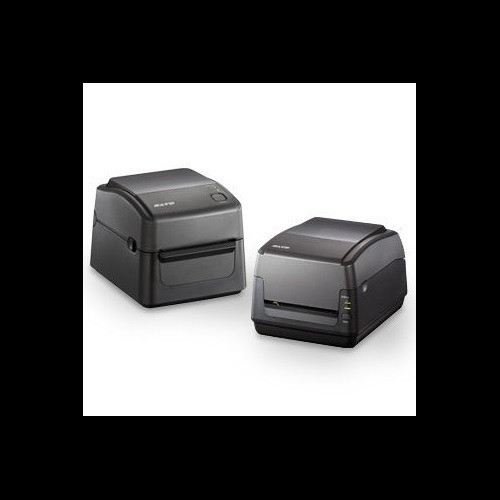
Both the Sato WD212-409DN-EX1-2 and the Zebra ZT11142-D01000FZ are desktop-form-factor label printers operating at 203 DPI resolution — a common cross-shop pairing for warehouse shipping, retail ticketing, and light industrial labeling applications. The Sato unit supports both direct thermal and thermal transfer print modes, while the Zebra is direct thermal only. This comparison evaluates print capability, media handling, and connectivity against published specifications to help installers and procurement buyers select the right unit for their environment.

In This Guide
- How do print speed, resolution, and supported print methods compare between the two printers?
- Which printer accommodates a broader range of media widths, roll sizes, and internal storage?
- How do the two printers differ in connectivity options and operating environment specifications?
- Which should you choose: the WD212-409DN-EX1-2 or the ZT11142-D01000FZ?
- Side-by-Side Specs
- FAQ
How do print speed, resolution, and supported print methods compare between the two printers?
Both printers share an identical 203 DPI resolution, so output sharpness under identical media and ribbon conditions is equivalent on that axis alone. The Sato WD212-409DN-EX1-2, however, specifies a print speed of 6 inches per second (ips), while the Zebra ZT11142-D01000FZ provides no print speed figure in its available specifications — buyers requiring throughput guarantees cannot confirm Zebra's rate from the supplied data.
The more significant differentiator is print method. The Sato supports both direct thermal and thermal transfer, meaning it can accept ribbon-based printing for longer-life labels on non-thermal stock, coated paper, or synthetic media. The Zebra ZT11142-D01000FZ is specified as direct thermal only — no ribbon mechanism is described, and no ribbon length spec is provided. For environments that require thermal transfer (e.g., labels exposed to heat, UV, or chemical contact), the Sato is the only confirmed option between these two.
Which printer accommodates a broader range of media widths, roll sizes, and internal storage?
The Sato WD212-409DN-EX1-2 publishes a complete media profile: minimum media width 1 inch, maximum media width 4.65 inches, maximum print width 4.09 inches, media core size 1 inch, and maximum roll diameter 5 inches. The maximum ribbon length is listed at 984 feet. These figures give installers concrete guidance for media procurement and printer bay planning.
The Zebra ZT11142-D01000FZ lists no media width minimum or maximum, no roll diameter, no core size, and no ribbon spec (consistent with its direct-thermal-only design) in the provided specifications. The Zebra card bullets reference labels '1–4 inches wide,' but this appears in marketing copy rather than a confirmed spec field. Buyers relying on the Zebra for wide or narrow specialty media will need to verify these figures against Zebra's full datasheet before committing.
On internal memory, the Sato specifies 16 MB Flash, 32 MB SDRAM, and 16 MB user storage — providing known headroom for stored label formats and fonts. The Zebra ZT11142-D01000FZ provides no memory specification in the supplied data, so format-storage capacity cannot be evaluated for that unit.
How do the two printers differ in connectivity options and operating environment specifications?
Connectivity is the area of greatest similarity. The Sato WD212-409DN-EX1-2 provides Ethernet, Wi-Fi, Bluetooth, and USB 2.0. The Zebra ZT11142-D01000FZ provides Ethernet, Bluetooth Low Energy (BTLE), and USB; it also lists serial connectivity in its marketing bullets, though serial does not appear in the structured spec fields. Notably, the Sato includes Wi-Fi where the Zebra does not list it — a meaningful difference for mobile or cable-constrained deployments. The Zebra's Bluetooth is specifically identified as BTLE (Bluetooth Low Energy), whereas the Sato's Bluetooth standard is not further qualified in the provided specs.
The Sato WD212-409DN-EX1-2 provides a full operating environment envelope: 41°F–104°F (5°C–40°C), power input AC 100–240 V / 50–60 Hz, weight 5.46 lbs (2.48 kg), and physical dimensions of 8.69" × 10.96" × 7.38". The Zebra ZT11142-D01000FZ supplies none of these values — operating temperature, power requirements, weight, and dimensions are absent from the provided specifications. Site planners and IT buyers cannot confirm the Zebra's power compatibility or rack/bench footprint from the data at hand.
Which should you choose: the WD212-409DN-EX1-2 or the ZT11142-D01000FZ?
Our take: The WD212-409DN-EX1-2 is the stronger choice when buyers need a fully specified, dual-mode desktop printer with confirmed throughput and broad media flexibility. Three concrete spec deltas drive this conclusion: first, the Sato confirms a 6 ips print speed while the Zebra provides no speed figure; second, the Sato supports both direct thermal and thermal transfer (with a 984 ft ribbon capacity), whereas the Zebra is direct thermal only; third, the Sato documents full media range (1"–4.65" width, 5" max roll diameter), operating temperature (41°F–104°F), power input (AC 100–240 V), and 16 MB Flash / 32 MB SDRAM memory — none of which are available for the Zebra in the supplied specs. The Zebra ZT11142-D01000FZ may suit cost-sensitive, ribbon-free, high-volume label runs where direct thermal suffices and full environmental specs can be sourced from Zebra's own datasheet. Until those figures are confirmed, the Sato carries lower procurement risk for mixed-environment or multi-media deployments.
Side-by-Side Comparison
Spec-for-spec, from manufacturer data.
| Specification | Sato WD212-409DN-EX1-2 | Zebra ZT11142-D01000FZ |
|---|---|---|
| Print Method | Direct Thermal / Thermal Transfer | Direct Thermal only |
| Resolution | 203 DPI | 203 DPI |
| Print Speed | 6 ips | — |
| Max Print Width | 4.09" | — |
| Min Media Width | 1" | — |
| Max Media Width | 4.65" | — |
| Max Roll Diameter | 5" | — |
| Max Ribbon Length | 984 ft | — (no ribbon) |
| Connectivity | Ethernet, Wi-Fi, Bluetooth, USB 2.0 | Ethernet, BTLE, USB |
| Wi-Fi | Yes | — |
| Bluetooth Type | Bluetooth (standard not further specified) | Bluetooth Low Energy (BTLE) |
| Memory | 16 MB Flash + 32 MB SDRAM | — |
| User Storage | 16 MB | — |
| Operating Temp Range | 41°F – 104°F (5°C – 40°C) | — |
| Power Input | AC 100–240 V, 50/60 Hz | — |
| Weight | 5.46 lbs (2.48 kg) | — |
| Form Factor | Desktop | Desktop |
| Warranty | 1-year | 1-year |
Frequently Asked Questions
Which should you choose: the WD212-409DN-EX1-2 or the ZT11142-D01000FZ?
The WD212-409DN-EX1-2 is the stronger choice when buyers need a fully specified, dual-mode desktop printer with confirmed throughput and broad media flexibility. Three concrete spec deltas drive this conclusion: first, the Sato confirms a 6 ips print speed while the Zebra provides no speed figure; second, the Sato supports both direct thermal and thermal transfer (with a 984 ft ribbon capacity), whereas the Zebra is direct thermal only; third, the Sato documents full media range (1"–4.65" width, 5" max roll diameter), operating temperature (41°F–104°F), power input (AC 100–240 V), and 16 MB Flash / 32 MB SDRAM memory — none of which are available for the Zebra in the supplied specs. The Zebra ZT11142-D01000FZ may suit cost-sensitive, ribbon-free, high-volume label runs where direct thermal suffices and full environmental specs can be sourced from Zebra's own datasheet. Until those figures are confirmed, the Sato carries lower procurement risk for mixed-environment or multi-media deployments.
Can either the WD212-409DN-EX1-2 or the ZT11142-D01000FZ print on synthetic or long-life labels that resist heat and chemicals?
Only the Sato WD212-409DN-EX1-2 supports thermal transfer printing, which uses a ribbon to bond ink onto synthetic, polypropylene, or polyester label stock — suitable for labels that must resist heat, UV, moisture, or chemicals. The Zebra ZT11142-D01000FZ is specified as direct thermal only, which relies on heat-sensitive media and is not appropriate for long-life or harsh-environment labels. If thermal transfer capability is a requirement, the Sato is the only confirmed option between these two.
Which printer is better suited for a wireless or mobile deployment where running Ethernet cable is not practical?
The Sato WD212-409DN-EX1-2 includes Wi-Fi in its confirmed connectivity spec (alongside Ethernet, Bluetooth, and USB 2.0), making it directly deployable on a wireless network without cabling. The Zebra ZT11142-D01000FZ does not list Wi-Fi in its provided specifications — only Ethernet, BTLE, and USB are noted. For wireless infrastructure integration without a dedicated Ethernet run, the Sato's Wi-Fi support is a confirmed advantage; the Zebra's wireless capability (if any) would need to be verified against Zebra's full product documentation.
Is the WD212-409DN-EX1-2 or the ZT11142-D01000FZ better for high-volume label runs where consumable cost matters?
For high-volume direct thermal runs where label stock is heat-sensitive and no ribbon is needed, the Zebra ZT11142-D01000FZ's direct-thermal-only design eliminates ribbon consumable costs entirely — a stated benefit in its product description. The Sato WD212-409DN-EX1-2 also supports direct thermal mode, so it too can operate ribbon-free when compatible media is loaded, though its confirmed print speed of 6 ips gives buyers a concrete throughput figure for capacity planning. The Zebra's throughput cannot be assessed from available specs. If direct thermal is sufficient and ribbon cost elimination is the primary driver, either unit may qualify — but the Sato's confirmed 6 ips rate provides more planning certainty.
More Label Printer Comparisons
- Sato WD212-409DN-EX1-2 vs Zebra ZT51042-T110000Z
- Sato WD212-409DN-EX1-2 vs Sato WD212-409DW-EX1-2
- Sato WD212-409DN-EX1-2 vs Sato WT312-403DW-EX1-2
- Sato WD212-409DW-EX1-2 vs Zebra ZT51042-T110000Z
- Sato WD212-409DW-EX1-2 vs Zebra ZT11142-D01000FZ
- Sato WD212-409DW-EX1-2 vs Sato WT312-403DW-EX1-2
Label Printer Buying Guides
Get a Second Opinion on Your Camera Choice
Share your site layout, coverage goals, and budget. Our team will validate the camera selection, flag anything we would change, and recommend products that match the use case.