
Brother PJ863 vs Brother PJ822: Specification Comparison
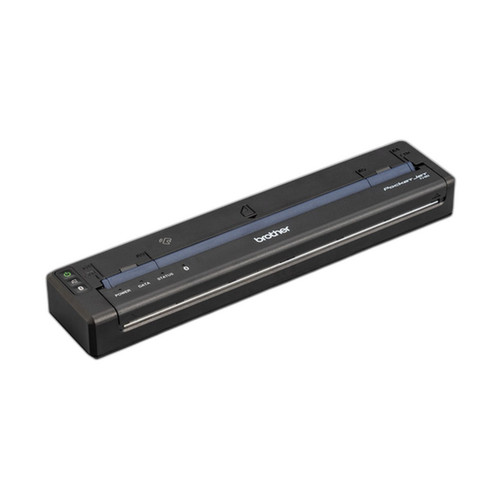
The Brother PJ863 and PJ822 are both PocketJet 8 series portable direct thermal printers targeting field and mobile label printing workflows. Both share an 8.5-inch print width, 3 ips print speed, USB-C connectivity, identical battery and memory configurations, and a tear-bar cutter. The primary differentiator is print resolution: the PJ863 prints at 300 dpi versus the PJ822's 200/203 dpi, and the PJ863 adds Bluetooth wireless connectivity that the PJ822 lacks. This comparison helps buyers choose between the two based on output quality and connectivity requirements.

In This Guide
- Which printer delivers higher output quality for barcodes and fine-text labels?
- Which printer supports more flexible connection methods for mobile and workstation use?
- Are the battery, weight, and portability specifications equivalent between the two models?
- Which should you choose: the PJ863 or the PJ822?
- Side-by-Side Specs
- FAQ
Which printer delivers higher output quality for barcodes and fine-text labels?
The PJ863 is specified at 300 dpi, while the PJ822 carries a dual-listed resolution of 200 dpi (product spec field) and 203 dpi (resolution field). The 300 dpi output of the PJ863 produces finer dot pitch, which directly benefits scannable barcodes such as Code 128 and QR codes — both of which are cited explicitly in the PJ863 spec bullets. The PJ822's 200/203 dpi is a standard thermal resolution adequate for large-text labels and basic receipts, but yields visibly coarser output on dense barcodes or small fonts. For deployments where barcode scan reliability is critical — compliance labeling, asset tracking, or shipping — the PJ863's resolution advantage is material. The PJ822's spec does not cite barcode compatibility explicitly.
Note: the PJ822 carries two resolution values in the provided specs (200 dpi and 203 dpi). Buyers should confirm the authoritative value with Brother documentation before finalizing a purchase decision.
Which printer supports more flexible connection methods for mobile and workstation use?
The PJ863 offers dual connectivity: USB-C (data and charging) plus Bluetooth. This enables wireless printing from smartphones, tablets, and mobile apps without a physical cable — a meaningful advantage in field deployments where workers carry handheld devices. The PJ822 specifies USB-C only, covering both data transfer and charging in a single port, but has no wireless capability listed in its specs. The PJ822 spec does note compatibility with Windows, Mac, and Linux operating systems, which is not explicitly stated for the PJ863. Neither spec lists a specific Bluetooth version or profile (e.g., SPP, BLE) for the PJ863, so buyers integrating with proprietary mobile apps should verify protocol compatibility with Brother directly.
Are the battery, weight, and portability specifications equivalent between the two models?
Both printers are specified identically across battery, weight, and form factor: a replaceable 10.8V rechargeable Li-ion battery rated for 300 cycles, a body weight of 0.95 lbs (430 g) without battery, an 8.5-inch paper width, and a tear-up-edge cutter. Memory is also identical: 256MB DRAM, 64MB flash with 30MB available. Neither spec lists operating temperature range, drop rating, or IP rating, so environmental ruggedization cannot be compared from the provided data. For field rotation use cases, the replaceable battery design on both units supports continuous operation with spare packs — neither model holds an advantage here based on available specs.
Which should you choose: the PJ863 or the PJ822?
Our take: The PJ863 is the stronger choice when print quality and wireless mobility are priorities. It delivers 300 dpi versus the PJ822's 200/203 dpi — a 50% resolution increase that meaningfully improves barcode scan reliability for Code 128 and QR applications. It also adds Bluetooth alongside USB-C, enabling cable-free printing from mobile devices, whereas the PJ822 is USB-C only. In every other measurable dimension — battery (10.8V Li-ion, 300 cycles), weight (0.95 lbs), memory (256MB DRAM/64MB flash), print speed (3 ips), print width (8.5 in), and cutter type — the two models are spec-identical. The PJ822 is appropriate for cost-sensitive, USB-tethered workstation deployments printing large-text labels or receipts where 200/203 dpi suffices. The PJ863 suits mobile field teams requiring wireless connectivity and higher-fidelity barcode output.
Side-by-Side Comparison
Spec-for-spec, from manufacturer data.
| Specification | Brother PJ863 | Brother PJ822 |
|---|---|---|
| Print Resolution | 300 dpi | 200 dpi / 203 dpi (dual-listed in specs) |
| Connectivity | USB-C, Bluetooth | USB-C only |
| Print Speed | 3 ips | 3 ips |
| Print Width | 8.5 in | 8.5 in |
| Print Method | Direct Thermal (no ribbon) | Direct Thermal (no ink or toner) |
| Media Type | Labels (4x6, 4x8 thermal) | Labels and receipts |
| OS Compatibility | Not specified in provided specs | Windows, Mac, Linux |
| Battery | Replaceable Li-ion, 10.8V | Replaceable Li-ion, 10.8V |
| Battery Life | 300 cycles | 300 cycles |
| Weight (without battery) | 0.95 lbs (430 g) | 0.95 lbs (430 g) |
| Memory | 256MB DRAM, 64MB flash (30MB available) | 256MB DRAM, 64MB flash (30MB available) |
| Cutter | Tear up edge | Tear up edge |
| Paper Width | 8.5 in | 8.5 in |
| Warranty | Manufacturer Warranty | Manufacturer Warranty |
| Datasheet | /content/product-datasheets/PJ863.pdf | /content/product-datasheets/PJ822.pdf |
Frequently Asked Questions
Which should you choose: the PJ863 or the PJ822?
The PJ863 is the stronger choice when print quality and wireless mobility are priorities. It delivers 300 dpi versus the PJ822's 200/203 dpi — a 50% resolution increase that meaningfully improves barcode scan reliability for Code 128 and QR applications. It also adds Bluetooth alongside USB-C, enabling cable-free printing from mobile devices, whereas the PJ822 is USB-C only. In every other measurable dimension — battery (10.8V Li-ion, 300 cycles), weight (0.95 lbs), memory (256MB DRAM/64MB flash), print speed (3 ips), print width (8.5 in), and cutter type — the two models are spec-identical. The PJ822 is appropriate for cost-sensitive, USB-tethered workstation deployments printing large-text labels or receipts where 200/203 dpi suffices. The PJ863 suits mobile field teams requiring wireless connectivity and higher-fidelity barcode output.
Does the PJ863 or PJ822 support wireless printing from a phone or tablet?
Only the PJ863 lists Bluetooth connectivity in its specs, enabling wireless printing from mobile devices. The PJ822 specifies USB-C only, so wireless mobile printing is not supported per the available specs. Buyers requiring phone or tablet printing without a cable should select the PJ863.
Is the print quality difference between 300 dpi and 200 dpi noticeable for barcode labels?
Yes, the difference is practically significant for dense barcodes and small fonts. The PJ863 at 300 dpi produces finer dot pitch, and its specs explicitly cite scannable Code 128 and QR code output. The PJ822 at 200/203 dpi is adequate for large-text labels and receipts but is not cited in its specs as barcode-optimized. For compliance or asset-tracking labels where scanner reliability is critical, the PJ863's resolution advantage is meaningful.
Are the battery and form factor the same on both models?
Yes, based on the provided specifications, both printers share identical battery and physical specs: a replaceable 10.8V Li-ion battery rated 300 cycles, a body weight of 0.95 lbs (430 g) without battery, 8.5-inch print/paper width, tear-up-edge cutter, and 256MB DRAM / 64MB flash memory. Neither model holds a portability or endurance advantage over the other per the available data.
More Label Printer Comparisons
- Sato WWCT04241-NAR vs Zebra ZD4A043-D01X01EZ
- Sato WWCT04241-NAR vs Zebra ZT41142-T010000Z
- Sato WWCT04241-NAR vs Zebra ZT41142-T31A000Z
- Sato WWCT04241-NAR vs Sato WWCT04441-WCN
- Sato WWCT04241-NAR vs Sato WWHC03041-WAN
- Sato WWCT04441-WCN vs Zebra ZD4A043-D01X01EZ
Label Printer Buying Guides
Get a Second Opinion on Your Camera Choice
Share your site layout, coverage goals, and budget. Our team will validate the camera selection, flag anything we would change, and recommend products that match the use case.