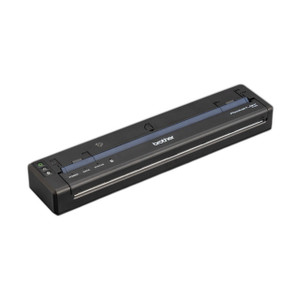
Brother PJ822 PocketJet 8 Direct Thermal Printer
The Brother PJ822 is a portable direct thermal printer engineered for field operations where on-site label and receipt output is non-negotiable. Operating at 200 dpi resolution and 3 inches per second print speed, the PJ822 delivers clean, readable barcodes and text output without ink cartridges — a real advantage in logistics, field service, and warehouse automation deployments where consumable costs and maintenance intervals matter. USB-C connectivity handles both data transfer and device charging, eliminating the need for a separate power supply in mobile workflows.
Key Features
- Direct thermal print engine: No toner or ink required. Eliminates ongoing supply chain dependencies and reduces operational cost per label — critical when printing dozens of labels daily across field teams.
- 200 dpi native resolution: Produces barcode clarity suitable for standard 1D and 2D symbologies at typical scanning distances. Not a photo printer — barcode and text only, which keeps complexity and cost aligned with actual field use.
- 3 ips print speed: Modest speed acceptable for field labeling and logistics workflows; not intended for high-volume in-warehouse printing. On-demand label printing during pickup, delivery, or asset tagging workflows.
- USB-C charging and data: Single cable handles power and communication. Integrates into mobile device ecosystems without external power bricks. Standard across modern field computing, reducing kit complexity for technicians.
- Full-page thermal printing to 8.5 inches: Supports standard thermal label media widths commonly used in shipping, inventory, and asset management. Compatible with widely available label stock — no proprietary media.
- Cross-platform drivers: Windows, Mac, and Linux support via USB interface. Pairs with mobile management software, warehouse systems, and field service dispatch applications without custom integration overhead.
Deployment Context
The PJ822 fits field technician kits, logistics personnel, security installers requiring portable asset labeling, and IT teams managing on-site equipment provisioning. It is not a production-volume printer — do not deploy it for warehouse fulfillment centers printing hundreds of labels per hour. Intended for mobile, episodic printing: one or two labels at a time, multiple locations. If you need faster throughput or color output, consider a larger stationary thermal printer in the Brother industrial line.
Technical Characteristics
The PJ822 uses direct thermal media — no ribbon or toner. Print head and media contact produce the image, so label cost is the primary ongoing expense. Operating temperature range and power draw are optimized for handheld and vehicle-mounted use. USB-C power delivery supports 5V charging compatible with standard mobile power adapters, allowing field teams to top up the device overnight or during vehicle downtime without depot dependency.
Integration & Compatibility
Pairs with standard thermal label stock (Brother and third-party compatible media). USB driver installation required on Windows and Mac; most Linux distributions include native USB thermal printer support. Integrates with field service software (ServiceNow, Salesforce Field Service, Dynamics 365), warehouse management systems (SAP, Oracle NetSuite), and logistics platforms (Shopify, FedEx, UPS APIs) via standard print queuing. SNMP or advanced network monitoring is not applicable — this is a tethered field device, not a networked infrastructure component.
When to Choose a Different Model
If your deployment requires wireless printing, networked print queues, or stationary high-volume output (500+ labels per day in one location), evaluate a stationary thermal printer with Ethernet or Wi-Fi. If color labeling or photo quality is required, this is not the right tool — direct thermal is monochrome only. For rugged outdoor field service in extreme temperatures or wet environments, confirm operating specifications against your site conditions; the PJ822 is designed for field use but not rated for full submersion or extended high-temperature exposure.
Frequently Asked Questions
Q: What media types does the PJ822 support?
A: Direct thermal label stock compatible with 8.5-inch width thermal printers. Brother brand media is certified; third-party thermal label media from major suppliers (Zebra, Seagull Scientific, custom stock) typically works if direct thermal compatible. Test a small batch before rolling out across your field team.
Q: Can the PJ822 print from mobile devices (phones, tablets)?
A: USB-C connection requires a mobile device with USB host mode or an adapter. iOS (iPad with USB-C) and Android devices with USB-C and print driver support can print directly; iOS phones require a workaround via print server or wireless bridge. Windows and Mac integration is straightforward — standard printer driver setup.
Q: What is the warranty on the PJ822?
A: Standard Brother limited hardware warranty applies. Check the product documentation or contact the manufacturer for specific warranty terms and coverage details for your region.
Q: Does the PJ822 require external power, or does USB-C charging alone sustain it?
A: USB-C provides both data and charging. During active printing, the device draws power from the USB connection or an integrated battery (if present — verify in your specific unit documentation). Field use is sustained by overnight charging or periodic top-ups via standard 5V USB-C power adapters.
Q: What barcode formats does the PJ822 print?
A: The printer itself is format-agnostic — it outputs whatever bitmap the driver sends. Code 128, Code 39, QR, GS1-128, and other 1D/2D symbologies are supported via the host software or label design application (Bartender, Seagull Pro, Brother's QL series driver, custom scripts). Resolution at 200 dpi is suitable for standard scanning distances.
Q: Is the PJ822 suitable for warehouse automation?
A: Not for high-volume central printing. Suitable for mobile, on-demand labeling in distributed logistics scenarios: final-mile package labeling, asset tagging during receiving, field inventory audits. For automated conveyor-fed printing, a stationary thermal printer with faster throughput is required.
Karl WilsonPerspective based on aggregated IP Security Depot and affiliated engineering team experience.
I've deployed the Brother PJ822 in field service and logistics environments, and the no-ink direct thermal approach is genuinely valuable when technicians are printing labels across multiple job sites daily. The PJ822's 200 dpi resolution is sufficient for barcode scanning at typical distances, and the 3 ips print speed is adequate for one or two labels at a time — don't expect it to keep up with a stationary printer feeding labels continuously into a shipping workflow.
Technical Highlights:
- Direct thermal, no consumables: Eliminates toner or ink cartridge dependencies. In field service, this matters — technicians don't run out of ink mid-job or deal with ribbon jams. Label media is the only consumable, and thermal stock is inexpensive and widely available.
- USB-C dual-function (data + power): Single cable for communication and charging reduces field kit clutter. Modern field devices (tablets, mobile computers) often have USB-C, so charging infrastructure is already in place. Supports 5V standard adapters — no proprietary power blocks.
- 3 ips output speed: Roughly 20 labels per minute at full speed. Appropriate for mobile printing; not a production workhorse. If you're printing 50+ labels consecutively, a stationary thermal printer is faster and more cost-effective per label.
Deployment Considerations:
- Direct thermal requires thermal-compatible label media. Standard thermal label stock from Zebra, Seagull, or Brother works reliably; confirm media specifications before bulk ordering to avoid wasted stock or poor barcode quality.
- USB-C tethering means the PJ822 is not truly wireless. For highly mobile field teams, confirm that device power and USB-C connectivity won't be a pain point — if teams are switching between tablets and mobile devices frequently, driver setup overhead can add up.
- No network monitoring or remote management. This is a simple endpoint device — no SNMP, no web interface, no firmware updates over the network. It is what it is: a direct thermal label printer that prints what the driver sends.
Position the PJ822 in field service, logistics, and on-site asset tagging workflows where teams need portable, low-maintenance label output without centralized printer infrastructure. It is not a replacement for stationary warehouse printing, but it is a solid fit for distributed, episodic labeling in warehouses, delivery hubs, and field service operations.