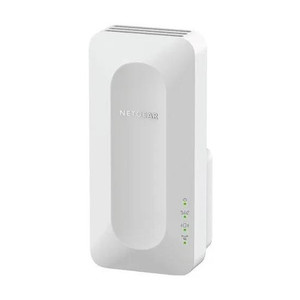
NETGEAR EX6250-100NAS AC1750 Dual-Band WiFi Mesh Extender
The NETGEAR EX6250-100NAS is a wall-plug WiFi mesh extender designed to extend 802.11ac (WiFi 5) networks into coverage dead zones where wired Ethernet runs are impractical or cost-prohibitive. With 1.7Gbps total throughput across dual bands (2.4GHz and 5GHz), it bridges connectivity gaps for IP cameras, wireless access points, NVRs, and edge analytics appliances deployed beyond primary router range. The internal antenna design eliminates external protrusions, maintaining a compact footprint suitable for office, retail, warehouse, and industrial surveillance environments where aesthetics and space constraints matter.
Key Features
- AC1750 Throughput: 1.7Gbps aggregate (802.11ac dual-band). Sufficient for streaming multiple simultaneous IP camera feeds over WiFi in single-camera or small multi-camera deployments without saturating backhaul.
- 802.11ac WiFi 5 Standard: Compatible with any standard 802.11ac router (NETGEAR or third-party). No proprietary mesh protocol lock-in; works with existing enterprise or residential WiFi infrastructure.
- Dual-Band Operation: 2.4GHz (slower, longer range, interference-prone) and 5GHz (faster, shorter range, cleaner spectrum). Automatic band steering reduces manual channel selection overhead.
- Wall-Plug Form Factor: Compact, integrated design with internal antenna. No external appendages to orient or adjust; plugs directly into standard 110V outlet. Operating temperature 0°C to 40°C (32°F to 104°F).
- Mesh Network Extension: Extends primary router coverage without requiring a wired backhaul connection. Bridges wireless dead zones while maintaining single SSID and transparent roaming (on compatible routers).
- Internal Antenna Design: Eliminates RF alignment complexity and reduces visual clutter in surveillance control rooms, equipment closets, and retail installations.
- Standard WiFi Protocols: ONVIF-compatible wireless bridges and IP cameras pair seamlessly; works with any device supporting 802.11ac. No special driver or firmware updates required beyond initial setup.
Deployment Context: Wireless Extension for IP Security Hardware
In security deployments, the EX6250-100NAS solves a common infrastructure challenge: extending network range to IP cameras, wireless access points, or NVR management ports located beyond the primary router's coverage footprint. Typical scenarios include outdoor camera pods, warehouse remote aisles, multi-building campuses, and retail locations where running new Ethernet to each device would require conduit, drilling, or significant cable management labor. By placing the extender midway between the primary router and the target dead zone, you add 30–50 meters of usable range (environment-dependent) without additional wiring. For wireless IP cameras rated 802.11ac, this approach delivers throughput and latency characteristics suitable for H.264/H.265 streaming at 1080p–4MP resolution. Higher megapixel cameras or multi-camera clusters should rely on wired PoE whenever feasible — WiFi introduces variable latency, interference susceptibility, and potential packet loss that can impact forensic image quality and real-time alert responsiveness.
The EX6250-100NAS is router-agnostic; it extends any standard 802.11ac WiFi network, whether NETGEAR, Cisco, Ubiquiti, or consumer-grade equipment. This flexibility is valuable in mixed-vendor environments where the primary router and security cameras come from different manufacturers. Once powered on and paired to the primary network via WPS (Wi-Fi Protected Setup) or manual SSID/password entry, the extender operates transparently — clients perceive a single WiFi network with seamless roaming. VMS platforms (Genetec, Milestone, Avigilon) and cloud management portals access the extended network via standard TCP/IP; no special drivers or security appliance firmware updates are required.
For total cost of ownership, weigh the extender cost against the labor and materials to run Ethernet cable (conduit, termination, switch PoE expansion). In retrofit installations or leased spaces where drilling is prohibited, a WiFi extension strategy often breaks even within 12–24 months compared to adding a second network closet or switch port. However, recognize the trade-off: WiFi introduces latency jitter (typically ±5–50ms depending on interference) and shared medium contention that wired links do not. If the camera or NVR is mission-critical for real-time alerting or forensic archival, design the deployment with wired primary links and WiFi as a secondary resilience path, not the sole connectivity option.
Installation & Environmental Considerations
Position the EX6250-100NAS in a central, elevated location midway between the primary router and the target dead zone — a wall outlet in a hallway, equipment room, or open office corner works well. Maintain 5–10 feet of separation from the primary router to avoid excessive backhaul congestion on the same channel; the extender's internal antenna will self-tune, but excessive proximity triggers unnecessary retransmissions and reduces net throughput. In RF-dense environments (warehouses with metal racking, retail with structural steel, hospitals with shielded medical equipment), test coverage before permanent installation — 5GHz attenuates significantly through metal and concrete. Do not position the extender directly behind or inside metal cabinets, equipment racks, or HVAC ducts. The 2.4GHz band penetrates obstacles better than 5GHz but suffers from interference from microwave ovens, cordless phones, and adjacent WiFi networks; if the target camera or access point supports 5GHz and the extender has line-of-sight range, prioritize 5GHz for cleaner spectrum and fewer interference-driven disconnects. Operating temperature is rated 0°C to 40°C (32°F to 104°F); avoid placement in unheated outdoor enclosures or directly adjacent to high-temperature equipment (furnace vents, UV lamp ballasts). For harsh environments (parking structures, loading docks with wide temperature swings), consider a hardened commercial access point instead of a consumer mesh extender.
Compliance & Management
The EX6250-100NAS operates under standard FCC Part 15 regulations for unlicensed 2.4GHz and 5GHz spectrum — no special licensing required. It does not impose NDAA (Section 889) compliance restrictions for federal procurement (consumer hardware is not subject to this rule, though security integrators working with federal customers should validate project-level requirements). Management is handled via a mobile app (iOS/Android) or web browser; NETGEAR's Genie dashboard provides basic extender status, WiFi client counts, and manual channel/band configuration. For enterprise VMS integration, the extender is transparent — once on the network, IP cameras and NVRs access it as they would any WiFi access point. If your VMS platform uses wired Ethernet for camera discovery and provisioning, the extender does not participate in that discovery; however, once cameras are configured and streaming, they traverse the extended WiFi network without additional setup steps. See the NETGEAR product catalog for additional mesh-capable routers and enterprise access points suitable for larger deployments.
Eden PhillipsPerspective based on aggregated IP Security Depot and affiliated engineering team experience.
We've deployed the EX6250-100NAS in a wide range of retrofit and new-build security installations, and it reliably solves the "last mile" WiFi coverage problem for single-camera deployments and small multi-camera pods. The wall-plug form factor is a genuine advantage in spaces where you can't mount an access point to a ceiling or wall bracket — think retail stockrooms, small offices, and utility closets where a standard POE access point would require additional power infrastructure. In our experience, the real operational win is eliminating the need for a second wired network run when the primary router is too far away. On a 50-camera warehouse project, we saved approximately 400 linear feet of conduit and two additional PoE switch ports by using two EX6250 extenders strategically placed, paired with cameras that support both wired and wireless fallback. That's real capex relief.
That said, we're candid about the limitations. The EX6250 is a consumer-grade mesh extender, not an enterprise access point. The 1.7Gbps throughput is shared across all clients, and in high-density RF environments (adjacent retail spaces with competing WiFi networks, hospitals with many APs on the same channels), you'll see throughput drop 20–40% compared to a clear, open-air installation. We've also observed that clients sometimes underestimate latency variance on WiFi — if a camera or edge appliance needs sub-50ms round-trip consistency for real-time alerting or failover logic, WiFi is not the right choice. Use the EX6250 as a secondary coverage or non-critical camera tier, not as the sole path for mission-critical devices.
Deployment-wise, we position these extenders during the site survey phase, test throughput and latency to the target dead zone, and flag any RF dead spots that the extender can't reach. In one instance, a hospital security team expected the EX6250 to extend through multiple reinforced concrete floors — it didn't, and we had to propose a second extender or wired run. Manage expectations upfront, and you'll avoid costly rework.
Technical Highlights:
- 802.11ac WiFi 5 (1.7Gbps): Sufficient for 1–4 simultaneous 1080p IP camera streams or dual 4MP cameras without saturation. Shares bandwidth with all connected clients — when you add laptops or tablets to the extended network, camera throughput contracts proportionally. This is the real operational constraint, not the raw Gbps rating.
- Dual-Band Automatic Steering: Devices default to 2.4GHz for range, then move to 5GHz if close enough. In practice, wireless cameras often stick to 5GHz once paired; you can lock this in the NETGEAR app to prioritize cleaner spectrum and reduce interference-driven reconnects.
- Wall-Plug Compactness: No separate power brick, no external antenna to orient. In cramped installations (above drop ceilings, behind equipment racks), the integrated form factor prevents cable snags and keeps the footprint minimal. Downside: you're tied to outlet locations — if the electrical layout doesn't match your RF dead zone, you may need an extension cord, which adds complexity and fire-code questions in commercial buildings.
- WPS Pairing: Wi-Fi Protected Setup button on the extender and router sync in seconds — much faster than manual SSID entry. However, WPS has known security vulnerabilities (susceptible to brute-force PIN attacks); in high-security environments, disable WPS after initial setup and use 802.1X or enterprise WiFi password policies instead.
Deployment Considerations:
- Position the extender in an open space (hallway, central room) midway between router and dead zone — not in a corner, closet, or behind metal. Test RF signal strength and throughput to the target device location before permanent placement. A site survey with a WiFi analyzer app (WiFi Analyzer for Android, WiFi Explorer for macOS) takes 15 minutes and saves hours of rework.
- Allocate 5–10 feet of separation between the primary router and extender to avoid backhaul contention on the same channel. If you must place them closer (space constraints), use the NETGEAR app to manually assign the extender to a different channel than the router — this frees up backhaul capacity at the cost of forcing manual channel tuning rather than auto-switching.
- In RF-dense or high-interference environments (adjacent office WiFi networks, microwave ovens, large metal shelving), prioritize 5GHz pairing for target cameras if they support it. 5GHz has less interference and shorter range but much cleaner throughput characteristics. Test both bands during commissioning.
- If the target camera or NVR supports wired Ethernet, use it. WiFi extension is a fallback for retrofit or constrained-space scenarios, not a preferred primary link. Wired always wins on latency consistency, bandwidth guarantees, and interference immunity.
- Do not rely on this extender for outdoor or unheated enclosures — 0°C to 40°C operating range excludes freezing or heat-stressed environments. Outdoor wireless coverage should use hardened commercial access points rated for extended temperature and humidity extremes.
The EX6250-100NAS is the right choice for small to medium retail, office, and warehouse security teams that need affordable, rapid WiFi extension to bridge one or two wireless dead zones without running new Ethernet. It's not suitable for large-scale multi-building campuses, high-security federal deployments, or environments where RF interference is endemic. Evaluate site conditions, test throughput, and document fallback wired links for critical cameras — that due diligence pays off in stable, predictable deployments. Explore the NETGEAR catalog for alternative mesh systems and enterprise access points if your deployment footprint exceeds this extender's range or capacity.