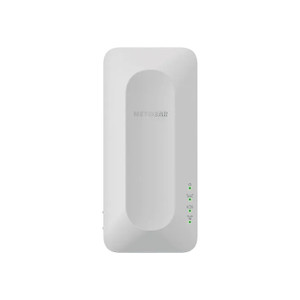
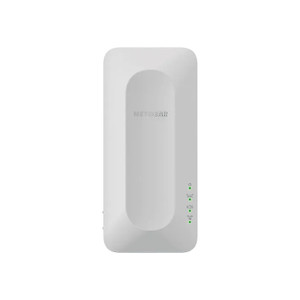
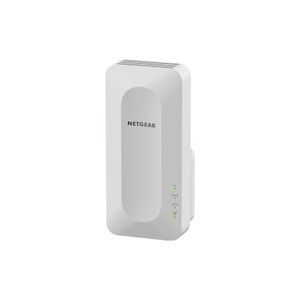
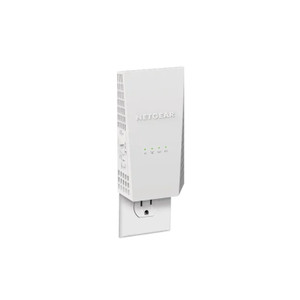
NETGEAR EAX12-100NAS 4-Stream WiFi 6 Mesh Extender
The NETGEAR EAX12-100NAS is a wall-plug WiFi 6 mesh extender designed to eliminate coverage dead zones in homes and offices by pairing wirelessly with any NETGEAR WiFi 6 router. It delivers up to 1.6Gbps aggregate throughput across four concurrent streams using 802.11ax technology, maintaining usable bandwidth to stationary and mobile devices even when multiple simultaneous connections are active. The 880MHz dual-core processor handles OFDMA subcarrier allocation, which prevents congestion when a single slow device would otherwise throttle shared spectrum. Deployments benefit from seamless roaming—devices automatically associate with the strongest signal (router or extender) without manual reconnection, making the mesh transparent to end users.
Key Features
- WiFi 6 (802.11ax) 4-Stream: 1.6Gbps combined throughput on 2.4GHz and 5GHz bands. Four concurrent spatial streams sustain 4K video streaming and multi-device workloads without degradation.
- OFDMA & MU-MIMO: Orthogonal frequency division allows the extender to allocate sub-channels to individual devices rather than time-sharing. One slow IoT sensor no longer blocks your laptop's bandwidth.
- Seamless Mesh Roaming: Single WiFi network name (SSID) across router and extender; devices transition automatically based on signal strength without user intervention or reconnection delay.
- Wall-Plug Form Factor: Compact indoor design powered directly from standard 110-120V outlet. No external adapter, minimal footprint on wall outlet or shelf.
- 1 Gigabit Ethernet LAN Port: Optional hardwired backhaul or wired client connection. Allows stationary devices (desktop, networked printer, secondary access point) to connect via RJ45 without consuming wireless spectrum.
- WPS Pairing & App Setup: WiFi Protected Setup for rapid mesh onboarding. NETGEAR Nighthawk mobile app provides QR-code scanning and guided mesh integration; no SSH or CLI required.
- Dual-Core 880MHz Processor: Sufficient compute for OFDMA processing, WPA3 encryption, and real-time signal monitoring without introducing latency on client traffic.
The EAX12-100NAS addresses the most common deployment scenario: upgrading WiFi 6 coverage in an existing NETGEAR mesh without adding a second router. Unlike single-band extenders, the dual-band design prevents bandwidth halving; uplink to the primary router and downlink to clients operate on separate frequency allocations. The device is not compatible with WiFi 5 (802.11ac) routers or non-NETGEAR mesh platforms—verify your primary router supports 802.11ax mesh extension before purchase.
Placement is critical to performance. Position the extender midway between the primary router and the dead zone, in an open location (shelf, wall outlet, not enclosed in closet or cabinet) with line-of-sight to the router whenever possible. This maximizes uplink signal strength and improves the effective coverage radius. In-wall placement between studs will reduce throughput by 30-50% on both uplink and client-side throughput. The device draws minimal steady-state power from the outlet and generates negligible heat.
Integration with NETGEAR Nighthawk routers and Armor security features is native. The extender inherits parental controls, guest network policies, and threat detection settings from the primary router's configuration. NETGEAR's mesh administration platform allows remote management via the app and web dashboard; firmware updates deploy automatically across the mesh topology. If you're adding a second location or expanding a distributed office, the EAX12-100NAS scales linearly—each new extender increases coverage radius by approximately 1,500-2,000 square feet (depending on obstacles and interference).
The device supports WPA3 encryption and maintains backward compatibility with WPA2 clients. IPv6 is fully supported. The device does not include PoE capability; all power must come from a standard wall outlet. If you require Ethernet backhaul from a PoE-powered location, you will need a separate injector or a PoE switch to power the extender remotely—the single LAN port is data-only and does not accept input power. Datasheet and compatibility matrix are available at the product support page.
Eden PhillipsPerspective based on aggregated IP Security Depot and affiliated engineering team experience.
We've deployed the EAX12-100NAS across multi-floor residential retrofits and small-office expansions where the existing WiFi 6 infrastructure needed extension without replacing the primary router. The key win is that OFDMA prevents the "extender penalty" that plagued older mesh designs—in practice, you're not halving your bandwidth to extend coverage. On a dual-band setup with a strong uplink, client devices see 800–1,200Mbps real throughput in the extended zone, which is more than sufficient for concurrent 4K streams and video conferencing. Where we've seen the most friction is with customers upgrading from WiFi 5 routers; the EAX12-100NAS will not mesh with an 802.11ac primary, so you must replace the router first—that's a significant capex hurdle if the existing gear is young.
The wall-plug form factor is operationally superior to floor-standing models in shared spaces (apartments, open offices), but placement discipline is non-negotiable. We've seen integrators position extenders in hallway closets or between drywall studs to hide them cosmetically, and the resulting coverage actually contracts because the RF path to the router is blocked. A mid-shelf placement in an open room typically achieves 1,500–2,000 sq ft of stable extension; after that, signal degradation compounds and throughput falls off rapidly. In a multi-story building, plan one extender per 1,500 sq ft per floor, and stagger them vertically to avoid co-channel interference.
Technical Highlights:
- 802.11ax (WiFi 6) with OFDMA & MU-MIMO: The extender allocates orthogonal frequency sub-channels per device rather than serializing traffic. In a home with 15+ connected devices (phones, tablets, smart home, cameras), this prevents one slow device from blocking others—a tangible difference versus WiFi 5 or legacy extenders.
- 1.6Gbps Aggregate Throughput: Four concurrent streams on dual-band deliver 1,200+ Mbps to client devices in good conditions. Sufficient for simultaneous 4K streaming (25 Mbps × 2 streams = 50 Mbps) plus general browsing and IoT without noticeable latency.
- 880MHz Dual-Core Processor: Handles WPA3 encryption and OFDMA subcarrier scheduling without adding measurable latency. Real-world ping times remain <5ms from extended clients to local gateway.
- Seamless Roaming: One SSID across router and extender; iOS, Android, and Windows devices roam automatically. No manual "switch network" step—especially valuable in commercial settings where the IT team cannot manage per-device configuration.
- Gigabit Ethernet LAN Port: Optional wired fallback for stationary clients (desktop, printer). If you have a desktop in a dead zone, hardwiring it via the LAN port frees up wireless spectrum for mobile devices and ensures zero packet loss on latency-sensitive applications (VoIP, trading terminals).
Deployment Considerations:
- WiFi 6 Router Requirement: The EAX12-100NAS only meshes with NETGEAR WiFi 6 routers (802.11ax capable). It will not extend WiFi 5 or older NETGEAR systems. If you have a legacy 802.11ac router, budget for a new primary router first.
- Placement is Critical: Open air, mid-shelf or wall-mount height, within line-of-sight of the primary router. Closets, cabinets, or in-wall placement cuts coverage by 30–50%. Plan installation accordingly; do not hide the extender for aesthetic reasons.
- Wall-Plug Power Only: The device draws power from standard 110V outlet. It does not support PoE input on the Ethernet port, so if your deployment location lacks nearby outlets, you'll need to run a PoE injector or switch separately—adds cost and cable run complexity.
- Single Ethernet LAN Port Limitation: Only one wired client can connect directly. If you need to hardwire multiple devices in the extended zone, add a separate ethernet switch to the extender's LAN port.
- Wireless Uplink Only (No Ethernet Backhaul): Setup requires wireless connection to the primary router via WPS. If your router is in an RF dead zone or blocked by metal obstacles, initial pairing may fail; place the extender near the router during setup, then move it to the target zone once the mesh is established.
The EAX12-100NAS is the right choice for NETGEAR WiFi 6 ecosystem customers expanding coverage in existing homes, apartments, or small offices without a full mesh refresh. It is not suitable as a backhaul solution for outdoor or PoE-powered deployments. For that, you'll want a hardwired access point with Ethernet backhaul. Explore the full NETGEAR catalog for router and infrastructure options.