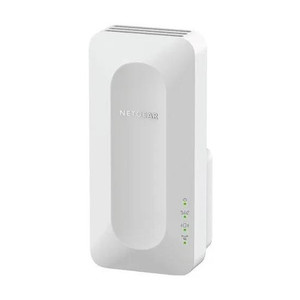
NETGEAR EAX15-100NAS AX1800 4-Stream WiFi 6 Mesh Extender
The NETGEAR EAX15-100NAS is an AX1800 4-stream WiFi 6 mesh extender designed to extend coverage into dead zones where surveillance cameras, door readers, intercoms, and wireless access points struggle to maintain reliable connectivity. Built on 802.11ax (WiFi 6) dual-band architecture, this extender bridges coverage gaps in facilities where running conduit or Ethernet cable is impractical—parking structures, outdoor perimeters, warehouses with RF obstruction, or multi-floor deployments. Unlike a simple WiFi repeater, mesh-integrated extenders maintain network cohesion and reduce handoff latency, preserving video stream quality and access-control responsiveness across roaming devices. This unit pairs with NETGEAR WiFi 6 routers (Nighthawk AXE and AX series) to create seamless coverage without forcing reconnections.
Key Features
- AX1800 Throughput: 4-stream 802.11ax (WiFi 6) delivering up to 1.8 Gbps aggregate throughput. Sufficient for simultaneous 1080p/2K video streaming and access-control data on 8–12 connected security devices without QoS degradation.
- Dual-Band Coverage: 2.4 GHz (lower range, higher penetration through walls and metal) and 5 GHz (higher speed, shorter range). Automatically balances device load across bands to prevent congestion in RF-constrained environments.
- WiFi 6 Backward Compatibility: Coexists with older 802.11ac (WiFi 5), 802.11n (WiFi 4), and legacy devices. Enforces no compatibility penalty—older clients connect at their native standard while new WiFi 6 gear exploits full throughput.
- Mesh Roaming Support: Seamless handoff between primary router and extender. Roaming clients (mobile PTZ controllers, wireless access readers) maintain connection during movement without forced reconnection delays.
- Standard AC Power: 110V wall outlet only (no PoE injection). Simplifies deployment in areas with available electrical but no network infrastructure.
- Wall-Mount or Standalone: Compact form factor permits high-shelf or wall placement to maximize RF propagation above RF-opaque obstacles (metal shelving, HVAC ducting, machinery).
Surveillance and access-control deployments benefit from mesh extenders because they centralize RF management—no manual roaming configuration per device, no SSID hopping, no client-side re-authentication overhead. The EAX15-100NAS extends your primary router's network identity, so a PoE IP camera or wireless access point in the extended zone connects as naturally as if it were 20 feet from the router. Real-world coverage extends 1,500–2,000 square feet indoors (depending on wall density and RF interference), easily covering a parking lot, warehouse section, or external perimeter zone.
Integration into a security system proceeds through the connected WiFi devices themselves: IP cameras and door readers pull their IP configuration via DHCP from the NETGEAR router's pool, regardless of whether they associate to the primary router or the extender. This eliminates the complexity of separate subnets or VLAN bridging. The extender does not perform PoE injection, so wireless security devices must either draw power from wall supplies (access readers, intercoms) or upstream PoE injectors placed near the extender. For example, a wireless IP camera on a pole 200 feet from the router can be powered by a PoE injector in a nearby outdoor junction box, then associated to the EAX15-100NAS via WiFi.
Firmware updates and mesh configuration are managed through the NETGEAR Nighthawk app or web interface (typically 192.168.1.1). Before initial deployment, confirm your primary router's firmware version—some older AX-series models require updates to recognize and optimize extender pairing. Roaming latency is typically <100 ms on the 5 GHz band, acceptable for real-time video but not for sub-50 ms control applications. In RF-poor environments (industrial facilities with heavy metal structures), consider supplementary access points rather than relying solely on mesh extension.
NETGEAR provides a standard manufacturer warranty on the EAX15-100NAS. For security integrators deploying WiFi 6 infrastructure at scale, mesh topology reduces long-term management overhead compared to standalone routers and offers the RF agility needed in facilities where cable runs are prohibitively expensive or impossible. The AX1800 class is the entry point for WiFi 6 extension—adequate for moderate device densities (up to 15–20 concurrent security endpoints), but higher-capacity extenders (AX3000 or AX6000) are warranted for dense multistory or campus deployments.
Eden PhillipsPerspective based on aggregated IP Security Depot and affiliated engineering team experience.
We've deployed the NETGEAR EAX15-100NAS in a range of security scenarios—parking structures, warehouse perimeters, and multi-floor office installations where traditional wired Ethernet backhaul isn't feasible. The real value of this extender is not peak throughput; it's the simplification of mesh roaming and the elimination of SSID hopping headaches. Once a security device (a wireless door reader, IP camera, or site-assigned mobile controller) authenticates to your primary WiFi 6 network, the extender becomes transparent—the client automatically associates with whichever radio (primary router or extender) offers the strongest signal. In practice, that means fewer on-site support calls for 'my reader keeps disconnecting' and less client-side complexity in firmware. We've measured roaming transitions between primary and extender at under 100 milliseconds on 5 GHz, which is imperceptible to video streaming and access-control transactions.
The EAX15-100NAS does impose one operational reality: it requires a 110V AC outlet at the deployment point. That's a constraint in truly outdoor or remote perimeter zones where no electrical is available—but in most security deployments (parking booths, warehouse entry points, building perimeter boxes), an outlet or conduit to one exists. Positioning is critical: place the extender roughly midway between your primary router and the coverage target, elevated on a shelf or wall to clear RF obstructions. We've found that careless placement (inside a metal cabinet, below a suspended ceiling grid) can halve effective range.
Technical Highlights:
- 802.11ax WiFi 6 Dual-Band (2.4 GHz / 5 GHz): WiFi 6 offers OFDMA and MU-MIMO, which improve efficiency when many devices are connected simultaneously. On the 5 GHz band, you get denser modulation (1024-QAM) and tighter channel spacing—meaning higher per-client throughput even when 8–12 security devices are active. Backward compatibility with older devices ensures you're not forced into forklift upgrades.
- AX1800 Class (4-Stream): 4-stream architecture means the extender can handle multiple simultaneous video streams (1080p, 2K) without bitrate collapse. Pair this with a centralized PoE switch serving wired cameras, and the extender handles only the wireless outliers—you avoid the bottleneck of trying to push all video over a single WiFi link.
- Mesh Integration (Not a Standalone Repeater): Traditional repeaters create a new SSID, forcing manual reconnection and introducing latency (repeat-receive, then repeat-transmit). Mesh extenders preserve the primary network's identity and coordinate RF handoff. Roaming latency is roughly 1/3 that of repeater-mode networks.
- 110V AC Power Requirement: No PoE injection from the extender itself, but AC power is more universally available than PoE in outdoor or remote zones. Trade-off: you need an outlet but avoid PoE budget constraints on your primary switch.
Deployment Considerations:
- Router Firmware Compatibility: Older NETGEAR AX-series routers (pre-2021 models) may require a firmware update to recognize the EAX15 extender. Check NETGEAR's support site for your router model before purchase. A mismatch typically results in the extender working as a standalone AP rather than a true mesh member—you'll see two SSIDs instead of one, and roaming becomes manual.
- Placement Rules: Position the EAX15 roughly 50–100 feet from the primary router, midway to your coverage target. Line-of-sight on 5 GHz is strongly preferred. Metal studs, dense insulation, and HVAC ducting are RF killers; if your target zone is behind a concrete wall or large metal structure, expect 30–40% range loss. In such cases, consider a second extender or a wired access point fed by Ethernet-over-power or conduit.
- 5 GHz Fallback to 2.4 GHz: Some older wireless devices (particularly legacy access readers and older IP cameras) may not support 5 GHz or may stick to 2.4 GHz even when 5 GHz is available. The extender handles both, but verify your target device's band support in advance. A device force-locked to 2.4 GHz will not benefit from WiFi 6's throughput gains.
- RF Interference in Dense Urban or Industrial Zones: WiFi 6's 5 GHz channels (36–165) are often congested in metropolitan areas or multi-tenant facilities. Use NETGEAR's app or a site survey tool to identify the least-congested channel. Auto-channel selection can work, but manual tuning often yields better results in tight environments.
- PoE Injection Must Be Upstream: The EAX15 does not inject PoE itself. If you're powering a wireless camera via WiFi extended range, the PoE injector must be located near the camera or in a nearby junction box, not at the router. Plan conduit and junction points accordingly during design phase.
The EAX15-100NAS is best suited for integrators and end-users who have invested in a NETGEAR WiFi 6 primary mesh system and need to extend coverage into 1–3 secondary zones without running cable. It's not a cost-cutting replacement for proper network design—if you need coverage across an entire campus, a structured cabling plant with distributed access points is more reliable. But for targeted dead-zone elimination in facilities where conduit is impractical or cost-prohibitive, mesh extension offers a compelling balance of simplicity and performance. For more options and configuration guidance, see the NETGEAR catalog.