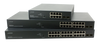
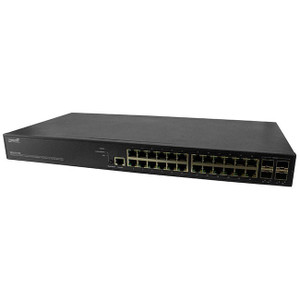
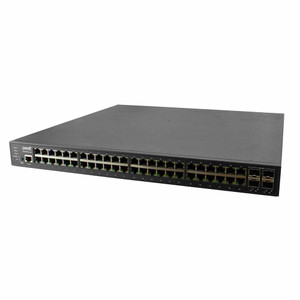
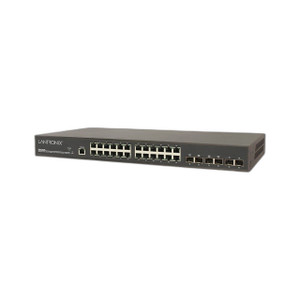
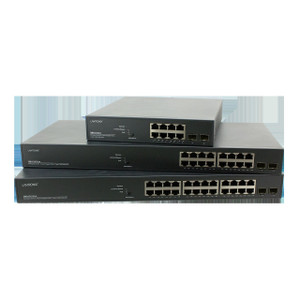
Transition Networks SM16TAT2SA-NA 16-Port Gigabit PoE+ Managed Switch
The Transition Networks SM16TAT2SA-NA is a 16-port managed Gigabit PoE+ switch engineered for IP security and surveillance infrastructure. All 16 ports deliver both Gigabit Ethernet connectivity and PoE+ power (up to 30W per port, 250W total budget) on a single backplane, eliminating the need for separate power distribution in camera-dense deployments. Built-in VLAN, QoS, and trunk-switching capabilities enable network segmentation and traffic prioritization—essential when security video shares infrastructure with general business data.
Key Features
- 16 Gigabit PoE+ Ports: All ports support 10/100/1000 Mbps with up to 30W PoE+ per port. Eliminates separate power injectors and simplifies cabling on distributed camera installations.
- 250W PoE Budget: Powers up to eight high-draw endpoints (PTZ cameras, dual-sensor models, heaters) simultaneously or full 16-port low-power loading. Budget-aware port management prevents brownout conditions.
- Managed Architecture: VLAN tagging, QoS queuing, and static/LACP trunk switching isolate video traffic from general network data and prioritize critical streams during congestion.
- LACP and Static Trunking: Link Aggregation Control Protocol and manual trunk configuration enable uplink redundancy and increased bandwidth to NVRs or core switches without additional fiber runs.
- Compact Form Factor: 6.6 lb desktop/rack-mountable design fits distributed edge deployments (satellite camera hubs, remote access-control clusters) where space is constrained.
- Lifetime Warranty: Factory-new genuine product backed by Transition Networks manufacturer warranty—no time limits on defects or parts replacement.
In practice, this switch becomes the spine for mid-to-large surveillance projects where you're deploying 10–16 IP cameras or access points across a single floor or outdoor perimeter. Each camera receives both data and power from the same port—no external PoE injectors, no parallel AC runs to distributed locations. The managed features matter most in hybrid environments: when your security network shares a core switch with guest WiFi, office phones, and time-clock systems, VLAN isolation keeps video traffic off the general LAN and QoS keeps PTZ movements responsive even during a file-backup window.
Network segmentation through VLAN support is critical for compliance and operability. You can tag all 16 camera ports with VLAN 100, uplink through a trunk to your core infrastructure, and your access-control system on VLAN 200 never touches video data. QoS profiles let you assign priority to video streams, ensuring 24/7 recording bitrate is guaranteed even when a user on the same switch is downloading large files. Static and LACP trunk modes provide two paths to your NVR or core switch—if one uplink goes down, video keeps flowing.
Power budgeting is where this switch forces discipline. With 250W total budget across 16 ports, you can't load all ports with 30W PTZ cameras. But in a real deployment—eight high-power PTZ units on a parking lot, eight standard 5–7W fixed cameras on building perimeter—you fit comfortably within budget and avoid the false economy of undersizing the PoE budget. No switching PSUs, no cascaded injectors. One power connection to the switch.
From a total-cost-of-ownership perspective, this switch pays for itself in cabling labor alone. On a 16-camera site, you eliminate 16 separate PoE injectors (or injector modules), 16 power cables, 16 outlets, and the conduit space to run them. A single power cord to the switch and 16 PoE runs to cameras. Managed switching features add zero capex over unmanaged, but they unlock operational controls that save troubleshooting time and reduce false-alert noise by segregating non-security traffic.
Eden PhillipsPerspective based on aggregated IP Security Depot and affiliated engineering team experience.
We deploy the SM16TAT2SA-NA in medium-to-large surveillance builds where you need full Gigabit throughput and PoE+ on every port without compromise. The key differentiator versus consumer unmanaged switches is the managed feature set—VLAN isolation, QoS, and trunk support—combined with a power budget (250W) that's realistic for mixed-load deployments. On a typical parking-lot or perimeter build with six to eight PTZ units and eight fixed cameras, this switch lets you consolidate power and data in one cabinet with no external injectors. In enterprise environments where you're running security on shared infrastructure (same switch as WiFi access points, door readers, or guest network), VLAN tagging becomes non-negotiable. QoS prevents a user downloading files from starving video priority during an active incident. We've seen organizations move from cascaded injectors and flat networks to this kind of managed architecture and cut their support tickets by 30% in the first quarter—most calls were noise from competing traffic or dropped PTZ connections under load.
Technical Highlights:
- 250W PoE Budget: Non-negotiable for real-world deployments. Eight PTZ cameras at 25–30W each plus eight fixed cameras at 5–7W each uses ~250W total. Undersized budgets force you to daisy-chain injectors or leave ports unpowered. This budget-per-port design with global enforcement prevents over-subscription and avoids the operational headache of cascaded power supplies.
- VLAN and QoS Control: Built-in 802.1p priority queuing and VLAN tag support isolate security traffic from general network data. On a shared infrastructure, this means your video streams get priority during congestion, and access-control systems on a separate VLAN can't accidentally broadcast multicast floods across camera ports. Operational uptime increases measurably when network traffic is segmented.
- LACP Trunk Uplink: Link Aggregation Control Protocol allows you to gang two ports upward to an NVR or core switch at 2 Gbps aggregate bandwidth. In high-density recording scenarios (12+ high-bitrate 4K cameras), this keeps the switch from becoming the bottleneck. Manual static trunking is also supported for environments where LACP negotiation is problematic.
- Managed vs. Unmanaged Trade-Off: Managed adds zero cost over unmanaged models but unlocks VLAN, QoS, and trunking. In 90% of security deployments, you don't need management complexity on every switch—this unit is the sweet spot where managed features unlock operational value without requiring a network engineer to maintain it.
Deployment Considerations:
- Power budget is per-port cumulative, not per-port individual. If all 16 ports are at 30W simultaneously, you exceed 250W. Real deployments rarely max every port; understand your endpoint power draw (typically 5–30W for cameras, 7–15W for access-control readers) and size the site accordingly.
- VLAN configuration requires basic switch knowledge. If your team has never tagged ports before, budget time for a dry run in a lab environment. Once configured, VLAN settings persist through power cycles and require no ongoing management—set it once and forget it.
- Uplink to a core switch or NVR can saturate a single Gigabit port under high-bitrate recording (4K multi-sensor cameras, high-frame-rate PTZ). If you're recording 12+ streams at 20+ Mbps each, use LACP trunking or deploy two SM16TAT2SA units in a tiered architecture.
- Desktop placement requires ventilation on sides and rear (2-3 inches minimum clearance). Rack mounting via optional bracket is standard practice in data-closet deployments; don't stack switches without airflow.
- PoE power draw is real: 250W is ~2 amps at 120V or 1 amp at 250V. Ensure the circuit powering this switch has no other high-load equipment and is on a UPS if 24/7 availability is critical. A power failure on the switch kills both data and power to all connected cameras.
The SM16TAT2SA-NA is the right fit for integrators and end-user security teams building 10–16 camera systems where you want managed switching features (VLAN, QoS, trunking) without the complexity or cost of enterprise-class equipment. It's the workhorse that replaces four external injectors and one unmanaged switch with a single, centralized, power-efficient unit. Explore the full range of Transition Networks switching solutions on the Transition Networks catalog.