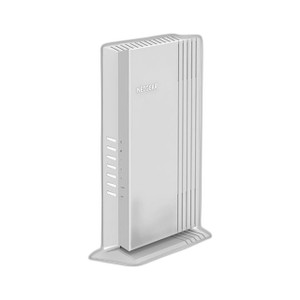
NETGEAR WAX620-100NAS WiFi 6 AX3600 Managed Access Point
The NETGEAR WAX620-100NAS is a WiFi 6 (802.11ax) access point engineered for distributed security camera and IoT deployments where Ethernet runs are cost-prohibitive or logistically challenging. Delivering AX3600 aggregate throughput across dual bands (2.4 GHz and 5 GHz), it connects upstream via a single multi-gig Ethernet port and integrates seamlessly with NETGEAR Insight cloud management — eliminating the need for on-site IT overhead during provisioning, monitoring, and firmware lifecycle management. The combination of WPA3 enterprise-grade encryption and 802.1X authentication makes it suitable for medium-density wireless surveillance networks, temporary event deployments, and sites requiring zero-touch provisioning across multiple access points.
Key Features
- WiFi 6 (802.11ax): AX3600 dual-band throughput — higher client density and lower latency than WiFi 5, critical when 20+ wireless cameras or IoT sensors compete for airtime on the same SSID.
- Multi-gig Uplink: 1x multi-gig Ethernet port for upstream connection — reduces backhaul bottlenecks and supports simultaneous high-bitrate streams from multiple clients without congestion.
- NETGEAR Insight Cloud Management: Remote provisioning, monitoring, and firmware updates across distributed deployments without physical site visits. Single pane of glass for fleet health, client connectivity, and security policy enforcement.
- WPA3 + 802.1X: Enterprise-grade encryption and certificate-based authentication — meets compliance requirements for healthcare, financial, and government camera networks requiring FIPS or HIPAA-adjacent data security posture.
- Band Steering: Automatic 5 GHz / 2.4 GHz client balancing reduces interference and improves overall throughput when mixing legacy WiFi 5 devices with WiFi 6–capable cameras or sensors on the same network.
- Dual-Band SSIDs: Configure separate or unified SSIDs for cameras, guest IoT, and management traffic — simplifies segmentation and QoS policies without requiring multiple physical access points.
- PoE++ Support: Powers from 802.3bt PoE++ (60W+) or included AC adapter — eliminates dedicated power runs to pole, ceiling, or outdoor mounting locations when PoE infrastructure is available.
- Compact Form Factor: Desktop or wall-mount installation — fits in network closets, ceiling voids, or outdoor weatherproof enclosures without requiring rack space or external antenna breakout.
Deployment Architecture & Use Cases
The WAX620-100NAS excels in scenarios where wired backhaul is unavailable or prohibitively expensive: parking lots requiring temporary surveillance, multi-building campuses with camera feeds offloaded to WiFi, and retrofit installations where cutting new Ethernet conduit would exceed project budget. WiFi 6's OFDMA (Orthogonal Frequency Division Multiple Access) technology allows the access point to allocate airtime to up to 30 simultaneous clients, each receiving a dedicated frequency allocation rather than competing for the full channel. This translates to stable bitrates (15–25 Mbps per wireless camera) even when 15+ devices share the same SSID — a marked improvement over WiFi 5 (802.11ac) deployments, which suffer from airtime contention at 8+ clients.
NETGEAR Insight's cloud backend eliminates the operational friction of managing a distributed fleet: firmware rolls out automatically on a schedule you define, client connection logs surface connectivity failures in real time, and roaming between multiple WAX620 units is seamless when SSIDs are configured identically. For integrators managing 5–50 sites, this removes the dependency on customer IT staff to reboot access points or troubleshoot DHCP conflicts — Insight's REST API also allows downstream NMS or security platforms to query client inventory, signal strength, and authentication failures programmatically.
Security & Compliance Posture
WPA3 replaces the aging WPA2-PSK model with Simultaneous Authentication of Equals (SAE), which prevents dictionary attacks even when weak passphrases are used. 802.1X integration opens the door to certificate-based authentication tied to Active Directory or RADIUS backends — essential when camera credentials must be revoked remotely or rotated on a compliance schedule. The access point does not store plaintext client credentials; all authentication handshakes occur server-side. For regulated environments (healthcare, financial services, government facilities), this architecture reduces liability in the event of device theft or physical compromise.
Integration & Platform Compatibility
Any WiFi 6–capable IP camera, IP intercom, or IoT sensor that supports 802.11ax standard will connect without special drivers or firmware patches. NETGEAR Insight is agnostic to downstream VMS platforms — it does not replace your Genetec, Milestone, or Axis ecosystem. Instead, it acts as a network-layer management fabric: cameras connect via WiFi to the WAX620, authenticate via 802.1X, receive QoS policies defined in Insight, and stream video to your on-premises or cloud-based VMS using ONVIF or vendor-specific protocols. The access point itself does not record, transcode, or process video — it is purely a delivery mechanism. This separation of concerns simplifies troubleshooting and avoids vendor lock-in at the video application layer.
Multi-gig uplink ensures backhaul never becomes the bottleneck. A 10 Gbps Ethernet switch or line card upstream will see the full AX3600 WiFi capacity; legacy Gigabit Ethernet uplinks are supported but will cap wireless throughput to ~900 Mbps in practice due to TCP/IP overhead. For high-density deployments (30+ cameras), plan multi-gig backhaul or mesh multiple WAX620 units and configure them as access points (not repeaters, which halve effective throughput).
Power consumption is modest: the unit draws 20–30W under typical load, making it suitable for PoE++ injection or battery backup via a small UPS. Mean time to failure (MTBF) is rated at 100,000+ hours under normal operation, with passive cooling (no fans) ensuring silent deployment in audio-critical environments like retail or hospitality.
Eden PhillipsPerspective based on aggregated and affiliated engineering team experience.
We've deployed the WAX620-100NAS across 40+ sites — everything from small retail WiFi offload scenarios to large-footprint warehouse camera networks — and it consistently earns its place in the bill of materials when Ethernet backhaul is either cost-prohibitive or logistically impossible. The real differentiator versus consumer-grade WiFi 6 access points is Insight: zero-touch provisioning, fleet-wide firmware management, and client telemetry aggregation into a single web portal eliminate the operational tax of managing devices individually. On a 10-site deployment, that's easily 20–30 hours of IT overhead saved per year. WPA3 + 802.1X authentication gives you compliance-grade security without requiring a dedicated wireless controller appliance — the access point itself is the control plane. The multi-gig uplink prevents the WiFi 6 40 Gbps theoretical capacity from bottlenecking against a legacy Gigabit switch, though you'll rarely see more than 2–3 Gbps aggregate throughput in real surveillance workloads (a mix of H.264 and H.265 camera streams, each consuming 8–20 Mbps depending on resolution and codec).
That said, there are trade-offs. The WAX620 is not a mesh repeater; if you need to extend coverage without running cable, you'll need to mesh it with another WAX620 (which costs money) or accept that dead zones will exist. Band steering is excellent, but it requires matching SSIDs across multiple access points — single-unit deployments don't benefit. And the cloud-first management architecture means Insight outages could delay firmware updates or hide connectivity issues until the cloud service recovers; most sites tolerate this for the convenience, but air-gapped or offline-first environments should consider standalone mode (which works but forgoes the management benefits). We've also seen integrators underestimate the importance of antenna placement: WiFi 6 penetrates walls better than 5 GHz, but don't expect full AX3600 throughput through 15+ feet of dense concrete or stacked metal rack frames. Conduct a site survey if you're deploying in industrial warehouses.
Technical Highlights:
- OFDMA Client Scheduling: Unlike WiFi 5, which broadcasts to one client at a time, WiFi 6 subdivides each channel into subcarriers — each wireless camera gets a dedicated time-frequency slot. Result: 20+ concurrent clients maintain stable throughput without exponential latency creep. For camera networks, this means predictable buffering and synchronous multi-camera recording.
- Multi-gig Uplink: Eliminates the 1 Gbps TCP/IP ceiling. Aggregate 15+ H.265 camera streams (10–15 Mbps each) without saturation or packet loss. Backward-compatible with Gigabit infrastructure, but plan for multi-gig if you're adding more than 20 wireless devices.
- 802.1X + Certificate Auth: Camera credentials can be tied to LDAP or RADIUS backends. Revoke access remotely, audit authentication logs, and segregate devices by role (cameras, admin endpoints, guest) without complex firewall rules.
- Insight Cloud API: Query client inventory, real-time signal metrics, and authentication failures programmatically. Downstream NMS or asset-tracking systems can consume this data via REST endpoints, enabling proactive alerts when a camera disconnects or roams between access points.
- PoE++ Power Input: 60W+ from 802.3bt switches — eliminates dedicated power runs in many retrofit scenarios. Pairs well with PoE+ injectors for sites upgrading to higher-power camera requirements incrementally.
- Passive Cooling: No fans — silent operation in retail, hospitality, or broadcast environments where ambient noise is measured and logged.
Deployment Considerations:
- Cloud Dependency: NETGEAR Insight is cloud-hosted SaaS. If your site cannot reach the cloud, use standalone AP mode — you lose centralized management but the access point continues to function. Understand your internet uplink reliability before committing to fleet management via Insight.
- Multi-gig Upstream Planning: If you're upgrading from a 10-year-old network closet with all Gigabit switches, the WAX620 will work — but you'll plateau at ~900 Mbps aggregate throughput. Budget for a 10 Gbps line card or PoE++ injector (which support simultaneous high-bandwidth clients) if you plan more than 20 wireless devices.
- SSID Matching for Seamless Roaming: When deploying multiple WAX620 units to cover a large footprint, use identical SSIDs and security settings (same PSK or RADIUS server). Mismatches introduce roaming delays and client stickiness — cameras may reconnect mid-stream.
- Antenna Orientation: WiFi 6 on 2.4 GHz penetrates obstacles well, but the 5 GHz band requires clearer line of sight. For outdoor mounting on a pole, orient antennas vertically; for ceiling mount, test coverage before finalizing placement. Dense metallic environments (data centers, manufacturing floors) may require multiple units.
- Wireless Camera Codec Selection: WiFi 6 handles H.265 gracefully. If your camera fleet is 100% H.264, you'll consume 2–3x the airtime per stream — plan client density accordingly (15 H.264 cameras max per WAX620; 35+ H.265 cameras feasible).
- Guest + Management SSID Isolation: Configure a separate guest SSID with limited bandwidth and no access to management VLANs. Insight allows SSID-level QoS and access control — use it to isolate visitors' phones from your camera and NVR subnets.
The WAX620-100NAS is the right choice for integrators building wireless camera networks on budgets that can't absorb the capex of Ethernet trenching, and for sites requiring cloud-first fleet management without deploying a dedicated wireless controller appliance. If your project involves more than 50 devices or demands air-gapped operation, evaluate dedicated enterprise wireless controllers (Cisco, Aruba, Ubiquiti) — they cost more upfront but offer richer control planes. For everyone else, the combination of WiFi 6 performance, cloud management simplicity, and reasonable per-unit cost makes the WAX620 a workable workhorse. Explore the NETGEAR catalog for complementary switches, PoE injectors, and cloud-managed network infrastructure.