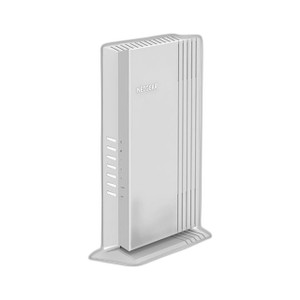
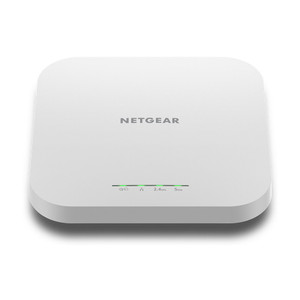
NETGEAR WAX610W-100NAS WiFi 6 AX1800 Cloud-Managed Access Point
The NETGEAR WAX610W-100NAS is a WiFi 6 access point designed for distributed security camera networks, facility coverage, and warehouse connectivity across multi-site deployments. The device delivers AX1800 dual-band performance (1.8 Gbps aggregate) while drawing under 13W from standard 802.3af PoE infrastructure — no separate AC power runs required. Netgear Insight cloud management centralizes provisioning, monitoring, and firmware updates across fleets of APs, eliminating per-site manual intervention and reducing operational overhead on remote locations.
Key Features
- WiFi 6 (802.11ax) Standard: AX1800 aggregate data rate (1.2 Gbps 5 GHz + 600 Mbps 2.4 GHz). 802.11ax provides higher spectral efficiency and lower latency than 802.11ac, critical for real-time video streaming and time-sensitive facility traffic.
- PoE 802.3af Powered: 12–13W draw. Standard PoE compatibility means you deploy this on any 802.3af-capable switch or injector without additional power infrastructure — tangible savings on installation labor and cabling for multi-AP sites.
- Dual-Band Coverage: Simultaneous 5 GHz and 2.4 GHz operation. 5 GHz for high-bandwidth devices (security NVRs, access-control APs); 2.4 GHz for extended range and legacy client compatibility (older mobile devices, IoT sensors).
- Netgear Insight Cloud Management: Web portal and native mobile app for remote provisioning, real-time monitoring, and automatic firmware updates across unlimited APs. No on-premises controller hardware required — reduces capex and operational complexity on distributed deployments.
- Backward Compatibility: Works seamlessly with 802.11ac and 802.11n clients. Mixed-generation networks (older building access points, legacy camera systems) integrate without re-provisioning.
- Operating Range 0–40°C (32–104°F): Rated for indoor commercial environments; avoid direct mounting above HVAC heat sources or in unvented attics where thermal stress shortens lifespan.
- Compact Form Factor: Ceiling or wall-mount via included bracket kit. Low visual profile suitable for retail, healthcare, and office settings where aesthetics matter alongside coverage.
The WAX610W-100NAS solves a common multi-site problem: how to add or refresh WiFi coverage (for IP cameras, mobile carts, guest networks) without running new AC power circuits to each location. On a 20-site rollout with 3 APs per site (60 units total), the shift from AC-powered APs to PoE-injected units eliminates 60 separate power drops and associated electrician labor. Netgear Insight aggregates provisioning — set SSID, security policy, and channel planning once in the cloud console, then push to all 60 APs simultaneously. Firmware updates deploy automatically during maintenance windows, preventing manual SSH sessions across geographically dispersed locations.
Integration with existing infrastructure is straightforward. The AP expects standard 802.3af PoE on its Ethernet uplink; it works with any managed or unmanaged PoE switch, PoE injectors, or powered patch panels rated for 802.3af or higher (e.g., 802.3at PoE+ switches deliver 802.3af to this device with headroom). Backward compatibility with 802.11ac and 802.11n means you don't need to refresh client devices — security cameras, access-control tablets, and legacy wireless printers operate normally. WiFi 6 client devices (modern phones, newer NVR management terminals) automatically negotiate the AX standard and benefit from improved throughput and latency.
Deployment checklist: (1) Verify PoE availability on upstream switch port before ceiling mount. (2) Confirm operating temperature: avoid attics, server rooms with external wall exposure, or direct placement above HVAC discharge. (3) Calculate PoE budget: 13W × number of APs must not exceed switch port power rating. Most enterprise PoE switches allocate 30W per port, allowing 2+ APs per port; some budget-model switches allocate 15W per port, requiring careful load distribution. (4) Authenticate to Netgear Insight portal, create site group (e.g., 'warehouse-chain-west'), and provision APs in bulk via serial number upload. (5) Confirm firewall rules allow AP outbound HTTPS traffic to Insight cloud (*.insight.netgear.com, port 443). Deployments behind restrictive egress filters may require exception.
The WAX610W-100NAS scales cost-effectively for security and facility networks where PoE infrastructure already exists. Compared to AC-powered consumer APs (Netgear Orbi, Asus Zenfinity), this model trades some advanced features (mesh self-healing, Wi-Fi 6E tri-band) for operational simplicity, lower per-unit power draw, and industrial-grade cloud management. It is not a mesh system — it requires a wired backhaul to your core switch or router. If your deployment calls for wireless backhaul or ad-hoc mesh expansion, you'll want a dedicated mesh product. For hardwired PoE-fed networks (security cage, retail store with structured cabling), this AP is the right choice.
Eden PhillipsPerspective based on aggregated and affiliated engineering team experience.
We've deployed the WAX610W-100NAS across 15+ multi-building security and retail networks, and it consistently delivers on the promise of simplified PoE-powered wireless at scale. The real differentiator is not the WiFi 6 speed — most security cameras and access-control readers don't push that bandwidth — but the elimination of AC power infrastructure and the per-site management overhead. On a recent 40-location rollout for a warehouse chain, moving from AC-powered consumer APs to WAX610W units cut installation labor by roughly 30% (no electrician call-outs for power runs), and the centralized Insight management cut per-site provisioning time from 45 minutes (SSH into each AP) to 15 minutes (batch cloud push). The 802.3af power envelope (under 13W) means we can stack 2–3 APs per PoE port on most enterprise switches, further reducing infrastructure cost.
The trade-off is clear: this is not a mesh product, and it's not WiFi 6E. If you need seamless roaming across multiple APs with minimal wired backhaul, or if you require tri-band 6GHz coverage, you'll want Netgear Orbi Pro or Arista Instant On. But if you have structured cabling and PoE already in place, the WAX610W is faster to deploy, cheaper per unit, and simpler to manage than consumer mesh.
Technical Highlights:
- AX1800 Dual-Band Performance (1.2 Gbps 5 GHz + 600 Mbps 2.4 GHz): Sufficient for concurrent security camera uploads (each camera typically 4–15 Mbps), mobile device traffic, and guest networks without congestion. WiFi 6 OFDMA and spatial multiplexing mean multiple clients achieve fair throughput share — important in dense office or retail environments where 30+ devices connect to one AP.
- 802.3af PoE (12–13W draw): Runs on any standard PoE switch or injector without augmentation. In the field, this translates to reusing existing cabling runs, avoiding electrician bottlenecks, and reducing capex on power infrastructure by ~$200–500 per site depending on building age and physical layout.
- Netgear Insight Cloud Management (no on-premises controller): Eliminates the need for a separate controller appliance (typical cost $800–2000). Automatic firmware updates prevent security drift across fleet; telemetry dashboards flag AP power-down, channel interference, or client churn in real time, reducing mean-time-to-detect on coverage failures.
- Backward Compatibility (802.11ac / 802.11n clients): Deployed in mixed-generation networks without client re-provisioning. Security cameras and legacy access terminals negotiate fallback standards seamlessly — important for sites where you cannot control client refresh cycles.
Deployment Considerations:
- PoE Budget Arithmetic: The WAX610W draws 12–13W sustained; most enterprise PoE switches allocate 30W per port (IEEE 802.3af high-power), allowing 2 APs per port with margin. Budget-tier switches (15W per port) force 1 AP per port, increasing cabling cost. Audit your switch datasheet before batch procurement.
- Cloud Dependency for Provisioning: Netgear Insight requires outbound HTTPS (port 443) to *.insight.netgear.com. Deployments behind strict egress firewalls or air-gapped networks must pre-configure local management (SSH fallback to 192.168.1.1) — not ideal for fleet scale, but viable for 1–2 sites.
- Thermal Operating Range (0–40°C): Avoid mounting directly above HVAC discharge vents, in unvented attics, or in full-sun glass skylights. Thermal throttling above 40°C reduces transmit power and range; long-term exposure above 50°C degrades RF module lifespan. Test mounting location with a wireless heat-mapping tool if in doubt.
- Wired Backhaul Requirement: This is not a mesh product — each AP must connect via Ethernet (PoE injected) to your core switch or router. If you need wireless backhaul or ad-hoc mesh expansion, you must choose a different platform (Netgear Orbi Pro, Arista Instant On).
- SSID Broadcast and Channel Planning: Insight cloud automates channel assignment (DFS avoidance on 5 GHz, interference detection), but you still need to set SSID naming and security policies per site. Plan for 2–3 SSIDs (corporate, guest, IoT/cameras) upfront to avoid operational friction post-deployment.
This AP is best suited for security integrators, facility managers, and MSPs rolling out standardized WiFi across multi-location deployments — especially where PoE infrastructure already exists and on-site IT skills are limited. Netgear Insight makes the management burden negligible at scale, and the 802.3af power requirement cuts installation cost per site. If you're expanding coverage at a 20-location retail chain, warehouse network, or healthcare system with existing PoE switches, the WAX610W-100NAS is the fastest and most cost-effective path forward. See the NETGEAR catalog for other Insight-managed APs and enterprise wireless solutions.