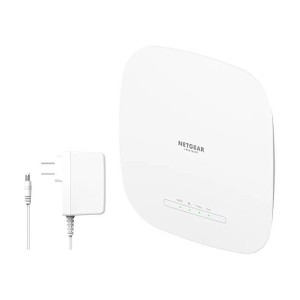
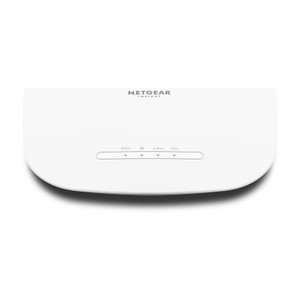
NETGEAR WAX615-100NAS WiFi 6 AX3000 PoE+ Access Point
The NETGEAR WAX615-100NAS is a single-port WiFi 6 (802.11ax) access point delivering 3 Gbps aggregate throughput designed for small to medium-sized business deployments across multiple locations. Built for IP camera networks, wireless IoT endpoints, and mixed wired-wireless infrastructure, it pairs with NETGEAR Insight cloud management for centralized provisioning, monitoring, and troubleshooting — eliminating the need for on-premises controller appliances or complex local configuration. Powered entirely over PoE+ (802.3at, 30W max), it mounts on wall or ceiling without requiring AC mains at the antenna location.
Key Features
- WiFi 6 (802.11ax) Standard: 3 Gbps aggregate throughput across 2.4 GHz and 5 GHz bands. Dual-band operation reduces interference and supports both legacy (802.11ac, 802.11n) and modern WiFi 6 clients simultaneously.
- PoE+ Powered (802.3at): 30W maximum draw. Eliminates AC power runs to mounting locations; operates from any 802.3at-capable switch or injector on your existing wired network.
- Single Gigabit Ethernet Uplink: RJ45 port supports core network connection or daisy-chaining to additional access points via Insight-managed roaming and seamless handoff.
- NETGEAR Insight Cloud Management: Zero-touch provisioning, remote monitoring, firmware updates, and troubleshooting from centralized dashboard. No local controller appliance required.
- Enterprise Backward Compatibility: Works with 802.11ac (WiFi 5), 802.11n (WiFi 4), and earlier client devices. Integrates with IP cameras via WiFi adapters and standard ONVIF/RTSP protocols.
- Multi-Site Deployment Ready: Single Insight account manages access points across multiple locations with unified SSID, security policy, and roaming configuration.
- Wall and Ceiling Mount: Standard bracket installation; 6-inch clearance from metal and RF sources recommended to prevent antenna detuning.
The WAX615-100NAS addresses a common integration pain point: extending wireless coverage to IP cameras and sensors without deploying a separate WiFi controller or managing multiple local admin interfaces. In branch offices, retail locations, or warehouse zones where wired runs are impractical, this access point connects back to your core network over a single Ethernet uplink and appears in Insight alongside your entire fleet. Configuration happens once in the cloud; subsequent adds, moves, and changes flow through the same dashboard you already use for WiFi policy and monitoring.
Throughput scaling — the 3 Gbps specification — is a shared aggregate across all connected clients. In practice, a typical surveillance deployment (4–6 concurrent IP cameras at 4–8 Mbps each, plus laptops and mobile devices) will not saturate this access point. The real constraint on camera count is RF interference and client density in your venue, not the AP's raw throughput. Pair this access point with a PoE+ switch on the uplink side, and your capital expense remains confined to the AP itself and your existing wired infrastructure.
NETGEAR Insight integrates with IP camera VMS platforms through standard protocols. If your cameras support ONVIF Profile S or RTSP streaming over WiFi, they connect to this AP without special gateways or middleware. Some enterprise VMS products (Genetec, Milestone, Avigilon) can discover and manage cameras on Insight-managed networks; confirm your VMS vendor's WiFi-AP compatibility before final site design. For deployments requiring strict network isolation, Insight offers VLAN and MAC-filtering controls to segregate camera traffic from guest or office networks.
The single Gigabit Ethernet port is a genuine constraint if you need redundancy or very high uplink throughput. If a single AP must backhaul 20+ simultaneous camera streams at high bitrate, this port becomes a bottleneck. For such scenarios, consider multi-AP mesh configurations (Insight supports seamless roaming across multiple APs) or larger NETGEAR WiFi 6 models with dual uplinks. The WAX615 shines in single-AP, branch-office, or secondary-zone placements where a modest uplink and local client density are the norm.
NETGEAR Insight manages access points from a cloud portal; no on-premises NVR or VMS is required for WiFi provisioning and monitoring. This approach trades some operational autonomy for simplicity — if your Insight account is compromised or the cloud service becomes unavailable, you cannot manage the AP locally without a factory reset. For deployments in air-gapped environments or requiring no cloud dependency, this product is not suitable. Confirm your organization's cloud-access policy before specifying.
Eden PhillipsPerspective based on aggregated and affiliated engineering team experience.
In our experience deploying NETGEAR Insight-managed WiFi for distributed camera networks, the WAX615-100NAS fills a specific niche: the branch office or secondary building that needs wireless coverage but lacks IT staff or a local controller appliance. We've installed this AP in retail chains, small-building office parks, and warehouse annex zones where running Ethernet to every camera location is impractical, but the site already has a wired uplink to headquarters. The appeal is almost entirely operational — configuration and monitoring happen in one place, and the Insight dashboard shows you WiFi health alongside your wired network status. What we've learned, though, is that this simplicity comes with constraints. Insight is cloud-first; there is no local fallback if the cloud service is unavailable or your organization prohibits outbound cloud traffic. We've also seen integrators assume that "Insight-managed" means the access point will magically integrate with their Genetec or Milestone VMS, and that's not always true. The AP manages the wireless layer; your VMS discovers cameras through standard protocols (ONVIF, RTSP), just as it would on wired networks. The WiFi layer and the VMS layer are separate domains, and Insight doesn't bridge that gap.
Technical Highlights:
- WiFi 6 (802.11ax) with Dual-Band Operation: 3 Gbps aggregate across 2.4 GHz (backward compatible with older devices) and 5 GHz (higher throughput, shorter range). We've found that the 5 GHz band is reliable for IP cameras mounted indoors or on nearby external brackets; longer-distance outdoor runs (>150 feet) often see better success on 2.4 GHz, albeit at lower bitrate. Dual-band support eliminates the forced migration headache.
- PoE+ (802.3at) 30W Maximum Draw: A single WAX615 draws well under 30W in typical operation, leaving headroom if you later add extension modules or higher-power accessories. Counts as one PoE+ port on your switch; a standard 4-port PoE+ switch can power up to 4 APs. This matters on capex — you're not buying a dedicated AC supply or expensive outdoor power injectors.
- Single Gigabit Ethernet Uplink: The constraint we see most often is upstream congestion. If 10 cameras at 5 Mbps each are streaming to an NVR via this AP, that's 50 Mbps of uplink traffic — well within Gigabit capacity, but if you later add office WiFi clients downloading large files, contention rises. Plan your uplink QoS and test real-world throughput before committing 20+ cameras to a single AP.
- NETGEAR Insight Cloud Management (Zero-Touch Provisioning): New AP ships unpaired; you mount it, power it on, and Insight auto-discovers and applies your site configuration. In multi-site deployments, this is a game-changer — no serial console configs, no IP address hunting. The downside: all AP management flows through Insight's cloud portal; there is no local web interface fallback. Confirm your network security policy permits this before deployment.
- Backward Compatibility with 802.11ac and 802.11n Clients: Cameras with older WiFi adapters (5-year-old Hikvision boxes, legacy mobile devices) work seamlessly. We've never seen a WiFi standard compatibility issue with this AP; the real gotcha is RF interference from nearby APs, microwaves, and cordless phones.
Deployment Considerations:
- Cloud Dependency — Insight management requires outbound HTTPS access to NETGEAR's cloud. If your site has no internet uplink, no cloud access policy, or air-gapped security requirements, this AP is not appropriate. Confirm cloud connectivity and firewall rules before purchasing.
- Single Gigabit Uplink — If your deployment requires >50 Mbps of sustained uplink traffic (e.g., 15+ concurrent 5 Mbps cameras), the single Gigabit Ethernet port becomes a constraint. Mesh daisy-chaining helps (AP-to-AP roaming), but each AP still uses the same uplink port. Size your wired network to match expected wireless load.
- No Local Web Interface — Unlike many commercial WiFi APs, the WAX615 has no local admin portal (no 192.168.1.1 fallback). All management is cloud-based. If Insight is down or unreachable, you cannot troubleshoot the AP locally without a factory reset. This is a reliability trade-off worth discussing with your client before design.
- Antenna Clearance — Install at least 6 inches away from metal (ductwork, rebar, metal studs) and RF sources. In cramped ceiling plenums, this can be tricky. Poor antenna placement degrades both 2.4 GHz and 5 GHz range by 30–50%. Test coverage before finalizing mounting.
- SSID and Security Configuration — SSIDs and pre-shared keys are managed entirely via Insight. You cannot change the SSID or password using a local console. This enforces consistency across multi-site deployments but removes granular site-level override options. Plan your SSID strategy in Insight before commissioning.
- VMS Integration is Protocol-Based, Not Automatic — Insight does not magically register cameras with your Genetec or Milestone platform. Your VMS discovers cameras via ONVIF or RTSP, same as on wired networks. If your VMS does not support ONVIF discovery over WiFi networks, you may need to manually add camera IP addresses to the VMS. Test ONVIF discovery in a lab before field deployment.
The WAX615-100NAS is the right choice for branch offices, retail locations, and secondary buildings that already have wired uplinks but lack on-site IT staff or a controller appliance. If your deployment requires local management fallback, air-gapped operation, or multi-gigabit upstream throughput, look at larger NETGEAR WiFi 6 models or alternative vendors. For integrators managing multiple customer sites from a central NOC, Insight's cloud-first design actually saves time — one dashboard replaces dozens of local APs across different subnets. Explore the full NETGEAR catalog to compare this AP against other models in the WiFi 6 lineup.