
Zebra ZD220 vs Sato WWPV41280: Specification Comparison
The Zebra ZD220 (ZD22042-D11G00EZ) and Sato WWPV41280 are both 203 dpi direct-thermal label printers aimed at B2B label production, but they occupy different deployment roles. The ZD220 is a corded desktop unit supporting thermal transfer in addition to direct thermal, while the WWPV41280 is a battery-powered mobile printer with IP54 ingress protection and a 7-foot drop rating. This comparison covers print capability and media handling, ruggedness and operating environment, and connectivity plus power architecture — the three axes that drive the desktop-vs-mobile decision for installers and IT buyers.
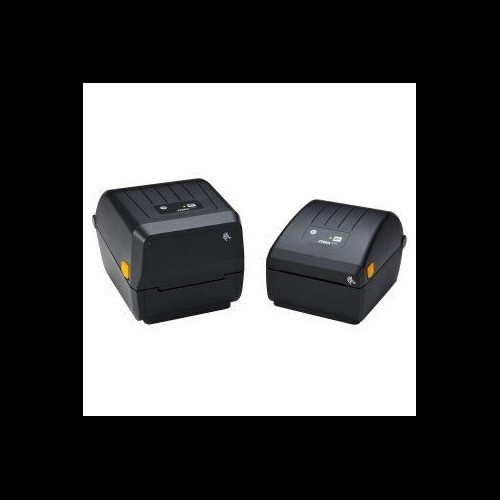
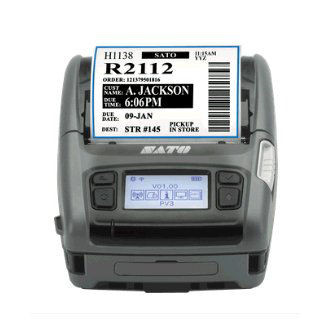
In This Guide
- Which printer delivers broader print capability and media handling?
- Which printer is better suited for harsh or mobile operating environments?
- How do the two printers compare on connectivity, power architecture, and software integration?
- Which should you choose: the ZD220 or the WWPV41280?
- Side-by-Side Specs
- FAQ
Which printer delivers broader print capability and media handling?
Both units resolve at 203 dpi, so label clarity is equivalent at that setting. Print speed favors the Sato WWPV41280 at 5 ips versus the ZD220's 4 ips — a 25% throughput advantage for continuous runs. Maximum print width, however, heavily favors the ZD220: 4.09 inches versus the WWPV41280's 2.83 inches, meaning the ZD220 can produce wider labels, compliance tags, and shelf labels that the Sato physically cannot. Media width range tells the same story — the ZD220 handles 1.00 in. to 4.4 in., while the WWPV41280 is limited to 1 in. to 3.15 in.
The ZD220 also supports thermal transfer printing in addition to direct thermal, which matters for labels requiring solvent, heat, or abrasion resistance such as asset tags and outdoor signage. The WWPV41280 is direct thermal only. For ribbon use, the ZD220 accepts up to 244 ft. (74 m) rolls at 4.3 in. wide — the Sato has no ribbon capability at all. Media roll capacity: the ZD220 accepts rolls up to 5.00 in. outer diameter; the Sato's maximum roll size is not specified in the provided data.
Which printer is better suited for harsh or mobile operating environments?
The Sato WWPV41280 is purpose-built for mobile and harsh environments. It carries an IP54 rating (dust-protected, splash-resistant from all directions) and a 7-foot drop specification — neither metric exists for the ZD220, which is a benchtop unit with no published ingress protection or drop rating.
Operating temperature range also favors the Sato: -4°F to 122°F (-20°C to 50°C) versus the ZD220's 40°F to 105°F (4.4°C to 41°C). The Sato's lower cold-weather floor is 44°F below the ZD220's, making it viable in cold-storage, outdoor staging, or unheated warehouse environments where the ZD220 would be out of spec. Storage temperature for the ZD220 extends to -40°F / 140°F, though that is a storage-only figure. The WWPV41280's storage temperature range is not specified in the provided data. For any deployment involving field technicians, loading docks, or mobile carts subject to drops and moisture, the Sato's certified ruggedness removes risk the ZD220 cannot address.
How do the two printers compare on connectivity, power architecture, and software integration?
Connectivity is a clear differentiator. The ZD220 (this SKU) provides USB only. The Sato WWPV41280 adds Wi-Fi and Bluetooth alongside USB, enabling wireless printing from Android devices, tablets, or WMS systems without cable tethering. The Sato also runs Android as its operating system, supporting on-device apps and direct integration with Android-based workflows.
Power architecture is fundamentally different. The ZD220 requires 100–240 VAC / 50–60 Hz mains power and is physically tethered to an outlet. The WWPV41280 runs on a rechargeable Li-ion battery — no outlet required. For fixed print stations with reliable AC power, the ZD220's wired connection is stable; for field, warehouse floor, or roving-cart deployments, the Sato's battery architecture is the only viable option.
On programming languages, the ZD220 supports ZPL II, EPL 2, and XML — three widely adopted label programming languages with broad integrator toolchain support. The WWPV41280's supported programming languages are not specified in the provided data, which is a gap buyers should confirm with Sato before committing to integration. Memory is identical on paper: both carry 256 MB Flash and 128 MB SDRAM; the Sato adds 128 MB user storage.
Which should you choose: the ZD220 or the WWPV41280?
Our take: The ZD220 is the stronger choice when the print station is fixed, label widths exceed 2.83 inches, or thermal transfer durability is required; the WWPV41280 is the stronger choice for mobile, wireless, or environmentally demanding deployments. Three concrete spec deltas drive that split: the ZD220's maximum print width of 4.09 in. versus the Sato's 2.83 in. eliminates the Sato for wider-format label jobs; the Sato's operating temperature floor of -4°F versus the ZD220's 40°F floor makes the Sato the only compliant option in cold-storage or outdoor environments; and the Sato's IP54 plus 7 ft. drop rating versus no published rating on the ZD220 removes risk in mobile field use. Buyers standardizing on ZPL II workflows should verify WWPV41280 language support before purchasing, as it is not documented in the provided specs.
Side-by-Side Comparison
Spec-for-spec, from manufacturer data.
| Specification | Zebra ZD220 | Sato WWPV41280 |
|---|---|---|
| Print Resolution | 203 dpi | 203 dpi |
| Print Method | Direct Thermal or Thermal Transfer | Direct Thermal only |
| Max Print Width | 4.09 in. (104 mm) | 2.83 in. |
| Print Speed | 4 ips (102 mm/s) | 5 ips |
| Media Width Range | 1.00 in. to 4.4 in. | 1 in. to 3.15 in. |
| Connectivity | USB | Wi-Fi, Bluetooth, USB |
| Power | 100–240 VAC / 50–60 Hz | Rechargeable Li-ion Battery |
| Operating Temp | 40°F to 105°F (4.4°C to 41°C) | -4°F to 122°F (-20°C to 50°C) |
| IP Rating | — | IP54 |
| Drop Rating | — | 7 ft |
| Weight | 2.5 lbs (1.1 kg) | 1.53 lbs |
| Memory Flash / SDRAM | 256 MB / 128 MB | 256 MB / 128 MB |
| User Storage | — | 128 MB |
| Operating System | — | Android |
| Programming Languages | ZPL II, EPL 2, XML | Not specified |
| Form Factor | Desktop (corded) | Mobile clamshell (polycarbonate) |
Frequently Asked Questions
Which should you choose: the ZD220 or the WWPV41280?
The ZD220 is the stronger choice when the print station is fixed, label widths exceed 2.83 inches, or thermal transfer durability is required; the WWPV41280 is the stronger choice for mobile, wireless, or environmentally demanding deployments. Three concrete spec deltas drive that split: the ZD220's maximum print width of 4.09 in. versus the Sato's 2.83 in. eliminates the Sato for wider-format label jobs; the Sato's operating temperature floor of -4°F versus the ZD220's 40°F floor makes the Sato the only compliant option in cold-storage or outdoor environments; and the Sato's IP54 plus 7 ft. drop rating versus no published rating on the ZD220 removes risk in mobile field use. Buyers standardizing on ZPL II workflows should verify WWPV41280 language support before purchasing, as it is not documented in the provided specs.
Can the Sato WWPV41280 print the same label widths as the Zebra ZD220?
No. The WWPV41280 has a maximum print width of 2.83 inches, while the ZD220 prints up to 4.09 inches. If your label format requires widths above 2.83 inches — common for compliance labels, shelf tags, or multi-column asset tags — the Sato cannot produce them and the ZD220 is required.
Will the Zebra ZD220 work in a cold-storage or unheated warehouse environment?
Not reliably. The ZD220's operating temperature minimum is 40°F (4.4°C), so any environment that drops below that threshold puts the printer out of its rated operating range. The Sato WWPV41280 is rated down to -4°F (-20°C), making it the correct choice for cold-chain or outdoor staging areas.
Does the Zebra ZD220 support wireless printing?
This specific SKU (ZD22042-D11G00EZ) includes USB connectivity only. The Sato WWPV41280 includes Wi-Fi and Bluetooth in addition to USB. If wireless or untethered printing is a requirement, the WWPV41280 addresses it natively; Zebra does offer wireless-equipped ZD220 variants, but that capability is not present in this SKU.
More Label Printer Comparisons
- Sato WWCLP1701-WAR vs Zebra ZD421
- Sato WWCLP1701-WAR vs Sato WWCLP1C01-WAR
- Sato WWCLP1701-WAR vs Sato WWFX31241-WDB
- Sato WWCLP1C01-WAR vs Zebra ZD421
- Sato WWCLP1C01-WAR vs Sato WWFX31241-WDB
- Zebra ZD421 vs Sato WWFX31241-WDB
Label Printer Buying Guides
Get a Second Opinion on Your Camera Choice
Share your site layout, coverage goals, and budget. Our team will validate the camera selection, flag anything we would change, and recommend products that match the use case.