
Ubiquiti U7-PRO-OUTDOOR-US vs Ubiquiti U7-PRO-XGS: Specification Comparison
Both the Ubiquiti U7-PRO-OUTDOOR-US and U7-PRO-XGS are WiFi 7 (802.11be) tri-band access points managed under the UniFi platform, making them legitimate cross-shop candidates for enterprise wireless deployments. The comparison centers on three axes where they diverge sharply: deployment environment and physical form factor, backhaul port speed and power budget, and radio stream count with associated client capacity. Buyers selecting between them are typically choosing between an outdoor campus edge node and a high-density indoor ceiling unit.
In This Guide
- Which unit fits your deployment environment — outdoor campus or indoor ceiling?
- Does the backhaul port and PoE budget matter for your switching infrastructure?
- How do the radio capabilities compare for throughput and concurrent client load?
- Which should you choose: the U7-PRO-OUTDOOR-US or the U7-PRO-XGS?
- Side-by-Side Specs
- FAQ
Which unit fits your deployment environment — outdoor campus or indoor ceiling?
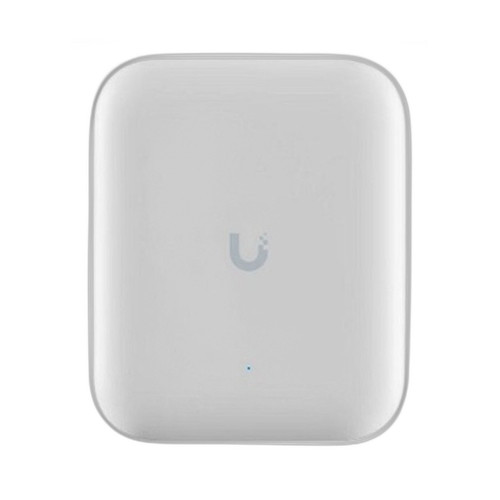
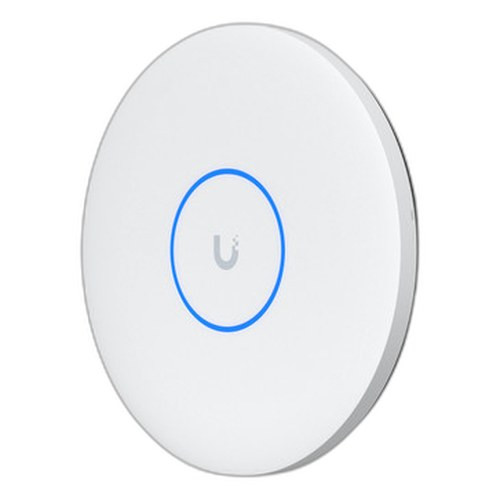
The U7-PRO-OUTDOOR-US is purpose-built for exterior installation. Its IPX6-rated UV-stabilized polycarbonate and aluminum alloy enclosure is rated from -30 to 60°C and withstands wind loading of 74.6 N at 200 km/h (16.8 lbf at 125 mph). It ships with a pole mount accepting 1–2.5" (25–63.5 mm) diameter poles and supports wall mounting, weighing 1.2 kg (2.6 lb). No IP rating is listed for the U7-PRO-XGS, and its ceiling-mount form factor (⌀215 × 32.5 mm, 800 g) with a lite ceiling/wall bracket is designed exclusively for conditioned interior spaces. The XGS operating ceiling is also lower — -30 to 40°C versus -30 to 60°C for the outdoor unit — confirming it is not rated for direct outdoor exposure. If the installation site is a parking structure, campus walkway, building exterior, or any space without climate control, the U7-PRO-OUTDOOR-US is the only specification-supported option of the two.
Does the backhaul port and PoE budget matter for your switching infrastructure?
The U7-PRO-XGS ships with a single 10 GbE RJ45 uplink that falls back to 5/2.5/1 GbE, and it requires PoE++ (802.3bt) at up to 29W. The U7-PRO-OUTDOOR-US provides a 1/2.5 GbE RJ45 uplink — a maximum of 2.5 Gbps of wired backhaul — and draws 21W over PoE+ (802.3bt, 42.5–57V DC). The 10 GbE port on the XGS is meaningful when aggregate client throughput approaches or exceeds 2.5 Gbps, particularly given its 8.6 Gbps 5 GHz radio capability. Installers must verify switch port availability accordingly: 10GBASE-T ports for the XGS versus standard 2.5GbE PoE+ ports for the outdoor unit. The 8W power delta (29W vs 21W) affects PoE budget planning on the upstream switch, especially in multi-AP deployments.
How do the radio capabilities compare for throughput and concurrent client load?
The U7-PRO-XGS specifies 8 spatial streams distributed as 2×2 on 6 GHz, 4×4 on 5 GHz, and 2×2 on 2.4 GHz, with maximum data rates of 5.8 Gbps (6 GHz), 8.6 Gbps (5 GHz), and 688 Mbps (2.4 GHz). The XGS also lists support for 500+ concurrent clients across a stated coverage area of 160 m² (1,750 ft²), and includes a dedicated spectral scanning radio per the product description. The U7-PRO-OUTDOOR-US reaches 5.8 Gbps on 6 GHz and 4.3 Gbps on 5 GHz; spatial stream count and maximum concurrent client figure are not specified in the provided data. Both units support channel bandwidths up to 320 MHz and the full 802.11be feature set. On raw radio throughput alone, the XGS's 5 GHz capability (8.6 Gbps vs 4.3 Gbps) and explicit 500+ client rating indicate a higher-density indoor design.
Which should you choose: the U7-PRO-OUTDOOR-US or the U7-PRO-XGS?
Our take: The U7-PRO-OUTDOOR-US is the stronger choice when the access point must survive outdoor or uncontrolled environments: it carries an IPX6 weathering rating, a -30 to 60°C operating range, pole-mount hardware for 1–2.5" masts, and wind-load certification to 200 km/h — none of which the U7-PRO-XGS provides. Conversely, the U7-PRO-XGS is the stronger choice for high-density indoor deployments: its 10 GbE backhaul (vs 2.5 GbE), 8.6 Gbps 5 GHz capability (vs 4.3 Gbps), and explicit 500+ concurrent client rating give it a clear advantage in warehouses, auditoriums, or open office floors. The 8W power differential (29W vs 21W) means the XGS requires a PoE++-capable switch port, while the outdoor unit runs on standard PoE+. Both are NDAA Section 889 compliant and managed under the UniFi platform. Select the U7-PRO-OUTDOOR-US for any exterior or weatherized installation; select the U7-PRO-XGS for dense indoor environments where backhaul and client scale are the binding constraints.
Side-by-Side Comparison
Spec-for-spec, from manufacturer data.
| Specification | Ubiquiti U7-PRO-OUTDOOR-US | Ubiquiti U7-PRO-XGS |
|---|---|---|
| WiFi Standard | WiFi 7 (802.11be) | WiFi 7 (802.11be) |
| Bands | 6 GHz, 5 GHz, 2.4 GHz | 6 GHz, 5 GHz, 2.4 GHz |
| Max 6 GHz Throughput | 5.8 Gbps (320 MHz) | 5.8 Gbps (320 MHz) |
| Max 5 GHz Throughput | 4.3 Gbps | 8.6 Gbps |
| Max 2.4 GHz Throughput | — | 688 Mbps |
| Spatial Streams | — | 8 (2×2 / 4×4 / 2×2) |
| Uplink Port | 1/2.5 GbE RJ45 | 10 GbE RJ45 (fallback to 5/2.5/1 GbE) |
| Power Type | PoE+ (802.3bt) | PoE++ (802.3bt) |
| Power Consumption | 21W | 29W |
| Voltage Range | 42.5–57V DC | 42.5–57V DC |
| Form Factor | Outdoor Wall/Pole Mount | Indoor Ceiling Mount |
| IP / Weather Rating | IPX6 | — |
| Operating Temperature | -30 to 60°C | -30 to 40°C |
| Wind Load Rating | 74.6 N at 200 km/h | — |
| Max Concurrent Clients | — | 500+ |
| NDAA Compliant | Yes | Yes |
Frequently Asked Questions
Which should you choose: the U7-PRO-OUTDOOR-US or the U7-PRO-XGS?
The U7-PRO-OUTDOOR-US is the stronger choice when the access point must survive outdoor or uncontrolled environments: it carries an IPX6 weathering rating, a -30 to 60°C operating range, pole-mount hardware for 1–2.5" masts, and wind-load certification to 200 km/h — none of which the U7-PRO-XGS provides. Conversely, the U7-PRO-XGS is the stronger choice for high-density indoor deployments: its 10 GbE backhaul (vs 2.5 GbE), 8.6 Gbps 5 GHz capability (vs 4.3 Gbps), and explicit 500+ concurrent client rating give it a clear advantage in warehouses, auditoriums, or open office floors. The 8W power differential (29W vs 21W) means the XGS requires a PoE++-capable switch port, while the outdoor unit runs on standard PoE+. Both are NDAA Section 889 compliant and managed under the UniFi platform. Select the U7-PRO-OUTDOOR-US for any exterior or weatherized installation; select the U7-PRO-XGS for dense indoor environments where backhaul and client scale are the binding constraints.
Can I use the U7-PRO-XGS outdoors instead of the U7-PRO-OUTDOOR-US?
No — based on the provided specifications, the U7-PRO-XGS carries no IP weathering rating and is a ceiling-mount form factor designed for indoor use. Its operating ceiling is listed at 40°C versus 60°C for the outdoor unit. The U7-PRO-OUTDOOR-US holds an IPX6 rating, UV-stabilized enclosure, pole-mount hardware, and wind-load certification. Only the U7-PRO-OUTDOOR-US is specified for outdoor installation.
Is the U7-PRO-OUTDOOR-US or U7-PRO-XGS better for a high-density venue with hundreds of concurrent clients?
The U7-PRO-XGS is the specification-supported choice for high client density. It explicitly lists support for 500+ concurrent clients and provides an 8.6 Gbps 5 GHz radio (4×4 streams) backed by a 10 GbE uplink. The U7-PRO-OUTDOOR-US does not specify a maximum concurrent client count in the provided data, and its uplink is limited to 2.5 GbE — which would become a bottleneck before the radio capacity is exhausted in a very dense deployment.
Do I need a different PoE switch for each unit?
Yes, in most cases. The U7-PRO-OUTDOOR-US draws 21W and requires a PoE+ (802.3bt, 42.5–57V DC) capable switch port. The U7-PRO-XGS draws 29W and requires a PoE++ (802.3bt) port. While both reference the 802.3bt standard, the higher wattage of the XGS means the upstream switch must deliver at least 30W per port to power it. Verify per-port and total PoE budgets on your switch before deploying either unit at scale.
Get a Second Opinion on Your Camera Choice
Share your site layout, coverage goals, and budget. Our team will validate the camera selection, flag anything we would change, and recommend products that match the use case.