
TP-Link DS1018GMP vs TP-Link SG1218MP: Specification Comparison
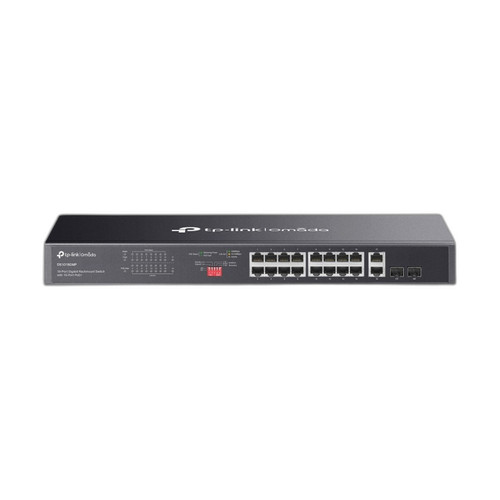
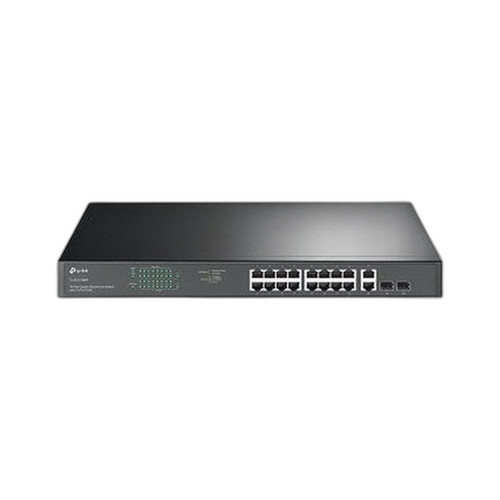
Both the TP-Link DS1018GMP and the TL-SG1218MP are 18-port Gigabit PoE+ rackmount switches sharing a nearly identical physical footprint, port count, and 250W PoE budget — making them a genuine cross-shop pair for installers sizing a single-tier access layer. The key differentiator is management tier: the DS1018GMP is fully unmanaged, while the TL-SG1218MP offers TP-Link's Easy Smart (Layer 2/3) management. This comparison examines port and throughput capacity, power and environmental specs, and management and operating mode capabilities.
In This Guide
- How do the DS1018GMP and TL-SG1218MP compare on port count, PoE capacity, and switching throughput?
- How do the DS1018GMP and TL-SG1218MP differ in power consumption, physical dimensions, and operating environment?
- What management capabilities and operating modes separate the DS1018GMP from the TL-SG1218MP?
- Which should you choose: the DS1018GMP or the SG1218MP?
- Side-by-Side Specs
- FAQ
How do the DS1018GMP and TL-SG1218MP compare on port count, PoE capacity, and switching throughput?
Both switches offer 18 ports total — 16 PoE+ Gigabit RJ-45 ports and 2 non-PoE Gigabit ports — with 2 Gigabit SFP combo slots included in the 18-port count. Each delivers a 250W total PoE budget with a per-port maximum of 30W under IEEE 802.3at (PoE+), and both support 802.3af devices at lower draw. Switching capacity is identical at 36 Gbps on both models.
The DS1018GMP specifies an Extend Mode that pushes PoE reach to 250m at reduced speed, while the TL-SG1218MP also lists 250m Extend Mode support. Both units support Priority Mode on ports 1–4 and PoE Auto Recovery. No asymmetry in port count, throughput, or PoE headroom is present between the two models based on the provided specifications.
How do the DS1018GMP and TL-SG1218MP differ in power consumption, physical dimensions, and operating environment?
The DS1018GMP specifies two power consumption figures: 19W with no powered devices (PD) connected, and 293.34W with a full 250W PoE load. The TL-SG1218MP lists only a single power consumption figure of 250W; a no-load figure is not provided in the supplied specifications. Both units accept a 100–240V AC, 50/60Hz power supply — this is explicitly stated for the TL-SG1218MP; the DS1018GMP lists certifications consistent with universal AC input but does not state the AC input range directly.
Physically, both switches share the same chassis dimensions: 17.3 × 7.1 inches footprint, with the DS1018GMP at 1.73 inches height and the TL-SG1218MP at 1.7 inches — both occupy a standard 1U rack slot. Operating temperature range is identical: 0°C to 50°C (32°F to 122°F). Storage temperature is also identical: −40°C to 70°C (−40°F to 158°F). Neither unit is rated for DIN-rail mounting per the provided specs.
What management capabilities and operating modes separate the DS1018GMP from the TL-SG1218MP?
This is the most material difference between the two products. The DS1018GMP is fully unmanaged — no CLI, no web GUI, and no VLAN or QoS configuration is available. Its operating modes are hardware-switch-selectable only: Extend Mode (250m reach), Priority Mode (ports 1–4 prioritized), Isolation Mode, and PoE Auto Recovery.
The TL-SG1218MP is classified as Easy Smart (Layer 2/3 per the supplied spec). Easy Smart management typically provides a web-based GUI for basic VLAN segmentation, port mirroring, QoS, and loop prevention — though the specific feature set supported is not enumerated in the provided specifications beyond the management tier label. Its listed operating modes include Priority Mode (ports 1–4), Isolation Mode, and PoE Auto Recovery; Extend Mode is listed under max range but not explicitly under Operating_Modes in the TL-SG1218MP spec block. The DS1018GMP additionally lists Extend Mode explicitly as an operating mode.
IEEE certifications are stated for the DS1018GMP (802.3, 802.3u, 802.3ab, 802.3x, 802.3af, 802.3at, 802.3z, 802.1p). Equivalent certification detail is not provided in the TL-SG1218MP spec block.
Which should you choose: the DS1018GMP or the SG1218MP?
Our take: The TL-SG1218MP is the stronger choice when the deployment requires any degree of network segmentation, traffic prioritization configuration, or remote monitoring — because it offers Easy Smart (Layer 2/3) management versus the DS1018GMP's fully unmanaged design. On every hardware metric the two units are effectively identical: both deliver 18 ports, 16 PoE+ at 30W per port, a 250W total PoE budget, 36 Gbps switching capacity, 2 Gigabit SFP combo slots, and a 1U rack form factor in matching 440 × 180 mm chassis. The DS1018GMP has one concrete hardware advantage: it specifies a no-load power draw of 19W versus no equivalent figure from the TL-SG1218MP. Choose the DS1018GMP for cost-sensitive, flat-network deployments — small retail, simple IP camera rows, or edge closets where zero configuration overhead matters. Choose the TL-SG1218MP wherever basic VLAN isolation or managed port control is a requirement.
Side-by-Side Comparison
Spec-for-spec, from manufacturer data.
| Specification | TP-Link DS1018GMP | TP-Link SG1218MP |
|---|---|---|
| Total Ports | 18 | 18 |
| PoE+ Gigabit Ports | 16 | 16 |
| Non-PoE Gigabit Ports | 2 | 2 |
| SFP Combo Slots | 2× Gigabit Combo SFP/RJ45 | 2× Gigabit SFP Combo |
| Fiber Type (SFP) | MMF and SMF | Not specified |
| PoE Standard | IEEE 802.3af/at (PoE+) | IEEE 802.3af/at (PoE+) |
| Total PoE Budget | 250W | 250W |
| Max PoE Per Port | 30W | 30W |
| Switching Capacity | 36 Gbps | 36 Gbps |
| Management Tier | Unmanaged | Easy Smart (Layer 2/3) |
| Operating Modes | Extend, Priority (1–4), Isolation, PoE Auto Recovery | Priority (1–4), Isolation, PoE Auto Recovery |
| Mount Type | Rack (1U) | Rack (1U) |
| Dimensions (in) | 17.3 × 7.1 × 1.73 | 17.3 × 7.1 × 1.7 |
| Power Consumption (no load) | 19W | — |
| Power Consumption (full PoE) | 293.34W | 250W |
| Operating Temp | 0°C to 50°C | 0°C to 50°C |
| Storage Temp | −40°C to 70°C | −40°C to 70°C |
Frequently Asked Questions
Which should you choose: the DS1018GMP or the SG1218MP?
The TL-SG1218MP is the stronger choice when the deployment requires any degree of network segmentation, traffic prioritization configuration, or remote monitoring — because it offers Easy Smart (Layer 2/3) management versus the DS1018GMP's fully unmanaged design. On every hardware metric the two units are effectively identical: both deliver 18 ports, 16 PoE+ at 30W per port, a 250W total PoE budget, 36 Gbps switching capacity, 2 Gigabit SFP combo slots, and a 1U rack form factor in matching 440 × 180 mm chassis. The DS1018GMP has one concrete hardware advantage: it specifies a no-load power draw of 19W versus no equivalent figure from the TL-SG1218MP. Choose the DS1018GMP for cost-sensitive, flat-network deployments — small retail, simple IP camera rows, or edge closets where zero configuration overhead matters. Choose the TL-SG1218MP wherever basic VLAN isolation or managed port control is a requirement.
Can either switch handle a 16-camera IP surveillance installation drawing 15W per camera?
Yes — both switches support 16 PoE+ ports at up to 30W per port with a 250W total budget. A 16-camera system at 15W per camera draws 240W total, which falls within the 250W budget on either unit. The DS1018GMP additionally specifies Extend Mode for runs up to 250m if cable distances are a factor.
Do I need the TL-SG1218MP if I just want to plug in cameras and an NVR with no configuration?
If the installation is a flat, single-VLAN network with no need for traffic segmentation or remote management, the DS1018GMP's unmanaged design is sufficient — and it avoids the overhead of configuring a managed interface. Both units offer the same port count, PoE budget, and throughput for this use case.
Is there a fiber uplink option on both switches?
Both switches include 2 Gigabit SFP combo slots (shared with 2 of the RJ-45 ports). The DS1018GMP explicitly states support for both multi-mode fiber (MMF) and single-mode fiber (SMF) via these slots. The TL-SG1218MP's spec describes them as Gigabit SFP combo slots but does not separately enumerate MMF/SMF compatibility in the provided specifications.
Get a Second Opinion on Your Camera Choice
Share your site layout, coverage goals, and budget. Our team will validate the camera selection, flag anything we would change, and recommend products that match the use case.