
Brother RJ4230BL vs Brother RJ2030: Specification Comparison
Both the Brother RJ4230BL and Brother RJ2030 are direct thermal mobile printers designed for untethered field use, sharing a common print technology, portable form factor, LCD display, and rechargeable battery-plus-belt-clip carry system. The comparison centers on three axes where they diverge meaningfully for B2B buyers: print width and media versatility, connectivity depth, and raw print speed — all of which drive deployment fit for distinct workflows such as shipping/labeling versus receipt-only point-of-activity printing.
In This Guide
- Which printer covers the media widths and types your deployment actually requires?
- What wireless and wired connectivity does each printer provide, and how does that affect integration flexibility?
- How do print speed and resolution compare, and what does that mean for throughput and output quality?
- Which should you choose: the RJ4230BL or the RJ2030?
- Side-by-Side Specs
- FAQ
Which printer covers the media widths and types your deployment actually requires?
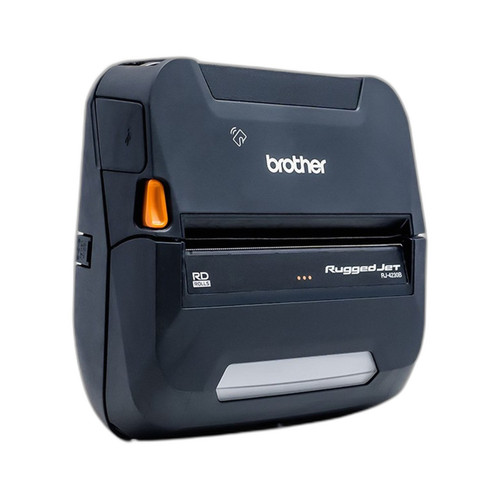
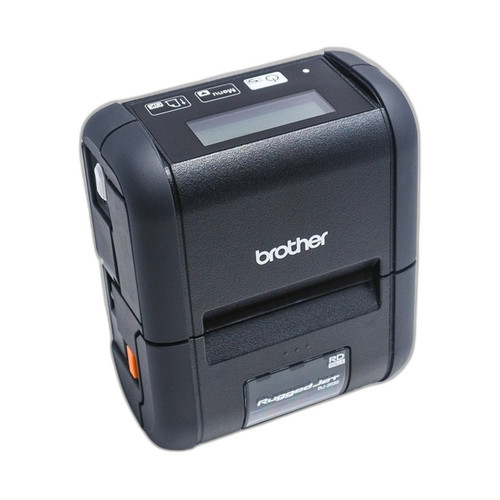
The RJ4230BL supports a 4-inch maximum print width and handles labels, tags, and receipts — three distinct media classes. This makes it viable for 4×6 shipping labels, asset tags, and customer receipts from a single device. The RJ2030 is specified for a 2-inch print width and receipts only. Buyers whose workflow is exclusively receipt printing will find the RJ2030 adequately specified, but any operation that also needs labels or tags must account for the RJ4230BL's broader media compatibility. No additional media-width specs (e.g., minimum width, roll diameter) are provided in the supplied specs for either unit.
What wireless and wired connectivity does each printer provide, and how does that affect integration flexibility?
The RJ4230BL specifies USB, Bluetooth 4.2LE, and NFC. The Bluetooth 4.2LE designation indicates Low Energy protocol support, which is relevant for pairing with modern mobile devices. NFC adds tap-to-pair capability, useful in high-turnover field environments where fast device association matters. The RJ2030 is specified as 'Bluetooth with wired option' — the exact Bluetooth version is not stated in the provided specs, and no NFC capability is listed. Both units include USB/wired connectivity. Buyers requiring NFC pairing or a specified Bluetooth version for MDM or app compatibility should note that only the RJ4230BL provides those details in the available spec data.
How do print speed and resolution compare, and what does that mean for throughput and output quality?
The RJ2030 is faster at 6 ips versus the RJ4230BL's 5 ips — a 20 percent speed advantage that is relevant in high-volume receipt-only queues. However, print resolution is specified only for the RJ4230BL at 203 dpi; no resolution figure is provided in the RJ2030's supplied specs. For label and barcode applications, 203 dpi is a standard field-readable resolution. The absence of a resolution spec for the RJ2030 is a gap buyers should resolve before committing to barcode-dependent workflows, though the RJ2030's receipt-only media classification suggests resolution requirements are less demanding for its primary use case. RAM (256 MB) is specified only for the RJ4230BL; the RJ2030 has no RAM figure in the provided specs.
Which should you choose: the RJ4230BL or the RJ2030?
Our take: The RJ4230BL is the stronger choice when deployments require label and tag printing, NFC pairing, or a verified Bluetooth 4.2LE specification alongside receipt output. It prints at 203 dpi across a 4-inch width versus the RJ2030's 2-inch receipt-only footprint, supports three media types versus one, and adds NFC to its connectivity stack — all backed by 256 MB RAM (RJ2030 RAM not specified). The RJ2030 holds a 1 ips speed advantage (6 vs. 5 ips) and is the lighter-footprint option where receipts are the sole output. Choose the RJ2030 for pure receipt-printing workflows where speed and simplicity dominate; choose the RJ4230BL for mixed-media field operations — shipping, asset tagging, and receipts — or wherever NFC tap-to-pair or a defined Bluetooth version is a platform requirement.
Side-by-Side Comparison
Spec-for-spec, from manufacturer data.
| Specification | Brother RJ4230BL | Brother RJ2030 |
|---|---|---|
| Product Type | Receipt Printer | Receipt Printer |
| Form Factor | Mobile Handheld | Portable |
| Print Method | Direct Thermal | Direct Thermal |
| Print Width | 4 in | 2 in |
| Print Speed | 5 ips | 6 ips |
| Print Resolution | 203 dpi | — |
| Media Types | Labels; Tags; Receipts | Receipts |
| Connectivity | USB, Bluetooth 4.2LE, NFC | Bluetooth, Wired |
| Bluetooth Version | 4.2LE | — |
| NFC | Yes | — |
| Display | LCD | LCD |
| RAM | 256 MB | — |
| Power | Lithium-ion battery with charger included | Rechargeable battery |
| Belt Clip Included | Yes | Yes |
| Warranty | 2-Year Limited | 2-Year Premier Limited |
| USB Cable Included | Yes | — |
Frequently Asked Questions
Which should you choose: the RJ4230BL or the RJ2030?
The RJ4230BL is the stronger choice when deployments require label and tag printing, NFC pairing, or a verified Bluetooth 4.2LE specification alongside receipt output. It prints at 203 dpi across a 4-inch width versus the RJ2030's 2-inch receipt-only footprint, supports three media types versus one, and adds NFC to its connectivity stack — all backed by 256 MB RAM (RJ2030 RAM not specified). The RJ2030 holds a 1 ips speed advantage (6 vs. 5 ips) and is the lighter-footprint option where receipts are the sole output. Choose the RJ2030 for pure receipt-printing workflows where speed and simplicity dominate; choose the RJ4230BL for mixed-media field operations — shipping, asset tagging, and receipts — or wherever NFC tap-to-pair or a defined Bluetooth version is a platform requirement.
Can the RJ2030 print shipping labels or asset tags, or is it receipts only?
Based on the provided specifications, the RJ2030 is listed with a media type of 'Receipts' only and a 2-inch print width. The RJ4230BL specifies Labels, Tags, and Receipts at a 4-inch width. If your workflow includes label or tag printing, the RJ4230BL is the unit with documented support; the RJ2030's spec sheet does not list those media types.
Does either printer support NFC for tap-to-pair with mobile devices?
Only the RJ4230BL lists NFC in its connectivity specifications (USB, Bluetooth 4.2LE, NFC). The RJ2030 is specified as 'Bluetooth with wired option' with no NFC mentioned in the provided specs. Buyers requiring NFC tap-to-pair for fast device association should select the RJ4230BL.
Which printer is faster, and does the speed difference matter for my use case?
The RJ2030 is specified at 6 ips versus the RJ4230BL at 5 ips — a 20 percent throughput advantage. In a high-volume receipt queue this gap is meaningful. For label and tag printing on the RJ4230BL, 5 ips at 203 dpi is a standard field rate. If your sole output is receipts and print speed is the primary criterion, the RJ2030 has the specified edge; for mixed-media or label-centric workflows, the RJ4230BL's broader capabilities outweigh the 1 ips difference.
More Label Printer Comparisons
- TSC 99-082A101-1001 vs Zebra ZD4A042-301X01EZ
- TSC 99-082A101-1001 vs Zebra ZD4A042-D01X01EZ
- TSC 99-082A101-1001 vs Zebra ZD4AH42-D01X01EZ
- TSC 99-082A101-1001 vs Zebra ZD4A022-D01X01EZ
- TSC 99-082A101-1001 vs TSC 99-083A501-0011
- TSC 99-082A101-1001 vs TSC 99-052A003-0411
Label Printer Buying Guides
Get a Second Opinion on Your Camera Choice
Share your site layout, coverage goals, and budget. Our team will validate the camera selection, flag anything we would change, and recommend products that match the use case.