
Church Security Camera Buying Checklist
Most church camera projects approved by a facilities committee on price and camera count alone end up under-used within 12 months. The projects that stick are the ones where the committee worked through a proper pre-purchase checklist: who is using the mobile app, where the cameras should and should not be placed, what the insurance carrier requires, what the volunteer safety team actually needs. This checklist is what we walk through on every church surveillance project.
Bottom Line
A church camera proposal is ready to approve when the facilities committee can answer yes to each of the 24 questions below. Gaps on more than three or four items mean the proposal is a starting point, not a finished plan. The cost of walking through this list is an evening meeting; the cost of skipping it is typically a system the church stops using within 12 months.
Our team works with church facilities committees on surveillance decisions regularly. The 24 questions below come from the real conversations we have before a church signs off.
Best For
- Church facilities committees evaluating camera proposals
- Pastors and church leadership approving camera budgets
- Volunteer safety team leads checking mobile-app and workflow fit
- Multi-campus church leadership standardizing across locations
Not For
- Commercial or residential proposals — use the office or multifamily checklists
- Schools or daycares with specific regulatory compliance beyond church policy
In This Guide
Church-Specific Priorities
Church surveillance has a distinct priority ordering:
Congregation comfort in worship spaces. Sanctuary and foyer placement should feel deterrent-present but not surveilled. This is the highest-priority cultural factor and drives camera aesthetics, placement, and signage decisions.
Childcare and nursery boundaries. Corridor and check-in coverage only. No classroom-interior cameras. Coordinate placement with the children's ministry leadership.
Volunteer safety team usability. Mobile app must be usable by volunteers with no surveillance training. Test this at commissioning.
Parking lot after evening services. Elderly congregant safety is the top concern after evening events. Cameras should support active volunteer monitoring, not just passive documentation.
Offering security without visible surveillance. Discreet coverage of counting, transport, and safe paths. Not visible enough to feel like the church distrusts the congregation.
Budget realism. Churches fund surveillance through donations, capital campaigns, or operational budgets competing with ministry needs. A proposal that fits the church's financial model is more likely to be fully deployed than a proposal that maxes out the available budget.
Red Flags in Church Surveillance Proposals
Cameras inside the sanctuary during worship. Most churches explicitly exclude this. A proposal that includes interior-sanctuary coverage during service hours has not been aligned with the pastoral team.
Classroom-interior cameras in children's ministry. Near-universally prohibited by church childcare policies. A proposal that includes them has not been coordinated with the children's ministry lead.
Industrial or warehouse-aesthetic cameras in worship spaces. Black housings, bullet cameras, or visible industrial mounting in sanctuaries or foyers signals the integrator does not understand the church context.
Audio recording enabled by default. Most churches want audio disabled. Confirm this at commissioning; two-party-consent states additionally require all-party consent.
No mobile app specification. Volunteer safety teams use cameras through mobile apps. A proposal that omits the mobile-app specification has not been scoped to the actual users.
Proposal from an integrator with no church experience. Warehouse and commercial-office experience does not translate cleanly to church culture. Ask for 2-3 church references and call them.
No retention spec. Storage size follows from retention. 30 days is the default; 60-90 for churches with recurring incidents or carrier requirements.
Overspecced megachurch system at a small church. The opposite mistake: an integrator selling a 32-channel enterprise system to a 150-member church is not aligned to the actual need.
Recommended Starting Products for a Church System
Four proven picks that anchor most church deployments. Mix with small-church NVR (XRN-820S) for congregations under 150, or step up to 32-channel for megachurches.
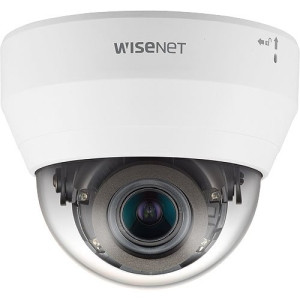
Hanwha
Hanwha QND-7082R 4MP Indoor IR Dome Camera
QND-7082R
4MP indoor IR dome. Discreet white housing, church-aesthetic-compatible, volunteer-team mobile-app friendly.
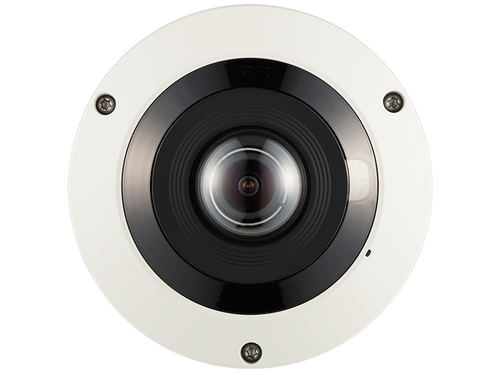
Hanwha
Hanwha PNF-9010RV 12MP 360˚ Fisheye Camera
PNF-9010RV
12MP fisheye for large fellowship halls. One clearly-posed camera rather than a cluster.
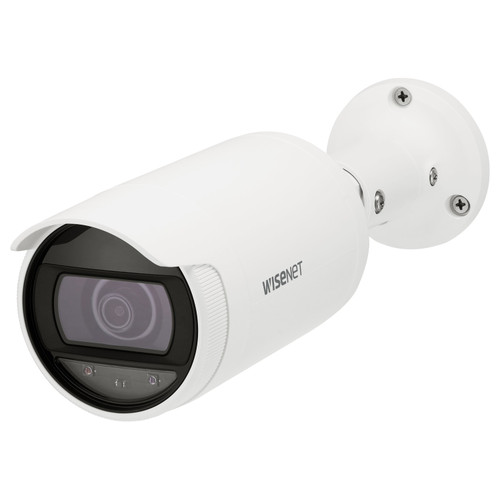
Hanwha
Hanwha ANO-L7012R 4MP Wide-Angle Low Light Outdoor Bullet IP Camera
ANO-L7012R
Outdoor bullet with low-light for evening-service parking coverage.
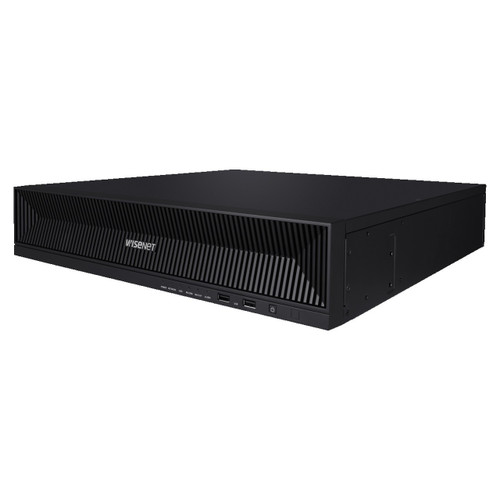
Hanwha
Hanwha XRN-1620B2 16-Channel 4K NVR
XRN-1620B2
16-channel 4K NVR for churches 150-500 members. Hanwha Wisenet WAVE mobile app for volunteer safety teams.
The 24-Question Church Security Camera Checklist
Walk through before approving any proposal. Gaps become unused systems, pastoral complaints, and volunteer-team frustration.
Has the pastoral team reviewed and approved sanctuary camera placement?
Sanctuary entries outside the doors is the default; interior coverage is a pastoral decision.
Are childcare classrooms excluded from camera coverage?
Corridor and check-in only; near-universal church policy.
Has the children's ministry lead reviewed corridor camera placement?
Placement should be coordinated, not imposed.
Is audio recording disabled by default?
Conversations in foyer and fellowship areas are often private; audio creates liability.
Is the mobile app usable by volunteers without training?
Wisenet WAVE and Milestone XProtect Mobile pass this test; test with a volunteer at commissioning.
Is role-based access configured for the volunteer safety team?
Volunteers see parking/entry cameras; facilities sees mechanical/exterior; pastoral sees offering room.
Are push notifications configured for after-hours events?
Parking motion after 10pm, sanctuary door opened outside service times, etc.
Is the camera aesthetic appropriate for worship spaces?
White low-profile domes, not industrial housings, in foyer and sanctuary entries.
Is signage planned for main entries?
Transparency builds trust; hidden cameras erode it.
Is retention explicitly specified (30, 60, 90 days)?
30 is the default; 60-90 for churches with recurring incidents.
Is the NVR right-sized for the congregation?
XRN-820S small; XRN-1620B2 mid; XRN-3220B4 large; multi-NVR for megachurch.
Is the parking lot camera coverage sized for evening-service safety?
Elderly-congregant walking paths, not just incident documentation.
Is there camera coverage at the offering counting room and transport path?
Discreet loss-prevention coverage.
Is the system budget aligned to church financial model (operational vs capital)?
Most churches fund via capital campaign or restricted donation, not operational budget.
Has the insurance carrier been consulted?
Some carriers provide premium discounts for documented surveillance; check before finalizing.
Is PoE switch budget sized with growth headroom?
Churches often add cameras over time; leave 25 percent PoE headroom.
Is cable-plant labor included in the proposal?
Hardware-only quotes understate true cost by 30-40 percent.
Is installation labor from a church-experienced integrator?
Warehouse-experience does not translate to church aesthetic and workflow.
Is there a spare-camera plan for failures?
Keep 1-2 spares on site so volunteer team can swap during the week rather than wait for service call.
Is the cybersecurity baseline configured?
Default-password changes, certificate setup, firmware update schedule.
Is there a volunteer-training plan (2-3 hours at commissioning)?
Mobile app, footage search, export workflow, incident process.
Is there a written surveillance policy for the church?
Who can view footage, who can export, when and why. Builds trust with congregation.
Is there a clear point of contact for post-install support?
Volunteer teams need support responsiveness, not multi-day ticket cycles.
Has the budget been reviewed and approved by church leadership?
Most churches require formal board or elder-team sign-off on capital spending.
Frequently Asked Questions
How much should a mid-size church budget for a camera system?
A 150-to-500-member church typically budgets $8,000 to $16,000 all-in for a 10-to-17 camera system including NVR, cabling, and installation. Smaller churches (under 150): $4,000 to $8,000. Larger (500-1,500): $18,000 to $40,000.
Can our facilities committee install cameras ourselves to save money?
Small churches sometimes self-install to save on labor. Mid-size and larger churches typically benefit from a professional integrator for NVR and VMS setup; cable-plant work can sometimes be done by volunteers. The hybrid approach is common.
What's the biggest mistake churches make when buying cameras?
Selecting an integrator who has no church experience. Warehouse or commercial-office integrators often propose systems with the wrong aesthetic, wrong mobile-app, and wrong sanctuary placement. Ask for church references and call them.
Do churches need enterprise VMS like Milestone or Genetec?
Small and mid-size churches do not. Hanwha Wisenet WAVE (included with XRN-series NVRs) covers the workflow. Large multi-campus churches benefit from enterprise VMS for federation across locations.
Can our insurance carrier require specific camera coverage?
Some can. Church insurance policies increasingly include surveillance coverage as an underwriting factor. Carriers may offer premium discounts (5 to 15 percent) for documented coverage of specific positions. Consult with your carrier before finalizing the spec.
What happens if the church grows or adds a campus?
If the NVR was right-sized with expansion headroom (1.5x current camera count), adding cameras is straightforward. Multi-campus expansion typically requires enterprise VMS and may warrant replacing the small-church NVR with a federated VMS architecture.
How often should we update camera firmware?
Monthly patch cadence is standard for commercial surveillance. Churches can be on a quarterly cadence if the volunteer team cannot handle monthly; integrator-managed firmware updates are the typical compromise.
No Bots, Just Experts
No bots, just experts. Free pre-sales support for every customer — product questions, BOM quotes, compatibility checks, price confirmation — typically answered within one business day. Paid services available like full system design, remote installation, and more. Got a list of products? Free BOM quote. Need help figuring out what to buy? Buy engineering time by the hour — $175/hour, qty 1 = 1 hour. Tell us about your project, we scope how many hours it needs, you purchase that quantity. Hardware buyers get up to one hour ($175) credited back against their order as a thank-you.