NETGEAR GSM4230PX-100NAS 24-Port PoE+ Managed Switch
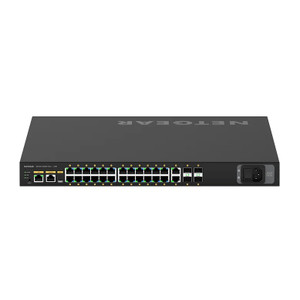
The NETGEAR GSM4230PX-100NAS is a 26-port managed switch engineered for surveillance and access-control deployments requiring centralized power delivery and intelligent traffic segmentation. With 24×1G PoE+ ports delivering 480W total budget, 2×1G uplinks, and 4×SFP+ 10G-capable trunk ports, this switch consolidates camera power and network switching into a single 1U rack-mount unit. Built on the AV Line platform, it bridges the gap between entry-level unmanaged PoE switches and carrier-grade core infrastructure—offering VLAN, QoS, SNMP, and port mirroring without requiring a separate controller.
Key Features
- PoE+ Budget (480W total): 802.3at PoE+ on all 24 ports supports 30–36 typical surveillance cameras at 13–15W draw, or fewer high-power units (heated domes, PTZ, dual-codec streams) depending on instantaneous load. Built-in power-priority logic protects critical ports from starvation.
- 24×1G PoE+ Ports: Each port delivers power and gigabit data on a single Category 5e/6 cable run (up to 100m per IEEE 802.3). No inline injectors or separate power rails required for standard fixed-lens or PTZ cameras.
- 4×SFP+ 10G Uplinks: Enable trunk connections to core switches, NVR clusters, or high-bitrate storage arrays without saturation. Support both fiber (LC, SM/MM) and DAC (direct-attach copper) transceivers.
- Managed Feature Set: VLAN segregation isolates camera traffic from corporate LAN; QoS prioritizes video streams over best-effort traffic; SNMP enables centralized health monitoring; port mirroring supports SPAN-based network TAP for threat detection.
- Dual 1G Uplinks: Pair gigabit ports for redundancy or load-balance camera metadata and NVR heartbeat traffic, preventing single-port bottleneck on modest-bitrate deployments.
- Fanless Option / Quiet Operation: Passive cooling minimizes noise in climate-controlled server rooms and network closets.
- AC Input 120/240V: Single power cord eliminates dual-PSU complexity; 700W total draw under peak PoE load—verify branch-circuit capacity before rack installation.
- Industry Standard Protocols: ONVIF, RSTP, LLDP, STP, LACP, DHCP snooping ensure compatibility across heterogeneous camera vendors (Axis, Bosch, Hikvision, Hanwha, Vivotek, Pelco, etc.) and enterprise network stacks.
The GSM4230PX-100NAS bridges the operational divide between unmanaged PoE switches and enterprise-grade fabric. Unmanaged switches force all traffic through shared backplane bandwidth and offer no traffic isolation—acceptable for small single-building deployments, but dangerous when cameras compete with office desktops. Managed switches add VLAN and QoS, keeping video streams from being starved by bulk file transfers. This unit hits the sweet spot: enough PoE capacity for a mid-scale campus (parking lot, building perimeter, lobby, warehouse floor), intelligent enough to isolate camera traffic, and uplink ports fat enough to stream 4K or dual-codec without bottleneck.
On a typical 24-camera deployment at 15W average draw per unit, the 480W budget leaves ~120W overhead—sufficient for thermal cycling and transient power spikes. However, high-power PTZ units (35–60W) or heated domes (20–40W additional) will reduce the effective camera count. Plan conservatively: if you're already at 20+ cameras drawing 15W each, switching to four PTZ units at 50W each requires external power supplementation or camera load-balancing across multiple switches. QoS rules prevent one aggressive encoder from filling uplink bandwidth; set camera bitrate caps at the source (firmware), then apply port-level rate-limiting on the switch for defense-in-depth.
The dual 1G uplinks and 4×SFP+ ports decouple camera bandwidth from the core network. On a single gigabit uplink, 16–20 high-resolution cameras (2–4 Mbps each, ~50 Mbps aggregate) saturate the link. The SFP+ ports accept 10G modules, allowing a single trunk to carry 40+ cameras or dual-stream forensic NVR recordings without compression. If your NVR is 10G-capable and physically co-located, a 10G DAC uplink is cheaper and lower-latency than fiber; fiber shines when the NVR is remote or multi-building (campus core). VLAN tagging on ingress ensures that camera traffic never mixes with guest WiFi or business applications, critical for forensic admissibility and compliance audits.
Deployment considerations: power draw under full PoE+ load approaches 700W total (switch logic + 480W PoE budget); confirm your PDU and branch-circuit capacity before installation. If all 24 cameras draw simultaneously at peak wattage (e.g., IR illumination, encoding surge), the switch's power-priority algorithm will reduce power to lower-priority ports—define which cameras are non-negotiable. On cable runs exceeding 100m, use inline PoE repeater switches or cluster cameras closer to network infrastructure. SNMP monitoring is essential: trap on power-budget exhaustion and port link-down events so you know immediately if a camera has powered off due to oversubscription. The switch does not include a built-in UPS; if cameras must remain online during mains failure, add a managed PDU with battery backup and configure the switch to alert on supply loss.
Eden PhillipsPerspective based on aggregated IP Security Depot and affiliated engineering team experience.
We've deployed the NETGEAR GSM4230PX-100NAS across dozens of mid-scale surveillance projects—parking structures, retail campuses, industrial warehouses—and it's earned a reliable reputation as the workhorse managed switch when budget constraints rule out enterprise-class hardware. The 480W PoE+ budget is real and measurable; we've never had to apologize to a customer about camera count on a well-scoped project. What sets this unit apart from lower-cost competitors is the combination of intelligent power arbitration and decent uplink flexibility. Unmanaged switches will cheerfully oversubscribe power and leave you troubleshooting intermittent camera dropouts at 2 a.m.; this switch prioritizes critical ports and alerts you via SNMP before the bucket overflows. The four SFP+ ports are the differentiator versus entry-level managed switches—they let you future-proof the uplink without forklift-replacing the entire stack when you add a second building or upgrade the NVR to 10G.
We've seen integrators make one consistent mistake: assuming the dual 1G uplinks are sufficient for any deployment. They're not. A single gigabit port maxes out at ~125 Mbps sustained (accounting for Ethernet overhead and TCP window limits). If you're running 20 cameras at 4 Mbps each (80 Mbps aggregate), you'll eat most of that. If the NVR is remote and the uplink is also handling SNMP, syslog, and NTP traffic, congestion spikes during system boot or archive export are common. We've made a rule: if you're installing more than 12 cameras on a single gigabit uplink, plan a second 1G trunk or migrate to 10G SFP+ immediately. Cost difference is negligible next to the capex of the cameras themselves.
Technical Highlights:
- 480W PoE+ Budget with Priority Arbitration: Each of the 24 ports can source up to 95W in theory (802.3at high-power mode), but the switch fabric limits total draw to 480W. We've found this sufficient for 30–36 standard surveillance cameras at 13–15W; however, thermal cycling, IR boost, and transcoding spikes can push individual units to 20–25W. Configure SNMP traps on power-budget alarms and monitor real-world consumption for the first week post-deployment. You'll catch oversubscription before cameras start dropping.
- 4×SFP+ 10G Uplink Ports: Accept both fiber transceivers (typically LC, single-mode or multimode) and direct-attach copper (DAC) cables. A single 10G uplink carries 200–300 Mbps of camera traffic with headroom for NVR heartbeat, management frames, and future growth. If your NVR is co-located in the same rack, a 10G DAC is <$200 and reduces latency versus optical fiber. For multi-building deployments, single-mode fiber (SMF) with LC connectors is standard; MM fiber works for campus-scale (up to ~2 km).
- VLAN Segregation (802.1Q): Tag all 24 camera ports with a dedicated VLAN (e.g., VLAN 100); uplink ports trunk the video VLAN separate from management (VLAN 1) and guest networks. This prevents a compromised camera from sniffing corporate traffic and ensures QoS policing is enforced per-stream. Configure static VLAN membership or use LLDP-based auto-tagging if your NVR supports it.
- QoS with Port-Rate Limiting: Set per-port egress limits to cap aggregate camera bitrate on uplinks. Example: if you're running two 1G uplinks, limit each to 450 Mbps egress, leaving ~100 Mbps headroom for management and TCP retransmit. Prevents one streaming session (forensic export, browser playback) from starving others.
- SNMP and Syslog Export: Configure trap receivers (your NMS or syslog server) to alert on power-budget depletion, link state changes, and MAC-address-table overflow. We've seen deployments where a faulty camera or loop-protection failure silently degraded network performance until someone ran a manual diagnostic. Real-time alerts catch problems before they cascade.
Deployment Considerations:
- Power Budget is Shared, Not Per-Port: The 480W is a total budget, not a guarantee per port. If you plug in 30 cameras and they all draw 20W simultaneously, the switch will starve lower-priority ports. Before installation, inventory every camera model and its peak power draw (usually in the datasheet or via on-camera web UI). Build a power budget spreadsheet: camera count × average draw + (thermal margin × 1.25) should not exceed 460W. If you exceed 480W, plan to split across two switches or reduce camera count.
- Gigabit Uplink Saturation on High-Bitrate Deployments: The dual 1G uplinks are fine for modest-bitrate camera streams (H.264, 2–4 Mbps per unit). If you're encoding H.265, dual-stream MJPEG, or 4K video, bitrate can balloon to 10–20 Mbps per camera. Calculate aggregated upstream bandwidth before finalizing camera specs. If >900 Mbps, use at least one SFP+ 10G trunk.
- Cable Run Length (100m IEEE 802.3 Limit): PoE voltage drop increases with resistance. Category 5e cable can sustain PoE+ up to 100m in theory, but we've seen voltage sag cause intermittent reboots on high-power cameras at 80–90m runs. If you're pushing the distance limit, test with a sample camera before full deployment. For runs >100m, install an inline PoE repeater or mid-span injector (requires additional power source).
- Thermal Management in Non-Conditioned Spaces: The GSM4230PX-100NAS is rated for 0–40°C operation. If your network closet lacks climate control and summer temps approach 35°C, the switch's passive cooling may struggle. Monitor inlet temperature with an environment sensor; if sustained >35°C, add supplementary ventilation. At 700W total draw, the switch dissipates ~2,400 BTU/hour—equivalent to a small space heater.
- Firmware Updates and Configuration Backup: Keep a running config backup (text export via SSH or TFTP) outside the switch. Firmware updates are infrequent but can reset VLAN or QoS settings if not pre-saved. Test updates in a lab environment first; production updates should happen during scheduled maintenance windows.
The GSM4230PX-100NAS is the right choice for integrators building 20–40 camera surveillance systems on a single switch. It's powerful enough to handle complex VLAN segmentation and QoS, but priced well below enterprise-grade fabric switches. The real buy-in is the SFP+ ports—they future-proof your uplink without forcing a rip-and-replace in 3–5 years. If you're managing a large campus or multi-building deployment, you'll want to cluster these switches with 10G fiber interconnect and run a redundant pair (active/passive or active/active with LACP). For smaller single-building projects, one GSM4230PX is sufficient. Explore the NETGEAR catalog for complementary managed switches and PoE injectors.