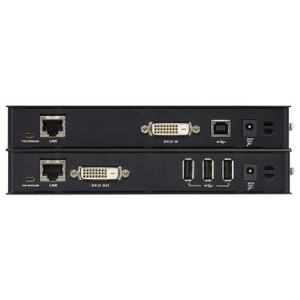
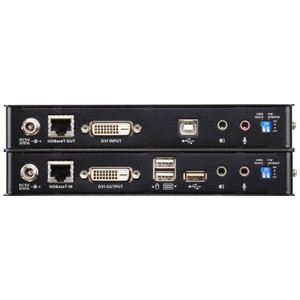
ATEN CE620-NK USB DVI HDBaseT 2.0 KVM Extender
Overview
The ATEN CE620-NK is a wired USB DVI KVM extender built on HDBaseT 2.0, designed to push keyboard, video, and mouse signals up to 150 meters over a single Cat5e or Cat6 run — without signal repeaters, fiber conversion, or dedicated AV cabling. If you're deploying control workstations in server rooms, broadcasting control suites, industrial control floors, or secure operations centers where the operator console must sit far from the computing hardware, the CE620-NK (often searched as CE620 NK) gives you a clean, direct extension path at up to 1920×1200 resolution. Both the transmitter and receiver ship as a matched pair, using wired infrastructure you likely already have in the building.
Key Features
- 150-Meter HDBaseT 2.0 Extension: The CE620-NK carries KVM signals up to 150 meters over a single Cat5, Cat5e, or Cat6 run. That's enough reach to span most multi-floor facilities or long industrial floor layouts without any mid-span amplifiers — simplifying your cabling plan and reducing ongoing maintenance points.
- 1920×1200 Maximum Resolution: Supports up to 1920×1200 (WUXGA) as well as 1920×1080 and 1600×1200. WUXGA covers the full native pixel count of professional-grade DVI monitors commonly used in control rooms and broadcast setups — you won't be scaling down content to fit the transport layer.
- DVI-D Video Ports (Transmitter and Receiver): Both the transmitter-side input and receiver-side output use DVI-D connectors. This makes the CE620-NK a direct fit for existing DVI workstation setups and DVI-equipped professional monitors, with no adapter required at either end.
- USB Keyboard and Mouse Pass-Through: Local USB ports on both the transmitter and receiver handle keyboard and mouse. The operator at the remote end gets full HID control over the connected computer — standard USB peripherals, no proprietary drivers for basic KVM operation.
- Single Cat5/5e/6 Interconnect: The RJ-45 port on each unit (one per transmitter, one per receiver) carries all KVM data over a single structured-cabling run. If your facility already has Cat5e or Cat6 home-run cabling between the rack room and operator desks, you may not need to pull any new cable at all.
- Metal Construction: Both units are housed in metal enclosures, giving them better EMI shielding and physical durability than plastic alternatives — relevant in industrial environments with motor-drive noise or dense RF environments near the transmitter.
- Rack-Mountable Design: The transmitter supports rack mounting, so it can be installed directly in a 19-inch equipment rack alongside the servers or workstations it extends — keeping the equipment side of the link organized and secured in your standard rack infrastructure.
- LED Status Indicators: Both units include LED indicators for at-a-glance verification of link status and power — useful during commissioning and for ongoing monitoring without needing to log into a management interface.
- Low Transmitter Power Draw: The transmitter consumes a maximum of 2.68 W, and both units are powered by 5V DC adapters. The low power draw means the transmitter can be co-located in a rack without contributing meaningful heat load to the cabinet's thermal budget.
Integration and Compatibility
The CE620-NK operates over standard structured cabling infrastructure (Cat5, Cat5e, or Cat6) — the same plant used for Ethernet, PoE cameras, and VoIP. This means in most commercial and industrial deployments, the horizontal cabling already in place can serve double duty. The DVI-D interface on both ends is directly compatible with a wide range of professional workstations, graphics workstations, industrial PCs, and DVI-equipped monitors without requiring active adapters. USB HID devices (keyboards, mice) connect directly to the USB ports on either unit. For integrators building out KVM switching and extension systems, the CE620-NK fits naturally downstream of a DVI-capable KVM switch at the transmitter side. Review the full ATEN product catalog for compatible KVM switches and matrix systems that pair with this extender. When planning cable runs, consult a structured cabling guide to verify that your Cat5e or Cat6 plant meets the point-to-point distance and crosstalk specs required by HDBaseT 2.0 at full 150m reach. For rack-side integration, rack management accessories including cable management and blanking panels help keep the transmitter installation tidy in a 1U or 2U slot.
Frequently Asked Questions
Q: What is the maximum extension distance of the CE620-NK?
A: The CE620-NK supports a maximum transmission distance of 150 meters (approximately 492 feet) over a single Cat5, Cat5e, or Cat6 cable run.
Q: What video resolutions does the CE620-NK support?
A: Supported resolutions include 1920×1200 (WUXGA), 1920×1080 (Full HD), and 1600×1200. The maximum digital resolution is 1920×1200.
Q: Does the CE620-NK require special cabling, or will standard Cat5e work?
A: Standard Cat5, Cat5e, or Cat6 structured cabling is supported. No proprietary or specialty cable is required. Cat6 is recommended for maximum performance and distance reliability.
Q: Can the transmitter unit be installed in a standard equipment rack?
A: Yes. The CE620-NK transmitter supports rack mounting and can be installed in a standard 19-inch equipment rack alongside the host computer or KVM switch.
Q: What type of video connector does the CE620-NK use?
A: Both the transmitter and receiver use DVI-D connectors for video. There are no HDMI or DisplayPort ports on either unit — a DVI source and DVI display are required, or an active adapter at each end.
Q: How much power does the CE620-NK transmitter consume?
A: The transmitter draws a maximum of 2.68 W from a 5V DC adapter. The low wattage has a negligible impact on rack cabinet thermal load.
The CE620-NK is the extender I reach for when a project calls for long-haul DVI KVM over existing structured cabling and the operator desk can't be co-located with the compute. The 150-meter HDBaseT 2.0 ceiling is the number that makes this unit viable for large industrial facilities and multi-floor control room builds — it's the difference between running a clean Cat6 home-run and having to budget for fiber conversion gear or mid-span repeaters.
Technical Highlights:
- 150m over Cat5/5e/6: HDBaseT 2.0 at 150 meters using commodity cabling is the core value here. On a control room retrofit where the horizontal plant is already Cat6, this often means zero new cable pull.
- 1920×1200 WUXGA ceiling: Covers the full native resolution of professional DVI monitors used in broadcast control and SCADA environments — the signal isn't downgraded to fit the transport.
- 2.68W transmitter max draw: At 5V DC and under 3W, the transmitter generates almost no heat in the rack. On a dense rack with 20+ devices, that thermal discipline matters.
Deployment Considerations:
- DVI-D only — if your host workstation or display has moved to DisplayPort or HDMI as the primary output, budget for active adapters at both ends and verify adapter compatibility with HDBaseT signal timing before committing to the run.
- Cat5 will technically work, but at 150m you're at the cable plant's limit. For new installs, run Cat6 — it gives you more headroom against crosstalk and attenuation at the full rated distance.
This unit fits cleanest in SCADA control rooms, broadcast production suites, and industrial automation cells where the operator console is on the floor and the compute is locked in a protected equipment room — exactly the environments where DVI is still the dominant video standard and Cat6 is already in the walls.