Product images are provided for reference and may not represent the exact model, configuration, or included components.

No Bots, Just Experts

Questions about this product? Free pre-sales support from a senior specialist — product questions, compatibility checks, BOM quotes, price confirmation — typically answered within one business day. Need camera placement or system design work? Engineering time is $175 per hour (qty 1 = 1 hour). Hardware buyers get up to one hour ($175) credited back on their order.

Description

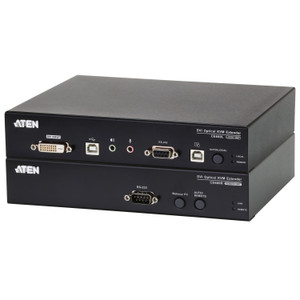
ATEN CE620 USB DVI HDBaseT 2.0 KVM Extender

Overview

The ATEN CE620 is a USB DVI HDBaseT 2.0 KVM extender designed to push keyboard, video, and mouse signals up to 330 ft (100m) over a single Cat 6 or Cat 6a cable — eliminating the need to co-locate a workstation with its display in control rooms, rack enclosures, or secure equipment closets. At 90m on Cat 5e, the CE620 delivers up to 1920x1200 resolution, making it a practical fit for dual-link DVI workflows in broadcast, surveillance operations centers, and AV integration projects. Long Reach mode extends the run to 150m (approximately 492 ft) at 1920x1080 — useful for large facility deployments where cable runs exceed standard HDBaseT limits.

Compatibility

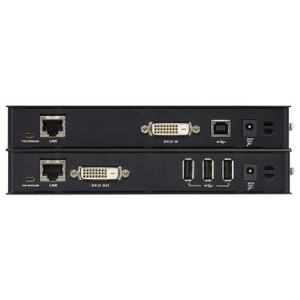
The CE620 is the receiver unit (CE620R) in the ATEN CE620 local/remote extender pair and requires the corresponding CE620L local transmitter unit to function — these are sold as a kit or individually depending on configuration. It connects via a single RJ-45 female port (black) to the Cat cable run and outputs DVI video on the orange video output port. Compatible with standard USB HID peripherals (keyboard and mouse). Designed for use with ATEN KVM extender systems and integrates with KVM switch infrastructure where extended reach to remote consoles is required. Review your cable plant carefully: Cat 5e supports up to 90m at full 1920x1200; Cat 6 or Cat 6a is required to reach 100m at the same resolution. Long Reach mode is a firmware-selectable option via the onboard slide switch.

Installation Notes

Firmware upgrades are performed via the onboard slide switch — no software utility required for basic field updates. A dedicated wakeup push button on the CE620R allows the remote workstation to be woken from standby without physical access to the host machine, a practical feature in unmanned equipment rooms. Operating humidity is rated 0–80% RH non-condensing; avoid installations in environments subject to condensation. For rack-mounted deployments, note that ATEN expresses physical dimensions in L×W×H format rather than the conventional W×D×H — verify orientation before ordering rack hardware. Pair with an appropriate structured cabling infrastructure using Cat 6 or Cat 6a for runs approaching the 100m limit.

Specifications
Resolution: 1600x1200
Mount Type: Rack
Function: CE620R
Unit To Unit: 1 x RJ-45 Female (Black)
Video Output: 1 (Orange)
Firmware Upgrade: 1 x Slide Switch
Wakeup Button: 1 x Push button
Video: Up to 1600x1200 & 1920x1200@90m (Cat 5e) / 100m (cat 6/6a)1920x1080@150m (Long reach mode enable)
Humidity: 0–80% RH, Non-condensing
Ce620-User-Manual-W.Pdf (805.51 Kb: 2025-04-21
Q&A
Reviews
Have Questions?

ATEN USB DVI Hdbaset 2.0 KVM Extender UP to 330 FT W/ 1920X1200 4K - CE620

$1,039.00
$720.99

RELATED PRODUCTS

Save $401.01
ATEN USB Displayport Hdbaset 2.0 KVM Extender 4K AT 330FT
Add to Cart The item has been added

ATEN CE920

ATEN USB Displayport Hdbaset 2.0 KVM Extender 4K at 330FT - CE920

Remote-unit (receiver) half of ATEN's HDBaseT 2.0 KVM extender pair, designed to place a keyboard, mouse, and 4K DisplayPort display up to 330 ft

    In stock · Ships same business day Free shipping over $499
    $1,302.00 $900.99 Save $401.01
    The item has been added Add to quote
    $1,302.00 $900.99 Save $401.01
    Save $401.01 Add to cart Add to quote

    System Design, Deployment & Technical Support

    Support services and planning resources for commercial surveillance, access control, and infrastructure deployments.

    Fixed scope • Fixed price

    System Design Assistance

    • Get help validating product compatibility
    • Coverage requirements
    • Storage planning and deployment architecture before you buy.
    Request Design Help

    Deployment & Configuration Support

    • Access fixed-scope support for rollout planning
    • User setup guidance
    • Migration and system standardization across single-site or multi-site deployments
    View Support Services

    Guides, Tools & Calculators

    • PoE requirements
    • Storage retention
    • Camera selection and deployment methodology
    Open Technical Resources